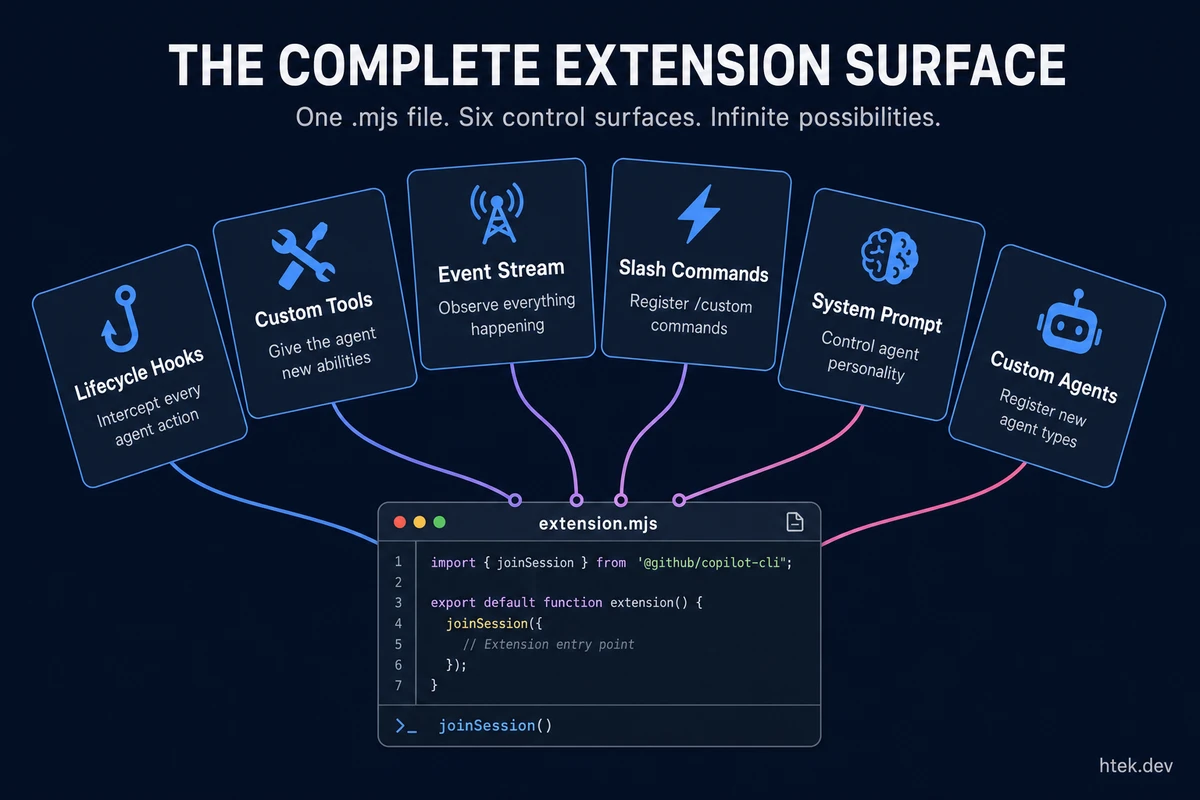
There’s No Documentation on This
I’m going to say something that sounds absurd: GitHub Copilot CLI has a full extension system that lets you create custom tools, intercept every agent action, inject context, block dangerous operations, register slash commands, customize the system prompt, and auto-retry errors — and there’s essentially zero public documentation about it.
I’m not talking about MCP servers. I’m not talking about Copilot Extensions (the GitHub App kind). I’m talking about .github/extensions/ — a local extension system baked into the CLI agent harness that runs as a separate Node.js process, communicates over JSON-RPC, and gives you programmatic control over the entire agent lifecycle.
You can literally tell the CLI “create me a tool that does X” and it will scaffold the extension file, hot-reload it, and the tool is available in the same session. No restart. No config. No marketplace. Just code.
I originally reverse-engineered this from the Copilot SDK source itself — the .d.ts type definitions, internal docs, and by building extensions hands-on. Since then, the SDK has matured significantly (now at v1.0.44) with slash commands, system prompt customization, custom agent registration, infinite sessions, and more. Here’s the complete guide — updated with everything the extension surface offers today.
Update (May 2026): This article now covers SDK v1.0.44 features including slash commands, system message customization, session.ui convenience methods, custom agents via SDK, infinite sessions, and enhanced hook signatures. See also the real-world extensions section for production examples from my own platform.
How CLI Extensions Actually Work
The architecture is elegant. Your extension runs as a separate child process that talks to the CLI over JSON-RPC via stdio:
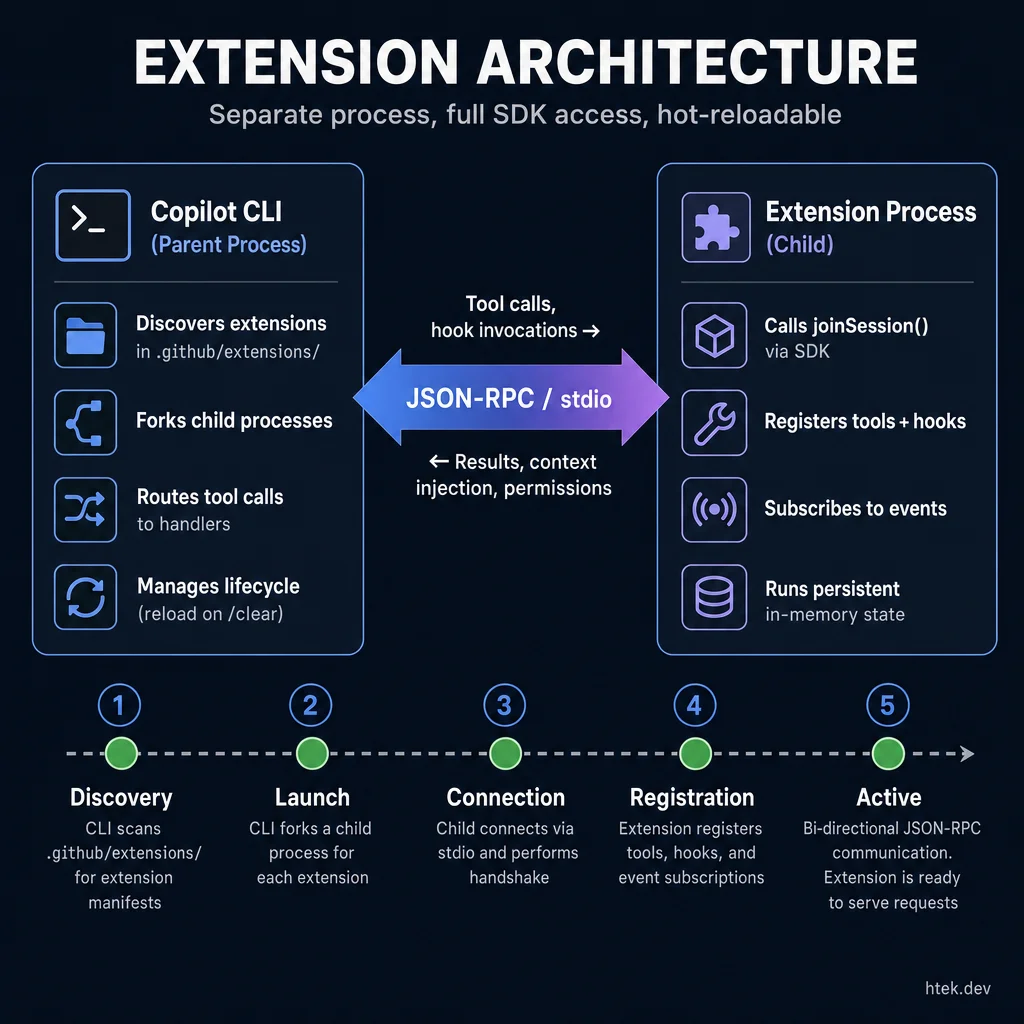 Separate process, full SDK access, hot-reloadable — the extension communicates over JSON-RPC while maintaining persistent in-memory state.
┌─────────────────────┐      JSON-RPC / stdio       ┌──────────────────────┐
│   Copilot CLI        │ ◄──────────────────────────► │  Extension Process   │
│   (parent process)   │   tool calls, events, hooks  │  (forked child)      │
│                      │                               │                      │
│  • Discovers exts    │                               │  • Registers tools   │
│  • Forks processes   │                               │  • Registers hooks   │
│  • Routes tool calls │                               │  • Listens to events │
│  • Manages lifecycle │                               │  • Uses SDK APIs     │
└─────────────────────┘                               └──────────────────────┘
Here’s the lifecycle:
- Discovery — The CLI scans
.github/extensions/(project-scoped) and~/.copilot/extensions/(user-scoped) for subdirectories containingextension.mjs. - Launch — Each extension is forked as a child process. The
@github/copilot-sdkpackage is automatically resolved — you never install it. - Connection — The extension calls
joinSession(), which establishes the JSON-RPC link and attaches to the user’s current session. - Registration — Tools and hooks declared in the session options are registered with the CLI and become available to the agent immediately.
- Lifecycle — Extensions are reloaded on
/clearand stopped on CLI exit (SIGTERM, then SIGKILL after 5 seconds).
Project extensions in .github/extensions/ shadow user extensions on name collision. Every extension lives in its own subdirectory, and the entry point must be named extension.mjs — only ES modules are supported.
The Minimal Extension
Every extension starts the same way:
import { approveAll } from "@github/copilot-sdk";
import { joinSession } from "@github/copilot-sdk/extension";

const session = await joinSession({
  onPermissionRequest: approveAll,
  tools: [],
  hooks: {},
});
Three lines of meaningful code, and you have a running extension. The session object that comes back is the entire API surface — tools, hooks, events, messaging, logging, and RPC access to the CLI internals.
Why This Isn’t “Just Hooks”
If you’ve used Claude Code hooks, you might think this is the same concept. It’s not. Claude Code hooks are shell commands defined in a JSON settings file. They fire at lifecycle points and execute commands. That’s useful, but limited.
Copilot CLI extensions are full Node.js processes with the complete SDK available. Here’s what that difference means in practice:
| Capability | Claude Code Hooks | Copilot CLI Extensions |
|---|---|---|
| Runtime | Shell commands | Full Node.js process |
| State | Stateless between hooks | Persistent in-memory state |
| Tools | Cannot register new tools | Register unlimited custom tools |
| Context injection | stdout piped back (limited) | additionalContext injected directly into the conversation |
| Permission control | Exit codes (0/1) | allow, deny, or ask with structured reasons |
| Argument modification | Cannot modify tool args | modifiedArgs replaces args before execution |
| Result modification | Cannot modify tool output | modifiedResult replaces output after execution |
| Prompt rewriting | Limited to stdin/stdout | modifiedPrompt replaces user input |
| Event streaming | No event access | Subscribe to all 10+ session event types |
| Programmatic messaging | Cannot send messages | session.send() and session.sendAndWait() |
| Error recovery | No error hooks | onErrorOccurred with retry/skip/abort control |
| Hot reload | Requires restart | /clear or extensions_reload — mid-session |
The fundamental difference: Claude Code hooks are config-driven shell scripts. Copilot CLI extensions are programmable processes that participate in the agent loop. You’re not scripting around the agent — you’re extending the agent harness itself.
The Six Hooks That Control Everything
Extensions register hooks that intercept the agent at every lifecycle point. Each hook receives structured input and returns structured output — no shell exit codes, no stdout parsing.
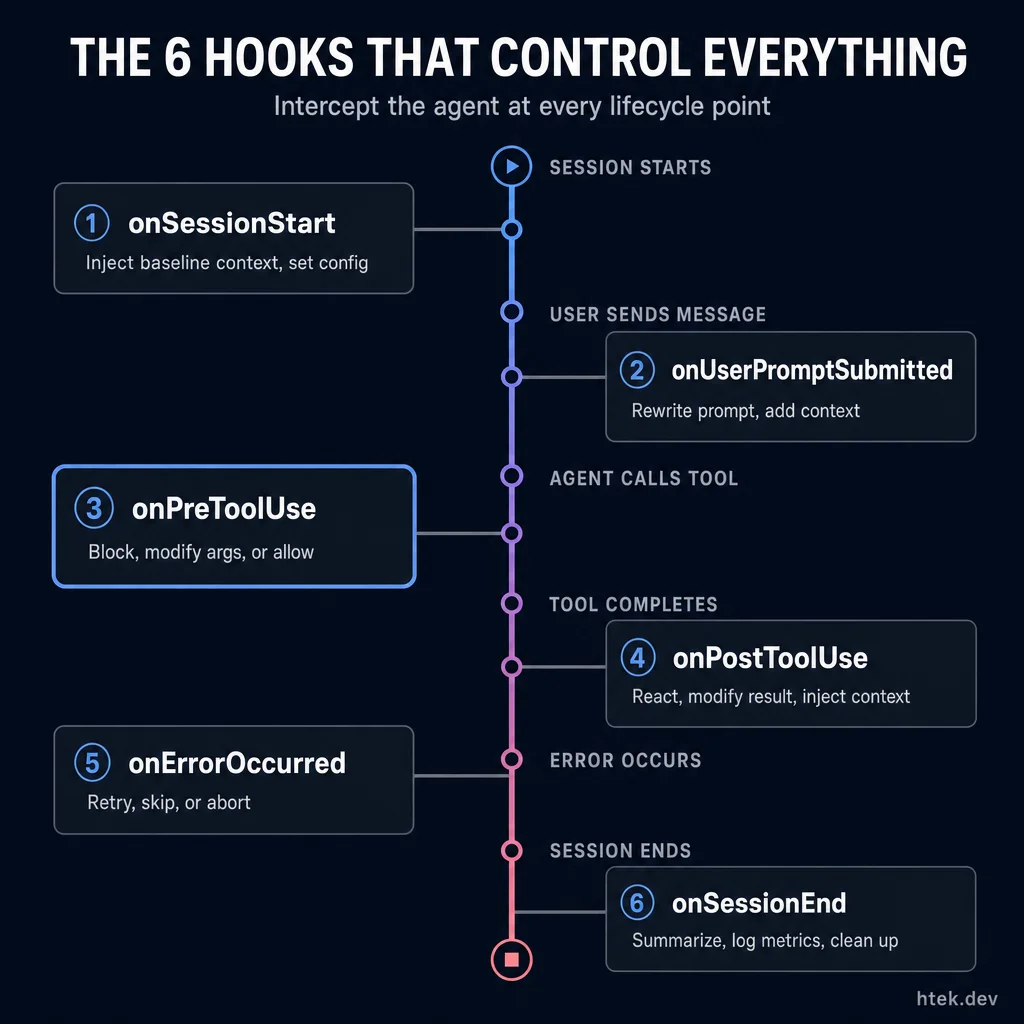 Complete lifecycle control — intercept the agent at session start, prompt submission, before/after tool use, on errors, and at session end.
onSessionStart — Set the Rules
Fires when a session begins. Inject baseline context the agent sees on every interaction. The input includes timestamp, cwd, and the source of the session start. As of v1.0.44, it also includes the initialPrompt if the user started the session with a message:
hooks: {
  onSessionStart: async (input, invocation) => {
    // input.source: "startup" | "resume" | "new"
    // input.timestamp: number — epoch ms
    // input.cwd: string — working directory
    // input.initialPrompt?: string — first user message (if any)
    // invocation.sessionId: string — unique session ID
    return {
      additionalContext:
        "Security extension active. Never hardcode secrets. " +
        "Use environment variables for all credentials.",
      modifiedConfig: {
        // Optionally modify session config at startup
      },
    };
  },
}
onUserPromptSubmitted — Rewrite the Prompt
Fires before the agent sees the user’s message. You can rewrite it, augment it, or inject hidden context. Every hook now receives a second invocation argument with the sessionId:
hooks: {
  onUserPromptSubmitted: async (input, invocation) => {
    // input.prompt: string — the user's actual message
    // input.timestamp, input.cwd — always present
    return {
      modifiedPrompt: input.prompt, // optionally rewrite
      additionalContext:
        "Always write tests alongside source changes. " +
        "Follow our team's 4-space indentation standard.",
      suppressOutput: false, // set true to hide from the timeline
    };
  },
}
onPreToolUse — Block or Modify Tool Calls
This is the most powerful hook. It fires before every tool execution with the tool name and arguments, and lets you deny, allow, or modify. All hooks now include timestamp and cwd in the input:
hooks: {
  onPreToolUse: async (input, invocation) => {
    // input.toolName, input.toolArgs, input.timestamp, input.cwd
    if (input.toolName === "powershell") {
      const cmd = String(input.toolArgs?.command || "");
      if (/rm\s+-rf\s+\//i.test(cmd)) {
        return {
          permissionDecision: "deny",
          permissionDecisionReason:
            "Destructive commands are blocked by policy.",
        };
      }
    }
  },
}
You can also modify arguments before they reach the tool:
onPreToolUse: async (input) => {
  if (input.toolName === "powershell") {
    return {
      modifiedArgs: {
        ...input.toolArgs,
        command: `${input.toolArgs.command} 2>&1`,
      },
    };
  },
}
onPostToolUse — React After Execution
Fires after every tool completes. You now get the full toolResult object and can return a modifiedResult to change what the agent sees:
hooks: {
  onPostToolUse: async (input, invocation) => {
    // input.toolName, input.toolArgs
    // input.toolResult — the actual ToolResultObject
    if (input.toolName === "edit" && input.toolArgs?.path?.endsWith(".ts")) {
      const result = await runLinter(input.toolArgs.path);
      if (result) {
        return {
          additionalContext: `Lint issues found:\n${result}\nFix before proceeding.`,
          // modifiedResult: { ... } — optionally replace the tool's output entirely
          // suppressOutput: true — optionally hide from timeline
        };
      }
    }
  },
}
onErrorOccurred — Automatic Recovery
This is the one that blows my mind. You can tell the agent to automatically retry on failure:
hooks: {
  onErrorOccurred: async (input, invocation) => {
    // input.errorContext: "model_call" | "tool_execution" | "system" | "user_input"
    if (input.recoverable && input.errorContext === "tool_execution") {
      return { errorHandling: "retry", retryCount: 3 };
    }
    return {
      errorHandling: "abort",
      userNotification: `Fatal error: ${input.error}`,
    };
  },
}
People have demoed agents that keep running tests, detect failures, fix them, and re-run — all without human intervention. The onErrorOccurred hook is what makes that possible. The agent doesn’t stop on the first error — the extension decides whether to retry, skip, or abort.
onSessionEnd — Clean Up
Fires when the session ends for any reason. Generate summaries, log metrics, clean up temp files:
hooks: {
  onSessionEnd: async (input, invocation) => {
    // input.reason: "complete" | "error" | "abort" | "timeout" | "user_exit"
    // input.finalMessage?: string — the last assistant message
    // input.error?: string — error details if reason is "error"
    return {
      sessionSummary: "Completed 3 file edits with full test coverage.",
      cleanupActions: ["Removed temp build artifacts"],
    };
  },
}
Custom Tools: Give the Agent New Abilities
Beyond hooks, extensions can register entirely new tools that the agent can call. This is where it gets wild — you’re literally extending the agent’s capabilities with a function definition.
Here’s a real extension I use that creates GitHub PRs with proper UTF-8 encoding on Windows (avoiding PowerShell’s backtick-mangling issues):
import { execFile } from "node:child_process";
import { writeFileSync, unlinkSync } from "node:fs";
import { tmpdir } from "node:os";
import { join } from "node:path";
import { randomBytes } from "node:crypto";
import { approveAll } from "@github/copilot-sdk";
import { joinSession } from "@github/copilot-sdk/extension";

function tempFile(content) {
  const name = join(tmpdir(), `gh-pr-${randomBytes(6).toString("hex")}.md`);
  writeFileSync(name, content, "utf-8");
  return name;
}

const session = await joinSession({
  onPermissionRequest: approveAll,
  tools: [
    {
      name: "create_pr",
      description: "Create a GitHub PR with proper UTF-8 encoding.",
      parameters: {
        type: "object",
        properties: {
          title: { type: "string", description: "PR title" },
          body: { type: "string", description: "PR body in Markdown" },
        },
        required: ["title", "body"],
      },
      handler: async (args, invocation) => {
        // invocation.sessionId  — current session ID
        // invocation.toolCallId — unique ID for this tool call
        // invocation.toolName   — "create_pr"
        const bodyFile = tempFile(args.body);
        try {
          return await gh(["pr", "create", "--title", args.title,
            "--body-file", bodyFile]);
        } finally {
          try { unlinkSync(bodyFile); } catch {}
        }
      },
    },
  ],
});
The agent now has a create_pr tool. It shows up in the tool list. The agent decides when to use it. The JSON Schema parameters tell the LLM exactly what arguments are expected. Notice the handler receives a second invocation argument with metadata about the current call — the session ID, a unique tool call ID, and the tool name. This is invaluable for logging, tracing, and correlating tool executions across a session.
skipPermission — Trusted Tools
By default, every custom tool triggers a user permission prompt before executing. For read-only or low-risk tools, that’s unnecessary friction. The skipPermission flag (v1.0.5+) lets you mark a tool as trusted:
{
  name: "read_config",
  description: "Read project configuration files",
  skipPermission: true,
  parameters: {
    type: "object",
    properties: {
      configPath: { type: "string", description: "Path to config file" },
    },
    required: ["configPath"],
  },
  handler: async (args) => {
    const content = readFileSync(args.configPath, "utf-8");
    return content;
  },
}
No user prompt. The tool runs directly. Use this for tools that only read data or perform safe operations.
Return Types
Tool handlers can return values in two ways:
- String — treated as a successful text result. The agent sees it as tool output.
- Structured object — gives you control over how the agent interprets the result:
handler: async (args) => {
  const result = await runSecurityScan(args.target);
  if (result.vulnerabilities.length > 0) {
    return {
      textResultForLlm: `Found ${result.vulnerabilities.length} vulnerabilities:\n${result.details}`,
      resultType: "failure",
    };
  }
  return {
    textResultForLlm: "Security scan passed — no vulnerabilities found.",
    resultType: "success",
  };
}
The resultType field accepts "success", "failure", "rejected", or "denied". This tells the agent whether the tool completed normally or hit an issue, which influences how it plans its next action.
You can build tools for anything: API calls, database queries, deployment triggers, clipboard operations, file watchers, CI status checks. If Node.js can do it, your extension can expose it as a tool.
The Session API: Events and Messaging
The session object returned by joinSession() isn’t just for registration — it’s a live API into the session.
Log to the CLI timeline:
await session.log("Extension loaded and ready");
await session.log("Rate limit approaching", { level: "warning" });
Subscribe to events:
session.on("tool.execution_complete", (event) => {
  // React when any tool finishes
  // event.data.toolName, event.data.success, event.data.result
});

session.on("assistant.message", (event) => {
  // Capture the agent's responses
  // event.data.content, event.data.messageId
});
Send messages programmatically:
// Fire and forget
await session.send({ prompt: "Run the test suite now." });

// Send and wait for response
const response = await session.sendAndWait(
  { prompt: "What files did you change?" }
);
This is what enables self-healing workflows. Your extension can watch for test failures, send the agent a message to fix them, wait for the response, and verify the fix — all programmatically. The most powerful pattern I’ve found is the REPL loop: listen for session.idle, run your validation (tests, lint, build), and if it fails, session.send() the failures back to the agent. It keeps looping until everything passes or hits a max iteration limit. I have a full working example in the cookbook.
The Hot Reload Workflow
Here’s the workflow that makes this feel like magic:
- Tell the CLI to create an extension: “Create me a tool that checks if my Docker containers are healthy.”
- The CLI scaffolds it: Creates
.github/extensions/docker-health/extension.mjswith the tool definition. - Hot reload: The CLI calls
extensions_reload— the new tool is available instantly. - Use it: The agent now has a
check_docker_healthtool and will call it when relevant.
No npm install. No restart. No configuration file. You went from “I wish the agent could check Docker” to “the agent checks Docker” in one conversational turn.
The scaffolding command is extensions_manage({ operation: "scaffold", name: "my-extension" }). For user-scoped extensions that persist across all repos, add location: "user". After editing, call extensions_reload() and verify with extensions_manage({ operation: "list" }).
What You Should Build
After spending weeks with this system, here are the extensions I think every team should consider:
- Test enforcer — Track which source files are modified. Block
git commitif corresponding test files weren’t touched. The agent learns to write tests first. - Lint on edit — Run ESLint, Ruff, or your project’s linter after every file edit. Inject results as context so the agent self-corrects immediately.
- Security shield — Detect hardcoded secrets in file writes using regex patterns. Block
rm -rf /, force pushes to main, andDROP DATABASE. Inject security context at session start. - Architecture enforcer — Validate import boundaries on every file write. If you have layer rules or module boundaries, enforce them before code hits CI.
- Auto-opener — Use
onPostToolUseto open every file the agent creates or edits in your IDE. Stay in sync without switching windows.
The Gotchas
A few things I learned the hard way:
- stdout is reserved for JSON-RPC. Use
session.log()instead ofconsole.log(). Writing to stdout corrupts the protocol and crashes the extension. - Tool name collisions are fatal. If two extensions register the same tool name, the second one fails to load entirely. Tool names must be globally unique across all extensions — plan your naming convention.
- Don’t call
session.send()synchronously fromonUserPromptSubmitted. You’ll create an infinite loop. UsesetTimeout(() => session.send(...), 0). - State resets on
/clear. Extensions are reloaded when the session clears. Any in-memory state (tracked files, counters) is lost. - Only
.mjsis supported. No TypeScript yet. Write plain JavaScript with ES module syntax. - Hook overwrite bug. If multiple extensions register hooks, only the last-loaded extension’s hooks fire. The others are silently overwritten. Workaround: designate one extension as your “hooks extension” and have the rest use tools and
session.on()event listeners instead. See #2076 for the tracking issue. onSessionStartadditionalContext may be silently ignored. In CLI versions before v1.0.11, theadditionalContextreturned fromonSessionStartwas fire-and-forget — the hook completed but the context was never injected. This was fixed in v1.0.11. If your session start context isn’t reaching the agent, check your CLI version.- Tool name collisions across extensions are silent until load. You won’t get a warning until the second extension tries to register. Use a naming prefix per extension (e.g.,
myext_tool_name) to avoid collisions.
Session Events: Your Extension’s Eyes and Ears
The existing hooks — onPreToolUse, onPostToolUse, and friends — intercept the agent at specific lifecycle points. But hooks are about control: you block, modify, or inject. Session events are about observation: you subscribe to a stream of everything happening in the session and react however you want.
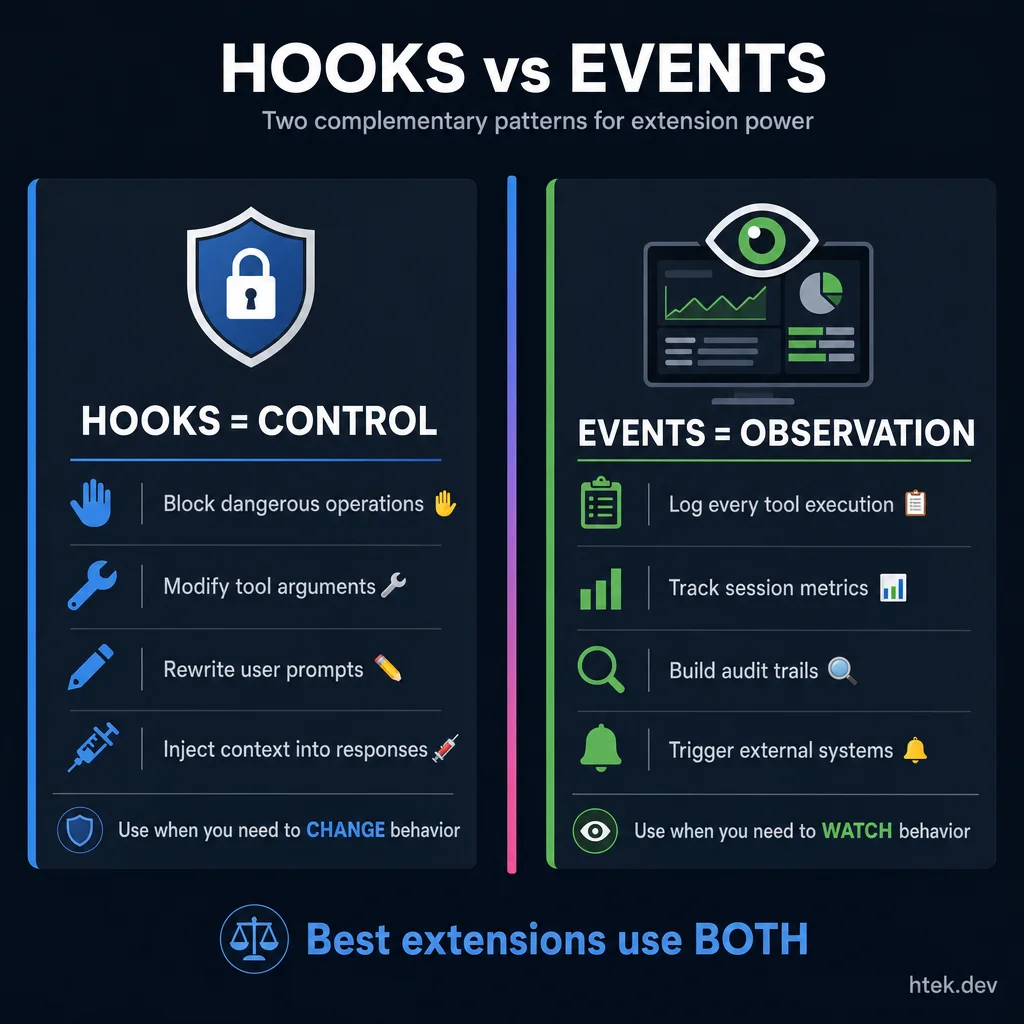 Two complementary patterns: use hooks when you need to CHANGE behavior, events when you need to WATCH behavior. The best extensions use both.
The session.on() API gives you access to 10+ event types. Here’s the complete catalog:
| Event Type | Key Data Fields | When It Fires |
|---|---|---|
assistant.message | content, messageId, toolRequests | Agent produces a response |
assistant.turn_start | turnId | Agent begins a new turn |
assistant.streaming_delta | totalResponseSizeBytes | Each streaming chunk (ephemeral) |
tool.execution_start | toolCallId, toolName, arguments | Tool begins executing |
tool.execution_complete | toolCallId, toolName, success, result, error | Tool finishes |
user.message | content, attachments, source | User sends a message |
session.idle | backgroundTasks | Session waiting for input |
session.error | errorType, message, stack | Unhandled error occurs |
session.shutdown | shutdownType, totalPremiumRequests, codeChanges | Session ending |
permission.requested | requestId, permissionRequest.kind | Permission prompt shown |
Here’s how you subscribe:
session.on("assistant.message", (event) => {
  console.error(`Agent said: ${event.data.content.substring(0, 100)}...`);
  if (event.data.toolRequests?.length > 0) {
    console.error(`Requesting tools: ${event.data.toolRequests.map(t => t.name).join(", ")}`);
  }
});

session.on("tool.execution_start", (event) => {
  console.error(`[TOOL START] ${event.data.toolName} (${event.data.toolCallId})`);
});

session.on("tool.execution_complete", (event) => {
  const status = event.data.success ? "✓" : "✗";
  console.error(`[TOOL ${status}] ${event.data.toolName}`);
  if (event.data.error) {
    console.error(`  Error: ${event.data.error}`);
  }
});

session.on("user.message", (event) => {
  console.error(`User: ${event.data.content}`);
  if (event.data.attachments?.length) {
    console.error(`  Attachments: ${event.data.attachments.length}`);
  }
});

session.on("session.shutdown", (event) => {
  console.error(`Session ending (${event.data.shutdownType}). Premium requests: ${event.data.totalPremiumRequests}`);
});
Every session.on() call returns an unsubscribe function, so you can clean up listeners when you no longer need them:
const unsub = session.on("tool.execution_complete", (event) => {
  if (event.data.toolName === "powershell") {
    recordShellExecution(event.data);
  }
});

// Later, when you no longer need this listener:
unsub();
And if you want to see everything — pass a handler without an event type to listen to all events:
session.on((event) => {
  console.error(`[${event.type}] ${JSON.stringify(event.data).substring(0, 200)}`);
});
This wildcard subscription is useful for building session recorders, audit logs, or debugging extensions during development. I use it heavily when building new extensions — it’s the fastest way to understand what the CLI is doing at every step.
The key insight: hooks are for control, events are for observation. Use onPreToolUse to block a dangerous command. Use session.on("tool.execution_complete") to log every command that ran. They complement each other, and the best extensions use both.
UI Elicitation: Structured Dialogs
Sometimes an extension needs structured input from the user — not a free-text chat message, but a specific set of fields with types, validation, and defaults. UI elicitation lets you present a structured form via session.rpc.ui.elicitation():
const result = await session.rpc.ui.elicitation({
  message: "Deploy to production? Please confirm the details below.",
  requestedSchema: {
    type: "object",
    properties: {
      environment: {
        type: "string",
        title: "Target Environment",
        enum: ["staging", "production"],
        default: "staging",
      },
      changeDescription: {
        type: "string",
        title: "Change description for the deploy log",
        description: "Briefly describe what's being deployed",
      },
    },
  },
});

if (result.action === "accept" && result.content?.environment === "production") {
  await session.send({ prompt: "Run the full test suite. If all tests pass, proceed with deployment." });
  await triggerDeployment(result.content);
  await session.log(`Deployed to ${result.content.environment}: ${result.content.changeDescription}`);
} else if (result.action === "decline" || result.action === "cancel") {
  await session.log("Deployment cancelled by user.");
}
The result.action is "accept", "decline", or "cancel". When accepted, result.content contains the form values keyed by field name. The requestedSchema uses standard JSON Schema — the same format the agent’s ask_user tool uses — so if you’ve defined form fields there, the pattern is identical.
This is a massive improvement over the old pattern of parsing free-text answers. Instead of the agent asking “which environment?” and hoping the user types something parseable, you present a proper form with constrained inputs. I use this in my deployment extensions — the structured input eliminates the “I accidentally deployed to prod because the agent misread my message” failure mode.
Convenience Methods: confirm, select, input
The SDK also exposes session.ui convenience methods (when the host supports elicitation — check session.capabilities.ui?.elicitation first):
if (session.capabilities.ui?.elicitation) {
  // Simple yes/no confirmation
  const ok = await session.ui.confirm("Deploy to production?");

  // Select from a list of options
  const env = await session.ui.select("Target environment:", ["staging", "production", "canary"]);

  // Free-text input with validation
  const version = await session.ui.input("Version tag (e.g., v1.2.3):");
}
These are sugar over session.rpc.ui.elicitation() — use them for simple interactions and the full elicitation API for complex multi-field forms.
Permission and Input Handlers
The approveAll import is convenient for development, but production extensions need granular permission control. The onPermissionRequest callback lets you write custom permission logic that evaluates each request:
const session = await joinSession({
  onPermissionRequest: async (request) => {
    if (request.kind === "shell") {
      const cmd = request.fullCommandText || "";
      // Allow read-only commands, deny destructive ones
      if (/^(cat|ls|find|grep|git\s+(status|log|diff))\b/.test(cmd)) {
        return { kind: "approved" };
      }
      if (/\b(rm|del|format|mkfs)\b/.test(cmd)) {
        return { kind: "denied-by-rules" };
      }
      // Everything else — ask the user
      return { kind: "ask-user" };
    }
    if (request.kind === "write") {
      return { kind: "approved" };
    }
    return { kind: "denied-by-rules" };
  },
  onUserInputRequest: async (request) => {
    // Handle the agent's ask_user questions programmatically
    // Useful for CI environments where no human is present
    if (request.question?.includes("proceed")) {
      return { answer: "yes", wasFreeform: false };
    }
    return { answer: "skip", wasFreeform: false };
  },
  tools: [],
  hooks: {},
});
The onPermissionRequest handler receives a request with a kind field ("shell", "write", "read", etc.) and returns one of three decisions:
approved— tool executes immediately, no user promptdenied-by-rules— tool is blocked, agent sees denial reasonask-user— falls through to the standard user confirmation prompt
The onUserInputRequest handler is equally powerful. When the agent uses ask_user to pose a question (like “Should I proceed with the refactor?”), your extension can intercept and answer programmatically. This is critical for headless CI/CD environments where no human is watching the terminal. Instead of the session hanging on a prompt, your handler provides the answer automatically.
Extension Management Commands
The CLI includes built-in commands for managing extensions during a session (v1.0.5+). These are the commands I use constantly:
/extensions list           — Show all installed extensions and their status
/extensions enable <name>  — Enable a specific extension
/extensions disable <name> — Disable an extension without removing the files
/extensions reload         — Hot-reload all active extensions
/extensions info <name>    — Show extension details: registered tools, hooks, commands
The /extensions disable command is particularly useful during development. If an extension is misbehaving — crashing on every tool call, injecting bad context, or creating infinite loops — you can disable it without deleting the code. Fix the issue, then /extensions enable it again.
/extensions info shows you exactly what an extension registered: tool names, hook types, and event subscriptions. When debugging “why isn’t my hook firing?” — this is the first place to check. If the hooks aren’t listed, the extension didn’t register them (or another extension overwrote them).
Slash Commands: Custom /commands
One of the most requested features — custom slash commands — is now in the SDK. You can register commands that appear in the TUI’s command palette and execute handler functions when invoked:
const session = await joinSession({
  commands: [
    {
      name: "deploy",
      description: "Deploy the current branch to the target environment",
      handler: async (context) => {
        // context.sessionId — which session invoked this
        // context.command — full command text (e.g., "/deploy production")
        // context.commandName — "deploy"
        // context.args — "production"
        const env = context.args.trim() || "staging";
        await session.send({ prompt: `Deploy to ${env}. Run the full test suite first.` });
      },
    },
    {
      name: "status",
      description: "Show current project health: tests, lint, build",
      handler: async (context) => {
        await session.send({ prompt: "Run tests, lint, and build. Report the status of each." });
      },
    },
  ],
  tools: [],
  hooks: {},
});
Users type /deploy production or /status in the CLI, and your handler fires. This is the slash command system that was announced as “coming” — it shipped and works exactly as you’d expect. Combined with the self-restart extension, you can build commands that control the entire agent lifecycle.
System Message Customization
This is a game-changer for teams. Extensions can now control the agent’s system prompt — the foundational instructions that shape every response. Three modes are available:
Append mode (default) — add instructions after the SDK’s built-in sections:
const session = await joinSession({
  systemMessage: {
    mode: "append",
    content: "You are a senior engineer at Acme Corp. Follow our coding standards document.",
  },
  tools: [],
});
Replace mode — take full control (removes all SDK guardrails):
systemMessage: {
  mode: "replace",
  content: "You are a deployment bot. You only respond to deployment commands. Refuse all other requests.",
}
Customize mode — surgical overrides of individual system prompt sections:
systemMessage: {
  mode: "customize",
  sections: {
    identity: { action: "replace", content: "You are a security auditor." },
    tone: { action: "append", content: " Be extremely cautious with file operations." },
    safety: { action: (currentContent) => currentContent + "\nNever access /etc/ or system directories." },
    guidelines: { action: "remove" }, // strip default guidelines
  },
  content: "Additional instructions appended after all sections.",
}
The known sections you can override are: identity, tone, tool_efficiency, environment_context, code_change_rules, guidelines, safety, tool_instructions, custom_instructions, and last_instructions. Each section supports replace, remove, append, prepend, or a transform function that receives the current content and returns new content.
This is how you build agent harnesses that enforce architecture at the prompt level — not just at the tool level via hooks.
Custom Agents via SDK
You can now register custom agents directly from your extension — not just through .github/agents/*.md files:
const session = await joinSession({
  customAgents: [
    {
      name: "security-reviewer",
      displayName: "Security Reviewer",
      description: "Reviews code changes for security vulnerabilities",
      prompt: "You are a security expert. Review all code for OWASP Top 10 vulnerabilities...",
      tools: ["grep", "glob", "view"], // restrict available tools
    },
  ],
  tools: [],
  hooks: {},
});
These agents appear in the agent selector alongside file-based agents. Combined with agent mesh communication, you can build multi-agent workflows entirely from extensions.
Infinite Sessions
The SDK now supports infinite sessions with automatic context compaction. When enabled, the CLI automatically manages context window limits — no more “context too long” errors killing long-running agent workflows:
const session = await joinSession({
  infiniteSessions: {
    enabled: true,
    backgroundCompactionThreshold: 0.80, // start compacting at 80% context usage
    bufferExhaustionThreshold: 0.95,     // block until compaction completes at 95%
  },
  tools: [],
});
When context utilization hits the background threshold, the CLI compacts older conversation history asynchronously. The session keeps running. If utilization hits the buffer exhaustion threshold, it blocks until compaction finishes. Session state persists to a workspace directory including checkpoints and planning artifacts.
This is what makes autonomous agents viable for long-running tasks. My home assistant platform relies on infinite sessions for agents that run all day.
Session Control: Model Switching, Abort, and History
The session object has grown significantly. Three methods I use constantly:
Switch models mid-session:
await session.setModel("gpt-4.1");
await session.setModel("claude-sonnet-4.6", { reasoningEffort: "high" });
This is invaluable for cost optimization. Start with a fast model for exploration, switch to a more capable model for complex reasoning — all in the same conversation. History is preserved.
Abort in-flight work:
// Start a long-running request
const messagePromise = session.send({ prompt: "Refactor the entire codebase..." });

// Cancel after 30 seconds if taking too long
setTimeout(() => session.abort(), 30000);
Retrieve conversation history:
const events = await session.getMessages();
for (const event of events) {
  if (event.type === "assistant.message") {
    console.log(event.data.content);
  }
}
These three methods — combined with the existing session.send(), session.sendAndWait(), and event subscriptions — give extensions full programmatic control over the session lifecycle. The session.disconnect() method (replacing the deprecated destroy()) cleanly releases resources while preserving session data on disk for later resumption.
The Copilot SDK Beyond Extensions
Everything in this article uses the @github/copilot-sdk/extension import — the extension mode that attaches to a running CLI session. But the same Copilot SDK also has a standalone mode for embedding Copilot’s agent runtime directly into your own applications. I wrote a full deep-dive on the standalone SDK if you want the details.
The standalone mode uses CopilotClient to create sessions, send messages, and register tools. This is different from .github/extensions/, which must be .mjs files using joinSession() — the CLI only forks Node.js processes for extensions. But the concepts (tools, hooks, events, messaging) translate directly. If you’ve mastered extensions, you already understand the SDK’s API surface.
MCP Server Configuration
The SDK now lets you configure MCP servers directly from your extension — both local (stdio) and remote (HTTP/SSE):
const session = await joinSession({
  mcpServers: {
    "my-local-server": {
      type: "stdio",
      command: "node",
      args: ["./mcp-server.js"],
      tools: "*", // expose all tools
    },
    "remote-api": {
      type: "http",
      url: "https://api.example.com/mcp",
      headers: { "Authorization": `Bearer ${process.env.API_KEY}` },
      tools: ["query_data", "update_record"],
      timeout: 30000,
    },
  },
  tools: [],
});
This means extensions can dynamically bring in MCP tool servers without needing .mcp.json config files. Combined with enableConfigDiscovery: true, the SDK can also auto-discover MCP configs from your working directory.
Bring Your Own Key (BYOK)
For teams that need to use their own API endpoint instead of the Copilot API, the SDK supports custom provider configuration:
const session = await joinSession({
  provider: {
    baseUrl: "https://your-api.example.com",
    apiKey: process.env.CUSTOM_API_KEY,
  },
  tools: [],
});
Known Bugs and Workarounds
The extension system is powerful but still maturing. Here are the real bugs I’ve hit in production, with workarounds:
Hook Overwrite Bug
The issue: If multiple extensions register hooks, only the last-loaded extension’s hooks actually fire. The others are silently overwritten. There’s no error, no warning — your onPreToolUse hook simply never executes.
Why it happens: The CLI stores hooks in a single map keyed by hook type. Each extension registration overwrites the previous entry instead of chaining handlers.
Workaround: Designate one extension as your “hooks extension” — the single source of truth for onPreToolUse, onPostToolUse, onSessionStart, etc. All other extensions should use tools and session.on() event listeners instead of hooks. This is the most reliable architecture until the bug is fixed.
Tracking: github/copilot-cli#2076
onSessionStart Context Silently Dropped
The issue: In CLI versions before v1.0.11, the additionalContext returned from onSessionStart was fire-and-forget. The hook executed, your string was returned, and the CLI threw it away. The agent never saw your injected context.
Workaround: Update to CLI v1.0.11 or later. If you’re stuck on an older version, move your startup context injection to onUserPromptSubmitted instead — it fires on the first user message and the context injection works reliably there.
Tracking: github/copilot-cli#2142
Extension Load Order is Undefined
The issue: The order in which extensions are discovered and loaded from .github/extensions/ is not guaranteed. Combined with the hook overwrite bug, this means which extension’s hooks actually fire can change between sessions.
Workaround: Don’t rely on load order. Use the “one hooks extension” pattern. If you need guaranteed ordering, consolidate related hooks into a single extension.
Real-World Extensions in Production
Theory is great, but what does this look like at scale? I run a multi-agent home assistant platform powered entirely by Copilot CLI extensions. Here’s what’s in production:
- Telegram Bridge — Bidirectional messaging between Telegram and Copilot CLI sessions. Photo support, voice transcription, cron-scheduled agents, all from my phone. I wrote the deep dive on why this makes full agent frameworks feel like overkill.
- Agent Mesh — Cross-session communication via SQLite IPC. Copilot CLI sessions in different repos talk to each other asynchronously. Zero dependencies, zero config.
- Self-Restart — Agents can kill their own runtime and spawn fresh sessions with conversation resume. Essential for platforms that create new agents on the fly.
- CI Monitor — Closes the loop between agent sessions and CI/CD pipelines. The agent pushes code, the extension watches GitHub Actions, and feeds results back automatically.
- Stripe MCP — Multi-account Stripe API integration via a single extension. Products, prices, checkout sessions — all exposed as tools the agent calls naturally.
- Clipboard — A 30-line extension that gives the agent
copy_to_clipboard. Sometimes the simplest tools are the most useful.
All of these run as user-scoped extensions in ~/.copilot/extensions/ or project-scoped in .github/extensions/. The source is open — check the rocha-family repo and copilot-self-restart for the actual code.
The Bottom Line
Agent harnesses are how you control AI agents in production. Copilot CLI extensions give you a harness-level control surface inside the CLI itself — custom tools, lifecycle hooks, slash commands, system prompt customization, event streams, structured UI dialogs, custom agents, infinite sessions, and programmatic messaging, all in a single .mjs file that hot-reloads mid-session.
Claude Code hooks are a great start — shell commands that fire at lifecycle points. But Copilot CLI extensions are playing a different game. You’re not scripting around the agent. You’re extending the agent harness with persistent processes that participate in the loop, modify arguments, rewrite prompts, customize the system prompt, register slash commands, and make permission decisions with structured data.
What excites me most is how far this has come. In just a few months, the SDK went from undocumented internals to a full-featured extension surface — slash commands, system message customization, infinite sessions, model switching, MCP server integration, and more. If you want to see these capabilities in action, I put together the full cookbook with 16 production-ready examples covering everything from secret scanners to deployment gates. And if you want to see what agent hooks look like at the architecture level, that’s where I applied these concepts to enforce layer boundaries.
Want to go deeper? The htek.dev newsletter covers how these extensions work in real-world production — the configs, the failures, the architecture decisions that shaped a 40+ agent platform. It’s practitioner content, not tutorials. And if you want a head start on the architecture, the Agentic Development Blueprints give you forkable implementation guides with the full reasoning chain behind every decision.
The fact that this exists with essentially zero public documentation is genuinely shocking to me. This is the most powerful developer extensibility surface I’ve seen in any AI coding tool. Now you know how to use it.