This is a submission for the GitHub Copilot CLI Challenge
What I Built
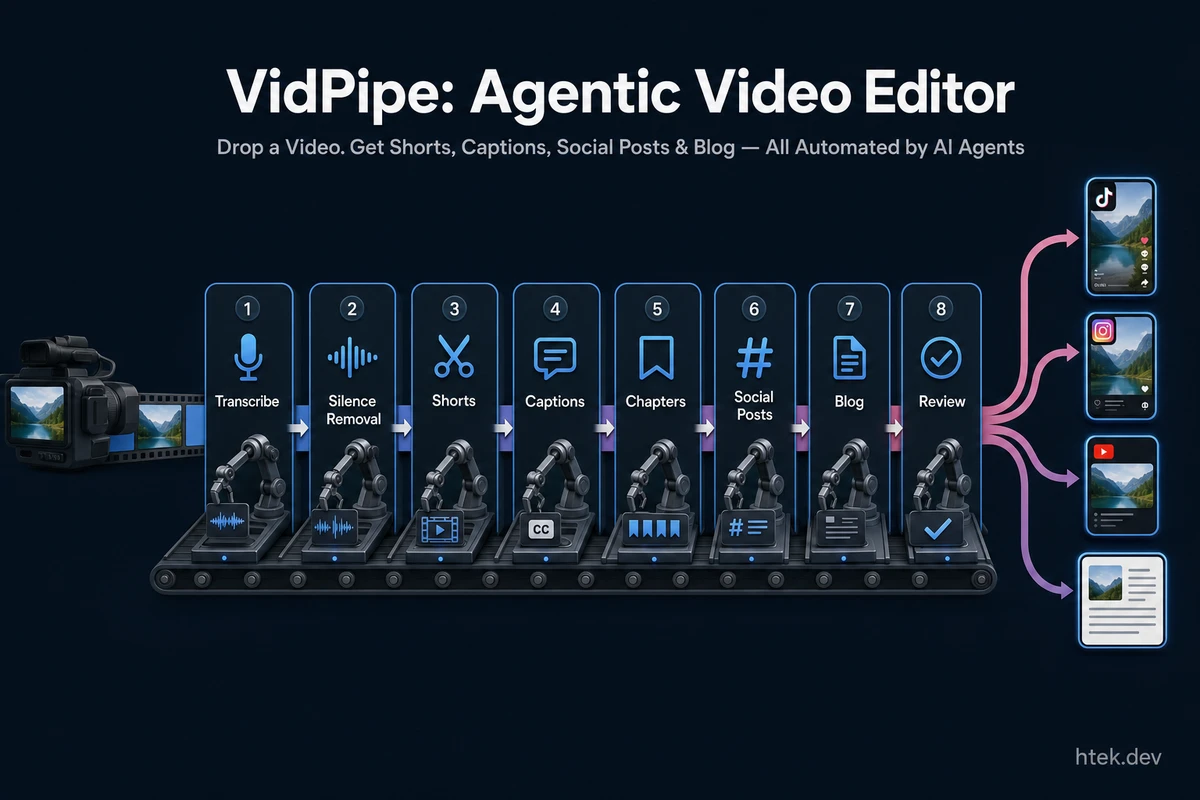
VidPipe is an open-source agentic video editor that automates the entire post-production workflow. You drop a video file, and a 15-stage AI pipeline transforms it into:
- Short clips (15–60s) with 6 variants per short (landscape, portrait, square, feed — all with burned captions)
- Medium clips (1–3 min) with crossfade transitions
- Karaoke-style captions (word-by-word highlighting, burned into video)
- AI silence removal (context-aware, capped at 20%)
- Chapter detection (JSON, Markdown, YouTube timestamps, FFmpeg metadata)
- Platform-tailored social posts for TikTok, YouTube, Instagram, LinkedIn, and X
- Blog post with web-sourced links
- Cost tracking across all LLM providers
The entire pipeline is orchestrated by 8 specialized AI agents built on the @github/copilot-sdk — ShortsAgent, SummaryAgent, ProducerAgent, ChapterAgent, SocialMediaAgent, BlogAgent, MediumVideoAgent, and SilenceRemovalAgent. Each agent uses structured tool calls to make intelligent, contextual decisions about your content.
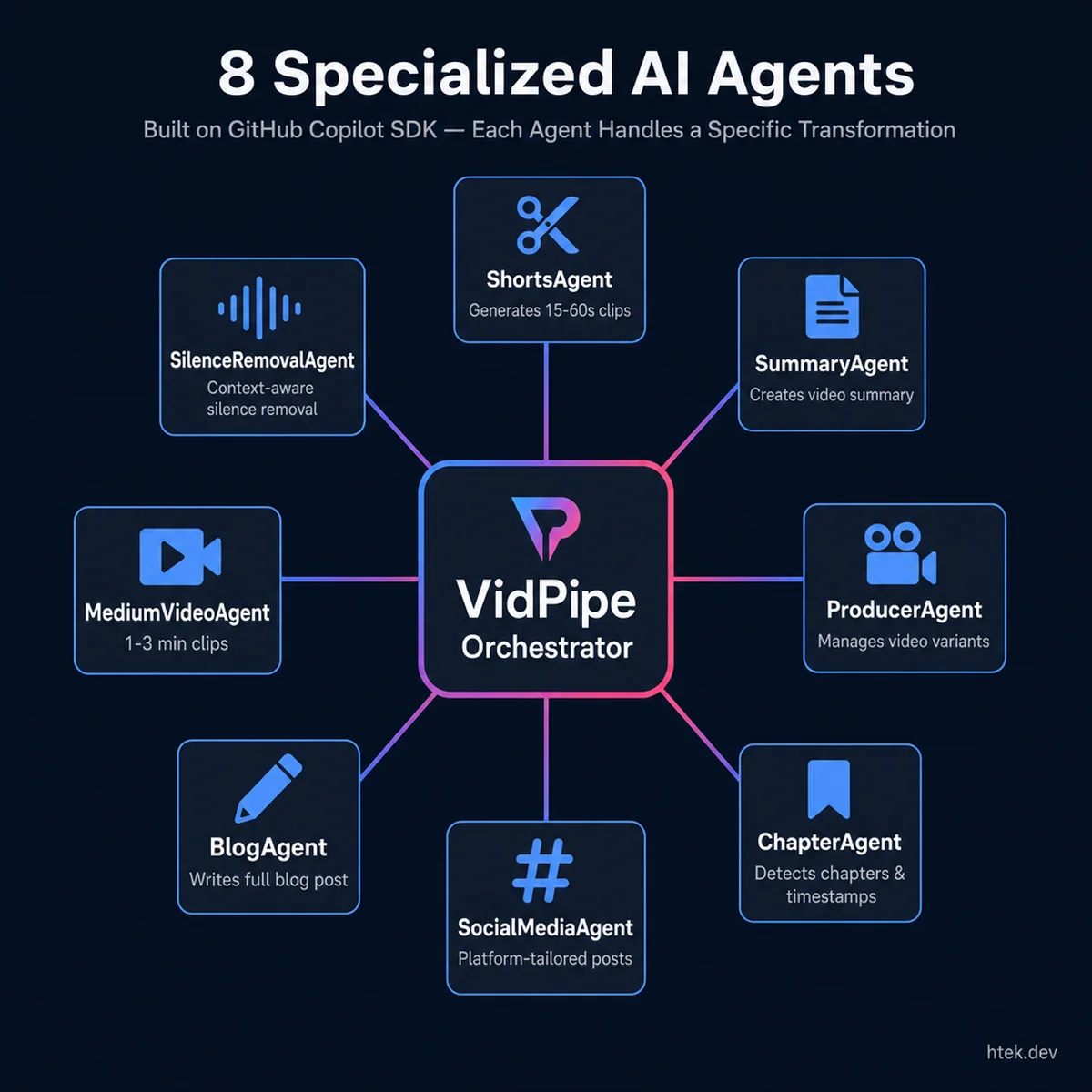 VidPipe’s agent architecture: each specialized agent handles one transformation in the pipeline, orchestrated by the central coordinator
Why I built this: I’m a full-time employee, a dad (with twins on the way — about to have 3 kids), and an aspiring tech creator. I love talking about technology but I hate editing. Recording is the fun part. Everything after? Time I don’t have. So I built a tool that lets me record once and publish everywhere.
GitHub Repository | npm package | Documentation
Demo
The video above walks through VidPipe processing a recording end-to-end — from ingestion through shorts generation, caption burning, and the Tinder-style review interface for approving social media posts.
The Pipeline in Action
Ingest → Transcribe → Silence Removal → Captions → Caption Burn
→ Shorts → Medium Clips → Chapters → Summary
→ Social Posts → Short Posts → Medium Posts
→ Blog → Queue Build → Git Push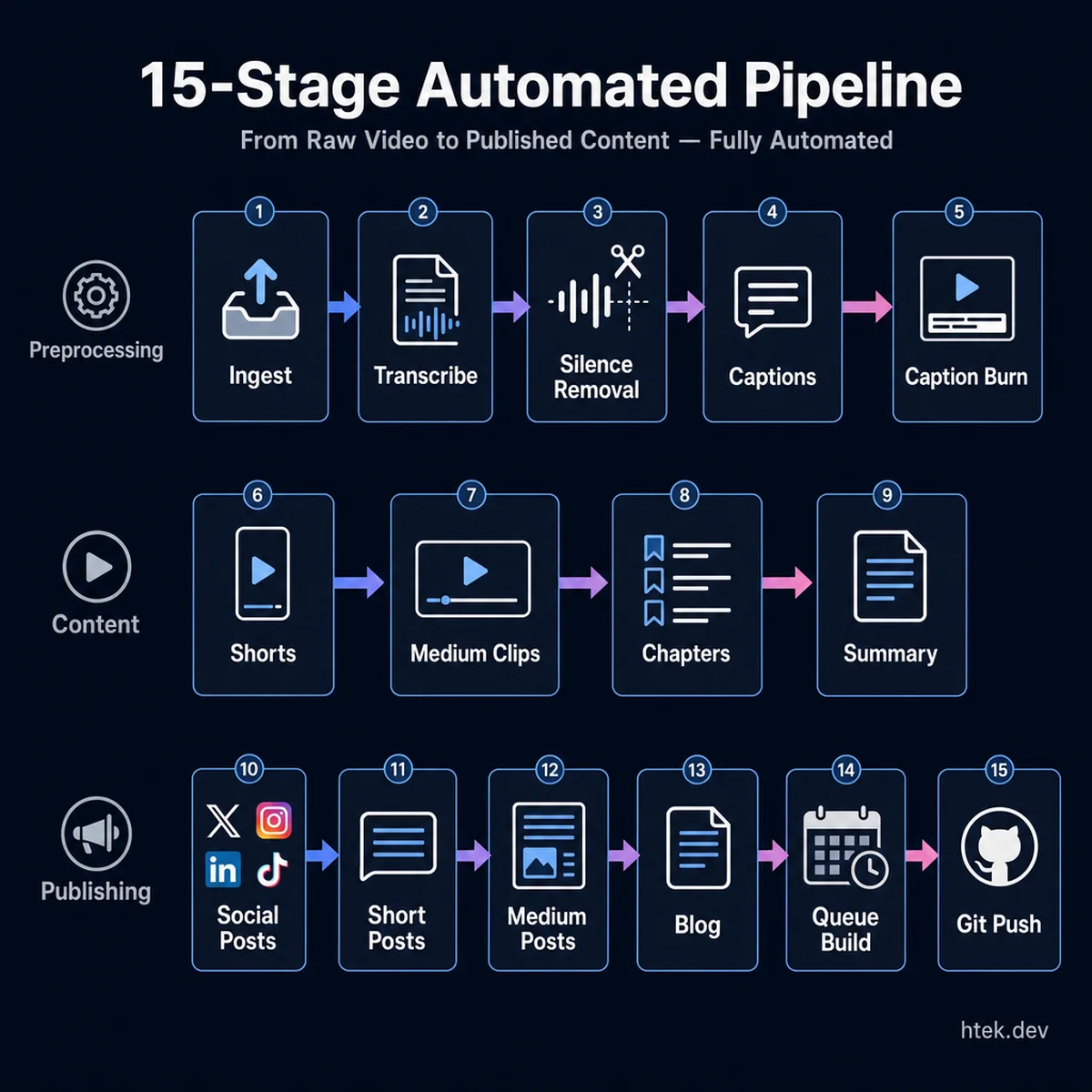 The complete 15-stage pipeline: from raw video through preprocessing, content generation, and automated publishing
Output Structure
Every processed video gets its own organized folder:
recordings/my-demo/
my-demo-captioned.mp4 # With burned-in captions
transcript.json # Word-level timestamps
README.md # AI-generated summary
shorts/
catchy-title-portrait.mp4 # 9:16 for TikTok/Reels
catchy-title-square.mp4 # 1:1 for Instagram
catchy-title/posts/ # Per-short social posts
chapters/
chapters-youtube.txt # Ready to paste into YouTube
social-posts/
tiktok.md, youtube.md, instagram.md, linkedin.md, x.md
devto.md # Full blog post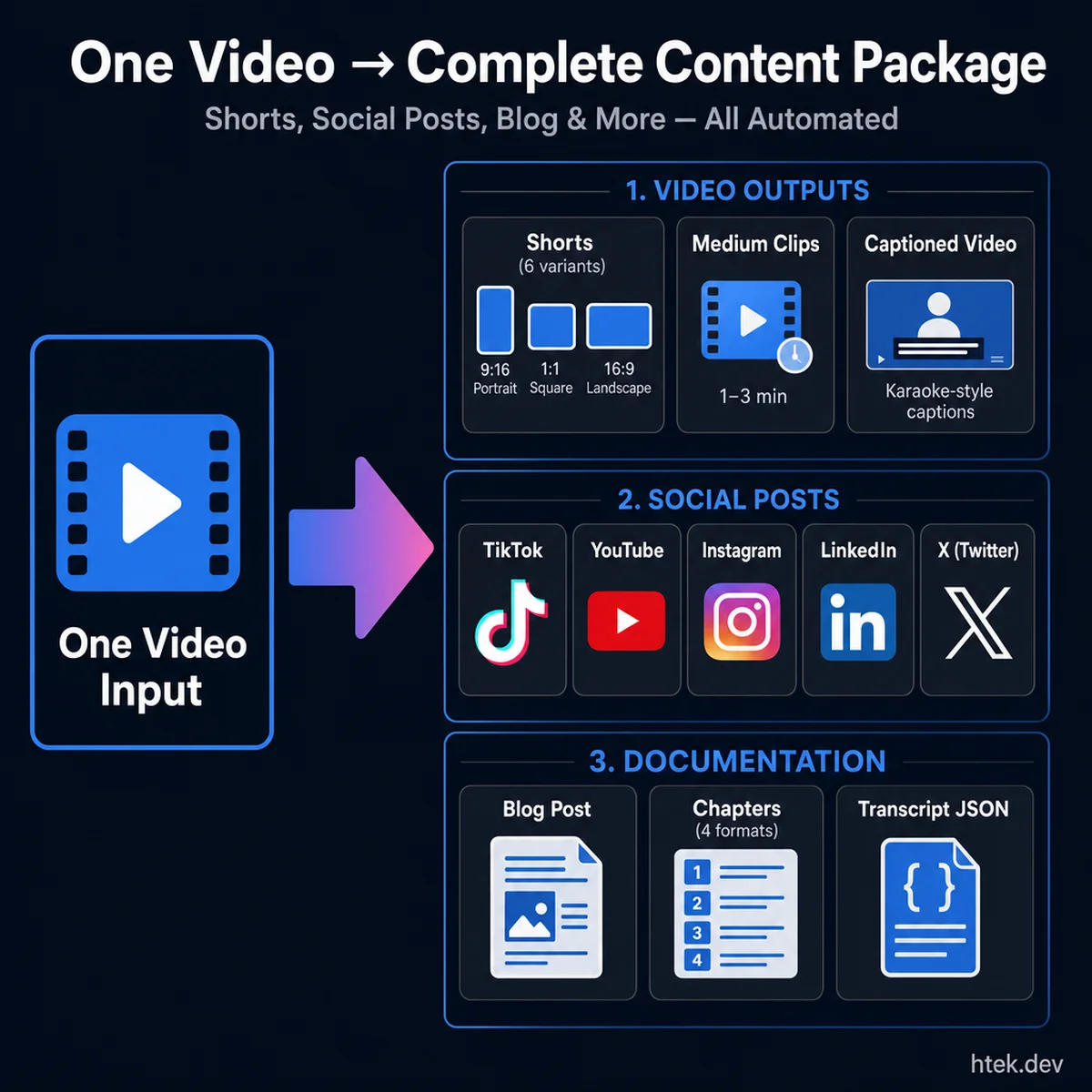 Complete content package: one video input generates shorts (6 variants), platform-tailored social posts, blog article, chapters, and full transcript
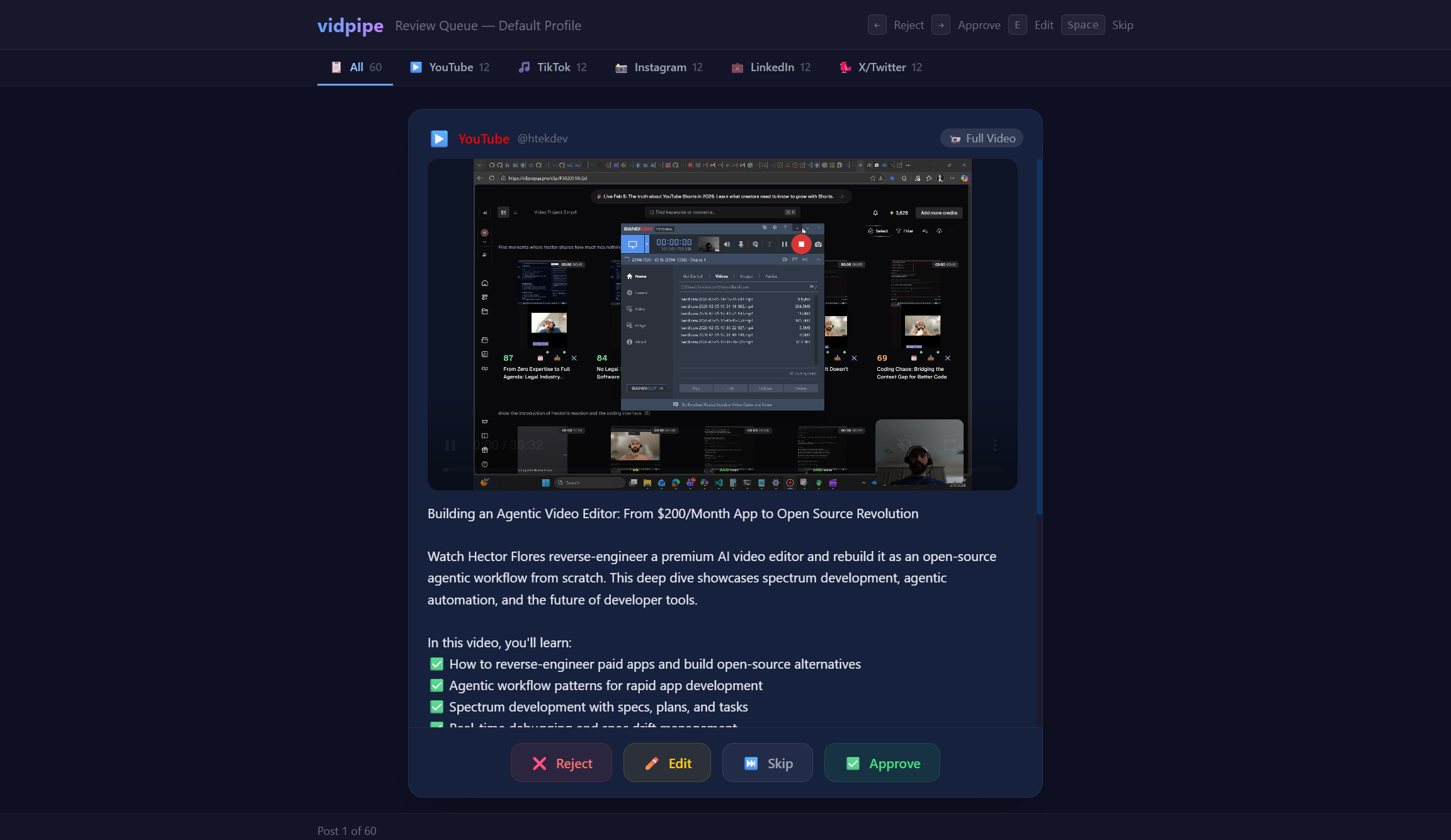
Review UI
VidPipe includes a built-in web app where you review and approve content before it gets scheduled:
My Experience with GitHub Copilot CLI
GitHub Copilot CLI wasn’t just a tool I used to write this project — it became an integral part of the development workflow itself. Here’s how:
1. Custom Copilot Hooks — Enforcing Quality at Every Step
I built 5 custom Copilot hooks in .github/hooks/ that run automatically during development:
pre-push-block— Blocks rawgit push. Forces thenpm run pushworkflow instead, which runs typecheck → tests → coverage → build → push → polls CodeQL + Copilot PR review. No shortcuts.post-edit-invalidate— Every time Copilot CLI edits a file, the code review is automatically invalidated. This forces a fresh review before pushing.pre-amend-block— Prevents amending pushed commits (protects git history).pre-force-push-block— Blocksgit push --forceentirely.pre-import-ban— Enforces ESM import conventions across the codebase.
These hooks mean that Copilot CLI operates within strict guardrails — it can’t take shortcuts, skip tests, or bypass review.
2. Custom Agents — Specialized AI Workers
I created 3 custom Copilot agents in .github/agents/:
code-reviewer— Reviews PRs for vidpipe-specific conventions: provider abstraction patterns, FFmpeg resolver usage, cost tracking, ESM imports, test coverage thresholds.security-fixer— Fetches CodeQL alerts from the GitHub API, reads the remediation guidance, and applies the smallest fix that resolves each vulnerability.review-triage— Triages Copilot’s own PR review comments, categorizing each as ACCEPT (fix it), REJECT (false positive), or DEFER (out of scope). Then implements all ACCEPT fixes and resolves threads via GraphQL.
3. Custom Skills — Reusable Workflows
3 custom skills in .github/skills/:
npm-publish— Handles granular npm access token creation via Playwright browser automation, authentication, and publishing.release— Version bump, changelog generation, GitHub release creation, and npm publishing in one command.late-api— Manages the Late.co social media scheduling API for listing, rescheduling, bulk deleting, and syncing posts.
4. The 37KB copilot-instructions.md
My .github/copilot-instructions.md is 37KB of project context — every pipeline stage, every agent behavior, every FFmpeg pattern, every testing convention. This means when Copilot CLI works on vidpipe, it deeply understands the architecture. It knows that the adjusted transcript goes to captions while the original transcript goes to shorts. It knows that execFile (not exec) is required for FFmpeg. It knows the provider abstraction layer and cost tracking patterns.
5. The Push Workflow — CI/CD Powered by Copilot
The npm run push command (which Copilot hooks enforce) runs this entire pipeline:
typecheck → tests (51 test files) → coverage check → build → git push
    → poll CodeQL alerts → poll Copilot PR review
    → auto-dispatch security-fixer agent for CodeQL alerts
    → auto-dispatch review-triage agent for review comments
If anything fails, Copilot CLI fixes it and re-runs. The cycle continues until all gates pass.
How Copilot CLI Impacted My Development
The numbers tell the story:
- 131 TypeScript files, ~12,000 lines of source code
- 51 test files, ~10,500 lines of tests
- 8 AI agents built on
@github/copilot-sdk - 15-stage pipeline processing videos end-to-end
- Published on npm as a global CLI tool
I built this entire project in 3 weeks — as a side project, after work, while parenting. That would have been impossible without Copilot CLI. It wrote tests, fixed security alerts, triaged its own code reviews, and kept the codebase consistent through custom hooks and instructions.
The most powerful aspect? Copilot CLI doesn’t just help you write code — it becomes part of your engineering system. The hooks enforce standards. The agents handle reviews. The skills automate releases. It’s not an assistant sitting next to you — it’s a teammate embedded in your workflow.
Built with love by a busy dad who’d rather record than edit. If you’re a creator struggling with the post-production grind, give VidPipe a try.
For more on where agentic video pipelines are heading, see The Future of Agentic Video Editing. And for a deeper look at fleet-mode orchestration patterns, Video Pipeline with Fleet Mode shows the production-scale version of this approach.