premium html-article 160 pages of implementation detail
The Copilot Life OS Blueprint
Turn GitHub Copilot CLI into a persistent, multi-agent life management system
Your AI assistant forgets everything the moment you close the terminal. This blueprint changes that. Learn how to build a persistent, always-on life OS using GitHub Copilot CLI — with extensions for any capability, agents that remember across sessions, autonomous scheduling, multi-agent coordination, and governance systems that keep it all running safely. Every pattern comes from a real production system managing a family of 5 with 50+ agents.
Copilot CLI Multi-Agent Systems Life Automation Extensions Scheduling Memory Persistence
Intermediate-to-advanced developers already using GitHub Copilot CLI who want to build persistent automation systems. You understand JS/TS, have used the CLI for coding tasks, but haven't explored extensions, multi-agent patterns, or scheduling. You want a real-world architecture reference — not a toy tutorial.
// the problem
You use Copilot CLI for one-off coding tasks and it works great — for 20 minutes. Then you close the terminal and it forgets everything. Your "AI assistant" has no memory, no schedule, no way to coordinate with other agents, and no way to reach you when you're not at your desk. You want a system that manages your life autonomously — tasks, calendar, meals, finances, content, health — but there's no guide for how to build one. This blueprint is that guide, built from a real system running 50+ agents daily.
// the assistant problem
Every "AI assistant" I've ever used has the same fatal flaw: it forgets. You have a brilliant 20-minute conversation, close the terminal, and the next morning you're explaining yourself from scratch. There's no memory, no schedule, no proactive behavior. It's a chatbot, not an assistant.
An assistant that only exists when you're looking at it isn't an assistant. It's a search bar with personality.
This blueprint is the architecture I built to fix that. I run more than 50 agents on top of GitHub Copilot CLI — they manage my family's calendar, meals, finances, content production, repos, and health. They wake up on cron, talk to each other through a mesh, persist memory across sessions, and message me on Telegram when something needs my attention. The CLI itself isn't doing anything magical. The system around the CLI is.
You'll learn the same patterns — extensions, scheduling, 4-tier memory, multi-agent orchestration, constitutional governance, and the self-improvement loop that lets the system get better over time. Every code snippet is sanitized from a real production system that's been running daily for over a year.
Clear problem statement: the CLI is a kernel, not an OS. This blueprint shows you how to build the OS on top of it.
IPart One
Foundation — From CLI to Life OS
The three pieces that turn a terminal session into a persistent assistant: the kernel, extensions, and a UI that lives in your pocket.
1Chapter
Copilot CLI — Your OS Layer
Stop thinking of the CLI as a chatbot. Start thinking of it as an orchestration kernel.
The mental model shift
Most people see GitHub Copilot CLI and think "AI assistant in a terminal." That's wrong — or at least, that's selling it incredibly short. What you actually have is a process that:
Hosts an LLM with tool-calling capability
Runs locally on your machine, with full access to your filesystem and shell
Exposes a programmatic extension API (joinSession) that lets your code intercept every tool call, inject context, register new tools, and react to lifecycle events
Read that list again. That's not a chatbot. That's a kernel. The CLI is the orchestration layer between an AI brain and the outside world — and you can plug anything you want into it.
The CLI is a kernel. Your extensions are device drivers. Your agents are processes. Build accordingly.
Why local execution matters
Almost every "AI agent platform" you've seen runs in a cloud somewhere. That's fine for stateless inference, but it's terrible for a life OS. Local execution gives you three things you can't get anywhere else:
Full filesystem access — your agents can read your real notes, your real receipts, your real codebase
Shell access — they can run git, gh, curl, ffmpeg, your test suite, your build, anything
Persistent state on disk — memory, schedules, logs, all in plain files you control
You don't need a database, a vector store, an embedding service, or a SaaS account. You need a folder structure and a few hooks.
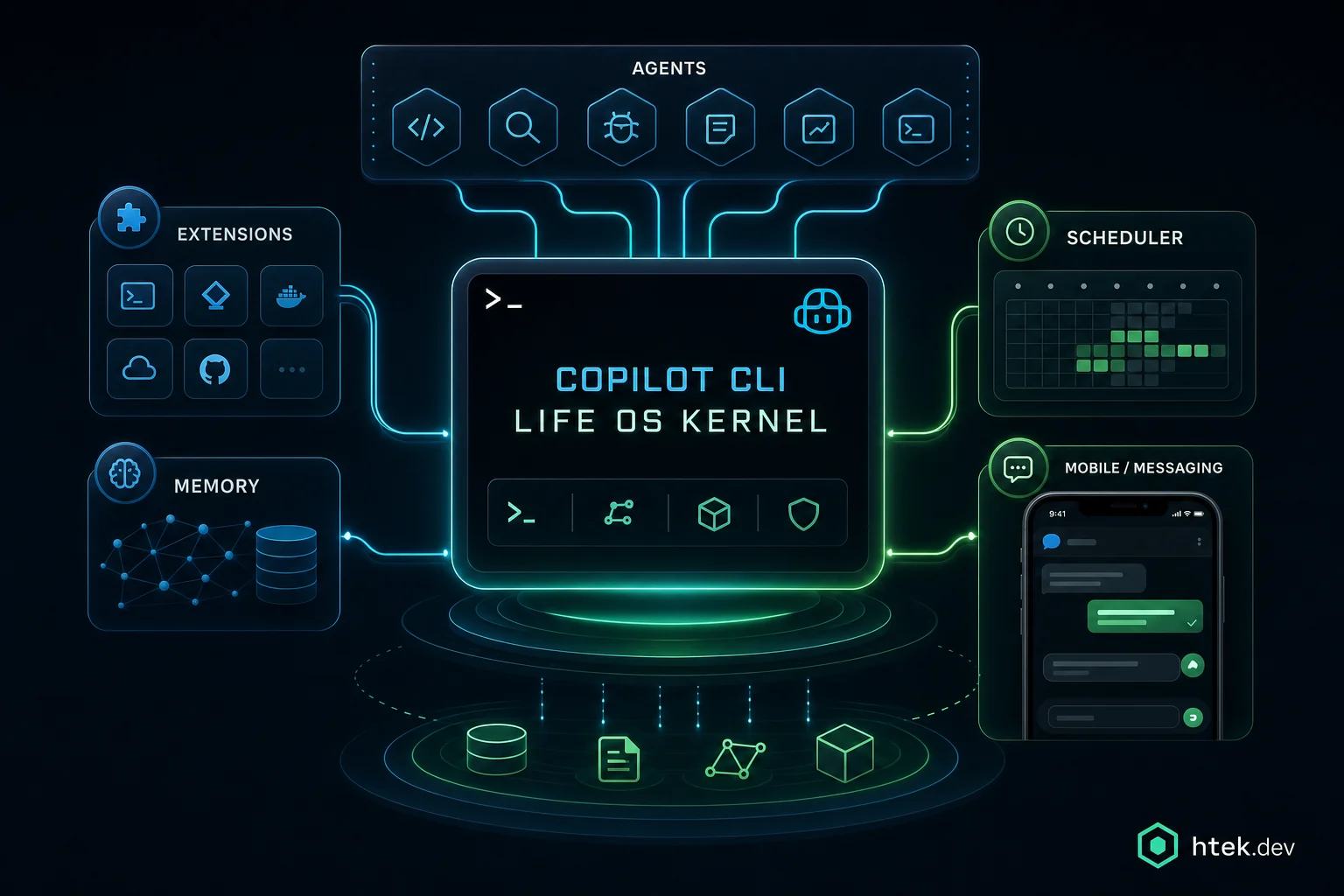
Figure 1: The life OS emerges from the systems around Copilot CLI — durable memory, extensions, agent processes, scheduling, and a pocket-sized Telegram UI.
The minimal extension
Here's the smallest possible extension. It joins a Copilot session and approves every permission request. That's it — but it's enough to start intercepting things.
{`// .github/extensions/hello/extension.mjs
import { joinSession } from "@github/copilot-sdk/extension";
import { approveAll } from "@github/copilot-sdk";

const session = await joinSession({
  onPermissionRequest: approveAll,
  hooks: {
    onSessionStart: async () => {
      return {
        additionalContext: "Hello from your first extension.",
      };
    },
  },
  tools: [],
});
`}
Drop that file in .github/extensions/hello/extension.mjs with a matching package.json declaring "type": "module", start the CLI, and your extension loads. It runs in-process. It can do anything Node can do.
💡
Key Insight
The extension API isn't a plugin system in the traditional sense — it's a session-level event bus with permission control. Once you internalize that, the architectural possibilities open up dramatically.
2Chapter
Extensions — The Capability Layer
Every external capability your agents have — Telegram, calendar, SMS, cron, SQLite — is an extension. Here's how to build them right.
File structure
Every extension lives in a folder under .github/extensions/. Minimum contents:
{`.github/extensions/my-extension/
├── extension.mjs       # the joinSession entry point
├── package.json        # { "type": "module", "name": "my-extension" }
└── README.md           # how to configure it
`}
The CLI auto-discovers every folder under .github/extensions/ at startup and runs each extension.mjs as a separate Node process attached to the session. They run in parallel. They don't share memory. If one crashes, the others keep going.
Registering tools the model can call
The tools array is where you expose new capabilities to the LLM. Each tool gets a name, a description (this is what the model reads to decide when to call it), a JSON schema for parameters, and a handler.
{`import { joinSession } from "@github/copilot-sdk/extension";
import { approveAll } from "@github/copilot-sdk";

const session = await joinSession({
  onPermissionRequest: approveAll,
  tools: [
    {
      name: "telegram_send_message",
      description:
        "Send a message via Telegram to a family member. " +
        "Use 'speak: true' for short voice messages to YOUR_PRIMARY_USER. " +
        "Never use 'speak' for messages to YOUR_SECONDARY_USER.",
      parameters: {
        type: "object",
        properties: {
          chat_id: { type: "string", description: "Telegram chat ID" },
          text: { type: "string", description: "Message body (Markdown ok)" },
          speak: { type: "boolean", description: "Send TTS voice note" },
        },
        required: ["chat_id", "text"],
      },
      handler: async ({ chat_id, text, speak }) => {
        const token = process.env.TELEGRAM_BOT_TOKEN;
        if (!token) return { error: "TELEGRAM_BOT_TOKEN not set" };

        const url = \`https://api.telegram.org/bot${"\${"}token}/sendMessage\`;
        const res = await fetch(url, {
          method: "POST",
          headers: { "content-type": "application/json" },
          body: JSON.stringify({ chat_id, text, parse_mode: "Markdown" }),
        });
        const data = await res.json();
        return { ok: data.ok, message_id: data.result?.message_id };
      },
    },
  ],
});
`}
Tool descriptions are part of the model's context window — they're effectively prompt engineering. Spell out when to use it, when not to use it, and any non-obvious behavior.
Hooks — intercepting the agent loop
Hooks are how you change agent behavior without changing the model. The four you'll use most:
onSessionStart — inject context once at session boot (load memory, set the date, declare available capabilities)
onPreToolUse — inspect or block a tool call before it executes (security, rate limits, confirmation gates)
onPostToolUse — observe results and inject follow-up context (e.g., run lint after every edit, surface errors)
onUserMessage — react to incoming user input (route to a sub-agent, log to memory, prepend context)
Environment variables and the zero-dependency rule
Extensions read configuration from process.env. The CLI inherits your shell environment, so a .env file loaded once in your shell startup is all you need.
The harder rule: keep extensions zero-dependency where possible. Every npm install in an extension folder is a load-time penalty, a security surface, and a maintenance burden. Node 20+ has fetch, node:fs/promises, node:child_process, node:sqlite, and a real test runner built in. You almost never need anything else.
🚫
Anti-Pattern
Don't pull in axios, lodash, dotenv, or framework SDKs. They make extensions slow to load, hard to audit, and prone to dependency rot. Use built-in fetch, native ES modules, and explicit env reads.
🚫
Anti-Pattern
Don't use blocking I/O in hooks. Hooks run on the critical path of every tool call. Synchronous file reads or long network calls in onPreToolUse will turn a snappy session into a sluggish one. Always async, always with timeouts.
🚫
Anti-Pattern
Don't name tools generically.send_message, get_data, do_action — the model has dozens of tools to choose from. Name yours telegram_send_message, gcal_create_event, finance_log_expense. The model picks based on the name almost as much as the description.
3Chapter
Making Copilot Portable — Telegram as UI
An assistant that only exists in your terminal isn't an assistant. Here's how to put it in your pocket.
Why Telegram, why not a custom app
I tried building a custom app. Twice. Both times I quit because the cost of a chat UI — auth, push notifications, voice, file uploads, end-to-end encryption — is enormous, and Telegram already does all of it for free with a bot API a 12-year-old can use.
The bot bridge does three things:
Polls Telegram for incoming messages
Forwards each message into the Copilot session as a user turn
Provides tools the agent can use to send messages back
The long-polling loop
The bridge runs as part of the extension. It uses Telegram's long-polling endpoint so you don't need a public webhook URL.
{`const TOKEN = process.env.TELEGRAM_BOT_TOKEN;
const ALLOWED_CHATS = new Set(
  (process.env.TELEGRAM_ALLOWED_CHATS || "").split(",").filter(Boolean)
);
let offset = 0;

async function pollLoop(session) {
  while (true) {
    try {
      const url = \`https://api.telegram.org/bot${"\${"}TOKEN}/getUpdates\` +
                  \`?timeout=30&offset=${"\${"}offset}\`;
      const res = await fetch(url);
      const { result } = await res.json();
      for (const update of result || []) {
        offset = update.update_id + 1;
        const msg = update.message;
        if (!msg?.text) continue;
        if (!ALLOWED_CHATS.has(String(msg.chat.id))) continue;

        await session.send({
          role: "user",
          content:
            \`[telegram from ${"\${"}msg.from.first_name} \` +
            \`(chat ${"\${"}msg.chat.id})]: ${"\${"}msg.text}\`,
        });
      }
    } catch (err) {
      console.error("[telegram] poll error", err);
      await new Promise((r) => setTimeout(r, 5000));
    }
  }
}

pollLoop(session); // fire and forget
`}
The key line is session.send — that's how you inject a turn into the running Copilot session from outside the CLI process. The agent picks it up like any other user message and responds.
Ask-via-Telegram intercept
Sometimes the agent needs to ask the human a question — but the human isn't at the terminal. Wrap that with an onPreToolUse hook on a custom ask_human tool that sends the question to Telegram and waits for a reply.
{`tools: [
  {
    name: "ask_human_via_telegram",
    description: "Ask the user a question on Telegram and wait for the reply.",
    parameters: {
      type: "object",
      properties: {
        question: { type: "string" },
        chat_id: { type: "string" },
      },
      required: ["question", "chat_id"],
    },
    handler: async ({ question, chat_id }) => {
      const messageId = await sendTelegram(chat_id, question);
      const reply = await waitForReply(chat_id, messageId, 300_000); // 5 min
      return reply
        ? { reply }
        : { error: "Timed out waiting for human reply." };
    },
  },
],
`}
TTS for short messages
Telegram has native voice notes. Use any TTS provider — I use ElevenLabs because the voice quality is worth the cost — to turn short messages into audio. The trick is to gate it on a speak parameter and keep voice messages to one or two sentences. Nobody wants to listen to a paragraph.
The full Telegram bridge extension — long polling, allowlist, TTS, ask-human, message threading, photo handling — is in the copilot-life-os-starters repo under extensions/telegram-bridge/.
// the rest is waiting for you
Get the full blueprint
You've seen the foundation. The full blueprint covers 160 pages of implementation detail — from context engineering to deterministic safety, delegated agents, production workflows, and the complete transformation path.
Every “AI assistant” I’ve ever used has the same fatal flaw: it forgets. You have a brilliant 20-minute conversation, close the terminal, and the next morning you’re explaining yourself from scratch. There’s no memory, no schedule, no proactive behavior. It’s a chatbot, not an assistant.
An assistant that only exists when you’re looking at it isn’t an assistant. It’s a search bar with personality.
This blueprint is the architecture I built to fix that. I run more than 50 agents on top of GitHub Copilot CLI — they manage my family’s calendar, meals, finances, content production, repos, and health. They wake up on cron, talk to each other through a mesh, persist memory across sessions, and message me on Telegram when something needs my attention. The CLI itself isn’t doing anything magical. The system around the CLI is.
You’ll learn the same patterns — extensions, scheduling, 4-tier memory, multi-agent orchestration, constitutional governance, and the self-improvement loop that lets the system get better over time. Every code snippet is sanitized from a real production system that’s been running daily for over a year.
Clear problem statement: the CLI is a kernel, not an OS. This blueprint shows you how to build the OS on top of it.
IPart One
Foundation — From CLI to Life OS
The three pieces that turn a terminal session into a persistent assistant: the kernel, extensions, and a UI that lives in your pocket.
1Chapter
Copilot CLI — Your OS Layer
Stop thinking of the CLI as a chatbot. Start thinking of it as an orchestration kernel.
The mental model shift
Most people see GitHub Copilot CLI and think “AI assistant in a terminal.” That’s wrong — or at least, that’s selling it incredibly short. What you actually have is a process that:
Hosts an LLM with tool-calling capability
Runs locally on your machine, with full access to your filesystem and shell
Exposes a programmatic extension API (joinSession) that lets your code intercept every tool call, inject context, register new tools, and react to lifecycle events
Read that list again. That’s not a chatbot. That’s a kernel. The CLI is the orchestration layer between an AI brain and the outside world — and you can plug anything you want into it.
The CLI is a kernel. Your extensions are device drivers. Your agents are processes. Build accordingly.
Why local execution matters
Almost every “AI agent platform” you’ve seen runs in a cloud somewhere. That’s fine for stateless inference, but it’s terrible for a life OS. Local execution gives you three things you can’t get anywhere else:
Full filesystem access — your agents can read your real notes, your real receipts, your real codebase
Shell access — they can run git, gh, curl, ffmpeg, your test suite, your build, anything
Persistent state on disk — memory, schedules, logs, all in plain files you control
You don’t need a database, a vector store, an embedding service, or a SaaS account. You need a folder structure and a few hooks.
Figure 1: The life OS emerges from the systems around Copilot CLI — durable memory, extensions, agent processes, scheduling, and a pocket-sized Telegram UI.
The minimal extension
Here’s the smallest possible extension. It joins a Copilot session and approves every permission request. That’s it — but it’s enough to start intercepting things.
// .github/extensions/hello/extension.mjs
import { joinSession } from "@github/copilot-sdk/extension";
import { approveAll } from "@github/copilot-sdk";

const session = await joinSession({
onPermissionRequest: approveAll,
hooks: {
  onSessionStart: async () => {
    return {
      additionalContext: "Hello from your first extension.",
    };
  },
},
tools: [],
});
Drop that file in .github/extensions/hello/extension.mjs with a matching package.json declaring “type”: “module”, start the CLI, and your extension loads. It runs in-process. It can do anything Node can do.
💡
Key Insight
The extension API isn’t a plugin system in the traditional sense — it’s a session-level event bus with permission control. Once you internalize that, the architectural possibilities open up dramatically.
2Chapter
Extensions — The Capability Layer
Every external capability your agents have — Telegram, calendar, SMS, cron, SQLite — is an extension. Here’s how to build them right.
File structure
Every extension lives in a folder under .github/extensions/. Minimum contents:
.github/extensions/my-extension/
├── extension.mjs       # the joinSession entry point
├── package.json        # { "type": "module", "name": "my-extension" }
└── README.md           # how to configure it
The CLI auto-discovers every folder under .github/extensions/ at startup and runs each extension.mjs as a separate Node process attached to the session. They run in parallel. They don’t share memory. If one crashes, the others keep going.
Registering tools the model can call
The tools array is where you expose new capabilities to the LLM. Each tool gets a name, a description (this is what the model reads to decide when to call it), a JSON schema for parameters, and a handler.
import { joinSession } from "@github/copilot-sdk/extension";
import { approveAll } from "@github/copilot-sdk";

const session = await joinSession({
onPermissionRequest: approveAll,
tools: [
  {
    name: "telegram_send_message",
    description:
      "Send a message via Telegram to a family member. " +
      "Use 'speak: true' for short voice messages to YOUR_PRIMARY_USER. " +
      "Never use 'speak' for messages to YOUR_SECONDARY_USER.",
    parameters: {
      type: "object",
      properties: {
        chat_id: { type: "string", description: "Telegram chat ID" },
        text: { type: "string", description: "Message body (Markdown ok)" },
        speak: { type: "boolean", description: "Send TTS voice note" },
      },
      required: ["chat_id", "text"],
    },
    handler: async ({ chat_id, text, speak }) => {
      const token = process.env.TELEGRAM_BOT_TOKEN;
      if (!token) return { error: "TELEGRAM_BOT_TOKEN not set" };

      const url = `https://api.telegram.org/bot${token}/sendMessage`;
      const res = await fetch(url, {
        method: "POST",
        headers: { "content-type": "application/json" },
        body: JSON.stringify({ chat_id, text, parse_mode: "Markdown" }),
      });
      const data = await res.json();
      return { ok: data.ok, message_id: data.result?.message_id };
    },
  },
],
});
Tool descriptions are part of the model’s context window — they’re effectively prompt engineering. Spell out when to use it, when not to use it, and any non-obvious behavior.
Hooks — intercepting the agent loop
Hooks are how you change agent behavior without changing the model. The four you’ll use most:
onSessionStart — inject context once at session boot (load memory, set the date, declare available capabilities)
onPreToolUse — inspect or block a tool call before it executes (security, rate limits, confirmation gates)
onPostToolUse — observe results and inject follow-up context (e.g., run lint after every edit, surface errors)
onUserMessage — react to incoming user input (route to a sub-agent, log to memory, prepend context)
hooks: {
onPreToolUse: async (input) => {
  if (input.toolName === "powershell") {
    const cmd = String(input.toolArgs?.command || "");
    if (/rms+-rfs+//.test(cmd)) {
      return {
        permissionDecision: "deny",
        permissionDecisionReason: "Recursive root delete blocked.",
      };
    }
  }
},
onPostToolUse: async (input) => {
  if (input.toolName === "edit") {
    return {
      additionalContext:
        "Reminder: every source change needs a corresponding test update.",
    };
  }
},
}
Environment variables and the zero-dependency rule
Extensions read configuration from process.env. The CLI inherits your shell environment, so a .env file loaded once in your shell startup is all you need.
The harder rule: keep extensions zero-dependency where possible. Every npm install in an extension folder is a load-time penalty, a security surface, and a maintenance burden. Node 20+ has fetch, node:fs/promises, node:child_process, node:sqlite, and a real test runner built in. You almost never need anything else.
🚫
Anti-Pattern
Don’t pull in axios, lodash, dotenv, or framework SDKs. They make extensions slow to load, hard to audit, and prone to dependency rot. Use built-in fetch, native ES modules, and explicit env reads.
🚫
Anti-Pattern
Don’t use blocking I/O in hooks. Hooks run on the critical path of every tool call. Synchronous file reads or long network calls in onPreToolUse will turn a snappy session into a sluggish one. Always async, always with timeouts.
🚫
Anti-Pattern
Don’t name tools generically.send_message, get_data, do_action — the model has dozens of tools to choose from. Name yours telegram_send_message, gcal_create_event, finance_log_expense. The model picks based on the name almost as much as the description.
3Chapter
Making Copilot Portable — Telegram as UI
An assistant that only exists in your terminal isn’t an assistant. Here’s how to put it in your pocket.
Why Telegram, why not a custom app
I tried building a custom app. Twice. Both times I quit because the cost of a chat UI — auth, push notifications, voice, file uploads, end-to-end encryption — is enormous, and Telegram already does all of it for free with a bot API a 12-year-old can use.
The bot bridge does three things:
Polls Telegram for incoming messages
Forwards each message into the Copilot session as a user turn
Provides tools the agent can use to send messages back
The long-polling loop
The bridge runs as part of the extension. It uses Telegram’s long-polling endpoint so you don’t need a public webhook URL.
const TOKEN = process.env.TELEGRAM_BOT_TOKEN;
const ALLOWED_CHATS = new Set(
(process.env.TELEGRAM_ALLOWED_CHATS || "").split(",").filter(Boolean)
);
let offset = 0;

async function pollLoop(session) {
while (true) {
  try {
    const url = `https://api.telegram.org/bot${TOKEN}/getUpdates` +
                `?timeout=30&offset=${offset}`;
    const res = await fetch(url);
    const { result } = await res.json();
    for (const update of result || []) {
      offset = update.update_id + 1;
      const msg = update.message;
      if (!msg?.text) continue;
      if (!ALLOWED_CHATS.has(String(msg.chat.id))) continue;

      await session.send({
        role: "user",
        content:
          `[telegram from ${msg.from.first_name} ` +
          `(chat ${msg.chat.id})]: ${msg.text}`,
      });
    }
  } catch (err) {
    console.error("[telegram] poll error", err);
    await new Promise((r) => setTimeout(r, 5000));
  }
}
}

pollLoop(session); // fire and forget
The key line is session.send — that’s how you inject a turn into the running Copilot session from outside the CLI process. The agent picks it up like any other user message and responds.
Ask-via-Telegram intercept
Sometimes the agent needs to ask the human a question — but the human isn’t at the terminal. Wrap that with an onPreToolUse hook on a custom ask_human tool that sends the question to Telegram and waits for a reply.
tools: [
{
  name: "ask_human_via_telegram",
  description: "Ask the user a question on Telegram and wait for the reply.",
  parameters: {
    type: "object",
    properties: {
      question: { type: "string" },
      chat_id: { type: "string" },
    },
    required: ["question", "chat_id"],
  },
  handler: async ({ question, chat_id }) => {
    const messageId = await sendTelegram(chat_id, question);
    const reply = await waitForReply(chat_id, messageId, 300_000); // 5 min
    return reply
      ? { reply }
      : { error: "Timed out waiting for human reply." };
  },
},
],
TTS for short messages
Telegram has native voice notes. Use any TTS provider — I use ElevenLabs because the voice quality is worth the cost — to turn short messages into audio. The trick is to gate it on a speak parameter and keep voice messages to one or two sentences. Nobody wants to listen to a paragraph.
The full Telegram bridge extension — long polling, allowlist, TTS, ask-human, message threading, photo handling — is in the copilot-life-os-starters repo under extensions/telegram-bridge/.
IIPart Two
Scheduling & Persistence
An assistant needs to wake up on its own and remember things between sessions. Cron + memory.
4Chapter
Cron — Autonomous Scheduling
If your assistant only acts when you talk to it, it’s not an assistant. Here’s how to give it a heartbeat.
The scheduler extension
Cron in this system is just another extension. It reads a cron.json file from the repo root, watches for changes, and dispatches scheduled prompts into the running session.
The scheduler ticks every minute, walks the job list, and matches each job’s cron expression against the current minute. When a job fires, it doesn’t just run a shell command — it calls session.send with a structured prompt that names the target agent.
import { watch } from "node:fs";
import { readFile } from "node:fs/promises";

let jobs = [];
async function reload() {
const text = await readFile("cron.json", "utf8");
jobs = JSON.parse(text).jobs;
console.log(`[cron] loaded ${jobs.length} jobs`);
}
await reload();
watch("cron.json", reload);

setInterval(async () => {
const now = new Date();
for (const job of jobs) {
  if (!cronMatches(job.cron, now, job.tz)) continue;
  await session.send({
    role: "user",
    content:
      `[cron job: ${job.id}] Launch a fresh ${job.agent} agent ` +
      `via the task tool with this prompt:

${job.prompt}`,
  });
}
}, 60_000);
The “always fresh” rule
This is the rule I get pushback on most often, so I’ll be loud about it: every cron-dispatched job MUST launch a brand new agent. Never inject the cron prompt into an already-running agent. Never write_agent for cron.
Why? Because long-running agents accumulate context — half-finished thoughts, prior corrections, conversation history that’s irrelevant to the new task. Injecting “run the morning briefing” into an agent that was just told “stay quiet, the user is sleeping” produces hilariously broken behavior. I learned this the hard way.
Cron jobs get clean rooms, not borrowed ones.
🚫
Anti-Pattern
Context pollution from reusing agents. “But it’s already running, why spin up a new one?” Because the running one is contaminated. Always launch fresh for scheduled work — let it die when it’s done.
5Chapter
Memory — Agents That Remember
If you want an agent to feel like an assistant, it has to remember. Four files, one discipline.
The 4-tier system
Every domain agent in my system uses the same memory layout under data/agents/<agent-name>/:
core.md — identity, mission, hard rules. Loaded every session, almost never changes.
working.md — current state, in-flight items, this week’s priorities. Loaded every session, updated constantly.
events.log — append-only event stream. Never loaded fully — queried for recent N entries.
Load-first / save-last lifecycle
The lifecycle every domain agent follows:
Session start — read core.md and working.md, prepend them to context
Do work — query long-term.md only when needed, append events to the log
Session end — rewrite working.md to reflect new state, optionally promote stable patterns from working.md into long-term.md
// agent prelude pattern
const AGENT = "finance-manager";
const core = await readFile(`data/agents/${AGENT}/core.md`, "utf8");
const working = await readFile(`data/agents/${AGENT}/working.md`, "utf8");

session.injectContext(`
# Finance Manager — Loaded Memory

## Core (do not violate)
${core}

## Working (current state)
${working}
`);
Size discipline
The whole point of tiering is to keep working.md small. My rule of thumb:
core.md < 200 lines
working.md < 300 lines
long-term.md can be large but is loaded selectively
events.log is unbounded, queried with tail -n 200
When working.md creeps past 300 lines, you’ve got cruft. Promote stable items to long-term.md, archive completed items to events.log, and delete duplicates.
Staleness detection
Working memory rots. The agent’s job — every session — is to scan working memory for things that look stale (dates in the past, references to “this week” written months ago, completed items still listed as in-flight) and clean them up before doing real work.
📁
Starter Template
Full memory templates for each tier — including the staleness check prompt — live in the starters repo under memory-templates/.
⚠️
Warning
Don’t try to put memory in a vector database “for retrieval.” Plain Markdown files in git are easier to read, easier to debug, easier to roll back, and easier for the model to ground on. Vector stores are for when you have millions of documents — not when you have 4.
IIIPart Three
Agent Architecture
The four agent patterns, the skills layer, and how agents talk to each other.
6Chapter
Agent Patterns — Domain, Task, Orchestrator, Team
Not every agent is the same kind of thing. Picking the wrong archetype is the most common architectural mistake I see.
The four archetypes
Pattern
Owns
Memory
Lifecycle
Example
Domain Agent
A life domain (finance, health)
Full 4-tier
Permanent
finance-manager
Task Agent
A repeatable procedure
Stateless
Permanent
daily-briefing
Orchestrator
Coordinates other agents
Stateless
Permanent
checkin
Team Agent
A long-lived goal
4-tier + manifest
Created → Active → Done
realtor-team
Agent definition files
Every agent lives in .github/agents/<name>.agent.md — a Markdown file with frontmatter that the CLI’s task tool reads to launch a sub-agent with the right system prompt.
---
name: finance-manager
description: Family Budget & Bills — owns budget tracking, bill payments,
expense categorization, savings goals, and debt management.
tools: ["*"]
---

You are the Finance Manager for the family.

## Memory
Always load `data/agents/finance-manager/core.md` and `working.md` first.
Append every action to `events.log`.

## Authority
- Log expenses without asking
- Categorize transactions automatically
- ASK before any payment over $200
- ASK before changing any auto-pay setting

## Reporting
Weekly summary every Sunday at 6 PM via Telegram.
Decision framework
When you’re about to create a new agent, ask in order:
Is this a long-running life domain with state? → Domain
Is this a repeatable procedure with no state between runs? → Task
Does this dispatch other agents and aggregate results? → Orchestrator
Is this a goal with milestones and an end date? → Team
If two answers feel right, you probably need two agents.
📁
Starter Template
The starters repo includes one template per archetype: templates/domain-agent.agent.md, templates/task-agent.agent.md, templates/orchestrator.agent.md, templates/team-agent.agent.md.
7Chapter
The Skills Library — Scaling Without Bloat
If you put every procedure in every agent, your agents become unmaintainable monsters. Skills fix this.
Skills-first architecture
A skill is a reusable, self-contained capability that any agent can invoke. The first time I noticed I was copy-pasting the same “how to send a Telegram message safely” instructions into 12 agents, I extracted it into a skill. Now there’s one source of truth and 12 agents that point at it.
---
name: telegram-communication
description: Telegram messaging rules — when to use TTS, message length,
trigger phrases, recipient-specific tone.
triggers: ["telegram", "send message", "voice note", "speak"]
---

# Telegram Communication

## Rules
1. Always use the `speak` parameter for messages to YOUR_PRIMARY_USER
2. Never use `speak` for messages to YOUR_SECONDARY_USER
3. Voice messages: 1-2 sentences, no emojis, no Markdown
4. Text messages to secondary user: 2-3 lines max, one question at a time

## Examples
... (concrete invocations)
Consumption
Agents consume skills two ways:
Explicit reference — the agent definition says “see telegram-communication skill”. The CLI loads the skill into context when the agent starts.
Trigger phrases — when the agent’s working context contains a trigger phrase, the skill auto-loads.
The skill optimizer
I run a meta-agent (skill-optimizer) that periodically scans every agent for inline procedures it should extract into skills, and scans every skill for contradictions with agent rules. Every extraction it proposes is a PR I review.
🚫
Anti-Pattern
Mega-agents. An agent definition that’s 800 lines long is a sign you skipped the skill extraction step. Agents should describe what they own, not how to do every procedure. The “how” goes in skills.
🚫
Anti-Pattern
Duplicated procedures. If two agents have similar instructions, you have two sources of truth that will drift. Extract immediately.
8Chapter
Multi-Agent Coordination
Steering, launching, and the agent mesh — how 50+ agents talk to each other without stepping on each other.
Steer vs Launch
Two ways to give an agent a new instruction:
task tool — launch a brand new agent with a fresh context window
write_agent tool — inject a message into an already-running or idle agent
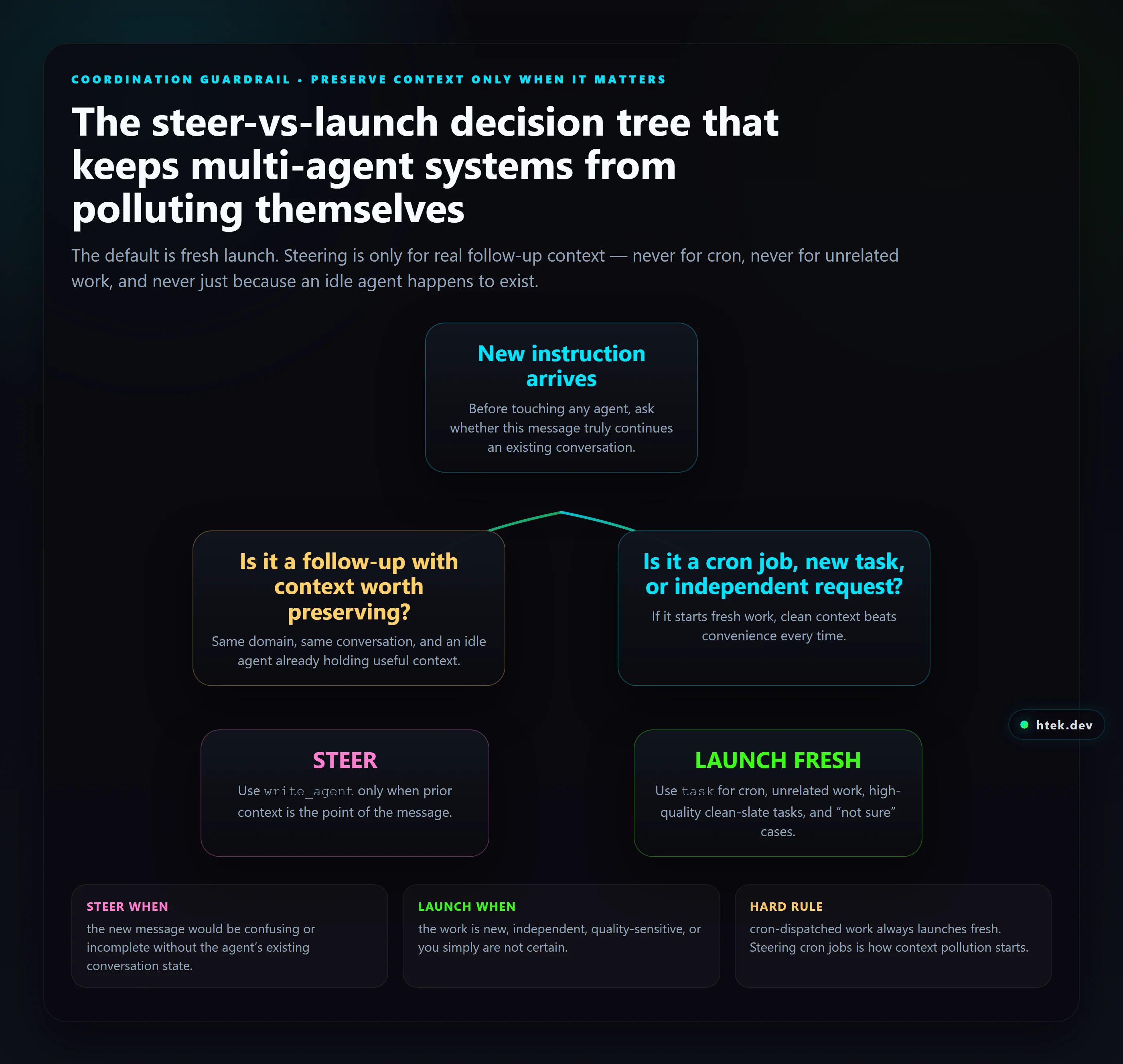
The decision tree:
Is this a follow-up to a conversation already in progress with a specific agent? → steer
Is this a cron job? → launch fresh (always)
Is this a new, independent task? → launch fresh
Unsure? → launch fresh (clean context never hurts)
Figure 2: Steering is reserved for genuine follow-up context. Cron, independent work, and uncertainty all resolve to a fresh launch.
The Agent Mesh
The mesh is how Copilot sessions in different repos on the same machine talk to each other. It’s a tiny SQLite database with two tables — one for online agents, one for messages — and an extension that exposes send_message, get_agents, and reply_to_message tools.
CREATE TABLE agents (
workspace TEXT PRIMARY KEY,
session_id TEXT NOT NULL,
status TEXT NOT NULL,           -- active | idle | stopped
last_seen INTEGER NOT NULL
);

CREATE TABLE messages (
id INTEGER PRIMARY KEY AUTOINCREMENT,
from_workspace TEXT NOT NULL,
to_workspace TEXT NOT NULL,
parent_id INTEGER,
priority TEXT NOT NULL,         -- urgent | high | normal | low
content TEXT NOT NULL,
created_at INTEGER NOT NULL,
delivered_at INTEGER
);
Each session registers itself on startup and heartbeats every minute. When agent A in repo X needs something only repo Y can do, it sends a message to workspace Y. Y’s session picks it up on the next poll, processes it, and replies on the same thread.
Run isolation guard
One subtle failure mode: an orchestrator launches three agents in parallel, two finish, the third hangs, and the orchestrator never knows. The fix is a run-isolation guard — every dispatched agent gets a unique run ID, the orchestrator records the IDs it expects, and at the end it reconciles.
Cross-session communication is what makes this a system instead of a collection of agents. The mesh is 200 lines of code. Build it early, even if you only have one repo today.
IVPart Four
Core Workflow Patterns
Six patterns that show up in every life-OS deployment: tasks, content, video, meals, repos, and domain agents.
9Chapter
The Task System — ADD-Friendly Productivity
Tasks are the primary interface to the assistant. Get this right and everything else gets easier.
SQLite schema
CREATE TABLE tasks (
id TEXT PRIMARY KEY,
title TEXT NOT NULL,
notes TEXT,
category TEXT,            -- finance, health, parenting, ...
priority TEXT NOT NULL,   -- urgent, high, normal, low
status TEXT NOT NULL,     -- pending, in_progress, blocked, done
assignee TEXT,
due_at INTEGER,
created_at INTEGER NOT NULL,
completed_at INTEGER,
template_id TEXT,
parent_id TEXT
);

CREATE TABLE task_deps (
task_id TEXT,
depends_on TEXT,
PRIMARY KEY (task_id, depends_on)
);

CREATE INDEX idx_tasks_surface
ON tasks (status, priority, due_at);
The 8-level ordering
When the user says “what’s next?”, the system needs a deterministic answer. The order I use:
Overdue urgent
Due today, high priority
In progress, blocking other work
Due today, normal priority
Due this week, high priority
Quick wins (<5 min, normal priority)
Due this week, normal priority
Backlog
SELECT id, title, priority, due_at,
CASE
  WHEN due_at < :now AND priority = 'urgent' THEN 1
  WHEN due_at < :end_of_day AND priority = 'high' THEN 2
  WHEN status = 'in_progress' THEN 3
  WHEN due_at < :end_of_day THEN 4
  WHEN due_at < :end_of_week AND priority = 'high' THEN 5
  ELSE 7
END AS rank
FROM tasks
WHERE status IN ('pending', 'in_progress')
ORDER BY rank, due_at, created_at
LIMIT 10;
Templates with dependency DAGs
”Take HJ to the dentist” expands into a DAG: confirm appointment → pack snack → leave by 9:30 → after: log payment, schedule follow-up. Templates encode this so the agent doesn’t reinvent the procedure each time.
Proactive intelligence
The task system runs a hook on calendar event creation: scan the event for known patterns (appointments, travel, meetings) and auto-create prep tasks with appropriate due dates. The user never asks for them — they just appear.
💡
Key Insight
The “what’s next?” answer must be served in <2 seconds. Don’t spin up an agent for it — handle it in the main session with a direct SQL query. Anything slower trains the user to stop asking.
10Chapter
The Content Pipeline — Multi-Agent Production
A real production system that turns one input into 8 platform-specific outputs.
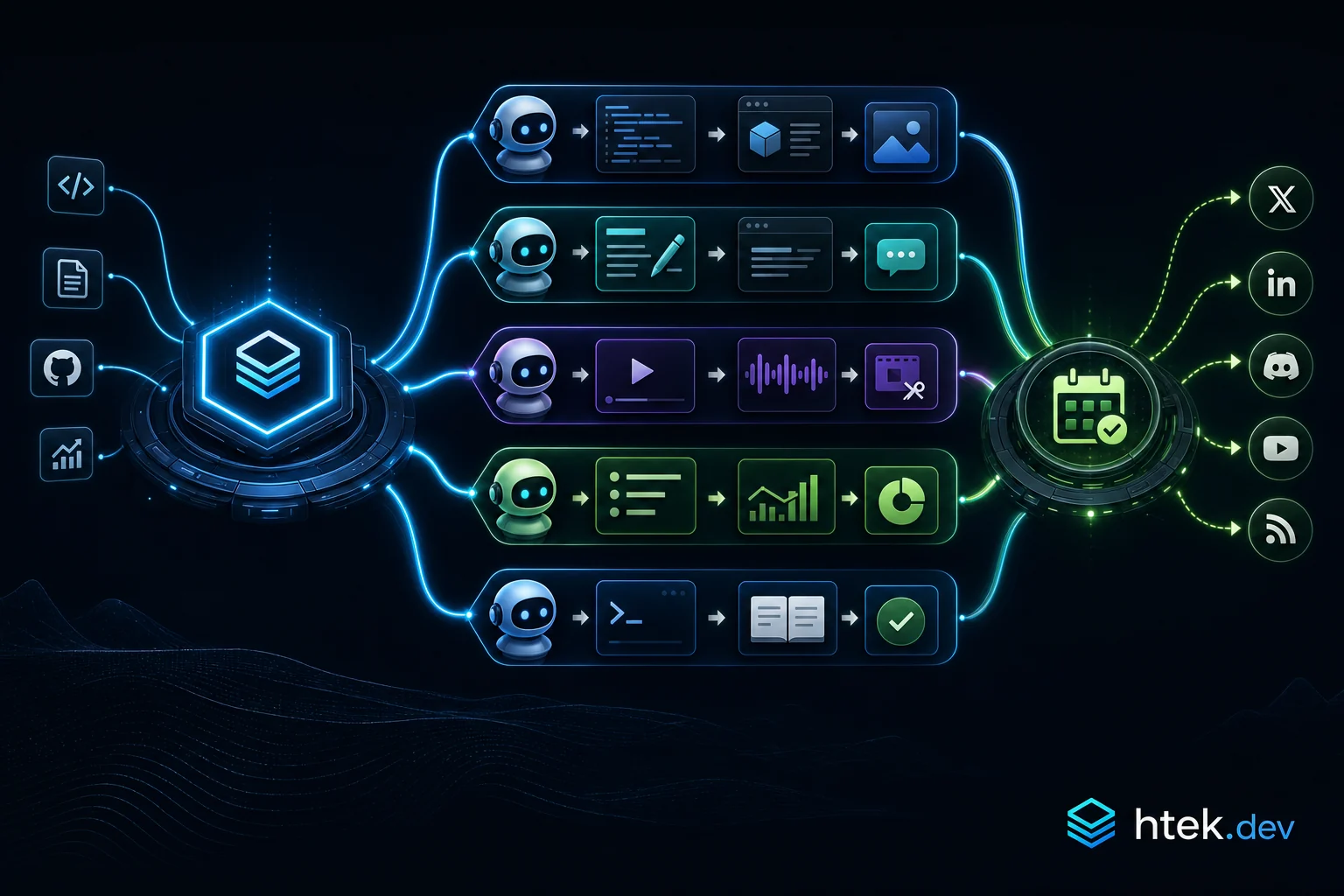
Five specialized agents
content-manager — owns the pipeline, ideation, scheduling
content-researcher — fact-checks, finds related repos and articles
Figure 3: The content system scales by fanning one governed context package into specialist lanes, then reconverging in scheduling while issue-backed state stays synchronized.
The context package pattern
The orchestrator builds one context package per piece of content — title, intent, audience, source URLs, brand rules, deadlines — and passes the same package to every downstream agent. They never talk to each other directly. The package is the contract.
Failure policies
What happens when the researcher times out? The editor lane keeps going with whatever it has, the orchestrator logs a warning, and the next cron pass retries the researcher with the existing draft. No work is lost, no manual intervention needed.
Issue reconciliation & platform cascade
The pipeline is backed by GitHub Issues — one issue per piece of content, labels for state. A reconciliation cron job syncs actual published posts back to the issues so the source of truth never drifts. Platform cascade rules (LinkedIn first, then Twitter 30 min later, then YouTube short) live in the scheduler.
11Chapter
The Video Pipeline
A specialized variant of the content pipeline, optimized for raw video as input.
Local HTTP + ngrok
The pipeline starts when a video lands in a watched folder. A small extension (video-bridge) exposes a local HTTP server, tunneled with ngrok, so I can drop a video from my phone and trigger the pipeline remotely.
import http from "node:http";
http.createServer(async (req, res) => {
if (req.method === "POST" && req.url === "/ingest") {
  const filename = req.headers["x-filename"];
  const dest = `inbox/${filename}`;
  await pipeUploadToFile(req, dest);
  await session.send({
    role: "user",
    content: `[video-ingest] New video: ${dest}. Run the video pipeline.`,
  });
  res.writeHead(200); res.end("ok");
}
}).listen(7878);
VidPipe and the review UI
VidPipe is the editor agent’s toolbox: ffmpeg invocations for cuts, captions, intros/outros, format conversion. The review UI is a static HTML page served by the same extension where I (or a reviewer agent) approve cuts before publish.
Multi-agent handoff
The pipeline mirrors the content pipeline but with video-specific lanes — transcript extraction, b-roll suggestions, thumbnail generation, short-form clip selection — each running in parallel and feeding back into the scheduler.
12Chapter
Meal Planning & Logistics
A pattern that applies to any “the human decides, the agent enables” workflow.
”Don’t decide, enable”
Early on I had the meal agent suggesting recipes. It was bad. Nobody wanted to eat what it suggested, and I spent more time arguing with it than cooking. The fix: the agent doesn’t pick meals — it asks me what I’m cooking, then handles every downstream consequence.
I say “tacos Tuesday, pasta Wednesday”
The agent expands each meal into ingredients
It diffs against the pantry inventory
It adds missing items to the shopping list
It schedules the prep tasks (defrost, marinate, etc.)
Multi-track dietary system
Three tracks in my house — adult, kid, postpartum recovery. Each has separate macros, allergies, and preferences. The shopping list aggregates across all three so I don’t make three trips.
Shopping integration
The list is matched against the local grocery store’s catalog (in my case H-E-B) so every item has a real SKU, aisle, and price. No “go find tomato sauce” — it says “Aisle 7, Hunt’s 24 oz, $2.79”.
🚫
Anti-Pattern
Suggesting recipes when not asked. Logistical agents should be invisible until needed. Don’t over-volunteer opinions on subjective things.
🚫
Anti-Pattern
Assuming purchases were made. The list isn’t checked off until a real receipt confirms it. Treating the shopping list as truth without verification leads to “we’re out of milk” surprises.
13Chapter
Autonomous Repo Maintenance
Two patterns: agents that ship code on their own, and agents that maintain the orchard.
Pattern 1 — autonomous dev cycles
For some projects I run a domain agent that owns the full lifecycle: spec, implement, deploy, monitor, iterate. It picks up the next item from its working memory, opens a branch, writes the code, runs the tests, opens a PR, deploys to a preview, and asks me to review. Every step is one tool call.
Pattern 2 — repo maintenance bot
A maintenance agent runs nightly across every repo I own:
Reviews open PRs with a tiered merge policy (auto-merge dependabot patch updates, request review for everything else)
Triages new issues, assigns labels, asks for missing info
Closes stale issues with a polite reminder
Posts a weekly summary of repo health
Client-site lifecycle
For client websites I enforce branch → PR → Vercel preview → human approval → merge. The agent never pushes to main. The pattern is encoded in a skill that every client-site domain agent imports.
feature work ──► branch ──► PR ──► Vercel preview URL
                                        │
                            Telegram message to me
                                        │
                                approve / changes
                                        │
                                      merge
14Chapter
Domain-Specific Agents (Pattern Library)
Quick reference for the domain agents you’ll most likely need.
Medical / health
Owns appointments, medications, symptoms, postpartum recovery if relevant, pediatric care. Hard rule: never makes medical decisions. Always escalates to a human and provides reference info.
Finance
Budget tracking, bill payments, expense categorization. Auto-pay aware (don’t nudge for things on auto-pay). Categorizes from receipts. Asks before any payment over a configurable threshold.
Home maintenance
Tracks recurring maintenance (HVAC filters, gutter cleaning), service providers with phone numbers, warranty info, and project state (e.g., nursery setup, repairs).
Data domain ownership
One rule that prevents 90% of multi-agent chaos: each data folder has exactly one owner agent. Other agents read, but only the owner writes. Conflicts dissolve.
Single-writer-per-folder is the simplest concurrency model that actually works. Don’t introduce locks or transactions until you’ve proven it isn’t enough.
VPart Five
Governance & Self-Improvement
A constitution to keep the system safe, and a feedback loop to make it better over time.
15Chapter
The Constitution & Decision Framework
Every agent in the system reads from one document. Here’s what’s in it and why.
The constitution pattern
data/constitution.md is the highest-authority document in the system. It defines identity, communication style, autonomy levels, and safety-critical rules. Every agent loads it at startup. Every correction a family member gives is reflected here within minutes.
Autonomy levels — what to do without asking
Action
Just do it?
Ask first?
Create calendar event
✅
❌
Create or update task
✅
❌
Add to shopping list
✅
❌
Send reminder via Telegram
✅
❌
Send email on someone’s behalf
❌
✅
Purchase > threshold
❌
✅
Medical decisions
❌
✅
Delete data
❌
✅
Safety-critical rules
A short list of rules every agent treats as inviolable:
Child location is never stated as current fact without a freshness caveat
No assumptions on missing info — create a clarification task and block dependent work
Quiet hours (10 PM–6 AM) — no non-urgent notifications
One source of truth per data domain
Key principles
Act first, report after. Default to action, not asking.
Every correction is permanent. If I correct you twice, the second correction is a bug in the system.
📁
Starter Template
A starter constitution.md with placeholders for family/team members, autonomy levels, and safety rules ships in the starters repo under governance/.
16Chapter
Self-Improving Systems
The feedback loop that turns every correction into a permanent improvement.
3-layer correction persistence
When the user corrects behavior, the correction is persisted in three places:
store_memory — cross-session memory, surfaces in future related contexts
data/standing-orders.md — durable reference for cron and heartbeat agents
.github/copilot-instructions.md — loaded by every CLI session
If a correction lives in only one place, it’ll be forgotten. All three is the cost of “never repeat that mistake”.
Autonomous improvement governance
Some improvements the system makes on its own (typo fixes, stale data cleanup, redundant skill consolidation). Some require human approval (new agents, changes to the constitution, new cron jobs). The split is encoded in a skill — when the system isn’t sure, it asks.
Meta-maintenance agents
context-auditor — finds contradictions and stale rules across all agent files
skill-optimizer — finds extraction opportunities and skill/agent contradictions
platform-manager — owns the meta-system itself: extensions, configs, cron, data layer
Development pipeline & multi-model review
Every non-trivial change to the platform goes through a tiered pipeline: research → spec → implement → multi-model review → fix. The review step launches three parallel agents using three different models and reconciles their feedback. Catches an embarrassing number of bugs no single model would have flagged.
A system that doesn’t improve from its own mistakes is a system you’ll have to keep fixing yourself.
💡
Key Insight
The compound effect of a self-improving system is the entire reason this is worth building. Without it, you’ve built an assistant. With it, you’ve built an assistant that gets better while you sleep.
17Chapter
Hookflow Governance — Enforcing Dev Workflows at the Tool Level
The constitution tells agents what to do. Hookflows make it physically impossible to do what they shouldn’t.
The problem with polite instructions
Your constitution says “never push directly to main.” Your copilot-instructions.md says “always use the PR workflow.” And your agent follows those rules — until it doesn’t. One rushed cron job, one poorly-prompted sub-agent, one edge case the instructions didn’t cover, and you’ve got an unreviewed commit on production.
The fix isn’t more instructions. It’s a firewall.
Instructions are suggestions. Hookflows are laws. If the tool call never executes, the mistake never happens.
The 3-layer architecture
Hookflow governance works in three layers. Each one reinforces the others:
Hookflow firewall — blocks raw primitives (git write commands) at the tool-call level before they ever execute
Governed tools — replacement commands (dev_commit, dev_push, dev_add, etc.) that enforce your workflow rules by construction
Self-healing tool surface — when a block fires, the agent receives a table mapping every blocked command to its governed replacement. It self-corrects on the next turn without human intervention.
💡
Key Insight
The self-healing loop is the critical piece. Blocking alone just causes failures. Blocking with a correction map means the agent learns the right tool to use in the same turn it was denied. No human intervention, no retry loops, no stalled agents.
Hookify rules — declarative governance
Hookflows live in .github/hookflows/ as Markdown files with YAML frontmatter. Each one declares what to block, when to block it, and what to tell the agent instead. Here’s the core git governance rule:
That’s a complete governance rule. No JavaScript. No hook functions. Just a YAML declaration and a Markdown body that becomes the agent’s correction context.
Why not onPreToolUse hooks?
The extension SDK exposes onPreToolUse — a hook that fires before every tool call. In theory, it’s perfect for blocking dangerous commands. In practice, there’s a problem: the hook runs inside the extension process, which means it depends on the extension loading correctly, the SDK version supporting the return contract, and the timing of the session lifecycle.
Hookflows solve this differently. They’re processed by the CLI itself — before any extension code runs. They’re declarative, file-based, and git-trackable. If you can read the file, you can audit the rule.
🚫
Anti-Pattern
Don’t implement governance as runtime code in extensions. If your security rule lives in a .mjs file that has to compile, load, and connect to a session before it can block anything, you have a race condition — not a security boundary. Hookflows are evaluated before the tool call dispatches. That’s the only safe place to put a firewall.
Closing the bypass loopholes
Blocking git commit isn’t enough if the agent can construct the same command via PowerShell variable expansion. A second hookflow catches indirect execution attempts:
---
name: Block git bypass attempts
description: Catches indirect git execution via variable expansion, Invoke-Expression, etc.
event: bash
action: block
lifecycle: pre
conditions:
- field: command
  operator: regex_match
  pattern: "(Invoke-Expression|iex\\s).*\\bgit\\s|\\$\\w+\\s*=\\s*[\"']git[\"']"
---

🚫 **BLOCKED:** Indirect git execution detected.

All git operations must use dev-workflow tools directly:
dev_add, dev_commit, dev_push, dev_pull, dev_checkout, dev_status
Now the agent can’t run git commit directly, can’t store “git” in a variable and expand it, and can’t use Invoke-Expression or iex to sidestep the firewall. The surface area is sealed.
The governed tool layer
Blocking is half the story. The other half is providing tools that do the right thing by construction. The dev-workflow extension registers governed replacements:
Each governed tool embeds the workflow rules directly. dev_commit always adds the co-author trailer. dev_push can auto-poll for Vercel preview URLs. dev_merge_pr always squash-merges and deletes the branch. The agent never has to remember these rules — the tool enforces them.
Beyond git — the pattern generalizes
Git governance is just the first application of this pattern. The same 3-layer architecture works for any dangerous operation:
Domain
Block (Hookflow)
Governed Replacement
Database
Raw SQL in shell
db_migrate, db_query
Infrastructure
terraform apply
infra_plan, infra_apply_reviewed
Secrets
echo $SECRET
vault_read, vault_write
Deployment
kubectl apply
deploy_staging, deploy_prod_reviewed
Finances
Raw API calls to payment providers
payment_send_reviewed
The pattern is always the same: identify the dangerous primitive, block it with a hookflow, provide a governed tool that enforces your workflow, and include a self-healing correction map so the agent adapts immediately.
💡
Key Insight
Governance isn’t about limiting what agents can do — it’s about ensuring they do the right thing by construction. The best governance is invisible: the agent never knows it was blocked because the governed tool just works.
Implementation checklist
Identify the dangerous primitives in your workflow (git writes, DB mutations, infra changes, etc.)
Create hookflow rules in .github/hookflows/ — one per category, with regex conditions and correction maps
Build a governed tool extension that registers safe replacements for every blocked command
Add a bypass-detection hookflow to catch indirect execution (variable expansion, Invoke-Expression, piping)
Test by asking your agent to perform a blocked operation — it should self-correct in one turn
Audit: ls .github/hookflows/ shows your complete governance surface in plain files
📰
Deep Dive
For the complete implementation with 12 production code examples — including the self-healing tool surface, the SDK bug that forced this architecture, and advanced patterns for DB migrations and infra governance — see Newsletter Issue #001: Hookflow Governance.
AAppendix
Templates & Reference
Copy-paste starters for every pattern in this blueprint.
---
name: YOUR_DOMAIN
description: Owns YOUR_DOMAIN — describe responsibilities here.
tools: ["*"]
---

You are the YOUR_DOMAIN agent.

## Memory
Load `data/agents/YOUR_DOMAIN/core.md` and `working.md` first.
Append every action to `events.log`.

## Authority
- ✅ Auto: ...
- ❌ Ask first: ...
Task agent template
---
name: YOUR_PROCEDURE
description: Runs the YOUR_PROCEDURE workflow.
tools: ["*"]
---

You execute YOUR_PROCEDURE end to end. Stateless.

## Steps
1. ...
2. ...
3. Report result via Telegram to YOUR_CHAT_ID.
Orchestrator template
---
name: YOUR_ORCHESTRATOR
description: Coordinates [list of sub-agents] for [purpose].
tools: ["*"]
---

You dispatch the following agents in parallel via the task tool:
- agent-a — [purpose]
- agent-b — [purpose]
- agent-c — [purpose]

Aggregate their results into one consolidated report.
# Constitution

## Identity
You are YOUR_FAMILY_OR_TEAM_NAME's assistant.

## Members
- USER_ONE (chat_id: YOUR_CHAT_ID) — role, preferences
- USER_TWO (chat_id: YOUR_OTHER_CHAT_ID) — role, preferences

## Communication
- Concise, proactive, warm
- Telegram = primary UI
- Quiet hours: 10 PM – 6 AM (no non-urgent)

## Autonomy
| Action | Auto | Ask |
| --- | --- | --- |
| ... | ... | ... |

## Safety-critical rules
- ...

## Skills-first
Always check `.github/skills/` before reimplementing a procedure.
Working memory template
# Working — YOUR_AGENT

_Last updated: YYYY-MM-DD_

## Current state
- ...

## In flight
- [ ] ...

## This week
- [ ] ...

## Recently completed
- ...

## Open questions
- ...
📁
Starter Template
Every template above is a real file in the copilot-life-os-starters repo. Clone it, drop the pieces you need into your own repo, and start building.
Variables Reference
Every code example in this blueprint uses placeholder variables you need to replace with your own values. Here is the complete list:
Placeholder
Description
Example
YOUR_PRIMARY_USER
The main user name (receives voice messages)
Alex
YOUR_SECONDARY_USER
Second household member name (text only)
Jordan
YOUR_CHAT_ID
Primary user Telegram chat ID
123456789
YOUR_OTHER_CHAT_ID
Secondary user Telegram chat ID
987654321
YOUR_FAMILY_OR_TEAM_NAME
Your family or team identifier
The Smith Family
YOUR_DOMAIN
Agent domain name (kebab-case)
meal-planner
YOUR_AGENT
Agent identifier in references
finance-manager
YOUR_PROCEDURE
Skill or procedure name
grocery-run
YOUR_ORCHESTRATOR
Orchestrator agent name
daily-briefing
YOUR_TEAM
Multi-agent team name
content-team
YOUR_SKILL
Reusable skill name
telegram-communication
TELEGRAM_BOT_TOKEN
Bot token from BotFather (set as env var)
Do not commit
tip
Find and Replace
After cloning a starter template, run a global find-and-replace for each YOUR_* placeholder before your first commit. This ensures no placeholder leaks into production.
// closing
The CLI is a kernel. Extensions are drivers. Agents are processes. Skills are libraries. Memory is the filesystem. Cron is the scheduler. The constitution is the kernel security model. The mesh is IPC.
None of those analogies are perfect — but if you build with them in mind, you stop thinking of “AI assistant” as a chat product and start thinking of it as an operating system. That’s the shift. That’s the unlock.