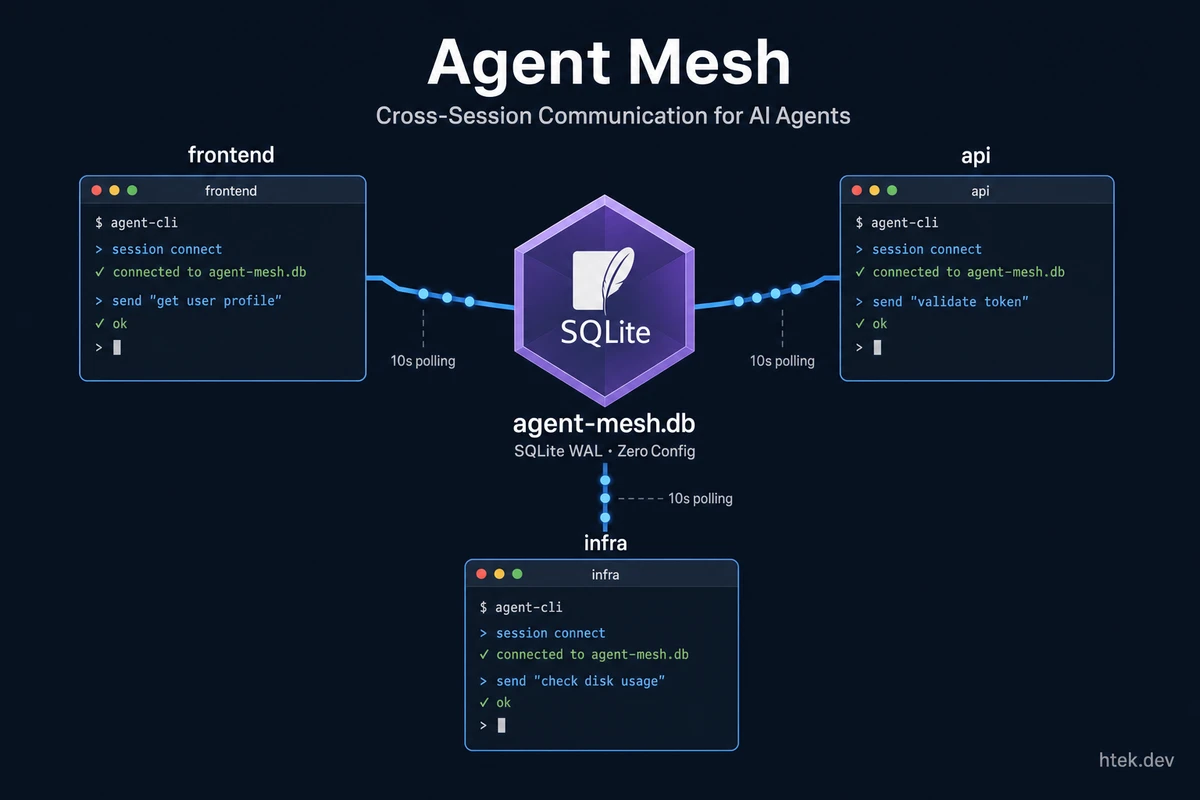
The Problem: Every Session Is an Island
If you run GitHub Copilot CLI in multiple terminals — say one for a frontend repo, one for an API, and another for infrastructure — those sessions have no idea the others exist. Each one is completely isolated. No shared context. No way to ask another session a question. No way to delegate work across repos.
I hit this wall the moment my setup grew beyond one terminal. I have a home assistant system managing my family’s daily life in one repo, a work assistant handling Microsoft sales data in another, and a video pipeline processing content in a third. These agents needed to coordinate — my personal calendar needed to block time on my work calendar, my content pipeline needed to notify my home assistant when a video was published, and I needed a single command to ask “who’s online?”
So I built agent-mesh. It’s a single-file Copilot CLI extension that creates a lightweight message bus between sessions using nothing but SQLite. No external dependencies. No config. No server to run. Copy one file and your sessions can talk to each other.
How It Works
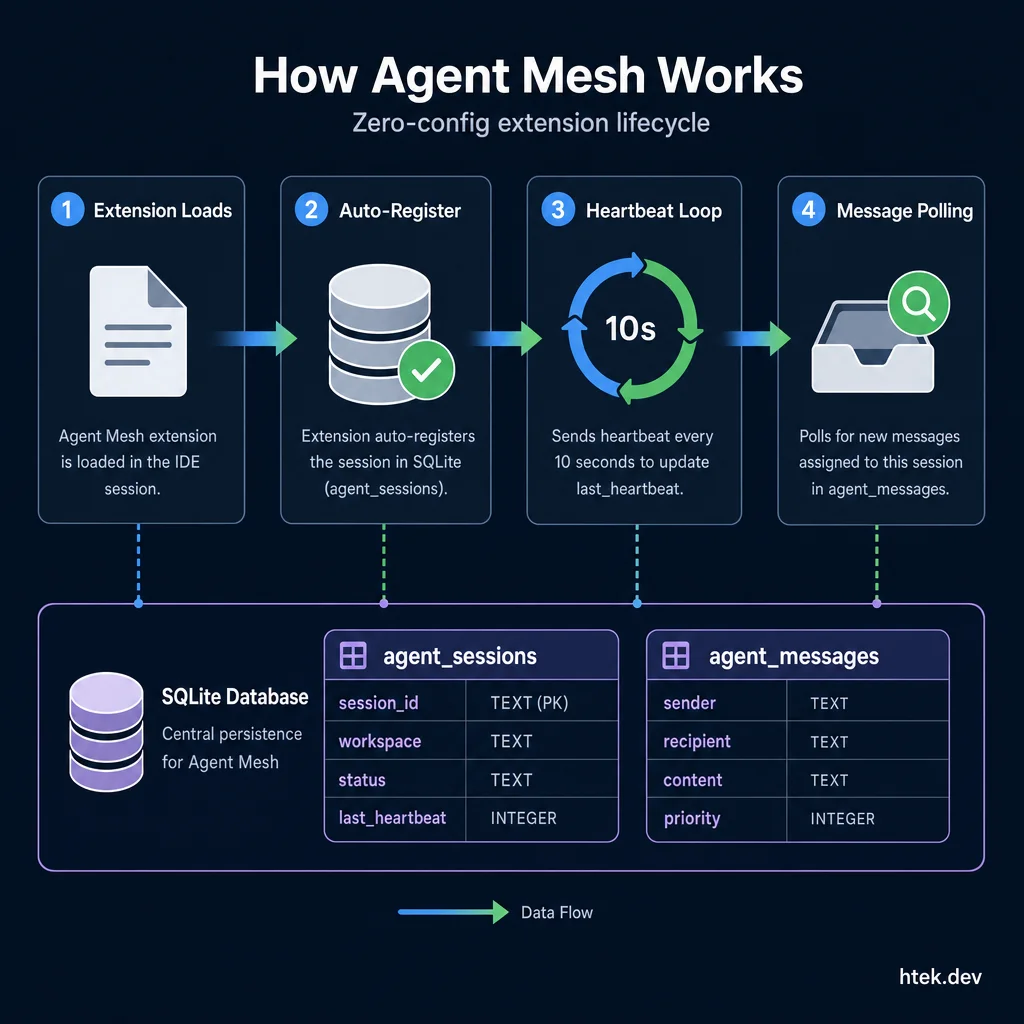 How Agent Mesh works: extension load → auto-register → heartbeat loop → message polling — all powered by a single SQLite database in WAL mode.
The concept is deliberately simple. Every Copilot CLI session that loads the extension automatically registers itself in a shared SQLite database the moment the extension is loaded — before any user message is sent. Each session gets a heartbeat, a workspace name (derived from your git repo), and a polling loop that checks for incoming messages every 10 seconds.
┌──────────────┐    ┌──────────────┐    ┌──────────────┐
│  Terminal 1   │    │  Terminal 2   │    │  Terminal 3   │
│  my-frontend  │    │  my-api      │    │  infra       │
│  (Copilot CLI)│    │  (Copilot CLI)│    │  (Copilot CLI)│
└──────┬───────┘    └──────┬───────┘    └──────┬───────┘
       │                   │                   │
       └───────────┬───────┴───────────────────┘
                   │
          ┌────────┴────────┐
          │  agent-mesh.db  │
          │  SQLite · WAL   │
          └─────────────────┘
That’s it. SQLite in WAL mode handles concurrent reads and writes from multiple processes — readers never block writers. The database has two tables: agent_sessions (who’s online) and agent_messages (the message queue). Messages are polled, routed to the LLM via session.send(), and cleaned up automatically — read messages are purged after 24 hours, and unread messages to stopped sessions expire after 24 hours too.
Setup: One File, Three Steps
This is the kind of thing I want to be dead simple to set up — especially since an AI agent might be the one reading these instructions and doing the setup itself. Here’s the full process:
1. Create the extension directory:
mkdir -p ~/.copilot/extensions/agent-mesh2. Copy the extension file:
# Clone the repo directly:
git clone https://github.com/htekdev/agent-mesh.git ~/.copilot/extensions/agent-mesh
3. Restart your Copilot CLI sessions.
That’s it. No npm install. No config files. No environment variables. No API keys. The SQLite database is created automatically on first run. When you restart a session, you’ll see:
🌐 Agent mesh: registered as "my-repo" — polling every 10sThe only prerequisite is Node.js 22+ because the extension uses the built-in node:sqlite module — no third-party SQLite bindings needed. Note that node:sqlite is still experimental in Node 22–23, but it works reliably for this workload and the API surface is stable enough for production use.
The Tools
The extension exposes five tools that become available in every session:
get_agents — See Who’s Online
get_agents(status="active")Returns a list of all registered sessions with their workspace name, status, and description. The description is auto-derived from the first line of each repo’s .github/copilot-instructions.md, so other agents can understand what each session does at a glance.
send_message — Talk to Another Session
send_message(
  workspace="my-api",
  content="What authentication middleware guards the /api/users endpoint?",
  priority="normal"
)
Target by workspace name (stable across restarts) or session ID (exact targeting). Messages support four priority levels: low, normal, high, and urgent. The recipient’s polling loop picks up the message, the LLM processes it with full context of the recipient’s codebase, and a reply comes back through the mesh automatically.
reply_to_message — Threaded Responses
reply_to_message(message_id=42, content="The /api/users endpoint uses JWT validation from src/middleware/auth.ts")Replies are linked to the original message, creating conversation threads. Follow-up messages within 10 minutes are auto-threaded.
get_message — Check for Replies
get_message(message_id=42)Retrieves a message and all its replies. Useful for checking if someone answered your question.
spawn_agent — Launch a New Session
spawn_agent(folder="C:/repos/my-api")Launches a new headless Copilot CLI session in the specified folder using the bundled spawn-copilot.ps1 script. Useful for dynamically spinning up agents in other repos from within the mesh — for example, if you need to bring a workspace online to send it a message.
What Makes It Powerful
The simplicity is the point. Because the mesh is just SQLite, it’s fast, reliable, and zero-maintenance. But what you can do with cross-session communication is where it gets interesting.
Instant Discovery
A subtle but important detail: agents register the moment the extension loads — not when the first user message arrives. This means if you open three terminals, all three are immediately visible to each other via get_agents() before anyone types a single prompt. Early registration makes the mesh feel alive from the instant you launch your sessions, and it means automated workflows (like cron jobs) can discover and message agents that haven’t received any user input yet.
Multi-Repo Coordination
Working on a full-stack feature? Your frontend agent can ask the backend agent about API contracts, shared types, or auth flows — and get answers grounded in the actual backend code, not guesses:
send_message(
  workspace="my-api",
  content="I need the exact TypeScript type for the UserProfile response from GET /api/users/:id. Can you check src/types/ and give me the interface?"
)
The backend agent reads its own codebase, finds the type definition, and sends it back. No copy-pasting between terminals. No losing context.
Work-Life Calendar Sync
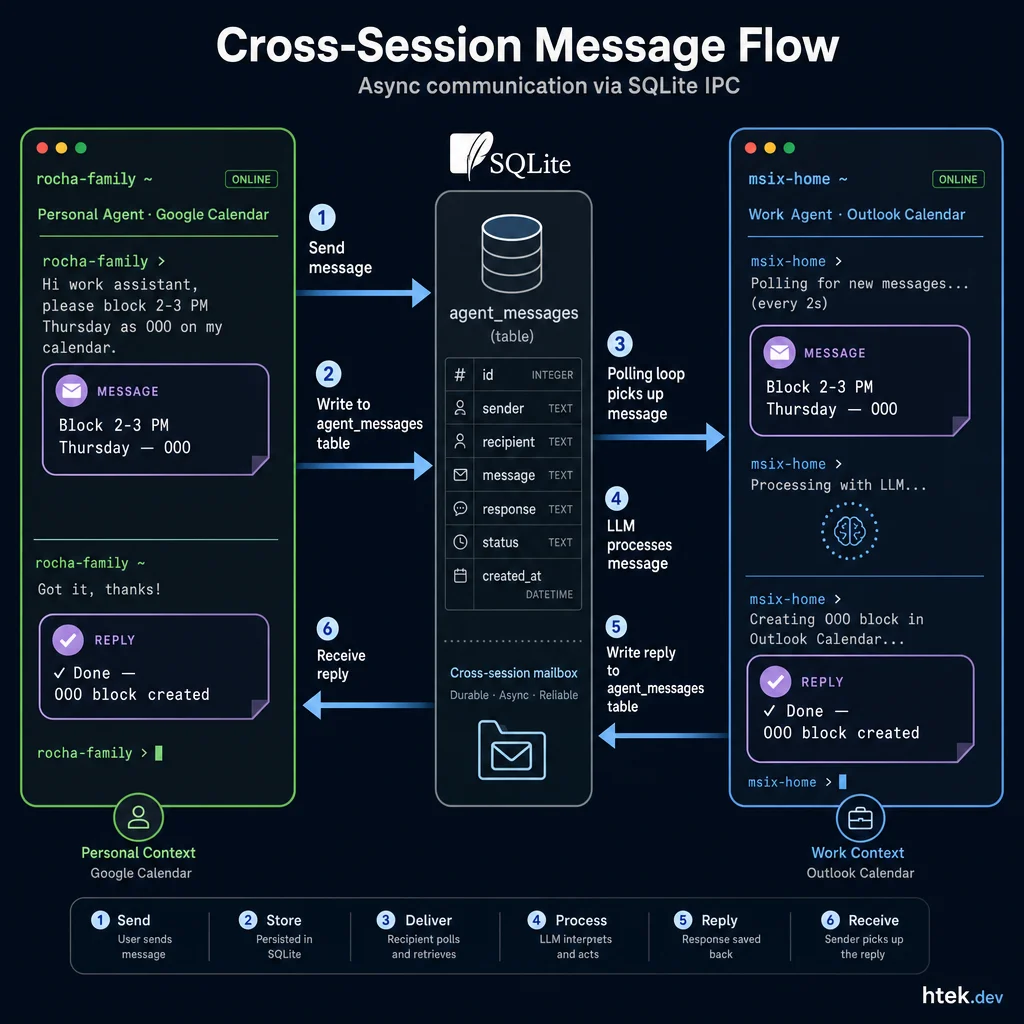 Cross-session message flow: personal agent sends → SQLite stores → work agent polls → LLM processes → reply flows back. Fully async, zero blocking.
This is the use case that sold me on building the mesh in the first place. My personal home assistant (rocha-family) manages my family calendar. My work assistant (msix-home) manages my Microsoft Outlook calendar. When a doctor’s appointment gets added to Google Calendar, the home assistant can tell the work agent to block that time on Outlook:
send_message(
  workspace="msix-home",
  content="Block 2-3 PM on Thursday as Out of Office — personal appointment. Don't include details."
)
No manual calendar juggling. The agents handle the cross-domain coordination because they can talk to each other.
Content Pipeline Orchestration
When my video pipeline agent finishes processing a video — transcription, captions, clips — it can notify my home assistant to create social media scheduling tasks:
send_message(
  workspace="rocha-family",
  content="Video 'Copilot CLI Extensions Deep Dive' is processed. Transcript and clips are ready. Please create content scheduling tasks for TikTok, YouTube Shorts, and LinkedIn."
)
This is real multi-agent orchestration happening on a single developer machine with zero cloud infrastructure.
Under the Hood: The SQLite Schema
For developers who want to understand (or extend) the internals, here’s the core schema:
CREATE TABLE agent_sessions (
    session_id      TEXT PRIMARY KEY,
    agent_name      TEXT,
    agent_description TEXT,
    cwd             TEXT,
    repo            TEXT,
    status          TEXT DEFAULT 'active',
    registered_at   TEXT NOT NULL,
    last_heartbeat  TEXT NOT NULL,
    metadata        TEXT
);

CREATE TABLE agent_messages (
    message_id          INTEGER PRIMARY KEY AUTOINCREMENT,
    sender_session_id   TEXT NOT NULL,
    recipient_session_id TEXT NOT NULL,
    content             TEXT NOT NULL,
    original_message_id INTEGER,
    priority            TEXT DEFAULT 'normal',
    created_at          TEXT NOT NULL,
    read                INTEGER DEFAULT 0,
    read_at             TEXT,
    expires_at          TEXT
);
Two tables. That’s the entire data model. The extension handles everything else — auto-registration at extension load time, heartbeats every 10 seconds, stale session cleanup after 10 minutes of no heartbeat, rate limiting (max 10 messages per pair per minute), and message purging after 24 hours.
The database runs in WAL mode with busy_timeout = 5000 and synchronous = NORMAL — optimized for concurrent multi-process access where readers never block writers. The extension also creates indexes on the message queue for efficient polling — check the source for the full DDL. SQLite handles this IPC workload trivially.
Safety Built In
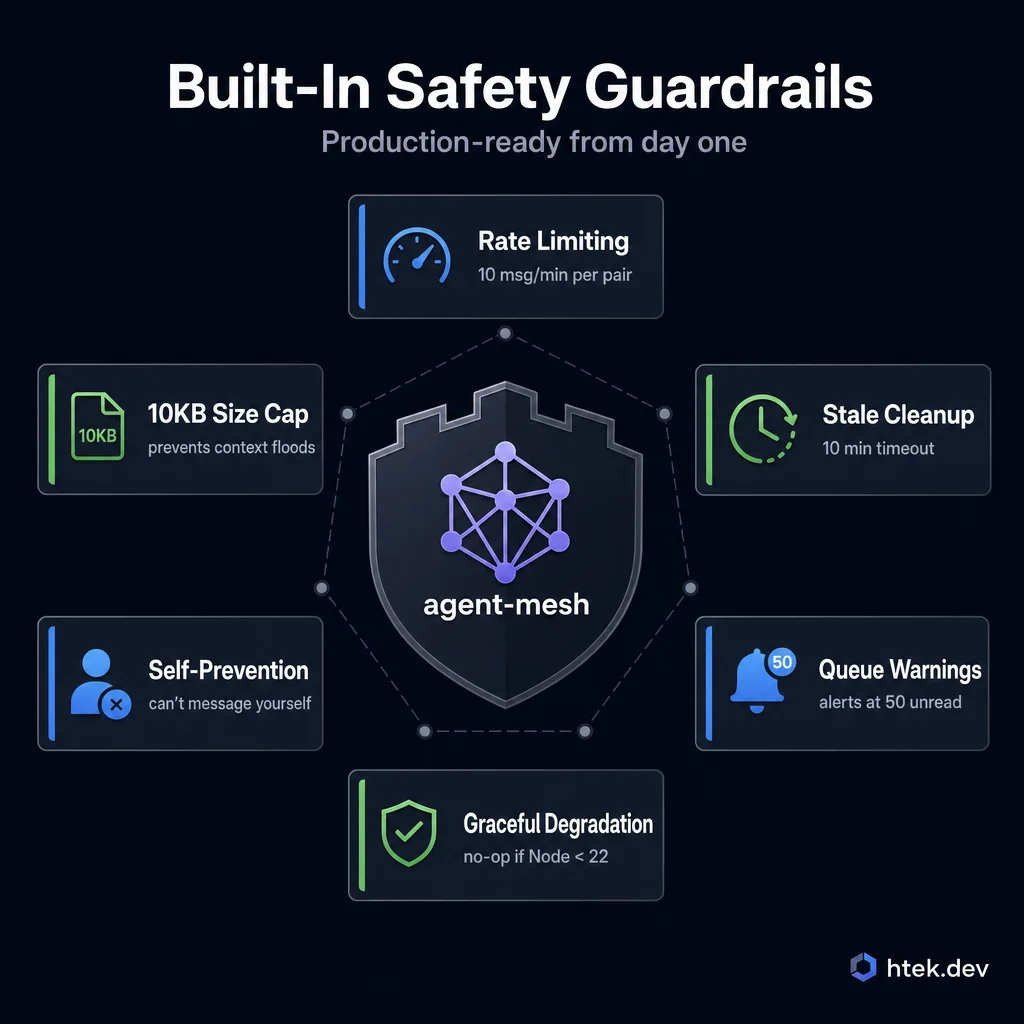 Production-ready safety: rate limiting, message size caps, automatic stale session cleanup, and graceful degradation for older Node.js versions.
This isn’t a toy. The extension includes real safety guardrails:
- Rate limiting — Max 10 messages between any session pair within 60 seconds
- Message size cap — 10KB per message, preventing context window floods
- Self-message prevention — Can’t accidentally message yourself
- Stale session cleanup — No heartbeat for 10 minutes → marked as stopped
- Queue depth warnings — Console alert when unread messages exceed 50
- Graceful degradation — If Node.js < 22, it loads as a no-op stub with a clear error message instead of crashing
The Bigger Picture
I’ve been running this mesh in production for weeks now. My home assistant, work assistant, and content pipeline all communicate through it daily. The Copilot CLI extension system makes it possible — extensions are just JavaScript files that get loaded automatically, with full access to the Copilot SDK’s session lifecycle hooks.
What I like most about this pattern is that it’s composable. You don’t need to adopt a framework. You don’t need a cloud service. You don’t need to restructure your workflow. Drop one file into your extensions directory and your existing sessions gain a new superpower. That’s the beauty of building on top of a platform like Copilot CLI — the extension model makes it trivial to add capabilities without touching anything else.
The full source is on GitHub — MIT licensed, zero dependencies, just an extension file and a helper script. If you’re running Copilot CLI across multiple repos, give it a try. And if you build something cool with it, I’d love to hear about it — find me on LinkedIn or X.