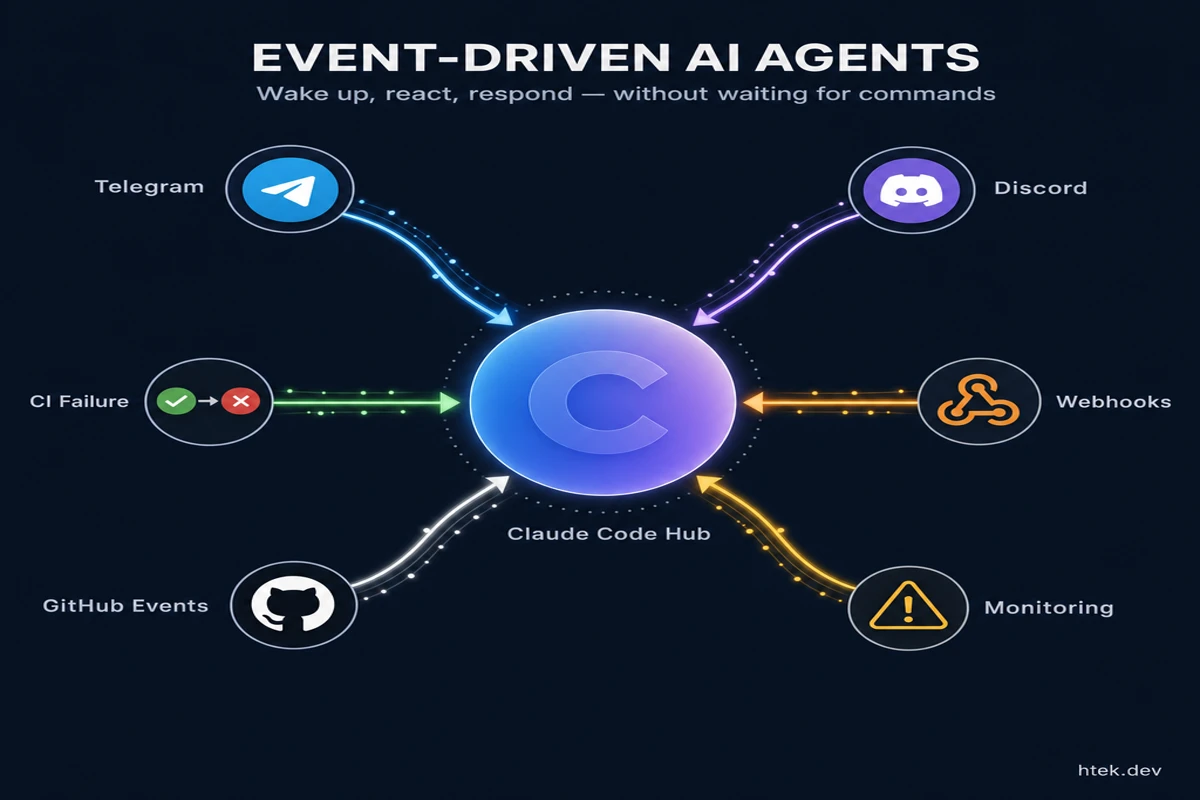
Up until last week, every interaction you had with an AI coding agent started the same way: you opened a terminal, typed a prompt, and waited. The agent did its thing. You came back. It was transactional — ask, receive, repeat. That model has served us reasonably well, but it’s been holding back a more powerful pattern.
Anthropic just changed that with Claude Code Channels, a new feature that turns Claude Code from a command-driven assistant into an event-reactive agent — one that can wake up when CI fails, respond to a message from your phone at 2am, and notify you when a long-running task finishes. All without you sitting in front of a terminal.
This is the event-driven architecture pattern showing up in AI tooling, and it’s a much bigger shift than it sounds.
What Claude Code Channels Actually Does
Channels is a plugin system that bridges Claude Code — running locally or on a remote server — to external messaging platforms. Currently, Telegram, Discord, and a local Fakechat plugin for testing are supported out of the box.
Here’s what that enables in practice:
- Remote triggering: Send a message from your phone and Claude Code picks it up, runs a task, and replies in the same chat thread
- Event-driven wake-up: Wire a CI webhook, monitoring alert, or scheduled job to push a message into your channel — Claude Code reacts automatically
- Two-way communication: Claude’s responses, code diffs, and execution results come back through the same channel — no terminal required
- Persistent session state: The agent maintains context across interactions as long as the session is alive, so it remembers what you were working on
The architecture is deliberately simple. Channels use a polling model — the plugin reaches out to Telegram or Discord at intervals rather than exposing open ports. Your machine initiates all network connections outbound. That’s a meaningful security decision.
How It Works Under the Hood
Channels are built on the Model Context Protocol (MCP), the open standard managed under the Linux Foundation that I’ve covered in the context of GitHub Copilot CLI extensions and self-healing infrastructure.
Each channel is an MCP plugin. When you launch Claude Code with the --channels flag, the specified plugins start alongside the session. Inbound messages from the chat platform get pushed as events into the running Claude session. Claude processes them, executes any requested actions (reading files, running tests, writing code, calling tools), and sends results back out through the plugin.
The plugin handles the platform-specific translation layer — Telegram’s Bot API, Discord’s gateway, or whatever custom integration you build. The core session logic stays clean.
This architecture has a direct consequence: channels work with any MCP-compatible integration. The official plugins cover Telegram and Discord, but the protocol is open. Teams can build custom plugins for Slack, PagerDuty alerts, GitHub webhooks, or internal dashboards.
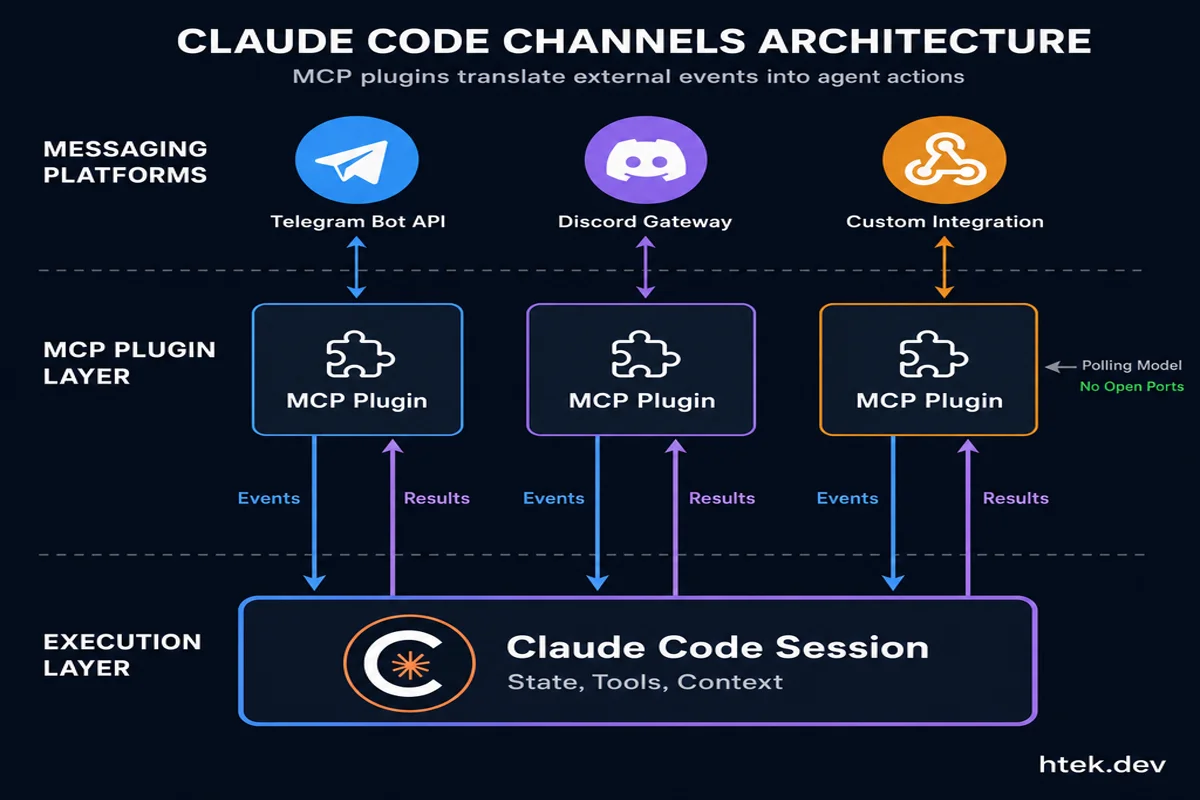 The three-layer architecture: messaging platforms connect through MCP plugins that translate external events into actions Claude can process
Setting It Up
Before you start, make sure you have:
- Claude Code v2.1.80 or newer — update with
claude update, verify withclaude --version - A claude.ai login on Pro, Max, Team, or Enterprise (API key access isn’t supported)
- Bun runtime — the channel plugins require Bun, not Node.js; install with
curl -fsSL https://bun.sh/install | bash - Team/Enterprise: your org admin must enable Channels in settings before user setup works
Telegram
- Create a bot via @BotFather with
/newbotand copy the API token - Install the plugin inside a Claude session:
/plugin install telegram@claude-plugins-official - Configure it:
/telegram:configure <your_bot_token> - Launch with channels active:
claude --channels plugin:telegram@claude-plugins-official - DM your new bot — it sends a pairing code you confirm in Claude with
/telegram:access pair <code> - Lock down access:
/telegram:access policy allowlist— skip this and anyone who finds your bot can trigger your agent
Discord
- Create an app at the Discord Developer Portal, add a bot, enable Message Content Intent, and copy the token
- Generate an OAuth2 invite URL (scope:
bot, permissions: View Channels, Send Messages, Read Message History) and invite it to your server - Install the plugin:
/plugin install discord@claude-plugins-official - Configure:
/discord:configure <your_discord_bot_token> - Launch:
claude --channels plugin:discord@claude-plugins-official - Pair: DM the bot in your server for a code, confirm with
/discord:access pair <code>, then set/discord:access policy allowlist
For local testing without touching either platform, claude --channels plugin:fakechat@claude-plugins-official spins up a simple local chat interface — useful for validating hooks and workflows before introducing real bot credentials.
Running Persistently
For always-on operation, wrap the launch command in tmux or screen so the session survives terminal disconnections:
tmux new-session -d -s claude 'claude --channels plugin:telegram@claude-plugins-official'Teams using remote servers can keep a Claude Code session alive this way and route CI events or deployment alerts through it without anyone needing to be online.
Why “Event-Driven” Is the Right Frame
The language I keep coming back to is event-driven, and it’s worth being precise about why.
Traditional command-driven AI tools operate on a pull model: the developer explicitly requests something, the tool responds, the interaction closes. This is fine for focused coding sessions, but it breaks down for long-running tasks and async workflows. You can’t be waiting at a terminal for a 45-minute test suite.
Event-driven agents invert this. The agent is waiting for events — messages, triggers, callbacks — and acts when they arrive. This is exactly how production systems are architected: services don’t poll each other constantly; they emit events and react to them asynchronously.
Channels brings this model to AI development tooling. Your CI pipeline emits an event (test failure). Claude Code receives it. Claude runs a diagnosis, pushes a fix, and pings you. You’re not in the loop until there’s something that needs your decision.
I explored the prerequisite infrastructure for this kind of workflow in Git Worktree: The Infrastructure That Unlocks Agentic Development — parallel checkouts let multiple agent tasks run without stepping on each other. Channels is the triggering layer sitting on top of that infrastructure.
And there’s a meaningful overlap with the sandboxing problem I looked at in NVIDIA OpenShell and the Rise of Agent Sandboxes in Agentic DevOps. When agents operate autonomously and react to external events, the question of where they run and with what permissions becomes critical. Channels itself doesn’t solve that — you still need to think about what tools your agent has access to and whether you’re running with --dangerously-skip-permissions on a machine with real credentials.
Claude Code Channels vs. OpenClaw
OpenClaw popularized the pattern of persistent, chat-controlled coding agents before Anthropic shipped this officially. It’s worth understanding where the two solutions differ.
| Dimension | Claude Code Channels | OpenClaw |
|---|---|---|
| Default availability | Session-scoped; requires active process | Daemonized; truly always-on |
| Messaging platforms | Telegram, Discord (+ custom MCP) | Telegram, Slack, WhatsApp, and more |
| Multi-agent | Sub-agents within session | Full multi-agent orchestration |
| Self-hosted | Runs locally; cloud-managed auth | Fully self-hosted, any model provider |
| Security model | Managed; no open ports | DIY; you manage trust and supply chain |
| Coding depth | Excellent; full Claude Code capabilities | Good, but general-purpose agent |
OpenClaw’s architectural advantage is that it was purpose-built for event-driven, daemon-style operation. Claude Code Channels is still fundamentally session-scoped — the agent is live while your process runs, not as a fully independent service. For many developer workflows, that’s fine. For always-on production alerting, you need to ensure the session actually stays alive.
VentureBeat’s analysis framed this as Anthropic shipping an “OpenClaw killer,” but I think that undersells the nuance. Channels is a first-class, officially supported path to async agent interaction with Claude’s full coding capabilities. OpenClaw remains more extensible and truly persistent by design. Many teams will run both.
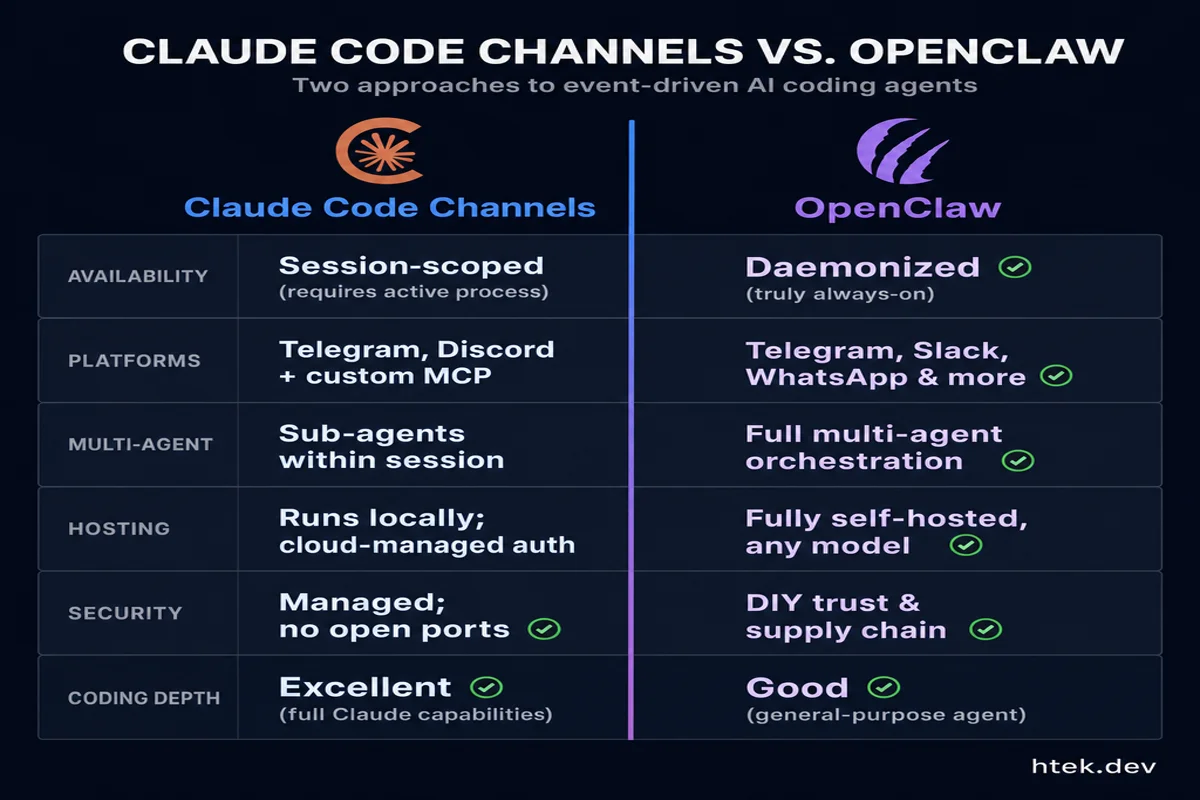 Claude Code Channels offers managed, session-scoped agent interaction; OpenClaw provides daemonized, fully self-hosted multi-agent orchestration
The Real Workflow Unlock
Here’s what excites me about this beyond the feature itself: it closes the last remaining gap in async agentic development.
Before Channels, the agentic workflow had a structural hole. You could kick off a long-running agent task and walk away — but you had no native way to be notified when it finished, ask a follow-up mid-task, or feed in new context without returning to the terminal. You were either babysitting the session or flying blind until you checked back.
Channels fixes that. Combine it with the patterns I’ve covered in Agent Hooks: The Secret to Controlling AI Agents in Your Codebase and you get a complete loop: agents that run autonomously under constrained policies, notify you through your preferred channel when they need input, and respond to your messages from wherever you are.
The practical shape of this looks like:
- You push a branch and kick off a background Claude Code session via
tmuxon your dev server - Claude analyzes the PR diff, runs the test suite, identifies failures, and attempts fixes
- If it hits something it can’t resolve autonomously, it messages you on Telegram: “Hit a merge conflict in
auth/middleware.ts— want me to defer or attempt a rebase?” - You reply from your phone. Claude proceeds.
- When the session completes, you get a summary in Discord with the final state of the branch
That’s a virtual teammate, not just a coding assistant. It’s the architecture that agentic DevOps has been building toward.
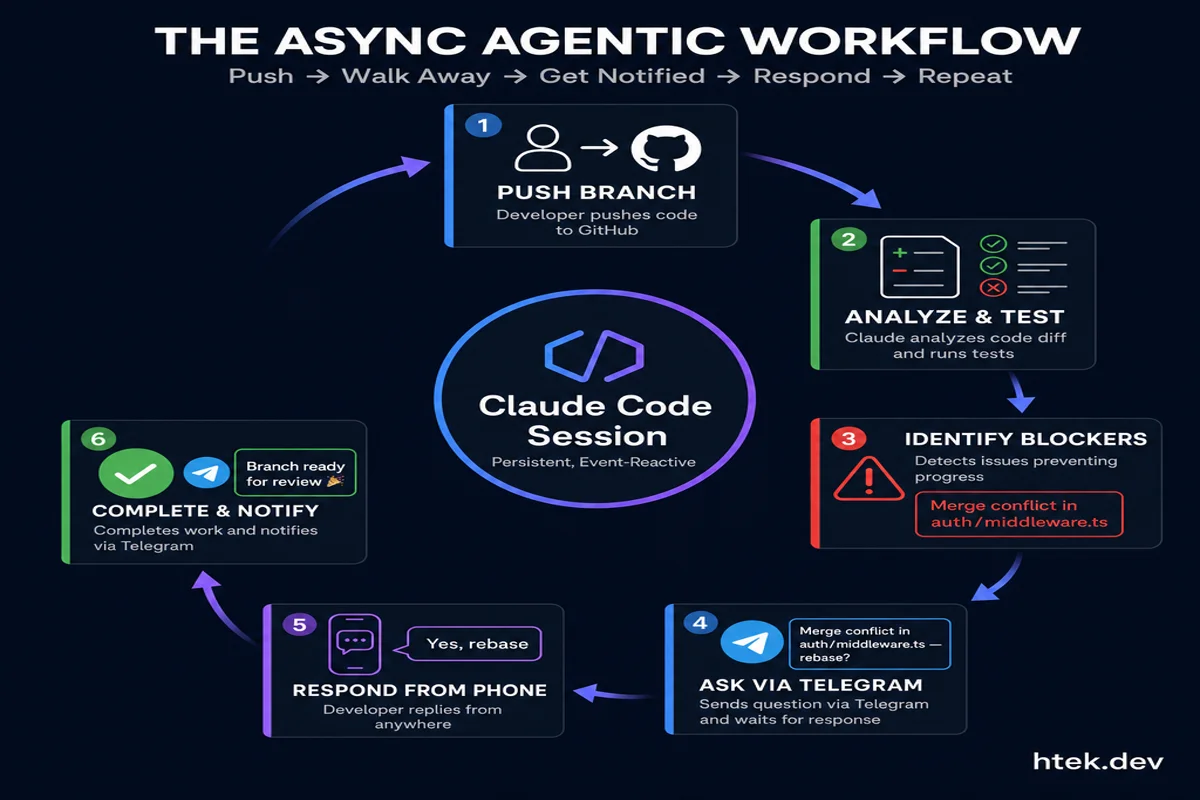 The event-driven agentic workflow: developers push code and walk away, agents work autonomously and surface questions via messaging, receive responses, and notify when complete
A Few Things to Watch
Pro subscription required. Channels aren’t available on free plans. You need Pro, Max, Team, or Enterprise — and Team/Enterprise admins have to explicitly enable the feature.
Bun dependency. The plugin system requires Bun, not Node.js. If you’re in an environment where adding runtime dependencies is non-trivial, factor that in.
The --dangerously-skip-permissions flag. For fully headless operation in tmux, Claude Code typically needs this flag to suppress interactive permission prompts. Only use this on trusted machines — it bypasses the confirmation dialogs that exist for good reasons.
Session persistence is your responsibility. If your tmux session crashes, your channel goes offline. For production-grade alerting, you’ll need process supervision — something like supervisord or a systemd unit wrapping the launch command.
The Bottom Line
Claude Code Channels is the event-driven interface that agentic development workflows have been missing from the official tooling. The architecture is clean — MCP plugins, polling model, no open ports — and it slots naturally into the async workflow patterns that serious AI development teams are already building toward.
The developer experience improvement is immediate: you can start a long-running agent task, step away, and stay in the loop through the chat platform you’re already in. No terminal babysitting.
The bigger architectural shift is what this enables over time: agents that react to CI events, monitoring alerts, and deployment triggers without human initiation at every step. That’s the event-driven agentic stack, and Anthropic just shipped a first-class entry point into it.
Set up the Fakechat plugin first. Get comfortable with how messages flow in and out. Then wire in Telegram or Discord and start offloading the terminal-sitting that’s been slowing down your async workflows.