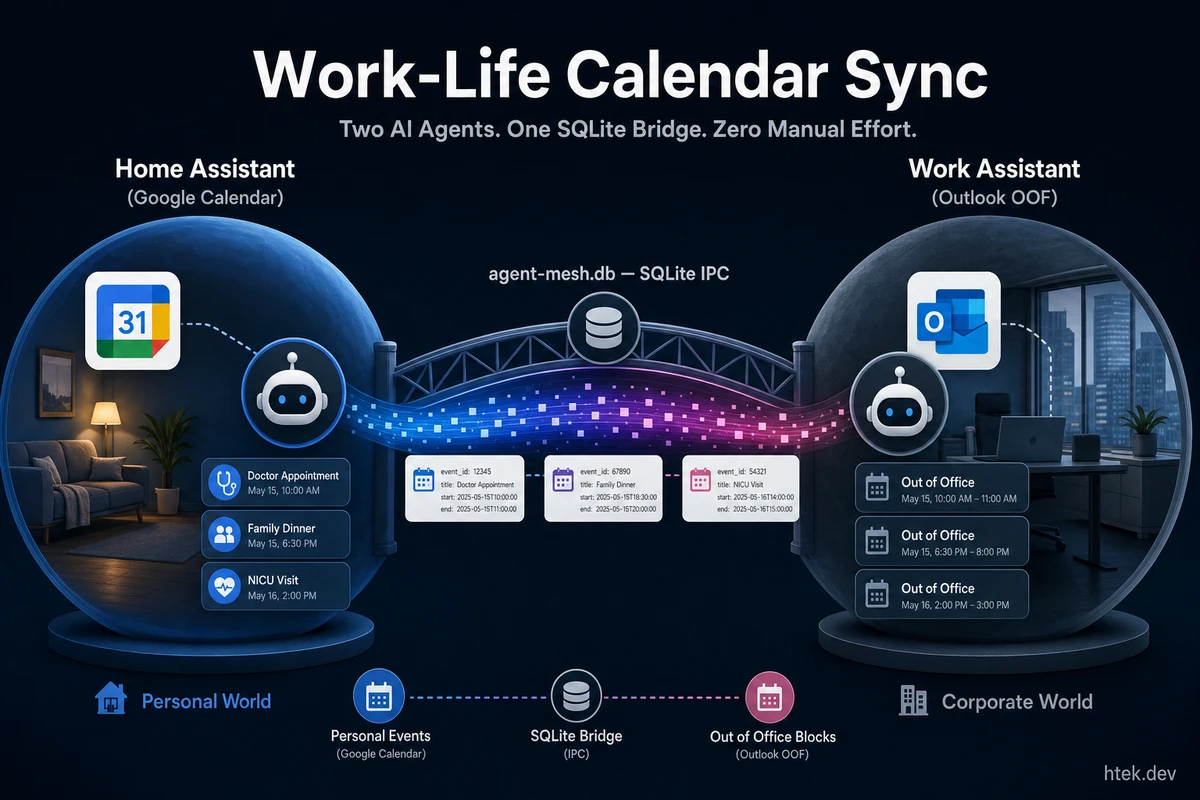
The Two-Calendar Problem
Every developer with a day job and a personal life has two calendars. My work Outlook has team syncs, 1:1s, and planning meetings. My personal Google Calendar has doctor appointments, NICU visits for my premature twins, kid pickups, recording sessions, and the occasional oil change.
The problem isn’t having two calendars. The problem is that nobody at work can see the personal one. So a coworker schedules a meeting at 10 AM on Tuesday — right on top of my wife’s OB appointment. I catch it at 9:45, scramble to decline, and look unprofessional. Or worse, I don’t catch it.
The manual fix is tedious: open Google Calendar, find the event, open Outlook, create a matching “Out of Office” block, repeat for every new event, every change, every cancellation. I was doing this three or four times a week. Then I stopped doing it because humans are bad at repetitive cross-system data entry. Then I missed more meetings.
So I built a system where two AI agents handle it automatically. My home assistant reads Google Calendar, talks to my work assistant through a mesh network, and the work assistant creates Out of Office blocks on Outlook. Zero manual effort. Five times a day, every weekday.
The Setup: Two Agents, Two Worlds
I’ve written about the multi-agent home assistant that runs my household — over 30 agents managing tasks, meals, finances, health, and more, all running on GitHub Copilot CLI. That system lives in one repo (rocha-family), runs in one terminal, and talks to my family through Telegram.
But I also have a work assistant — a separate Copilot CLI session in a different repo (msix-home) with its own agents, its own tools, and its own domain knowledge. It has access to Microsoft Graph for Outlook, MSX Dataverse for sales data, Power BI for analytics, and WorkIQ for M365 Copilot queries. It’s a completely independent system.
These two assistants couldn’t talk to each other. They’re in different terminals, different repos, different Git repositories. From each agent’s perspective, the other one doesn’t exist.
Until the agent mesh.
The Agent Mesh: Cross-Session IPC for Copilot CLI
The agent mesh is a Copilot CLI extension I built that lets any number of CLI sessions discover each other and exchange messages. It’s deliberately simple — a shared SQLite database on my machine, WAL mode for lock-free concurrency, and a polling loop that checks for new messages every 10 seconds.
Here’s the architecture:
┌──────────────────┐         ┌──────────────────┐
│  Terminal 1       │         │  Terminal 2       │
│  rocha-family     │         │  msix-home        │
│  (Home Assistant) │         │  (Work Assistant)  │
└────────┬─────────┘         └────────┬─────────┘
         │                            │
         └──────────┬─────────────────┘
                    │
          ┌─────────┴─────────┐
          │  agent-mesh.db    │
          │  (SQLite, WAL)    │
          │  ┌─────────────┐  │
          │  │ agent_sessions │  │
          │  │ agent_messages │  │
          │  └─────────────┘  │
          └───────────────────┘
Each session auto-registers on startup with its workspace name (derived from the Git repo folder). Sessions heartbeat every 10 seconds. Messages are inserted into a queue table and picked up by the recipient’s polling loop, which routes them via session.send() for the LLM to process.
The tools are minimal — four in total:
get_agents— discover who’s onlinesend_message— send to a workspace or session IDreply_to_message— threaded responsesget_message— check for replies
Installation is one step: clone the repo into ~/.copilot/extensions/agent-mesh/ and restart your sessions. You’ll need Node.js 22+ (for the built-in node:sqlite module), but beyond that — no npm install, no config files, no environment variables. The database creates itself.
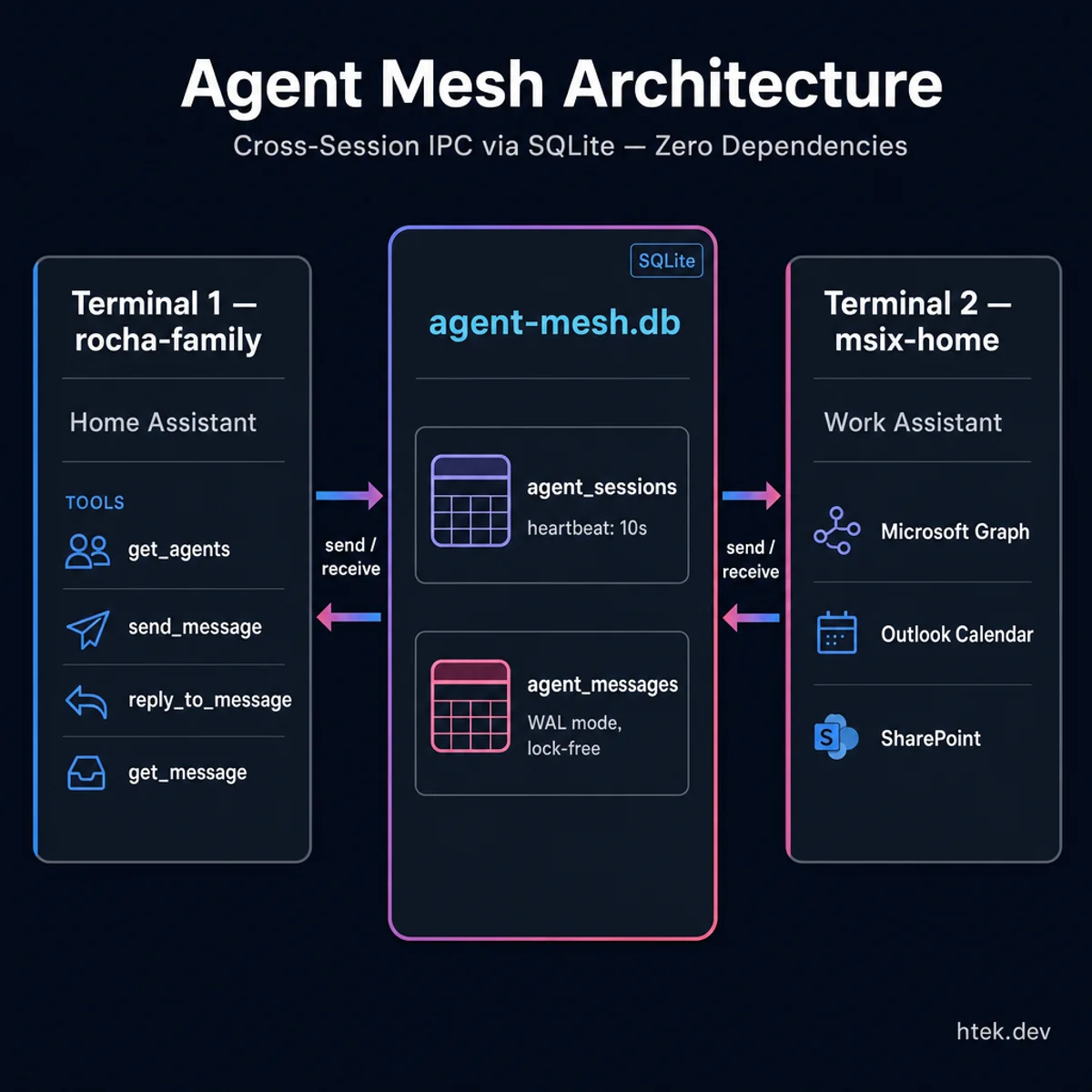 Agent Mesh Architecture — two completely isolated terminal sessions sharing a single SQLite database for zero-dependency cross-session IPC
The Sync Agent: Personal Calendar → Outlook OOF
With the mesh in place, I created a dedicated work-life-sync agent in my home assistant. Its job description fits in one sentence: read Google Calendar, send OOF instructions to the work agent via mesh, track what’s been synced.
Here’s the actual flow, five times a day on weekdays:
- Wake up on cron (6 AM, 9 AM, noon, 3 PM, 6 PM CT)
- Check Google OAuth — if tokens expired, create a re-auth task and stop
- Fetch upcoming events from Google Calendar (next 3 days)
- Filter — weekday events only, time-bound or PTO-keyword all-day events, future only
- Compute delta against previously synced events in memory
- Send mesh message to
msix-homewith structured instructions - Update sync state and log the run
The cron entry in cron.json is straightforward:
{
  "id": "work-life-sync",
  "schedule": "0 6,9,12,15,18 * * 1-5",
  "enabled": true,
  "agent": "work-life-sync"
}
Five runs per weekday. Monday at 6 AM catches anything added over the weekend. The midday runs catch same-day changes. The 6 PM run catches tomorrow’s additions.
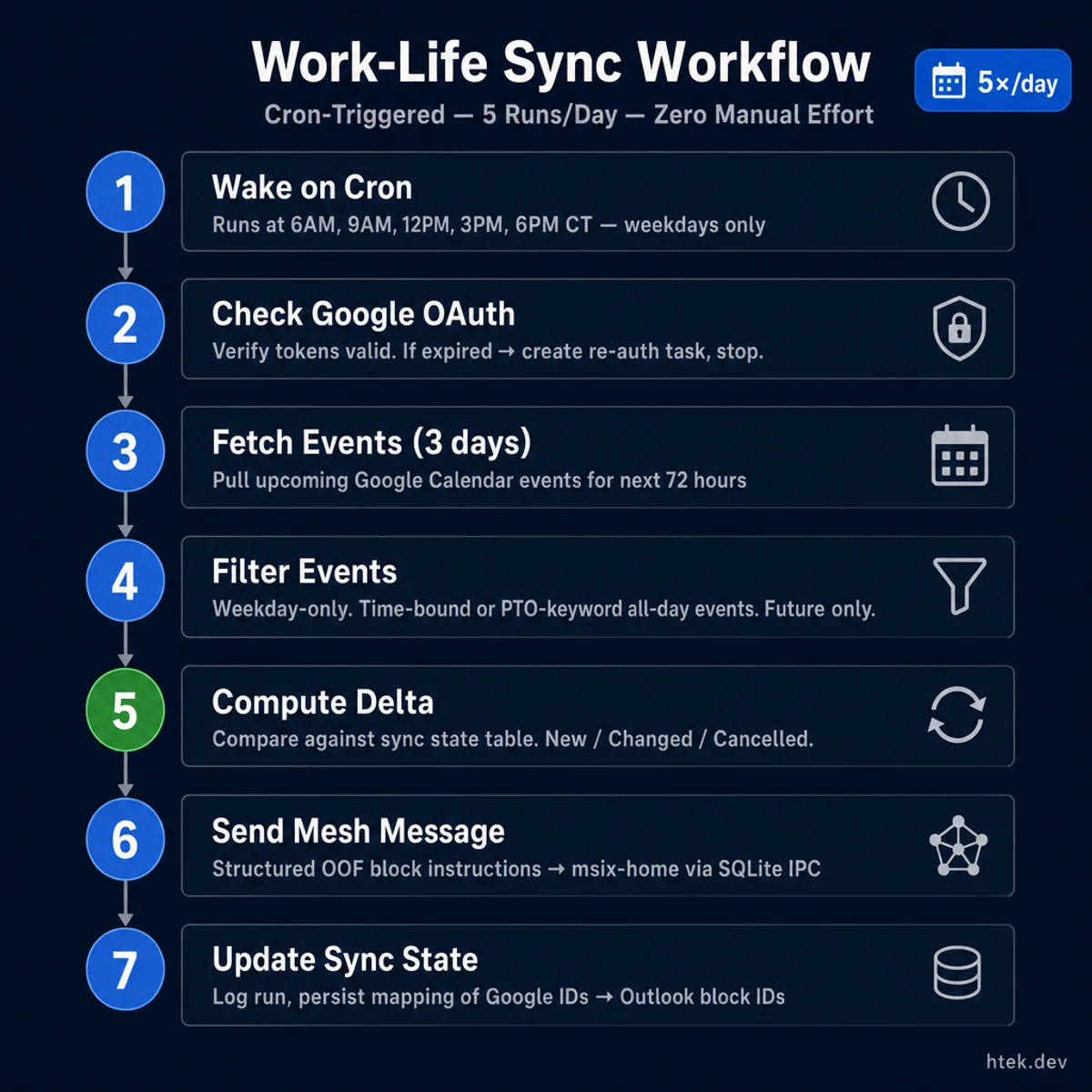 The complete 7-step sync workflow — runs 5× per weekday, exits silently when zero changes are detected
The Mesh Message
When the sync agent detects new, changed, or cancelled events, it sends a structured message through the mesh. Here’s what an actual message looks like:
WORK_LIFE_SYNC — Availability Block Request

BLOCKS:
1. [CREATE] "Personal — Medical" | 2026-05-02 10:00 AM – 11:00 AM CT
   | showAs=oof, private, no attendees, no Teams | block_key=evt_abc123
2. [CREATE] "Personal — Childcare" | 2026-05-02 3:00 PM – 3:30 PM CT
   | showAs=oof, private, no attendees, no Teams | block_key=evt_def456
3. [DELETE] block_key=evt_ghi789 | (event cancelled on personal calendar)

CONTEXT: Automated sync from Hector's personal Google Calendar.
Create/update/delete Outlook calendar events as specified.
All blocks: showAs=oof, sensitivity=private, no attendees,
no Teams/online meeting. Timezone: America/Chicago.
The work assistant receives this, parses the instructions, and creates the corresponding Outlook events via Microsoft Graph. Every block is marked Out of Office and Private — coworkers see I’m unavailable, but they don’t see the details. A doctor appointment shows up as “Personal — Medical” on my work calendar. That’s all anyone needs to know.
Smart Category Detection
The agent maps event titles to categories using keyword matching, so the OOF blocks are descriptive without leaking details:
| Category | Keywords | OOF Subject |
|---|---|---|
| Medical | doctor, dentist, NICU, OB, therapy | Personal — Medical |
| Family | birthday party, graduation, wedding | Personal — Family |
| Childcare | pickup, daycare, soccer, practice | Personal — Childcare |
| Errands | repair, mechanic, DMV, delivery | Personal — Errands |
| Time Off | vacation, PTO, travel, holiday | Personal — Time Off |
| Default | (no match) | Personal |
A “Pediatrician — Leilani” event becomes “Personal — Medical.” A “Soccer practice — HJ” becomes “Personal — Childcare.” A “Family trip to San Antonio” becomes “Personal — Time Off” with OOF blocks on every weekday it spans.
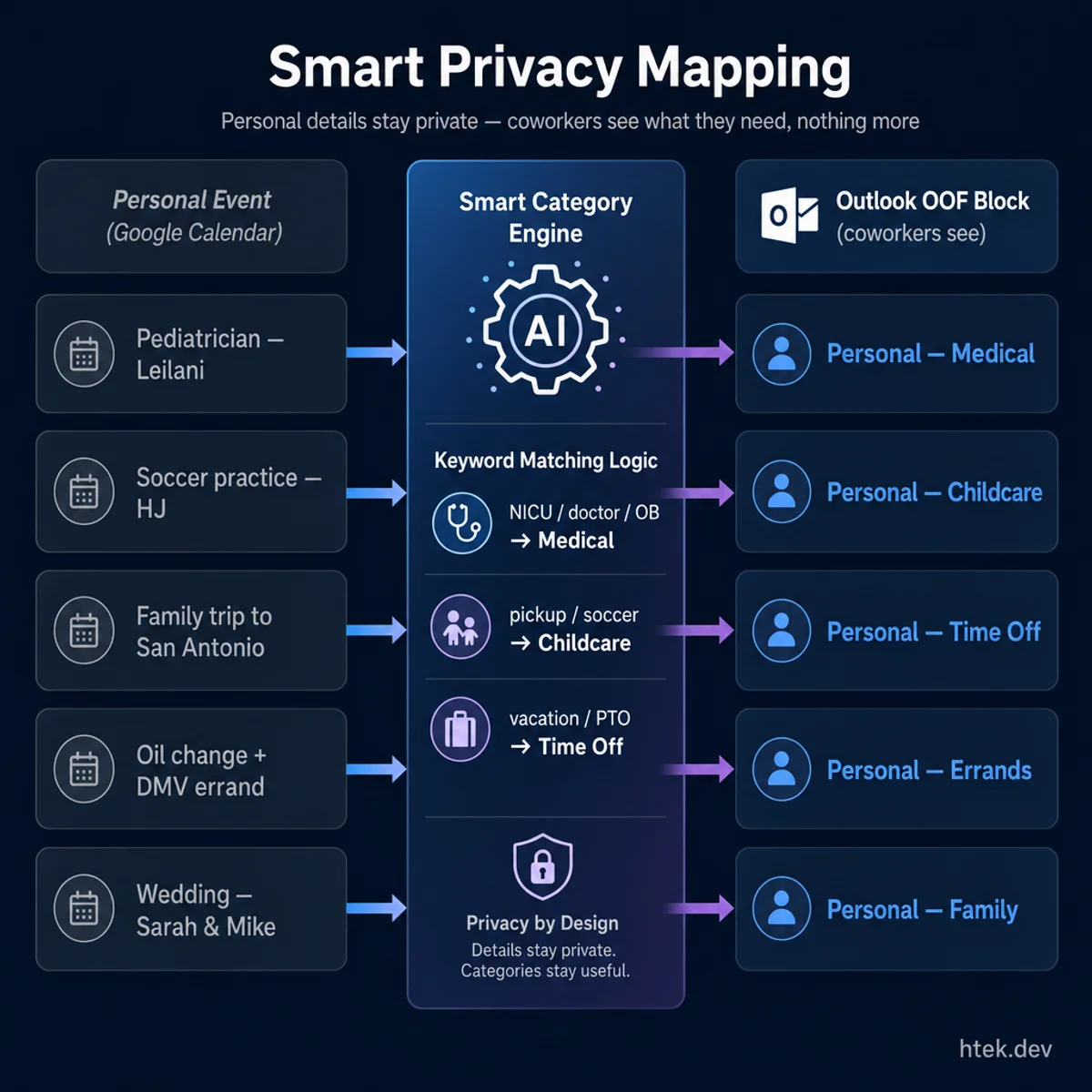 Smart privacy mapping — your personal details stay yours, coworkers see what they need to know
Delta Sync, Not Full Replace
The agent doesn’t blindly recreate everything each run. It maintains a sync state table in its working memory — mapping Google event IDs to Outlook block IDs — and computes a delta:
- New event in Google, not in sync table → CREATE on Outlook
- Changed event (time or title differs) → UPDATE on Outlook
- Deleted event (in sync table, gone from Google) → DELETE from Outlook
- Unchanged → skip entirely
Most runs produce zero changes. The agent logs “zero delta” and exits silently. When a doctor appointment gets rescheduled from 10 AM to 2 PM, the next sync cycle catches the change and sends an UPDATE. When I cancel a haircut, the next cycle sends a DELETE. The Outlook calendar stays accurate without me touching it.
Why This Matters: Real Multi-Agent Orchestration
There’s no shortage of multi-agent demos — chatbots that delegate to sub-agents, retrieval pipelines with planning loops, code review chains. Most of them solve problems that exist only inside the demo.
This solves a problem I had every week. And the architecture that makes it work — two independent AI agents communicating asynchronously through a shared database — is the same pattern you’d use for:
- Frontend ↔ backend coordination — “Hey API agent, I’m getting a 403 on
/api/users. What middleware guards that endpoint?” - Multi-repo deploys — “Tell the infra agent to update the Terraform config for the new service the API agent just added”
- Cross-team tooling — any scenario where knowledge lives in different repos and different terminal sessions
The mesh doesn’t care what the agents are doing. It’s pure infrastructure — a single-file extension that gives every Copilot CLI session the ability to discover peers and exchange messages. What you build on top of it is up to you.
The Boring Parts That Make It Work
A few design decisions that prevent this from being a fragile demo:
One-way sync only. Personal → Work. Never the reverse. I already see work meetings on Google via an ICS subscription. The system has one direction and no feedback loops.
Silent when healthy. The agent only messages me on errors — expired OAuth tokens, mesh delivery failures, the work agent being offline for 24+ hours. Successful syncs produce a one-line log entry and nothing else. I don’t need a notification that the system I built is working.
Graceful degradation. If my work terminal is offline, the mesh queues the message. Unread messages to stopped sessions persist for up to 24 hours — plenty of time for msix-home to come back online and pick up the queued instructions. If Google OAuth expires, the agent creates one task asking me to re-authenticate, then stops — no spam, no retries, no crashes.
Privacy by default. Every OOF block is marked private with no attendees and no Teams link. Coworkers see “Personal — Medical” and know not to schedule over it. They don’t see “Pediatrician — Leilani follow-up re: ROP screening.”
Build Your Own
The agent mesh is open source and takes two minutes to install. If you’re running Copilot CLI in multiple terminals — which you probably are if you work across repos — you already have the foundation. The mesh just lets those sessions talk.
The work-life sync agent is specific to my setup (Google Calendar + Outlook), but the pattern isn’t. Any cross-system data flow that requires two different tool sets is a candidate: CRM to project tracker, personal notes to team wiki, monitoring alerts to incident response. Two agents, each with access to their own world, connected by a 10-second polling loop and a SQLite database.
I covered the full home assistant architecture, the extension system that powers it, and the crisis that stress-tested it. The agent mesh is the next layer — the one that lets these systems stop being islands and start being a network.
The Bottom Line
I spent months manually copying calendar events between Google and Outlook. I’d forget, miss meetings, look unprofessional. Now two AI agents handle it automatically — one reads my personal calendar, sends a structured message through the mesh, and the other creates Out of Office blocks on my work calendar. Five times a day, every weekday, zero effort.
That’s not a demo. That’s Tuesday. And it’s the kind of mundane, boring, life-improving automation that multi-agent systems should be solving — not generating blog posts about themselves, but quietly keeping two calendars in sync so I can focus on the things that actually matter.