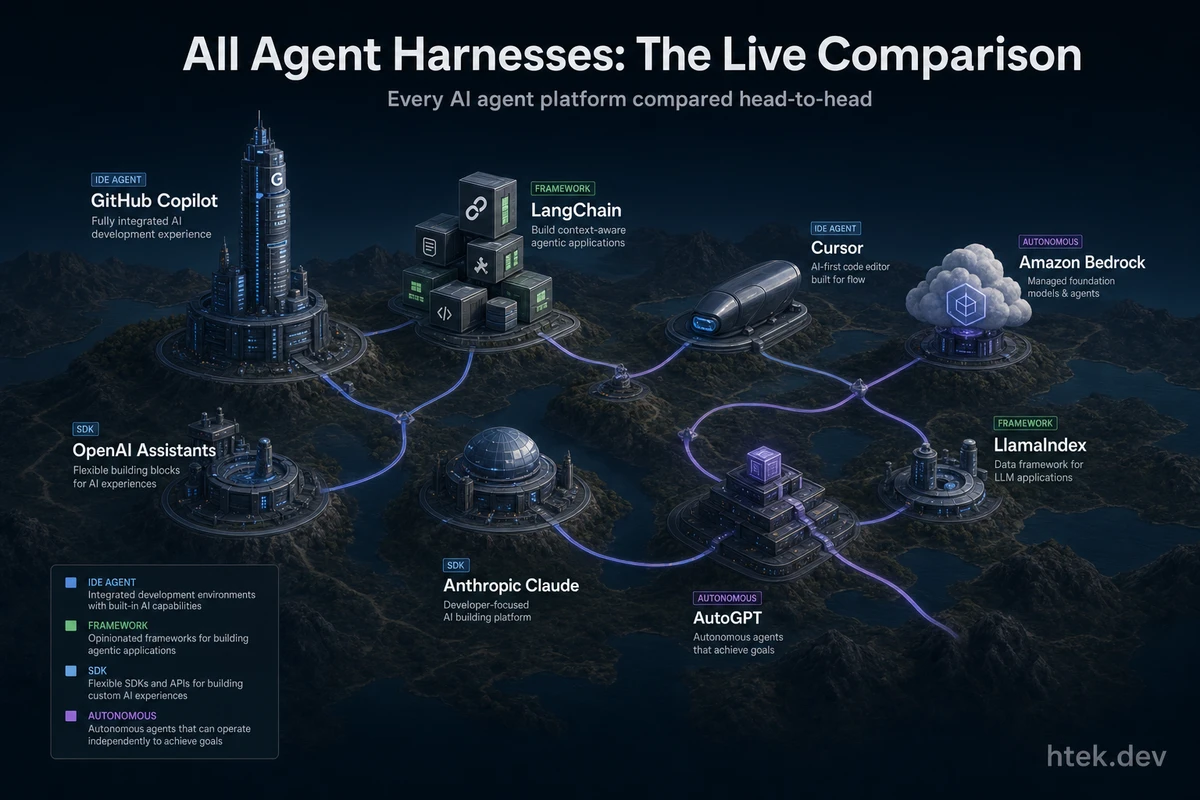
🔴 LIVING ARTICLE — This page is continuously maintained and updated as platforms ship new features. Bookmark it. Come back often.
Last updated: June 25, 2026 (6:36 PM CT) — Copilot for JetBrains: Claude as agent provider (public preview) + org/enterprise agents + mid-run CLI steering + per-turn AI credits indicator (June 22); Copilot CLI new terminal interface goes GA (June 23)
Why This Page Exists
There are over a dozen platforms claiming to be the best way to build, run, and manage AI agents. Some are IDEs, some are cloud services, some are open-source libraries, and some are full autonomous coding environments. The terminology is a mess. Marketing pages all say “agent framework” but the products underneath are fundamentally different things.
I’ve been building multi-agent systems in production — 50+ agents running autonomously on cron schedules, managing everything from content pipelines to household logistics. That experience taught me something the comparison posts miss: the harness matters more than the model. The right control plane turns a chatbot into a production system. The wrong one turns your codebase into a liability.
This is my attempt to give you the definitive bird’s-eye view. Every major agent harness, every feature set, head-to-head — with honest pros and cons for each. No ranking where my favorite conveniently wins. Just the facts, organized so you can make the right call for your situation.
What Is an Agent Harness?
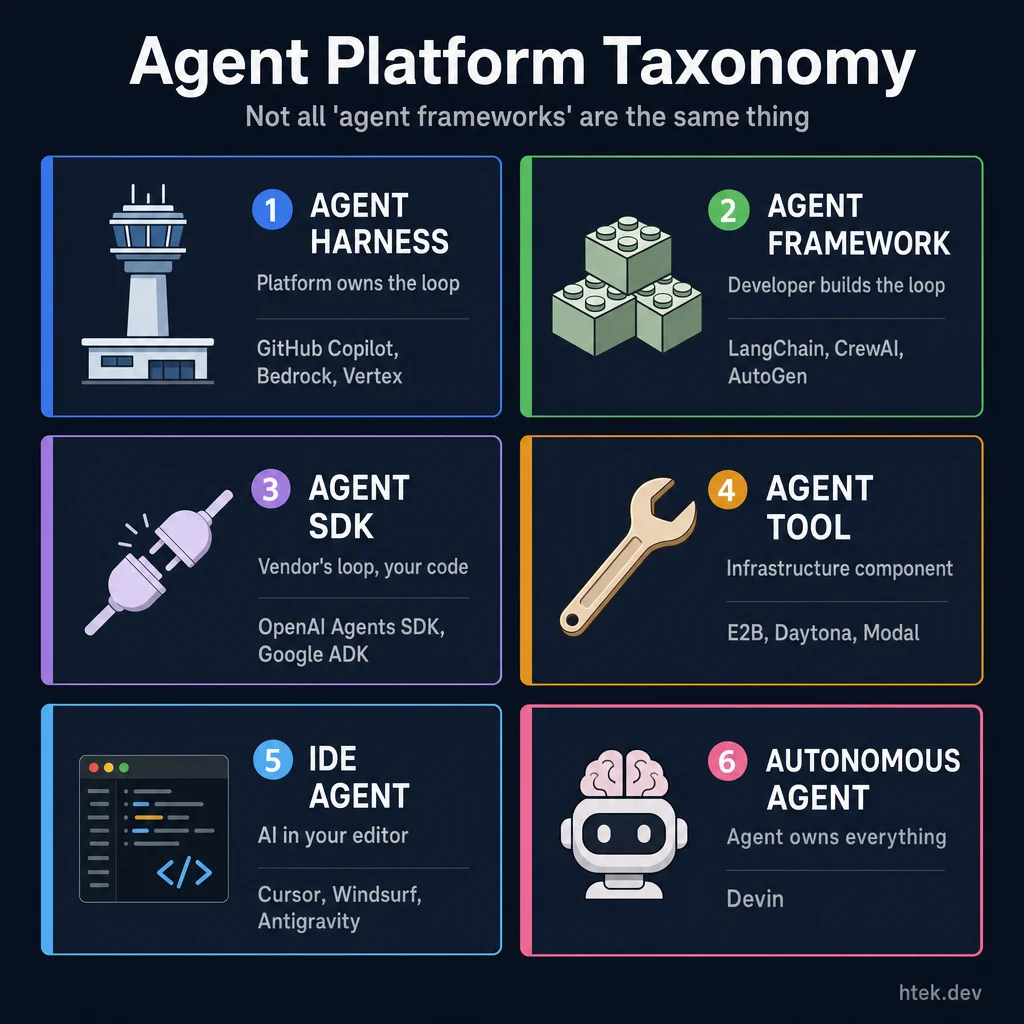 The six categories of agent platforms — not all “agent frameworks” are the same thing.
Before comparing anything, we need to define what we’re actually comparing. The industry uses “agent framework,” “agent SDK,” and “agent harness” interchangeably — but they’re different things. Anthropic’s engineering team nailed the distinction: the harness is the runtime container that wraps around an agent’s execution.
| Category | What It Does | Who Controls the Loop | Examples |
|---|---|---|---|
| Agent Harness | Runtime container — lifecycle, governance, tool access, policy enforcement | The platform | GitHub Copilot, Bedrock Agents, Vertex AI Agent Builder |
| Agent Framework | Programmable building blocks for composing agents in code | The developer | LangChain/LangGraph, CrewAI, AutoGen, Semantic Kernel |
| Agent SDK | Thin client library binding your code to a vendor’s harness | The vendor’s runtime | OpenAI Agents SDK, Google ADK |
| Agent Tool / Sandbox | Infrastructure component agents call into (increasingly integrated into SDKs) | N/A — it’s a tool | E2B, Daytona, Modal, GKE Agent Sandbox, Cloudflare Workers |
| Agent Orchestrator | Control plane running multiple harnesses side by side | The orchestration layer | Warp Oz |
| IDE Agent | AI assistant embedded in a code editor with agent capabilities | The IDE vendor | Cursor, Devin Desktop, Google Antigravity, JetBrains AI |
| SLM Agent Harness | Lightweight harness optimized for small language models (4B–27B) on-device | The framework + local hardware | Microsoft MagenticLite |
| Autonomous Agent | Fully self-directed agent with its own cloud environment | The agent itself | Devin Cloud |
The key distinction: a harness owns the loop. It decides whether a tool call executes, enforces budgets, manages context, and provides observability. A framework gives you the building blocks to construct that loop yourself. An SDK connects you to someone else’s loop. As Analytics Vidhya’s taxonomy puts it: frameworks provide building blocks, runtimes execute workflows, harnesses enforce control.
A May 2026 study by MBZUAI analyzing Claude Code’s source (1,884 files, ~512k lines) quantified this: ~98.4% of a production agent is harness infrastructure (permissions, context management, sandboxing, tool routing, recovery) — only ~1.6% is AI decision logic. Four independently-built agents (Claude Code, Codex CLI, Aider, OpenClaw) all converged on the same harness patterns, suggesting this architecture is a fundamental constraint of the problem, not a design choice.
Why does this matter? Because if you’re evaluating “agent platforms” without understanding these categories, you’ll compare LangChain (a library you embed) against Bedrock Agents (a managed service you configure) and wonder why the feature lists look nothing alike. They’re solving different problems at different layers.
Head-to-Head Comparison Tables
Harnesses, IDE Agents & Autonomous Agents
| Feature | GitHub Copilot (Extensions + CLI) | OpenAI Agents SDK | Anthropic Claude Code | Amazon Bedrock Agents | Google Vertex AI Agent Builder | Cursor | Devin Desktop (fmr. Windsurf) | Devin Cloud | JetBrains AI |
|---|---|---|---|---|---|---|---|---|---|
| Tool Use | Extensions API + MCP + function calling | Function calling + hosted tools | MCP protocol + Bash/file tools | Action groups → Lambda/Step Functions | Fulfillments + Vertex Extensions | Built-in code/terminal tools | Code search + editing tools | Full dev environment tools | IDE-native tools |
| Memory | Copilot instructions + repo context + conversation | Thread-level + vector stores | Project indexing + conversation | Knowledge bases (OpenSearch/S3) + sessions | Vertex AI Search + flow state | Codebase index + session | Codebase index + session | Codebase index + persistent sessions | Project index + conversation |
| Multi-Agent | Multi-agent via CLI (task tool, background agents) | Handoffs between agents, swarm patterns | Sub-agents via tool use | Orchestration via Step Functions | Sub-agent routing via flows | Agents Window — up to 8 parallel agents in isolated worktrees | ACP-compatible multi-agent (Agent Command Center) | Parallel Devins | Single agent |
| Sandboxing | Docker containers, Codespaces | Native harness/compute separation — 7 providers (E2B, Modal, Cloudflare, Vercel, Daytona, Blaxel, Runloop) | Bash sandbox, permission prompts | Lambda/VPC isolation | Cloud Functions/Cloud Run | Local or remote containers | Local environment | Cloud VM per session | Local or remote |
| Governance | Pre/post tool hooks (hooks.json), extension allowlists, org policies, MXC OS-level sandboxing | Guardrails API, content filters | Permission prompts, .claude files | IAM + CloudTrail + CloudWatch | IAM + Cloud Audit Logs | User approval prompts | User controls | Admin controls | Enterprise controls |
| Extensibility | Extensions + custom agents + skills | Plugin system + tool definitions | MCP servers (open protocol) | Lambda action groups | Webhooks + Extensions | Limited plugin API | Limited | API integrations | Plugin marketplace |
| IDE Integration | VS Code, Visual Studio, JetBrains, Xcode, CLI | None (API-first) | VS Code extension, terminal | None (API/console) | None (console/API) | Native (Cursor IDE) | Native (Devin Desktop IDE) | Cloud IDE (VSCode-based) | Native (JetBrains IDEs) |
| CLI Support | ✅ Full CLI agent | ❌ | ✅ Claude Code CLI | ❌ | ❌ | ❌ | ❌ | Slack/API | ❌ |
| Cloud vs Local | Both (local CLI + Codespaces + cloud agent) | Cloud (OpenAI servers) | Local-first + cloud | Cloud (AWS) | Cloud (GCP) | Local + remote | Local + remote | Cloud only | Local + remote |
| Pricing | Free tier → $10/mo → $39/mo → Enterprise | Pay-per-token + storage | Free (Claude Code) + API costs | Pay-per-token + AWS services | Pay-per-token + GCP services | Free → $20/mo (Pro) → $60/mo (Pro+) → $200/mo (Ultra) | Free / Pro $20/mo / Max $200/mo / Teams $80+$40/seat | Free / Pro $20/mo / Max $200/mo / Teams $80+$40/seat | Bundled with JetBrains subscription |
| Open Source | Extensions spec open, CLI proprietary | SDK open source (MIT), runtime proprietary | CLI open source, MCP open protocol | Proprietary | Proprietary | Proprietary | Proprietary | Proprietary | Proprietary |
Agent Frameworks
| Feature | LangChain / LangGraph | CrewAI | Microsoft Agent Framework (AutoGen + Semantic Kernel) | Google ADK | Mastra |
|---|---|---|---|---|---|
| Tool Use | Decorators + schemas + any callable | Tool decorators with role binding | Skills/functions (semantic + native) + agent tooling | Tools with schema definitions | TypeScript-first tool definitions |
| Memory | Programmable (buffer, summary, vector, entity, graph) | Shared crew memory + agent memory | Vector store connectors + key-value + conversation history | Session state + Google Search grounding | Explicit read/write memory with observability |
| Multi-Agent | Graph-based (nodes = agents, edges = flow) | Crews with role-based orchestration | Conversational groups + composable kernels (unified orchestration) | Multi-agent with AgentTool delegation | Multi-agent message flows |
| Sandboxing | Developer-managed (any environment) | Developer-managed | Developer-managed (Azure containers available) | Developer-managed (GCP available) | Developer-managed |
| Governance | Callbacks, LangSmith tracing | Callbacks, logging hooks | Azure IAM/RBAC + ACS (Agent Control Standard) + Foundry tracing | Google Cloud IAM + logging | Built-in observability, metrics, logs |
| Extensibility | Very high — model-agnostic, 700+ integrations | Moderate — growing ecosystem | High — multi-language (C#, Java, Python, JS) + Microsoft ecosystem | Moderate — Google ecosystem | High — TypeScript ecosystem |
| Deployment | Self-hosted (any infra) + LangSmith cloud | Self-hosted (Python apps) | Self-hosted + Azure + Foundry Agent Service (hosted agents) | Self-hosted + GCP integration | Self-hosted (Node.js) |
| Pricing | Free (OSS) + LangSmith SaaS optional | Free (OSS) + CrewAI Enterprise optional | Free (OSS) + Foundry hosting optional | Free (OSS) | Free (OSS) |
| License | MIT | MIT | MIT | Apache 2.0 | MIT |
Every Harness, In Depth
GitHub Copilot (Extensions + CLI + Cloud Agent)
GitHub Copilot isn’t just autocomplete anymore — it’s a full agent harness with extensions, hooks for governance, and a CLI that runs autonomous agents in your terminal. The extensions system lets third-party services register as tools, and the hooks.json governance layer gives organizations pre/post-tool interception that no other IDE agent offers.
The cloud coding agent can autonomously research a repository, create implementation plans, and submit pull requests — triggered directly from GitHub Issues. It runs in a secure cloud sandbox with full access to the repo context.
May 2026: GitHub released a technical preview of the Copilot App — a standalone desktop client that moves Copilot from IDE extension to an agentic desktop workflow. Each task runs in its own session via git worktrees, enabling parallel work without conflicts. The app includes a cross-repo inbox, integrated terminal, and browser for live previews, guiding code changes from planning to merged PR. On May 18, GitHub made remote control for Copilot CLI sessions generally available — you can now start a CLI agent session and monitor, steer, approve, or stop it remotely from GitHub Mobile, github.com, VS Code, or JetBrains. This multi-surface capability means you can kick off a complex agent task at your desk and manage it from your phone while walking the dog.
Also in May 2026: Microsoft released WinUI agent skills — a modular plugin shipping 8 composable skills (dev-workflow, design, code-review, UI testing, packaging, WPF migration) that work with both GitHub Copilot and Claude Code. This cross-platform skill architecture demonstrates how agent skills can be portable across different harnesses, strengthening the ecosystem’s shift toward standardized, composable agent capabilities.
May 21, 2026: Microsoft introduced the Plan agent for Visual Studio — a dedicated agent mode that asks clarifying questions, drafts an implementation plan, and lets you review and edit it before a single line of code changes. Plans are saved as .copilot/plans/plan-{title}.md, version-controlled alongside your code, and shareable with your team. Once approved, the Plan agent hands off directly to Agent mode for implementation. This closes the gap between “intent” and “code” that has caused frustration with autonomous agents jumping straight into implementation.
May 21–22, 2026: GitHub shipped the Copilot Agent Tasks REST API — a POST /agents/repos/{owner}/{repo}/tasks endpoint that lets you trigger the cloud coding agent from any script, portal, or CI pipeline without touching the web UI. The agent runs in a GitHub Actions environment, opens a PR when done, and supports mid-task clarification (waiting_for_user state). Economy model options (Claude Haiku 4.5 and GPT-5.4-mini at 0.33× cost multiplier, added May 18) make high-volume automation economical. A companion GET endpoint returns a repository’s full agent configuration for security audits. Available on Copilot Business and Enterprise at launch; expanded to Copilot Pro, Pro+, and Max on June 4, 2026 — enabling individual developers to fan out refactors across repos, automate releases, and integrate cloud agent tasks into personal pipelines via PAT or OAuth tokens.
May 27, 2026: GitHub Copilot CLI launched a plugin and marketplace system — installable packages that can bundle custom agents, skills, hooks, MCP servers, and LSP integrations into a single distributable unit. Plugins are hosted via GitHub-backed marketplaces (copilot-plugins and awesome-copilot) or bundled directly from repositories. This transforms Copilot CLI from a single-agent terminal tool into an extensible platform where the community can ship reusable agent components.
May 29, 2026: Microsoft is building a Copilot “super app” that unifies GitHub Copilot, Copilot Chat, Copilot Cowork, and a new agentic workflow capability internally named “Autopilot” into a single destination. Led by Jacob Andreou (head of unified Copilot), the project aims for end-of-summer 2026 launch. A toggle lets users switch between personal and enterprise Microsoft 365 Copilots. GitHub Copilot has 4.7 million paid subscribers. The consolidation signals Microsoft’s intent to make Copilot the single surface for all AI-assisted work — coding, chat, workflow automation — eliminating the fragmentation that confused customers across separate Copilot products.
May 27, 2026 — enterprise cost validation: Microsoft shifted engineers from Claude Code to GitHub Copilot CLI across its Experiences and Devices division (Windows, Microsoft 365, Teams, Surface), with a June 30 cutoff. After opening Claude Code to thousands of engineers in late 2025, per-engineer costs reached $500–$2,000/month under token-based pricing — an 8–12% surcharge on top of existing headcount costs. Uber burned through its entire 2026 AI coding budget in four months with 84% engineer adoption. The shift validates Copilot CLI’s economic model: seat-based access plus stronger governance beats opaque token sprawl. Claude models still work inside Copilot CLI, and Microsoft’s broader Anthropic investment ($5B) is unaffected — this is a pricing model decision, not a product quality decision.
June 1, 2026 — GitHub AI Credits: Starting tomorrow, GitHub moves Copilot to AI Credits billing while keeping plan prices unchanged — Pro $10/month, Pro+ $39/month, Business $19/user/month, Enterprise $39/user/month. One AI Credit equals $0.01, usage is metered by tokens at per-model rates, and code completions plus Next Edit Suggestions remain unlimited. Business customers get promotional $30/user/month credits for June–August and Enterprise gets $70/user/month; credits pool across the org, and admins can set spend caps at the enterprise, cost-center, and user level. GitHub also swapped the default Business/Enterprise base model from GPT-4.1 to GPT-5.3-Codex in May. The important framing: this is Copilot maturing into a more transparent enterprise platform — real budget controls and pooled credits without sacrificing the broad, multi-surface experience that made Copilot easy to operationalize.
June 2, 2026 — Copilot Max and governance updates: GitHub launched Copilot Max — a power-user tier for existing Pro/Pro+ subscribers with the highest included AI Credits and spending limits. Code review now consumes Actions minutes (in addition to AI Credits), and user-level budget controls are GA — admins can set universal or per-user spend caps with proactive email notifications as users approach thresholds. New sign-ups for Student, Pro, Pro+, and Max remain paused while GitHub scales the infrastructure. The cumulative picture: Copilot’s billing is now a full enterprise governance surface — pooled credits, tiered spending, granular admin controls, and transparent per-model cost tracking.
June 2, 2026 — Build 2026: GitHub Copilot App, SDK GA, and Cloud Automations: Microsoft Build 2026 unveiled the GitHub Copilot App — an agent-native desktop experience in technical preview for Pro, Pro+, Business, and Enterprise users. The headline feature: Canvases — bidirectional work surfaces where agents and humans collaborate in real time. Canvases display plans, PRs, browser sessions, terminals, deployments, dashboards, or workflow states, with agents updating and developers editing/reordering freely.
The GitHub Copilot SDK is now generally available for Node.js/TypeScript, Python, Go, .NET, Rust, and Java — one runtime to build internal tools on the same agentic infrastructure that powers Copilot itself. Cloud automations let agents run on schedules, respond to events, open issues, and post comments, with a default prompt-permission model and autopilot option after trust is established.
Memory++ and /chronicle provide cross-surface continuity — your entire Copilot session history now syncs across the app, CLI, VS Code, JetBrains, and GitHub.com. Chronicle delivers standup summaries, personalized tips, and custom instructions surfaced from past work. Sessions are private by default, shareable as view-only via CLI (/share gist) or on github.com. Local sessions sync to your GitHub account automatically.
The Copilot CLI was also refreshed at Build 2026 with Rubber Duck (a conversational thinking-partner agent now GA — helps you work through architectural decisions and debugging puzzles without triggering any code changes, named after the classic rubber duck debugging technique), voice input (GA — narrate your session hands-free), a redesigned terminal interface with tabs for Issues, Pull Requests, and Gists (experimental via /experimental), and prompt scheduling (experimental) — extending the agent’s autonomy beyond interactive sessions into always-on background work.
June 2, 2026 — Gemini 3.1 Pro + Gemini 3.5 Flash across Copilot surfaces: GitHub expanded model choice significantly with two Google Gemini models now available in Copilot CLI, Copilot cloud agent, the GitHub Copilot app (technical preview), and the Copilot SDK. Gemini 3.1 Pro (Preview) is available for Student, Pro, Pro+, Business, and Enterprise subscribers; Gemini 3.5 Flash for Pro, Pro+, Business, and Enterprise. Business and Enterprise admins must opt in via Copilot model policy settings. This makes Copilot one of the only developer tools offering simultaneous access to models from OpenAI, Microsoft (MAI), Anthropic, and Google across a single consistent interface.
June 2, 2026 — GitHub Agent Apps: AI agents installable from the Marketplace: GitHub launched Agent Apps — AI agents from GitHub partners that install from the GitHub Marketplace like any GitHub App and integrate directly into your GitHub workflows. Three entry points: assign an issue to the agent, @mention it in a pull request comment, or select it in the Agents UI with a custom prompt. The first wave includes partners like SonarQube (code quality and security analysis that gets access to the full PR context) with more partners and internal tooling support coming soon. The significance: GitHub is becoming a marketplace for specialized task agents — not just Copilot as a monolithic assistant, but a composable ecosystem where teams install the specific agents they need for code review, incident management, security analysis, and more. This is the agent equivalent of the GitHub Apps marketplace — a distribution layer that turns GitHub into a platform for third-party autonomous workers.
June 4, 2026 — 1M-Token Context Windows + Configurable Reasoning Levels: GitHub Copilot now supports one-million-token context windows — enabling deep work across large codebases, multi-file projects, and long documents without losing context. Available in VS Code, Copilot CLI, and the Copilot app today, expanding to more surfaces soon. Alongside this, configurable reasoning levels let developers dial in the speed/depth tradeoff and unlock extended thinking for architectural and debugging challenges. Both capabilities consume more AI credits at higher settings — GitHub recommends defaults for everyday tasks and extended options for complex, multi-file problems.
June 2, 2026 — MAI-Code-1-Flash: Microsoft launched MAI-Code-1-Flash, a 5B-parameter coding model built end-to-end by Microsoft and integrated directly into GitHub Copilot in VS Code. Designed for fast, efficient assistance in everyday developer workflows, it’s trained with Copilot harnesses from production workflows to improve tool interaction. Key claims: solves harder problems with up to 60% fewer tokens, adaptive thinking that adjusts reasoning depth by request type, and strong instruction-following for single and multi-turn tasks. Rolling out to VS Code individual users via the Auto picker or model picker — no extra setup required. Part of Microsoft’s seven new MAI models spanning image, voice, transcription, coding, and reasoning, with Frontier Tuning enabling organizations to train custom MAI models on their own workflows.
June 4, 2026 — Fix with Copilot for failing Actions (Pro/Pro+/Max): GitHub expanded Fix with Copilot for failing Actions to all individual-tier subscribers — Pro, Pro+, and Max — previously limited to Business and Enterprise plans. When a GitHub Actions workflow fails, click the Fix with Copilot button on the workflow run logs page and the cloud agent investigates the failure, pushes a fix branch, and tags you for review when done — running in its own cloud sandbox. Individual developers can now hand off CI firefighting to Copilot without needing an enterprise plan.
June 5, 2026 — Enterprise-managed plugins in VS Code (public preview): GitHub Copilot’s enterprise-managed plugin distribution expands from Copilot CLI to VS Code (version 1.122+). Enterprise admins define plugin configurations — custom agents, skills, hooks, and MCP server references — in a settings.json file at .github-private/.github/copilot/settings.json. Both VS Code and the Copilot CLI automatically pull and apply these settings for licensed Copilot Business and Enterprise users, with configured plugins auto-installed on first authentication. This gives enterprise teams a single, version-controlled governance surface for distributing standardized agent tooling across the entire developer fleet.
June 5, 2026 — GPT-5.2 and GPT-5.2-Codex retired: GitHub deprecated GPT-5.2 and GPT-5.2-Codex across all Copilot experiences on June 5, 2026 — Chat, inline edits, ask and agent modes, and code completions — with the exception that GPT-5.2 remains available in Copilot Code Review. The suggested alternative is GPT-5.5. GPT-4.1 was also deprecated on June 1 (alternative: GPT-5.5). With both models retired, Copilot’s model roster continues consolidating around newer-generation options: GPT-5.5, GPT-5.3-Codex, MAI-Code-1-Flash, Gemini 3.1 Pro, and Gemini 3.5 Flash. Enterprise admins may need to update model policies to enable access to the replacement models.
June 26, 2026 — GitHub Desktop 3.6: GitHub Desktop 3.6 ships Copilot-powered commit message authoring and merge conflict resolution, plus native Git worktree support — extending Copilot’s AI footprint from the IDE and CLI into the standalone Git GUI. The Copilot conflict resolution engine analyzes the diff and suggests resolutions inline; worktree support lets Desktop users manage parallel branches (useful for running multiple Copilot agent sessions simultaneously). GitHub Desktop now surfaces Copilot across every major Git moment: write, branch, and resolve — not just code generation.
✅ Pros:
- Deepest integration — VS Code, Visual Studio, JetBrains, Xcode, Eclipse, standalone CLI, and now a dedicated desktop app with Canvases and cloud automations
- Copilot SDK GA — build internal tools on the same agentic runtime (Node.js/TS, Python, Go, .NET, Rust, Java)
- Remote control for CLI sessions (GA) — monitor and steer agents from mobile, web, or any IDE
- Extension system lets any service become an agent tool — unique in the IDE space
- hooks.json governance — pre/post tool call interception for enterprise policy enforcement
- CLI agent supports multi-agent patterns (background agents, task delegation, agent steering)
- Enterprise trust — SSO, audit logs, content exclusions, org-level policy, IP indemnity
- GitHub ecosystem integration — Actions, Issues, PRs, Codespaces, Security
- MCP support for extensible tool discovery
- Free tier available, competitive pricing at every tier
- AI Credits add transparent budget controls, pooled usage, and admin spend caps without giving up Copilot’s broad enterprise footprint
- MAI-Code-1-Flash — first-party Microsoft coding model with 60% fewer tokens on hard problems
❌ Cons:
- Extension ecosystem is growing but younger than VS Code’s plugin marketplace
- CLI agent requires local setup (though Codespaces solves this)
- Multi-agent patterns in CLI are powerful but require context engineering knowledge
- Cloud agent is newer and still maturing compared to the IDE and CLI experience
🎯 Best for: Teams already in the GitHub ecosystem who want IDE + CLI + cloud agent coverage with enterprise governance. If you need agents that integrate with your entire DevOps workflow — from issue to PR to deployment — nothing else touches the integration depth.
OpenAI Agents SDK
The OpenAI Agents SDK (which evolved from the Swarm research project) is OpenAI’s production-grade framework for building multi-agent workflows. It’s MIT-licensed and has undergone a major architecture overhaul in May 2026 — transforming from a lightweight chat SDK into a full agent infrastructure platform.
May 2026 — Architecture Overhaul (GPT-5.4): OpenAI rewrote the Agents SDK from the ground up, splitting into a two-layer architecture: harness (control flow, model calls, tool routing, pause/resume) and compute (isolated sandbox for file I/O, dependency installation, code execution). The two layers are fully decoupled — API keys and credentials never enter the execution sandbox.
Seven sandbox providers are officially supported: Blaxel, Cloudflare, Daytona, E2B, Modal, Runloop, and Vercel. A new Manifest configuration layer describes the agent workspace — mounted files, cloud storage sources (AWS S3, GCS, Azure Blob, Cloudflare R2), and artifact outputs. Switch sandbox providers by changing one config line.
The SDK now includes Codex-inspired tooling: configurable memory, file system tools, patch/apply editing, skills-based progressive information disclosure, AGENTS.md custom instructions, MCP tool access, and shell execution. Snapshot-based checkpoint recovery enables long-running agents to survive container failures, and multi-sandbox parallel execution provides sub-agent isolation.
OpenAI is also consolidating ChatGPT, Codex, and the API under Greg Brockman into a single agentic platform. The positioning is clear: OpenAI aims to own the foundational infrastructure layer for production agents, pushing third-party frameworks (LangChain, CrewAI, AutoGen) toward higher-level orchestration or more specialized tooling.
May 22, 2026: Codex shipped a Goals feature for long-running autonomous tasks. Type /goal to define a persistent objective — e.g., “migrate this JavaScript codebase to TypeScript in strict mode” — and Codex works toward it continuously, potentially for hours or days. Goals can be paused, resumed, and edited mid-flight. The agent logs every file change, command, and generated test as it works, and a single goal has been demonstrated handling over 100 hours of sustained coding work. Available in both the Codex app and CLI.
May 30, 2026: OpenAI rolled out “Computer Use” screen control to the Codex Windows app — transforming it from a text-only coding assistant into an autonomous engineering workstation. The agent can now view the user’s screen, move the cursor, click buttons, and type inside external applications (e.g., extract Figma wireframes and translate them into React components). Available via the Microsoft Store for ChatGPT Plus/Pro/Business/Enterprise. Simultaneously, OpenAI updated the ChatGPT iOS/Android app for full remote control of Windows host machines — letting engineers trigger agent threads, review progress, and approve/reject code changes from their phones.
May 18–19, 2026: OpenAI began testing Codex for Mac remote control via the ChatGPT iPhone app — remotely control your Mac (files, apps, browser) from your phone using a new Secure Relay Layer that avoids public internet exposure. And Dell and OpenAI announced a partnership to deploy Codex on-premise via Dell AI Factory, bringing the agent closer to enterprise data with policy controls and approval gates (5,000+ Dell AI Factory customers already using the stack).
May 28, 2026: In an OpenAI Build Hour session, the team showcased three major additions to the Agents SDK: (1) a Skills API that lets developers package reusable, versioned workflows into skills that agents can mount via a manifest file; (2) a Hosted Shell tool running CLI-grade tasks inside isolated containers via the Responses API — useful for build/test steps and linting; and (3) network-enabled containers with explicit outbound access control. TypeScript support for sandbox agents is now available. The session demonstrated end-to-end task automation using the model-native harness pattern — harness handles control flow while sandboxes handle compute, with no shared credentials between layers.
✅ Pros:
- Native harness + sandbox architecture — production-grade isolation out of the box, no DIY sandboxing
- 7 sandbox providers with Manifest-based portability — switch providers without rewriting code
- Codex-level tooling (file system, patch/apply, shell, memory) included in the SDK
- Checkpoint recovery and multi-sandbox parallelism for long-running agents
- Native access to OpenAI’s latest models (GPT-5.4, o3, etc.) with minimal latency
- Built-in tracing and observability via the OpenAI dashboard
- Guardrails API for input/output validation
- Handoffs pattern makes multi-agent delegation intuitive
- Active development with 26,000+ GitHub stars
- Companies like Ramp report 50%+ of PRs created by agents on this stack
❌ Cons:
- Tightly coupled to OpenAI models — limited multi-provider support
- No IDE integration — purely API/code-first
- Python-first — TypeScript support now available for sandbox agents but still catching up
- SDK remains at 0.Y.Z versioning (pre-1.0 stability guarantees)
- Enterprise governance is limited to OpenAI’s platform controls (no org-level hook interception like GitHub Copilot)
- Positions OpenAI as infrastructure gatekeeper — third-party framework ecosystem may narrow
🎯 Best for: Teams building production AI agents on OpenAI’s platform who need out-of-the-box sandboxing, multi-cloud storage integration, and Codex-level tooling without assembling their own infrastructure stack. The new architecture makes this the strongest “batteries-included” SDK for OpenAI-native development.
Anthropic Claude Code
Claude Code is Anthropic’s agentic coding tool — a CLI-first agent that reads your codebase, runs commands, and edits files. It’s powered by Claude and uses the Model Context Protocol (MCP) for extensible tool access. The CLI itself is open source.
May 2026: At Code With Claude 2026, Anthropic unveiled major updates: managed agents with an advisor/executor pattern (smaller models handle routine tasks, larger models tackle hard cases), an internal “Rubber Duck” critic for post-planning review, auto mode with a safety classifier to limit destructive actions, worktree-based branch isolation, and routines for scheduled/webhook-triggered workflows.
Claude Managed Agents Platform (May 6): Anthropic launched three new primitives that transform managed agents from stateless tools into persistent, memory-aware infrastructure:
- Dreaming (research preview): A background process where agents autonomously review prior sessions, clean memory duplicates/contradictions, and extract reusable patterns — improving future performance without changing model weights. Harvey (legal AI) reported ~6× higher task completion rates purely from agents learning from their own history.
- Outcomes (public beta): A formal grading system where a separate Claude evaluator agent scores work against a developer-defined rubric checklist. If the work doesn’t pass, the grader provides specific feedback and the agent iterates automatically — built-in self-critique with retry loops.
- Multi-agent Orchestration (public beta): A lead agent breaks tasks into sub-tasks, assigns them to specialist agents (each with different models, prompts, and tools), runs them in parallel with shared memory and artifacts, and coordinates until completion. First-class agent team composition without custom orchestration code.
- Webhooks (public beta): Built-in webhook support for agent workflows to notify external systems (Slack, email, custom apps) on job completion or milestone events.
Agent View & /goal (v2.1.139+, May 2026): Claude Code shipped Agent View — a live session dashboard (claude agents) showing all running, blocked, and completed sessions with real-time metrics. The /goal command creates autonomous loops: set a completion condition and Claude works across unlimited turns — writing code, running tests, fixing failures — until the condition is met. Combined with /bg for background execution, Claude Code now functions as a persistent autonomous worker that only requests human input when genuinely stuck. Subsequent releases (v2.1.143–v2.1.144) added worktree isolation controls, model/effort persistence across session restarts, and /resume for recovering backgrounded sessions.
Also in May 2026: Anthropic launched MCP Tunnels and Self-Hosted Sandboxes for Claude Managed Agents. MCP Tunnels lets agents reach internal MCP servers (databases, APIs, knowledge bases) without exposing them publicly — a single encrypted outbound connection replaces inbound firewall rules. Self-Hosted Sandboxes (public beta) split the architecture: the agent loop stays on Anthropic’s infra while tool execution moves to customer infrastructure via launch partners Cloudflare, Daytona, Modal, and Vercel. Both features target enterprise security and compliance teams where data exfiltration gates previously blocked agent PoCs.
May 28, 2026 — billing restructure: Anthropic announced a billing split effective June 15, 2026 — programmatic Agent SDK usage moves to a separate monthly credit pool. Affected: Agent SDK calls, claude -p headless mode, Claude Code in GitHub Actions, and third-party harnesses (OpenClaw, Hermes, etc.). Credits are tied to subscription plans with separate quotas from interactive Claude.ai usage. This follows enterprise cost pressure — Microsoft canceled most internal Claude Code licenses (per-engineer costs of $500–$2,000/month) and Uber exhausted its 2026 AI coding budget in four months at 84% developer adoption. The billing split signals Anthropic is searching for a sustainable pricing model as agentic usage patterns generate far more tokens per session than interactive chat.
May 28, 2026 — Claude Opus 4.8 + Dynamic Workflows: Anthropic released Claude Opus 4.8 alongside a $65 billion fundraise at a $965B valuation. The model achieves record coding benchmark scores at the same pricing as Opus 4.7 ($5/$25 per 1M input/output tokens). A new fast mode runs 2.5× faster at ~3× cheaper. The marquee feature: Dynamic Workflows (research preview for Enterprise/Team/Max plans in Claude Code). Dynamic Workflows decompose large tasks into hundreds of parallel subagents — each handling a slice of work (reading, testing, bug-finding, validation), then adversarially verifying results before synthesis. Demonstrated for large-scale code migrations where a single session orchestrates hundreds of parallel workers within one conversation. Under the hood, Anthropic’s official launch post and workflow docs describe JavaScript orchestration scripts built around primitives like agent(), parallel(), pipeline(), and phase(), with runtime caps of up to 16 concurrent agents (or cpu_cores - 2, whichever is lower) and 1,000 total agents per run. The feature requires Claude Code v2.1.154+ and now spans the CLI, Desktop, VS Code extension, Claude API, Amazon Bedrock, Vertex AI, and Microsoft Foundry. New effort controls let users trade reasoning depth for speed. Also in this release: self-healing sessions (auto-detection and bypass of fatal exceptions to keep sessions alive), a full-screen TUI renderer, real-time streaming of thinking steps, enhanced MCP connection reliability, and a “feedback” feature for long-term adaptive learning.
✅ Pros:
- CLI-first design — excellent for terminal-native developers
- MCP protocol is open and vendor-neutral — any MCP server works as a tool
- Strong project understanding via codebase indexing
.claudefiles for project-level instructions and rules- Sub-agent delegation via the
Tasktool for parallel work - Managed agents with advisor/executor pattern and internal critic for reliability
- Dreaming (research preview) — agents autonomously learn from prior sessions between runs
- Outcomes system — formal grading rubric with auto-retry ensures quality
- Multi-agent orchestration (public beta) — lead + specialist agents with shared workspace
- Dynamic Workflows (research preview) — decompose tasks into hundreds of parallel subagents with adversarial verification
- Agent View dashboard (
claude agents) for monitoring all sessions in real time /goalcommand for autonomous goal-driven loops across unlimited turns- Auto mode with safety classifier + worktrees for isolated branch work
- Self-healing sessions — auto-recovery from fatal exceptions keeps agents alive
- Routines + webhooks for cron/event-triggered agent workflows
- Open source CLI with transparent tool execution
- Scheduled tasks for automated maintenance
- MCP Tunnels for private internal system access + Self-Hosted Sandboxes for on-prem tool execution
❌ Cons:
- Anthropic-model-only — can’t use GPT-4o or Gemini through it
- No visual IDE (VS Code extension exists but it’s CLI-in-editor)
- API costs can escalate quickly with heavy agentic usage (long context windows) — Microsoft and Uber both hit budget limits at scale
- Enterprise governance features are newer (MCP Tunnels still in research preview)
- Permission system relies on user approval prompts — no org-level policy hooks
- Billing restructure (June 15) adds complexity — separate credit pools for interactive vs Agent SDK usage
🎯 Best for: Developers who live in the terminal and want a powerful, extensible coding agent with open protocols. MCP’s vendor-neutral tool ecosystem is a genuine differentiator for teams building cross-platform integrations.
LangChain / LangGraph
LangChain is the most widely adopted agent framework, with LangGraph adding stateful, graph-based orchestration for complex multi-agent workflows. Together they offer 700+ integrations covering every major model, vector store, and tool.
June 1, 2026: LangGraph 1.2.3 shipped the v3 streaming protocol — a significant architecture upgrade. RemoteGraph now supports v3 streaming natively, the SDK adds WebSocket transports alongside SSE, and tool-dispatched subagents get named identifiers via lc_agent_name for dramatically better observability in multi-agent systems. New stream decoders with interleave_projections let you multiplex messages and tool call projections from multiple agents into a single stream. The SDK (0.4.1) also distinguishes between user-initiated and system cancellations — useful for building resilient retry logic.
✅ Pros:
- Largest ecosystem — 700+ integrations, massive community, extensive documentation
- LangGraph’s graph-based orchestration is genuinely powerful for complex workflows
- Model-agnostic — swap between OpenAI, Anthropic, Google, open-source models freely
- LangSmith provides production-grade tracing, evaluation, and monitoring
- Checkpointed workflows for long-running agents with state persistence
- Python and JavaScript SDKs
❌ Cons:
- Steep learning curve — abstraction layers can feel over-engineered for simple use cases
- No built-in sandboxing or execution isolation (BYO infrastructure)
- No governance hooks at the platform level — you build your own policy layer
- Frequent breaking changes between major versions
- Enterprise adoption often requires significant custom engineering on top of the framework
🎯 Best for: Teams building custom multi-agent applications that need maximum flexibility and model portability. If you’re willing to invest in infrastructure, LangGraph’s graph-based orchestration is best-in-class for complex stateful workflows.
CrewAI
CrewAI takes a role-based approach to multi-agent systems. You define “crews” of agents with specific roles, goals, and backstories, then orchestrate them through sequential or hierarchical task execution.
May 2026 update: CrewAI v1.14.5 shipped May 18 with A2A (Agent-to-Agent) protocol support, enabling inter-crew communication through Google’s open standard. The release also deprecates CrewAgentExecutor in favor of the new AgentExecutor pattern, signaling a maturing internal architecture.
May 28, 2026: CrewAI 1.14.6 graduated from pre-release to stable, shipping the Agent Control Plane (ACP) Beta — a managed orchestration layer for multi-crew coordination. ACP introduces centralized agent registry, deployment management, and inter-crew communication through a hosted control surface. The release also hardens state management: checkpoint serialization now handles BaseModel fields as JSON schema, drops unroundtrippable callbacks, and supports full AgentExecutor restore from checkpoint state. Security-wise, the StdioTransport was enhanced to prevent environment variable leakage. The Skills Repository moved behind a CREWAI_EXPERIMENTAL gate — signaling CrewAI is consolidating its core before expanding its plugin surface.
✅ Pros:
- Intuitive role-based abstraction — easy to conceptualize multi-agent collaboration
- Quick to prototype — get a working multi-agent system in minutes
- Growing ecosystem with pre-built tools and templates
- Good documentation and active community
- CrewAI Enterprise adds deployment, monitoring, and team management
❌ Cons:
- Less flexible than LangGraph for complex orchestration patterns
- Smaller integration ecosystem than LangChain
- Production hardening requires significant custom work
- No built-in sandboxing, governance, or policy enforcement
- Role/backstory abstraction can feel artificial for non-conversational use cases
🎯 Best for: Teams prototyping multi-agent systems who want an intuitive, role-based API. Great for research, content generation, and analysis workflows where agents play distinct specialist roles.
Microsoft AutoGen
AutoGen is Microsoft’s framework for building scalable multi-agent conversational applications. It excels at patterns where agents debate, critique, and collaborate through structured conversations.
⚠️ Superseded (April 2026): Microsoft launched Microsoft Agent Framework 1.0 as the unified successor to AutoGen and Semantic Kernel. AutoGen remains open-source with critical fixes, but new features and development effort are moving to Agent Framework. Migration guide available.
✅ Pros:
- Rich multi-agent conversation patterns — critic, coder, planner, executor roles
- Deep Azure ecosystem integration (Azure OpenAI, Cognitive Search, Container Apps)
- Strong research foundation (from Microsoft Research)
- Code execution capabilities with Docker-based isolation
- Active community and growing sample library
❌ Cons:
- API has undergone significant redesigns (AutoGen 0.4 → AgentChat) — migration friction
- Heavier abstraction than OpenAI Agents SDK for simple use cases
- Primarily Python — limited multi-language support
- Conversation-centric design doesn’t fit all agent patterns
- Enterprise governance still requires custom Azure integration work
🎯 Best for: Research teams and enterprises in the Microsoft ecosystem building multi-agent conversational systems — code review agents, planning committees, or collaborative debugging workflows.
Microsoft Agent Framework
Microsoft Agent Framework reached Release Candidate in February 2026 and General Availability on April 8, 2026. This is Microsoft consolidating its agent story into one open-source SDK: the enterprise-ready plugin and identity patterns from Semantic Kernel, the orchestration research from AutoGen, and a clear opinionated model for where new work should go. Python and .NET are first-class, pip install agent-framework and dotnet add package Microsoft.Agents.AI get you started, and the framework bakes in MCP, graph workflows, checkpointing, human-in-the-loop, and multi-model support across Azure OpenAI, Microsoft Foundry, OpenAI, Anthropic, Ollama, and more.
May 28, 2026 (python-1.7.0): Microsoft added HarnessAgent support plus A2AAgentSession with referenced task IDs and input-required flows, making the framework more credible for production cross-agent coordination. The same release also introduced experimental Foundry prompt-agent conversion and deployment APIs — a sign Microsoft wants Agent Framework to span local development and hosted agent deployment without forcing a framework switch.
Also in late May 2026: the emerging create_harness_agent pattern is worth watching because it packages eight subsystems in one call: function invocation, history, context compaction, todo planning, plan/execute mode, durable memory, skill loading, and OpenTelemetry instrumentation. Microsoft is also shipping FIDES (Flow Integrity Deterministic Enforcement System) middleware for prompt-injection defense — deterministic flow labeling instead of heuristic best-effort filtering. That moves MAF closer to a reusable harness runtime, not just a bag of framework primitives.
June 1, 2026 — Build 2026 Preview: Microsoft previewed Agent Framework sessions for Build 2026 (starting June 2). Key sessions include “Claw and agent harness in Microsoft Foundry” (deep dive on multi-agent systems, Claw patterns, hosted agents, triggers, state management), “From prototype to production” (lifecycle for production-grade agents with Foundry Agent Service), and “Govern open-source AI agents, any framework, any scale.” A demo session builds an autonomous “Agentic Startup Content Factory” across three frameworks — LangGraph, .NET Microsoft Agent Framework, and GitHub Copilot SDK — deployed to Azure Container Apps with Microsoft Foundry observability. Microsoft also announced new security capabilities designed to stop prompt injection from hijacking agents.
June 2026 — Steady Release Cadence: Microsoft Agent Framework shipped three .NET releases in June: dotnet-1.9.0 (June 3, 2026) added MCP-based skills discovery via McpSkillsPlugin, letting any MCP server surface as a native framework skill. dotnet-1.10.0 (June 10, 2026) validated full compatibility with the GitHub Copilot SDK v1.0.0 and bumped Microsoft.Extensions.AI to 10.6.0. The latest, dotnet-1.11.0 (June 23, 2026 — currently Latest), formalizes Skills over MCP as an architectural decision (ADR 0029), makes MCP a hard dependency for Foundry Hosting, adds per-run refreshable MCP authentication headers, and introduces a breaking security change: file-access tools with read-only authority now require explicit human approval — hardening MAF’s enterprise positioning and aligning it with least-privilege agent execution.
✅ Pros:
- Unified successor to AutoGen + Semantic Kernel — finally one Microsoft framework instead of two overlapping bets
- Strong multi-agent story — graph-based workflows, type-safe routing, handoffs, group chat, checkpointing, and pause/resume
- Standards-forward — built-in MCP support plus A2A interoperability for cross-runtime collaboration
- Python + .NET first-class from day one, with strong Azure and Foundry integration
- Better architecture for real production systems — agent sessions, context providers, middleware, tracing, and explicit human approval paths
- Open source with migration guidance for both Semantic Kernel and AutoGen teams
❌ Cons:
- New name, new package surface, and a live migration story — the ecosystem is still catching up to the consolidation
- JavaScript/Java developers don’t get the same first-class story as Python and .NET today
- Still a framework, not a managed harness — you own deployment, runtime isolation, and governance unless you pair it with Azure/Foundry
- Microsoft’s previous two-framework history means some teams will wait before fully committing
🎯 Best for: Teams that want Microsoft’s clearest forward path for agent systems — especially Python or .NET shops building on Azure, Foundry, or Microsoft 365-adjacent infrastructure. If you’re starting fresh in Microsoft’s ecosystem in 2026, this is the framework to evaluate first.
Microsoft Semantic Kernel
Semantic Kernel is Microsoft’s orchestration framework for building AI copilots and agents in enterprise applications. It bridges LLM capabilities with traditional application code through a plugin architecture.
⚠️ Roadmap Superseded (April 2026): Microsoft Agent Framework 1.0 is the recommended path forward for new agent projects. Semantic Kernel remains supported as a GA SDK, but its roadmap is now superseded by Agent Framework. Microsoft recommends existing SK users migrate to Agent Framework for future feature development.
⚠️ Critical Security Update (May 22, 2026): Microsoft disclosed two critical vulnerabilities affecting Semantic Kernel. CVE-2026-25592 (CVSS 10.0, .NET SDK) — an accidentally exposed
[KernelFunction]annotation onDownloadFileAsyncinSessionsPythonPluginenables full remote code execution via prompt injection. Fix:Microsoft.SemanticKernel.Core >= 1.71.0. CVE-2026-26030 (CVSS 9.8, Python SDK) —InMemoryVectorStoreruns attacker-controlled filter expressions througheval(), allowing arbitrary Python execution from a poisoned RAG corpus. Fix:pip install "semantic-kernel>=1.39.4". Microsoft’s guidance for both: disable auto-invocation on any agent with access to disk, shell, or production data. The same week saw similar vulnerabilities in PraisonAI and OpenClaw, confirming this is a systemic pattern across agent frameworks. Upgrade immediately if you are running Semantic Kernel in production.
✅ Pros:
- Multi-language — C#, Java, Python, JavaScript support
- Tight Azure and Microsoft 365 integration (RBAC, managed identities, Entra ID)
- Plugin architecture makes it natural for enterprise “copilot” experiences
- Strong typing and enterprise patterns (.NET-first design)
- Good fit for building custom internal copilots on Microsoft stack
❌ Cons:
- Multi-agent support is manual — less opinionated than AutoGen or CrewAI
- Not designed primarily as an agent framework — more of an orchestrator
- Smaller community than LangChain
- .NET-first design can feel awkward in Python-dominant AI ecosystem
- Less third-party model support compared to LangChain
🎯 Best for: Enterprise .NET/Java teams building internal copilots on Azure. If your stack is C# + Azure + Microsoft 365, Semantic Kernel is the natural choice for AI-augmented applications.
Amazon Bedrock Agents
Amazon Bedrock Agents is AWS’s fully managed agent harness. You configure agents declaratively — pick a model, define action groups (Lambda functions), attach knowledge bases (OpenSearch/S3), and Bedrock handles the runtime.
✅ Pros:
- True managed harness — no loop code to write, configure and deploy
- Strongest infrastructure isolation — Lambda/VPC/IAM per tool
- Deep AWS service integration (S3, DynamoDB, Step Functions, CloudWatch)
- Enterprise-grade governance — IAM, CloudTrail, service control policies, VPC endpoints
- Knowledge bases with automated RAG patterns
- Multi-model support (Claude, Llama, Titan, Mistral via Bedrock)
❌ Cons:
- AWS lock-in — tools must be Lambda/AWS services
- Declarative configuration limits flexibility for novel agent patterns
- Multi-agent orchestration is indirect (via Step Functions, not native)
- No IDE integration — API/console only
- Cost can be opaque (token costs + Lambda + storage + data transfer)
- Less community tooling compared to open-source frameworks
🎯 Best for: AWS-native enterprises that want a managed, governed agent runtime with minimal custom code. If your infrastructure is already on AWS and compliance requirements are strict, Bedrock Agents’ built-in governance is a major advantage.
Google Vertex AI Agent Builder + ADK 2.0
Vertex AI Agent Builder is Google Cloud’s managed harness, building on Dialogflow CX. The Agent Development Kit (ADK) 2.0 — released stable on May 19, 2026 — is the open-source companion framework featuring a new graph-based workflow execution engine and structured Task API for multi-agent orchestration.
✅ Pros:
- Managed harness with dialog management roots (Dialogflow CX) — great for conversational flows
- ADK 2.0 is open source (Apache 2.0) with graph-based Workflow Runtimes — deterministic execution independent of LLM decisions
- Structured Task API for explicit multi-agent delegation with A2A protocol support for cross-framework agent communication
- Google Search grounding for real-time information access
- Vertex AI Search integration for enterprise RAG
- GCP governance — IAM, VPC Service Controls, Cloud Audit Logs
- Multi-model support via Vertex AI (Gemini, Claude, Llama, Mistral)
- Native Cloud Run and Vertex AI integration gives GCP teams a LangGraph alternative with built-in infrastructure
❌ Cons:
- GCP lock-in for the managed harness (ADK is open-source, but best experience requires GCP)
- Agent Builder’s dialog-management heritage can feel constraining for code-centric agents
- 2.0 introduces breaking changes from 1.x (entire execution model shifted from LLM-driven to graph-based)
- Ecosystem still smaller than LangChain/LangGraph outside Google Cloud
- Pricing complexity similar to AWS (token costs + GCP services)
- LiteLLM security concern: ADK 2.0 stable excludes versions 1.82.7–1.82.8 (compromised dependency)
🎯 Best for: GCP-native enterprises building conversational or multi-agent systems, or teams wanting an open-source graph-based orchestration framework (ADK 2.0) with optional managed deployment. Direct competitor to LangGraph for Python agent orchestration — choose ADK if you’re already deep in Google Cloud.
Google Antigravity 2.0
Google Antigravity 2.0 is Google’s agentic coding platform, announced at Google I/O 2026 (May 19) as the direct competitor to Cursor and GitHub Copilot’s desktop workflows. It includes a desktop app, CLI tool (replacing the Gemini CLI), and an SDK for custom agent workflows — all powered by the new Gemini 3.5 Flash model.
May 2026 (Google I/O): Major platform launch featuring multi-agent orchestration in a desktop app, dynamic subagent workflows, scheduled background tasks, voice commands, and integrations across Google AI Studio, Android, and Firebase. Google is also using Antigravity’s coding capabilities in consumer Search — generating real-time custom UI as part of search answers. The new Android CLI 1.0 provides a standardized interface that ANY AI agent (including GitHub Copilot, Claude Code, and OpenAI Codex) can use to access Android Studio capabilities — representing a “platform-as-tool” strategy where Google provides specialized tooling for the entire ecosystem.
Additionally, Google launched Gemini Spark — a 24/7 agentic personal assistant built on the Antigravity harness that runs on dedicated Google Cloud VMs. Spark integrates deeply with Google Workspace (Gmail, Docs, Sheets, Slides), has its own Gmail address, interacts with the web via Chrome, supports MCP for third-party integrations, and tracks agent progress on mobile via Android Halo.
Managed Agents API (May 19–20): Google also launched Managed Agents in the Gemini API — a single API call provisions an Antigravity agent in an isolated Linux sandbox (Ubuntu with Python 3.12 and Node.js 22). The agent can reason, execute code, manage files, browse the web, and use Google Search — all in an ephemeral sandboxed environment. Developers extend agents via AGENTS.md and SKILL.md markdown files, version them, and invoke by ID. VentureBeat’s analysis notes this is the lowest-friction agent deployment any major platform has shipped — it collapses weeks of sandbox provisioning into one function call. Pricing is pay-as-you-go (100K–3M tokens per interaction at Gemini 3.5 Flash rates); environment compute is free during preview.
✅ Pros:
- Full agentic desktop app with multi-agent orchestration and parallel task execution
- CLI tool for terminal-first developers (replacing Gemini CLI)
- Antigravity SDK for building custom agents on Google’s platform
- Native voice command support
- Deep ecosystem integration — AI Studio, Android, Firebase, Google Cloud
- Android CLI 1.0 provides unique mobile development tooling accessible to ANY agent
- Gemini Spark extends the harness into personal productivity (Gmail, Workspace)
- MCP support for third-party tool integrations
❌ Cons:
- Heavy Google ecosystem lock-in (AI Studio, GCP, Workspace)
- Pricing is premium — AI Ultra at $100/mo (5x limits) or $200/mo (20x limits)
- Desktop app is new and still maturing vs established competitors
- Gemini CLI users must migrate to the new Antigravity CLI
- Spark is initially limited to AI Ultra subscribers (premium tier required)
- Less developer tooling depth than GitHub Copilot’s extensions + hooks governance system
🎯 Best for: Teams already deep in the Google ecosystem (GCP, Workspace, Android) who want a unified agentic development platform with strong mobile development tooling. The Android CLI is genuinely unique — no other platform provides standardized CLI access to Android Studio capabilities for AI agents.
Pricing (May 2026):
- AI Ultra: $100/month (5x higher AI limits than Pro)
- Top AI Ultra: $200/month (20x higher limits, reduced from $250)
- Gemini Spark: included with AI Ultra subscription
Warp Oz — Multi-Harness Control Plane
Warp Oz is a cloud agent orchestration platform from Warp, launched in February 2026 and significantly updated in May 2026. It’s the first control plane that runs Claude Code, OpenAI Codex, and Warp Agent side by side — addressing the “multi-harness problem” that enterprises face when they don’t want to commit to a single agent.
May 2026: Major update adds multi-harness support (run any combination of Claude Code, Codex, and Warp Agent through one interface), automatic multi-agent orchestration for parallel subagent coordination, cross-harness persistent memory (research preview), and expanded enterprise controls (per-team billing, individual credit caps, least-privilege permissions per agent).
✅ Pros:
- Only platform running multiple agent harnesses (Claude Code, Codex, Warp Agent) side by side
- Compare harness effectiveness and assign the right one per task — true harness-agnostic orchestration
- Cross-harness persistent memory — agents build on organizational knowledge across sessions
- Enterprise self-hosting: Kubernetes, Docker, or direct execution
- Built-in orchestration layer with task lifecycle tracking (created → running → completed/failed)
- First-party integrations (Slack, GitHub PRs, CI failures) trigger agent work automatically
- REST API and TypeScript/Python SDKs for programmatic control
- BYOLLM (Bring Your Own LLM) on Enterprise plan
❌ Cons:
- Enterprise pricing required for self-hosted execution — annual contracts via sales
- Cloud agent billing is non-deterministic (no per-run cost cap for individual users yet)
- Newer platform — less battle-tested than standalone harnesses it orchestrates
- Cross-harness memory is still in research preview
- Adds an orchestration layer on top of existing harnesses — more infrastructure to manage
- Limited to supported harnesses (Claude Code, Codex, Warp Agent currently)
🎯 Best for: Engineering teams deploying multiple coding agents at scale who need a single governance plane across harnesses. If you’re already running Claude Code AND Codex and want consistent access controls, audit logs, and cost tracking across both — Oz is uniquely positioned as the orchestration layer above individual harnesses.
Cursor
Cursor is an AI-native code editor (VS Code fork) with a built-in agent mode that can autonomously plan, write, and test code within your project.
April 2, 2026: Cursor 3.0 shipped the Agents Window — a ground-up rebuild replacing the old Composer pane with a full-screen tiled workspace for parallel AI agent execution. Up to 8 agents run simultaneously in isolated git worktrees (local, SSH, or cloud), preventing file edit collisions. Commands like /worktree to create, /apply-worktree to merge, and /delete-worktree to clean up enable multi-branch workflows. This positions Cursor as a multi-agent orchestration surface rather than a single-agent editor.
May 21, 2026: Cursor released Composer 2.5 — scoring 62 on the Artificial Analysis Coding Agent Index, third place overall behind only Claude Opus 4.7 (max) in Claude Code (66) and GPT-5.5 (xhigh) in Codex (65), which cost $4.10 and $4.82 per task respectively. Composer 2.5 standard runs at $0.07/task — 10–60× cheaper than those top-two slots. A “Fast” variant at $0.44/task executes 30% faster. Built on Kimi K2.5 base with ~85% of compute from Cursor’s own additional training. On SWE-Bench-Pro-Hard-AA the model scored 47%, matching Claude Opus 4.7 (max) at a fraction of the cost. Not available outside Cursor (no external API).
May 28, 2026: Cursor announced a built-in Canvas feature that integrates interface design directly inside the IDE via MagicPath integration. Cursor can now create and manage design files, reference open files and components, and collaborate on visual UI tasks without leaving the editor — positioning it as a potential competitor to Figma for in-IDE interface design workflows.
May 29, 2026: Cursor 3.6 shipped Auto-review — a new run mode designed to let the agent work longer with fewer interruptions. Tool calls now flow through a three-stage filter: allowlisted calls auto-run, sandboxable calls execute in isolation, and everything else gets routed to a classifier subagent that decides whether to allow, retry differently, or ask for approval. It’s a meaningful safety/usability upgrade for long autonomous runs, even if Cursor still frames the classifier as convenience rather than a hard security boundary.
Also in late May 2026: Cursor shipped Thermos — a branch audit tool that runs deep security and harsh code quality reviews in parallel, then synthesizes the output into a single prioritized findings list. That’s a notable step toward review-first agent workflows inside the IDE.
June 4, 2026 — Cursor SDK: custom tools, nested subagents, and auto-review: Cursor’s TypeScript and Python SDKs gained major new capabilities for programmatic agent use: custom tools can now be passed as function definitions via local.customTools (exposed through a built-in MCP server so every subagent inherits them automatically), subagents can be nested to any depth, and auto-review gates tool calls before execution by default. This makes Cursor’s local and cloud SDK agents significantly more capable for production scripts, CI pipelines, and custom integrations.
June 5, 2026 — Cursor 3.7: Design Mode in the browser: Cursor’s 3.7 release ships Design Mode in the Cursor browser — a new interaction layer where developers can click, draw, or describe UI changes by voice directly over the rendered page. Agents receive the selected elements, their code, and the surrounding visual layout as context, enabling precise “make this match that” UI edits and group component adjustments. Voice input stays active while an agent is mid-run, so the next change can be queued before the current one finishes. This moves Cursor toward a visual-first agent experience where the browser becomes a design surface rather than just a preview pane.
✅ Pros:
- Seamless agent-in-editor experience — no context switching
- Strong codebase understanding via semantic indexing
- Agent mode handles multi-step tasks (implement feature → write tests → debug)
- Agents Window enables parallel multi-agent workflows in isolated worktrees
- Active development with rapid feature iteration
- Growing user base and community
- Competitive free tier
❌ Cons:
- Proprietary — limited extensibility beyond what Cursor provides
- No governance hooks for enterprise policy enforcement
- Agent is a black box — limited observability into decisions
- Fork dependency on VS Code means extension compatibility lags
- No CLI agent capability
🎯 Best for: Individual developers who want the smoothest AI-in-editor experience and are comfortable with a curated, opinionated tool. Less suitable for enterprises needing governance and policy control.
Google Antigravity (formerly Windsurf / Codeium)
Google Antigravity is Google’s agent-first development platform, born from the $2.4 billion acquisition of Codeium/Windsurf in mid-2025. Antigravity 2.0, launched at Google I/O 2026, is a standalone desktop application with native multi-agent orchestration — agents coordinate in parallel while you focus on the big picture.
✅ Pros:
- Native multi-agent orchestration — run parallel agents (one codes, another generates assets)
- Backed by Google’s Gemini 3.5 Flash model with deep integration
- Unified platform: desktop app + CLI + SDK in one experience
- Antigravity CLI inherits and improves on Gemini CLI (migration guide available)
- Strong codebase-wide context understanding (inherited from Windsurf’s Cascade)
- Enterprise deployment options via Google Cloud
❌ Cons:
- Gemini-first — model choice exists but Gemini gets priority treatment
- Gemini CLI shutdown (June 18, 2026) forces migration to Antigravity CLI
- Still establishing governance/policy framework for enterprise
- Ecosystem lock-in with Google services
- Community still transitioning from Windsurf branding (further complicated by Cognition rebranding the Windsurf IDE as Devin Desktop in June 2026 — Google retained Codeium’s AI technology while Cognition acquired the editor)
- Multi-agent orchestration details still emerging
🎯 Best for: Developers wanting a Google-native agent-first IDE with multi-agent orchestration and deep Gemini integration. Teams already in the Google Cloud ecosystem get the most seamless experience.
Devin
Devin by Cognition is a fully autonomous AI software engineer that operates in its own cloud environment. It can plan, code, debug, and deploy with minimal human intervention.
June 3, 2026 — Devin Desktop Launch (Windsurf Rebrand): Cognition launched Devin Desktop — the rebranded Windsurf IDE, now positioned as an “Agent Command Center” for managing local and cloud AI agents from a single unified surface. Devin is now a four-surface platform: Devin Desktop (IDE + agent manager), Devin Cloud (autonomous agent), Devin CLI, and Devin Review. Desktop supports the Agent Client Protocol (ACP), enabling third-party agents (including Claude Code) to run alongside Devin’s own agents. Existing Windsurf users received the update over-the-air — plans, settings, and extensions carry over. The strategic move: Cognition is shifting from “autonomous agent” to “agent platform” — owning the IDE surface where developers coordinate all their AI agents, not just Cognition’s.
June 1, 2026: Cognition raised $1 billion at a $26 billion valuation — more than doubling its value in 8 months. CEO Scott Wu stated Devin now writes 89% of Cognition’s internal code. The latest version is reportedly 4× faster and 2× more efficient than earlier releases. A new MultiDevin feature lets one AI agent coordinate several coding agents simultaneously — creating something closer to a small automated engineering team. Major enterprise customers reportedly include Goldman Sachs, Microsoft, Dell, Cisco, and Palantir.
✅ Pros:
- Most autonomous agent — handles end-to-end tasks from plan to PR
- Own cloud environment with full dev tools (browser, terminal, IDE)
- Parallel Devins for concurrent work on multiple tasks
- NEW: Devin Desktop (fmr. Windsurf) — full IDE + Agent Command Center for managing local/cloud agents
- NEW: ACP support — third-party agents (Claude Code, etc.) run alongside Devin agents
- Interactive planning for collaborative task scoping
- Devin Search and Wiki for codebase exploration and documentation
- Slack integration for conversational task delegation
❌ Cons:
- Updated June 2026: Flat-rate tiers replaced ACU pricing — Free / Pro $20/mo / Max $200/mo / Teams $80+$40/seat / Enterprise (previous $2.25/ACU model retired)
- Reliability concerns — independent evaluations found low task completion rates
- Windsurf → Devin Desktop rebrand may confuse existing Windsurf community
- Cloud-only for Devin Cloud — Desktop runs locally but cloud agent requires internet
- Opaque internals — limited observability into agent decisions
- No governance framework for enterprise policy enforcement
🎯 Best for: Teams wanting a unified surface to manage multiple AI agents (local + cloud). Devin Desktop gives you an IDE with agent orchestration built in; Devin Cloud handles fully autonomous end-to-end tasks. The ACP support makes it a viable “control center” even if you use non-Cognition agents.
Grok Build (xAI)
Grok Build is xAI’s entry into the coding agent space, launched in early beta on May 15, 2026. It uses natural language as an “agentic command line interface” for software engineering tasks — planning, reviewing, and implementing code changes.
May 28, 2026: Grok Build shipped v0.2.3 with a persistent memory system. The /remember command creates notes that survive across sessions — with rich side-by-side previews, fullscreen editing, and a # shortcut for quick access. This addresses one of the biggest gaps in early agent tools: context that doesn’t vanish when a session ends.
May 28, 2026 — Grok Build 0.1 API + Kilo Code integration: xAI released Grok Build 0.1 as a public beta API — a specialized coding model at $1/M tokens in, $2/M tokens out, running at 100+ tokens/second. Available via OpenRouter and Vercel AI Gateway. Simultaneously, xAI shipped Grok integration into Kilo Code (May 27) — bringing Grok as an agent tool inside VS Code, JetBrains, and the terminal for SuperGrok/X Premium+ subscribers via the Model Context Protocol. This makes xAI the fourth vendor to ship an agent in existing developer surfaces, joining Claude Code, Codex, and Antigravity. Kilo Code remains open-source, and the integration removes the separate API key requirement for eligible subscribers.
The API also supports full Agent Client Protocol (ACP), meaning orchestration platforms can call Grok Build as a primitive — the same way they call Claude Code or Codex CLI — making it interoperable with multi-harness control planes like Warp Oz.
Kilo Code keeps expanding: Kilo says it has crossed 3M+ downloads / 40T+ tokens processed while stretching across VS Code, JetBrains, CLI, Cloud Agents, and Slack. Third-party reporting adds 1.5M+ users, BYOK with zero markup, KiloClaw at $49/month, and Teams at $15/user/month, plus a $45M Series B led by Andreessen Horowitz with Sequoia, Accel, and Microsoft M12, 3,200 active Slack workspaces, and a 78% commit-acceptance rate. The strategic distinction is Kilo’s review-first posture: every agent run is supposed to end in a human-reviewable artifact instead of a blind auto-merge.
✅ Pros:
- Natural language CLI approach — conversational coding workflow
- Backed by xAI’s Grok models with strong reasoning capabilities
- Plan → review → implement workflow mirrors professional development practices
- Persistent memory via /remember — session context that survives across sessions
- Public API at competitive pricing ($1/$2 per M tokens) with 100+ tok/sec throughput
- MCP integration into Kilo Code — agent runs natively in VS Code, JetBrains, and terminal
- Early-mover advantage in xAI’s growing ecosystem
❌ Cons:
- Full CLI requires SuperGrok Heavy subscription ($300/month) with no standalone pricing
- Early beta — feature set and reliability are still maturing
- Model-locked to Grok/xAI — no bring-your-own-model flexibility
- API launched but ecosystem is nascent — limited community tooling beyond Kilo Code
- Late to market compared to established alternatives (Claude Code, Copilot CLI, Cursor)
🎯 Best for: Developers already invested in xAI’s SuperGrok ecosystem who want a coding agent without switching platforms. The $300/month price point makes it hard to justify unless you’re already paying for SuperGrok Heavy for other reasons.
Holo3.1 / HCompany (Desktop Agent Harness)
Holo3.1 is a computer-use model family from HCompany, released June 1, 2026. Unlike coding agents that operate through terminals, Holo3.1 is designed to act directly on GUIs — clicking buttons, navigating applications, and filling forms that have no programmatic API. The model runs locally on consumer hardware or on NVIDIA DGX Spark with agent-harness optimizations cutting step time from 6.8s to 3.3s.
June 1, 2026: HCompany released Holo3.1 with open-source checkpoints (Q4 GGUF for local Mac/Windows deployment) and announced HoloDesktop — an open-source desktop agent harness designed to plug into existing coding agents as a sub-agent. When a task requires stepping out of the terminal and into a real application, your coding agent (Claude Code, Codex, Cursor) delegates to Holo. The result is a computer-use agent that runs privately on your machine or in the cloud via HCompany’s Models API. NVIDIA collaborated on agent-harness optimizations delivering 2× end-to-end speedup on DGX Spark with NVFP4 quantization.
✅ Pros:
- Computer-use agent that bridges the gap between terminal-only agents and GUI-based workflows
- Open-source model checkpoints (Q4 GGUF) for fully private local deployment
- Designed as a sub-agent — integrates with existing coding agent workflows rather than replacing them
- NVIDIA DGX Spark optimizations for enterprise-grade throughput
- Runs on consumer hardware (Apple Silicon benchmarks provided)
❌ Cons:
- Pre-release (HoloDesktop “coming soon”) — not yet available for production use
- Limited to computer-use tasks — not a general coding agent
- Single-vendor model (HCompany) — no bring-your-own-model
- New entrant with limited community and documentation
- Requires either local GPU resources or DGX Spark for optimal performance
🎯 Best for: Teams whose workflows include GUI-heavy tasks (testing, data entry, design tool interaction) that current terminal-only agents can’t handle. Wait for HoloDesktop release before evaluating for production.
JetBrains AI Assistant
JetBrains AI is integrated into IntelliJ, PyCharm, WebStorm, and the full JetBrains IDE family, with an agent mode called Junie for autonomous multi-step coding tasks.
✅ Pros:
- Native integration in the full JetBrains IDE family
- Junie agent mode for autonomous multi-step tasks
- Leverages JetBrains’ deep code analysis (inspections, refactoring, type inference)
- On-prem inference options for sensitive environments
- Multi-model support (OpenAI, Anthropic, Google, local models)
- Bundled with JetBrains All Products Pack
❌ Cons:
- JetBrains IDEs only — no VS Code, no CLI
- Agent capabilities are newer and less mature than Cursor or Copilot
- Limited extensibility for custom agent behaviors
- No governance/hooks framework comparable to Copilot’s hooks.json
- Smaller AI-focused community compared to VS Code ecosystem
🎯 Best for: JetBrains users who don’t want to switch editors but want AI agent capabilities. The deep IDE integration (inspections, refactoring) gives it advantages in languages where JetBrains excels (Java, Kotlin, Python).
Mastra
Mastra is a TypeScript-first agent framework focused on observability and developer experience. It’s designed for building multi-agent systems in Node.js applications with built-in visibility into agent behavior.
✅ Pros:
- TypeScript-native — first-class experience for Node.js/Next.js teams
- Built-in observability (metrics, logs, visualization of agent flows)
- Explicit memory model — developers see how and when memory is read/written
- Multi-agent message flows with clear debugging
- Growing ecosystem with modern developer ergonomics
❌ Cons:
- TypeScript/Node.js only — no Python, C#, or Java support
- Newer and smaller community than LangChain or CrewAI
- No built-in sandboxing or governance
- Less battle-tested in production than established frameworks
- Limited model provider integrations compared to LangChain
🎯 Best for: TypeScript teams building multi-agent applications who prioritize observability and debuggability. If your stack is Next.js/Node.js and you want to see exactly what your agents are doing, Mastra’s visibility is a differentiator.
Statewright — State Machine Guardrails
Statewright is a Rust-based state machine engine that constrains which tools an AI agent can use in each phase of work. Instead of giving a model 40+ tools and hoping for the best, Statewright defines workflow phases (planning → implementing → testing) with per-state tool restrictions. The agent sees 5 tools instead of 30, reducing flailing and improving task completion.
Architecture: The core is a deterministic Rust engine — no LLM in the loop for enforcement. A plugin layer integrates with coding agents via MCP. When a workflow activates, hooks enforce tool restrictions per state. Supports Claude Code and Codex (hard enforcement via hooks), Cursor (advisory via MCP), plus opencode and Pi. Guardrails include per-state tool allowlists, bash command discernment (blocks echo > file, rm -rf, scripting), edit guards (max lines/files per state), conditional transitions, approval gates, and environment variable scoping.
Research results: In a 5-task SWE-bench subset, two local models went from 2/10 passing to 10/10 with Statewright constraints — same tasks, same hardware. The structural win on larger models is breaking read-loop death spirals and keeping the tool space focused.
Pricing: Free tier (3 workflows, 200 transitions/mo) → $29/mo Pro → $99/mo Team → Enterprise. Self-hostable via Docker Compose (Apache 2.0 engine, FSL-1.1-ALv2 gateway converting to Apache 2.0 in 2029).
Source: GitHub — statewright/statewright (373 stars, v1.0, May 2026)
The Governance Gap
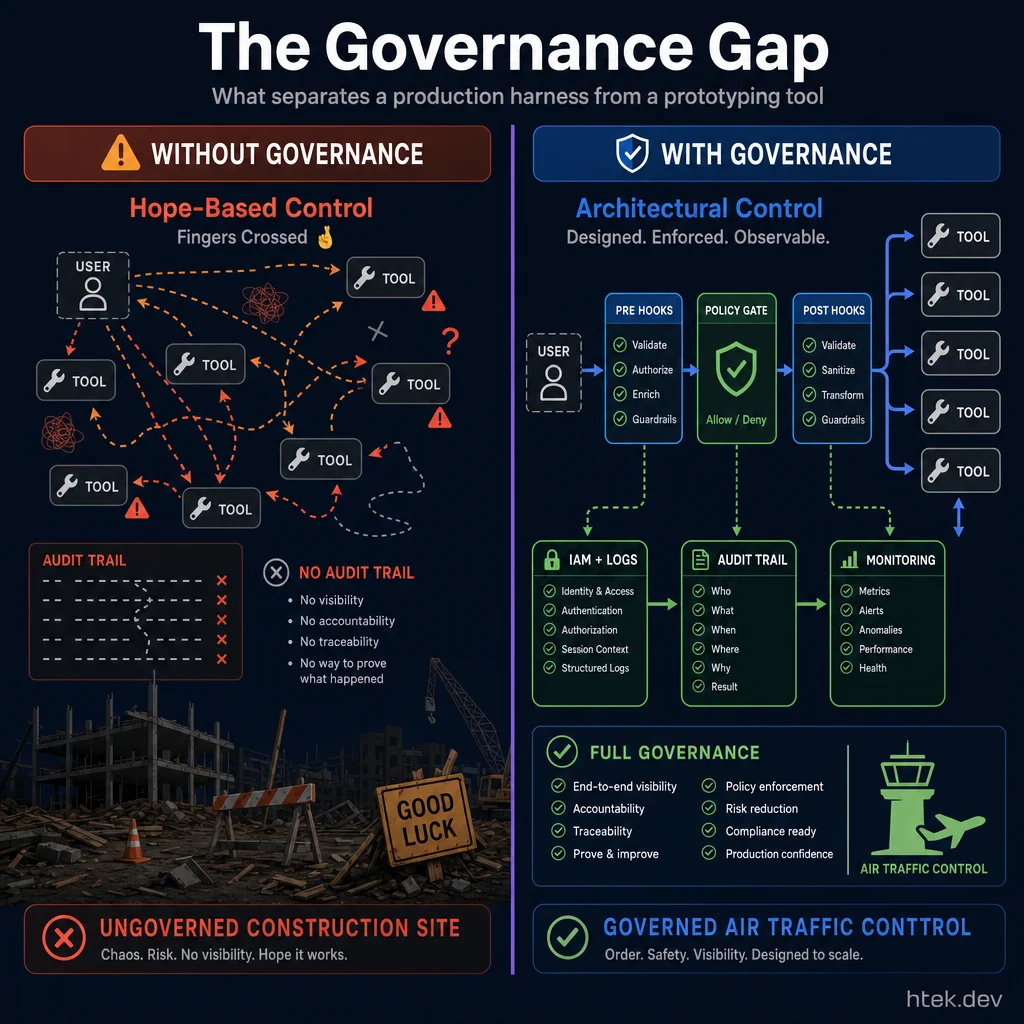 What separates a production harness from a prototyping tool — architectural control vs hoping agents behave.
Here’s what surprised me most when building this comparison: most agent platforms have no governance story at all. Cursor, Windsurf, CrewAI, Devin — they all have “user clicks approve” and that’s it. There’s no programmatic policy layer, no pre-tool-call interception, no audit trail that an enterprise compliance team would accept.
Only three platforms offer real governance primitives:
- GitHub Copilot — hooks.json with pre/post tool call interception + extension allowlists + org-level policies
- Amazon Bedrock Agents — IAM + CloudTrail + service control policies + VPC endpoints
- Google Vertex AI Agent Builder — IAM + Cloud Audit Logs + VPC Service Controls
Emerging governance entrants (May 2026):
- Microsoft Agent Governance Toolkit (AGT) — Microsoft released a public preview of the open-source AGT (May 28) — a runtime policy engine that evaluates agent actions against declarative policies before execution. AGT supports OWASP Agent Security standards, prevents unwanted operations, reduces token/logging risk, and works with any agent harness. This is the first vendor-neutral, open-source governance toolkit specifically designed for AI agents — filling a critical gap between harness-specific governance (Copilot hooks, Bedrock IAM) and no governance at all.
- Warp Oz — multi-harness control plane with consistent access controls, audit logs, per-team billing, credit caps, and least-privilege permissions applied uniformly across Claude Code, Codex, and Warp Agent. Self-hosted in K8s or Docker for data sovereignty.
- Kore.ai Artemis — AI-native agent platform (May 21) with Agent Blueprint Language (ABL) — a compiled, declarative language that standardizes how agents are defined, validated, and governed. Six built-in orchestration patterns (supervisor, delegation, handoff, fan-out, escalation, agent-to-agent federation) plus a Dual-Brain Architecture combining agentic reasoning and deterministic flows in parallel. Every decision is logged, traced, and analyzed in real-time. Launches on Microsoft Azure with broader cloud support forthcoming.
- Versa Zero Trust MCP — zero-trust architecture for Model Context Protocol that validates every AI agent action before execution. Human-in-the-loop governance via Versa Verbo. Available now with VersaONE Universal SASE Platform Release 23.1.1.
- Neura — pre-action governance layer that converts agent actions into Action Cards, routes them through a Relay for approval, and returns a Decision Receipt with trace and ledger context before execution.
- Redis Context Engine — while primarily a memory layer, Redis’s new Context Retriever uses the Model Context Protocol to auto-generate structured tools that give agents semantic access to business data.
The frameworks (LangChain, AutoGen, etc.) give you hooks to build governance, but you’re writing that layer yourself. That’s fine for startups but a non-starter for regulated enterprises. If governance is a requirement — and in 2026, it should be — your shortlist gets very short very fast.
I wrote about this gap in depth in my three layers your AI agent is missing article, and built @htekdev/agent-harness specifically to address it.
How to Choose
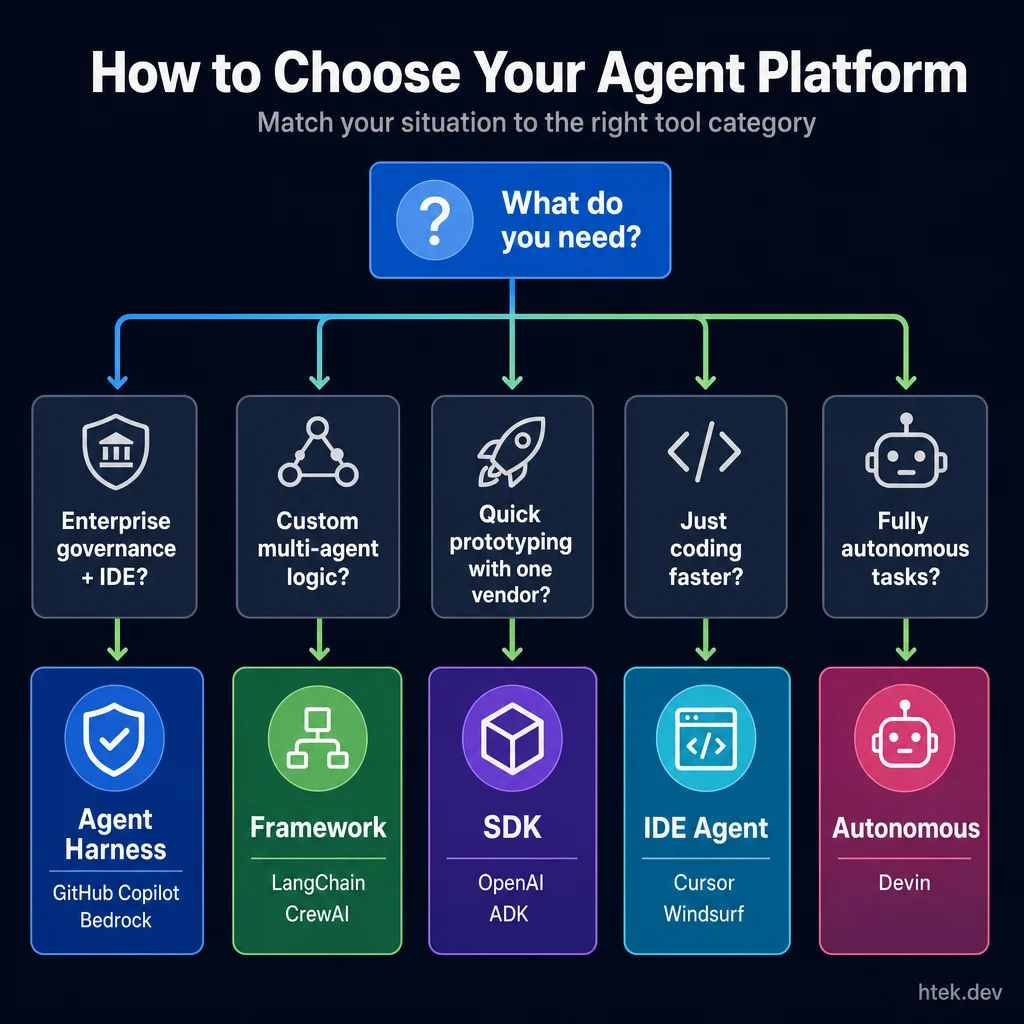 Match your situation to the right tool category — start with what you’re building, not which platform is “best.”
Don’t start with “which platform is best?” Start with “what am I building?”
| If you’re building… | Start here | Why |
|---|---|---|
| A custom AI application (chatbot, RAG app, copilot) | LangChain/LangGraph or Semantic Kernel | Maximum flexibility and model portability |
| AI coding assistance in your editor | GitHub Copilot | Broadest IDE + CLI + cloud coverage with governance |
| A quick AI coding setup, single-editor focus | Cursor | Most polished single-editor experience |
| Managed, governed agents on AWS | Amazon Bedrock Agents | Enterprise governance out of the box |
| Managed, governed agents on GCP | Vertex AI Agent Builder | Enterprise governance out of the box |
| A CLI-first agentic coding workflow | Copilot CLI or Claude Code | Extensions/hooks vs MCP extensibility |
| Multi-agent prototypes with roles | CrewAI | Fastest time-to-prototype for role-based systems |
| Multi-agent conversational systems | AutoGen | Rich debate/critique/collaborate patterns |
| Multi-agent graph-based orchestration | LangGraph | Best-in-class for stateful graph workflows |
| Full autonomous task delegation | Devin | Highest autonomy level (with supervision) |
| Internal copilots on Microsoft stack | Semantic Kernel | Native .NET/Azure/M365 integration |
| TypeScript-first agent apps | Mastra | Best observability for Node.js agents |
| Minimal multi-agent SDK | OpenAI Agents SDK | Production-grade harness/sandbox with 7 providers — strongest batteries-included SDK |
| Orchestrating multiple harnesses at scale | Warp Oz | Only multi-harness control plane with unified governance |
| One-call managed agent deployment on Google | Google Managed Agents API | Lowest-friction agent deployment (sandbox + tools in one call) |
| Kubernetes-native agent execution at scale | GKE Agent Sandbox | Sub-200ms provisioning, gVisor isolation, millions of agents |
| On-device browser agents with small models | Microsoft MagenticLite | Purpose-built SLM harness (4B–27B) with sandboxed browser execution |
| Ultra-long autonomous agent runs (hours/days) | Alibaba Qwen3.7-Max (model) + any harness | 35-hour continuous autonomous execution with 1,000+ tool calls |
| Enterprise multi-agent governance with declarative blueprints | Kore.ai Artemis | ABL compiled language, 6 orchestration patterns, AI-native lifecycle |
Where Copilot Stands — Honest Assessment
I use Copilot every day — it runs 50+ agents managing my home, my content pipeline, and my development workflow. So let me be direct about where it leads and where it doesn’t.
Where Copilot genuinely leads:
- Ecosystem breadth — Copilot now spans IDE (all major editors), CLI, cloud agent, dedicated desktop app, and API. The May 2026 Copilot App adds a fifth surface — a standalone agentic desktop — extending GitHub’s multi-surface workflow story
- Governance — hooks.json is unique. No other IDE agent gives you programmatic pre/post tool-call interception. For enterprises, this is a dealbreaker in Copilot’s favor.
- Extensions — the ability to turn any service into an agent tool via the extensions API is unique among IDE agents. Cursor and Windsurf are closed ecosystems.
- Enterprise trust — IP indemnity, content exclusions, SSO, audit logs, org-level policy. GitHub spent years earning enterprise trust, and it shows.
- GitHub integration — Issues → cloud agent → PR → Actions → deploy. The full software lifecycle, automated.
Where others have edges:
- Claude Code’s MCP protocol is more open and portable than Copilot’s extensions API. MCP works across vendors; Copilot extensions are GitHub-specific.
- Cursor’s in-editor UX is more polished for pure coding tasks. The diff/apply flow feels snappier.
- LangGraph’s orchestration is more flexible than Copilot CLI’s multi-agent patterns for complex stateful workflows.
- Bedrock and Vertex offer stronger cloud-native governance for non-GitHub-centric enterprises.
- Devin’s autonomy level exceeds what any IDE agent currently attempts.
This isn’t a contest where one tool wins everything. It’s a landscape where your constraints determine the right choice.
Notable New Entrants — May 2026
Microsoft Webwright — A terminal-native web agent framework from Microsoft Research (open-sourced May 24, 2026). Instead of predicting one browser action at a time, Webwright agents write and run Playwright code in an iterative loop (~1,000 lines of harness code across 3 modules: Runner, Model Endpoint, Environment). Scored 60.1% on the Odysseys long-horizon browsing benchmark (up from base GPT-5.4’s 33.5%) and 86.7% on Online-Mind2Web. Scripts are reusable as CLI tools. Supports OpenAI, Anthropic, and OpenRouter backends. (Source)
NVIDIA AI-Q — An open-source deep research skill (May 20, 2026) designed to plug INTO existing agent harnesses — Claude Code, Codex, and LangChain Deep Agents. Instead of each harness rebuilding retrieval and synthesis logic, AI-Q provides a SKILL.md + helper script pattern: delegate a research question to a running AI-Q server, get back a structured, citation-backed report. Secure MCP integration connects to authenticated enterprise data sources. Built on NVIDIA’s NeMo Agent Toolkit; deployable via Docker Compose or Helm on developer machines, on-prem clusters, or data centers. Dell AI Factory validation for regulated industries. The significance: agent harnesses are becoming composable — standardized skill interfaces mean capabilities can be shared across harnesses without reimplementation.
Google Agent Sandbox on GKE (GA) + Agent Substrate — Google Cloud’s secure, cloud-native execution environment for AI agent workloads on Kubernetes reached general availability (May 20, 2026). Customers including LangChain and Lovable are deploying millions of agents in production on the platform. Alongside the GA announcement, Google open-sourced Agent Substrate — a lightweight control plane that enables sub-second agent startup by pre-provisioning ready compute capacity and moving agents onto/off it in real time. Agent Substrate builds on the Agent Sandbox runtime and targets ultra-scale agent density for orchestrators that need to spawn thousands of concurrent agents. This is infrastructure-as-commodity: the execution layer for agents is becoming as standardized as container runtimes.
xAI Grok Build — xAI’s new AI coding agent launched May 24, 2026, competing directly with Claude Code and Codex. Runs on Grok 4.3 (~500B parameters) with parallel agent support for multi-task workflows. Pricing starts at $99/month (introductory) scaling to $300/month — positioning it as a premium enterprise tool rather than a developer mass-market play. SpaceX signed a definitive agreement to acquire Cursor for $60B in stock (June 16, 2026; expected Q3 close). Grok V9 (~1.5T parameters) with major coding upgrades reportedly arriving within weeks. (Source)
AWS MCP Server GA — AWS’s managed MCP server reached General Availability in May 2026, now part of the Agent Toolkit for AWS. Provides AI coding agents with full AWS API coverage, IAM-based governance (CloudTrail logging, CloudWatch metrics), sandboxed Python execution for multi-step tasks, and up-to-date documentation access. Free to use (pay only for consumed resources). Works with Claude Code, Kiro, Cursor, and Codex via MCP protocol. Currently available in us-east-1 and eu-central-1. (Source)
Notable New Entrants — Late May 2026
Google AX (Agent eXecutor) — Google open-sourced AX v0.1.0 (May 28, 2026), a Go-based runtime layer for long-running AI agents. AX solves the “4-hour crash” problem: when an orchestration process dies, agents die with it. AX provides kernel-style durable execution with sub-second agent startup and automatic recovery. The architecture separates the agent’s logic from its lifecycle — even if the host process crashes, AX preserves agent state and resumes from the last checkpoint. Works with any LLM provider. Apache 2.0 licensed. This complements Google’s Agent Sandbox (execution isolation) with a missing piece: execution durability. (Source)
Microsoft Agent Governance Toolkit (AGT) — Microsoft released AGT in public preview (May 28, 2026), an open-source runtime policy engine for AI agents. AGT evaluates agent actions against declarative policies before execution — preventing unwanted operations without modifying agent code. Supports OWASP Agent Security standards, plugs into any agent harness (not just Microsoft products), and targets the governance gap this article has highlighted. This is significant: governance is becoming a separate, composable layer rather than something each harness must build from scratch. (Source)
Pydantic AI Harness — The Pydantic team launched an official capability library (May 28, 2026) for Pydantic AI agents. It provides standalone building blocks — tools, hooks, instructions, and model settings — to compose agents from reusable capability modules. Each module is independently testable and version-controllable. The significance: this is the first framework to separate agent capabilities from agent definitions, enabling a marketplace-style approach to agent composition.
Notable Developments — May 30, 2026
Replit + Visa Trusted Agent Protocol — Replit announced a strategic partnership with Visa (May 30, 2026) to embed native payment infrastructure and a cryptographic identity layer directly into AI agent workflows. The Visa Trusted Agent Protocol enables agents to undergo onboarding and certification for real-time identity verification and safer machine-to-machine (M2M) transactions — with guardrails including user consent, authentication, spending controls, and defined transaction limits. Over 1,000 Visa employees already use Replit for prototyping. Replit also launched self-serve Enterprise access (contracts up to $200k) with enhanced governance (SSO, SCIM, RBAC, audit logs, SOC-2) and a new Solution Partner Program with Accenture, Slalom, and Hexaware. The significance: agent commerce is becoming a first-class infrastructure layer, not an afterthought. The Trusted Agent Protocol introduces a model where agents earn cryptographic credentials to transact autonomously — a pattern other platforms will likely adopt.
Hexo Labs SIA — Self-Improving AI — Hexo Labs open-sourced SIA (Self-Improving AI) under MIT license (May 28, 2026). SIA introduces a dual-lever self-improvement loop: after each run, a Feedback-Agent can rewrite the scaffold (harness) OR trigger a LoRA weight update, or both. Architecture splits into three LLM-driven roles — Meta-Agent (initial scaffold), Task-Specific Agent (execution + logging), and Feedback-Agent (evaluation + change decisions). Claims 350× acceleration over baselines on OpenAI’s MLE-Bench. First known framework to edit both scaffold and model weights in a single improvement loop. (Source)
Notable Developments — May 31, 2026
GitHub Copilot AI Credits go live June 1 — Starting tomorrow, GitHub switches Copilot to token-priced AI Credits while keeping the familiar seat tiers in place. One AI Credit equals $0.01, code completions and Next Edit Suggestions stay unlimited, Business gets promotional $30/user/month credits for three months and Enterprise gets $70/user/month, and admins can manage spend at the enterprise, cost-center, and user level. The significance: Copilot is turning pricing into a governable enterprise feature — more transparent, more flexible, and easier to budget than pretending long-running agents can stay flat-rate forever.
A2A Protocol v1.2 reaches real production scale — A2A is now running at 150+ organizations in production, not just pilots, with cryptographically signed agent cards for domain verification under the Linux Foundation’s Agentic AI Foundation. Microsoft, AWS, Salesforce, SAP, and ServiceNow are already running it. The key takeaway is architectural clarity: MCP handles tool/data access while A2A handles cross-agent coordination.
Lovable subagents — Lovable’s primary build agent can now spawn parallel Researcher, Reviewer, and Synthesizer subagents, each with its own activity-log thread for traceability. This is a direct answer to the fix-loop problem in vibe coding: research the existing codebase before patching, review the diff before it lands, and keep auxiliary summarization work out of the main agent’s context window.
Kilo Code keeps compounding — Kilo reports 3M+ downloads and 40T+ processed tokens across VS Code, JetBrains, CLI, Cloud Agents, and Slack. Supplemental coverage adds 1.5M+ users plus Teams and KiloClaw pricing and a $45M Series B with 3,200 active Slack workspaces and a 78% commit-acceptance rate. The bigger point: open-source, review-first coding agents are no longer side projects — they’re becoming serious multi-surface platforms.
MCP adoption keeps accelerating — Model Context Protocol now sits at 97M monthly SDK downloads, 9,400+ published servers across registries, and 78% of enterprise AI teams reporting at least one MCP-backed agent in production. Additional coverage reinforces the same pattern: MCP is no longer experimental glue code, it’s baseline infrastructure.
Replit Canvas expands into a multimodal design workspace — Replit added GPT-Image 2 image generation, Seedance video generation, animated SVGs, and multi-edit controls for layout and typography inside Canvas. The significance: design surfaces are becoming first-class agent workspaces instead of chat sidecars.
Notable Developments — June 1, 2026
NVIDIA NemoClaw Agent Framework — NVIDIA launched NemoClaw at GTC Taipei 2026, an open-source agent framework with templates for planning, reasoning, execution, and delegation. Part of the NVIDIA Agent Toolkit, NemoClaw connects with popular harnesses (LangChain, CrewAI, Semantic Kernel) and pairs with the OpenShell secure runtime for containerized, policy-driven agent governance. CUDA-X libraries are exposed as agent skills. Built for enterprise-scale autonomous agents that act as “digital coworkers.” Nemotron 3 Ultra (550B parameters) ships alongside as the recommended model for long-running agent workloads. Enterprise partners include SAP, ServiceNow, Accenture, and Dell. The significance: NVIDIA is entering the agent orchestration layer, not just providing models and GPUs — NemoClaw is a full framework that competes with LangGraph and CrewAI while leveraging NVIDIA’s hardware ecosystem for on-device execution via RTX Spark. (Source)
GitHub Copilot AI Credits are now live — The usage-based billing model officially launched June 1. One AI Credit = $0.01. Code completions and Next Edit Suggestions remain unlimited. Business seats get promotional $30/user/month credits (3-month intro), Enterprise gets $70/user/month. Admins have granular spend controls at enterprise, cost-center, and user levels. The transition preserves Copilot’s position as the most enterprise-governable AI coding platform — usage transparency is a feature, not a limitation.
Cursor Cloud Agents + Jira Integration — Cursor’s Cloud Agents can now be triggered directly from Jira tickets, using the work item title, description, comments, and repository settings to scope the task, then posting completion updates and PR links back to Jira. The integration supports Atlassian MCP authentication for full bidirectional read/write access (read issues, edit descriptions, create linked tickets). Early community feedback shows the auth propagation still maturing, but the workflow pattern is compelling: ticket becomes scoped input → agent executes → PR + Jira update as output. Teams using .cursor/rules/*.mdc for per-area governance report cleaner diffs and shorter reviews.
MiniMax M3 — MiniMax released M3, a frontier model with a one-million-token context window and native multimodal input (image/video), specifically designed for coding agents and long-running automation workflows. Paired with MiniMax Code for multi-stage producer-verifier pipelines. Aimed at developers building complex agent workflows that need extended context over many files. The significance: Chinese AI labs are now building models specifically optimized for agent harnesses — not just general chat — increasing the model options available to BYOM frameworks like LangGraph and CrewAI.
OpenCode — Open-Source Terminal Agent — OpenCode is an emerging open-source, model-agnostic terminal coding agent that competes directly with Claude Code. Supports Claude, GPT, Gemini, and local models. Features include a polished TUI (terminal UI), multi-file editing, and the flexibility to switch between any LLM provider. Key advantage over Claude Code: no vendor lock-in. Key disadvantage: less polished instruction-following and speed compared to Claude’s managed experience. Positioned for developers who want Claude Code’s workflow without Anthropic dependency.
Kore.ai Artemis Edition — Kore.ai launched Artemis, a new-generation Agent Platform for building, governing, and operating enterprise multi-agent AI systems. Features Agent Blueprint Language (ABL) for declarative agent definition, built-in governance and observability, and production-grade architecture for multi-agent orchestration at enterprise scale. Targets regulated industries needing auditable agent behavior. The significance: enterprise agent governance platforms are multiplying — joining Microsoft’s AGT and NVIDIA’s OpenShell in the “agent control plane” space.
JetBrains Mellum2 — Open-Source 12B MoE Agent Model — JetBrains open-sourced Mellum2, a 12B-parameter Mixture-of-Experts model where only 2.5B parameters are active per token — delivering 2× faster inference than comparable models while remaining competitive on code generation, reasoning, and math benchmarks. Released under Apache 2.0, Mellum2 is purpose-built for the intermediate steps in agent workflows: routing, RAG, summarization, sub-agent orchestration, and private deployments. Available on Hugging Face with a full technical report. The significance: open-source models purpose-built for agent infrastructure are arriving — not to replace frontier models at the outer loop, but to handle the high-throughput, latency-sensitive inner operations (routing, validation, retrieval) that make agents affordable at scale. GitHub Copilot and other harnesses that support bring-your-own-model can leverage Mellum2 for these efficiency-critical sub-tasks.
SkipLabs Skipper — Closed-Loop Autonomous Coding Agent — SkipLabs launched Skipper, a closed-loop coding agent that takes a single prompt and returns a running, validated service — with zero developer review in the loop. Created by Julien Verlaguet (creator of Facebook’s Hack programming language) alongside engineers from Facebook, Microsoft, Microsoft Research, and Meta, Skipper positions itself as the architectural substrate beneath foundation models. Rather than competing with Claude, GPT, or Gemini, it routes tasks to the best-suited model, autonomously decomposes work, generates and validates code, and delivers production-ready software. SkipLabs argues that “building correct software has always been an architecture problem disguised as a coding problem” — AI didn’t change that, it made it more urgent. The significance: a new category of “developer-optional” agent is emerging — Skipper represents the logical extreme of autonomous coding where the human provides intent and the agent handles everything through to production deployment. Whether this proves viable at enterprise scale or is limited to greenfield services remains to be validated.
Notable Developments — June 2, 2026
GitHub Copilot Max + budget controls GA — GitHub launched Copilot Max as an upgrade path for existing Student, Pro, and Pro+ subscribers, with the highest included AI Credits usage and spending limits for power users. User-level budget controls are now GA for organizations and enterprises, and Copilot code review consumes GitHub Actions minutes. The significance: Copilot’s pricing and governance model is becoming a complete enterprise control surface, not just a seat license.
LangGraph 1.2.3 ships v3 streaming — LangGraph’s June 1 release adds v3 streaming support to RemoteGraph, WebSocket transports in the SDK, named tool-dispatched subagents via lc_agent_name, and multiplexed message/tool projections through interleave_projections. The significance: LangGraph is maturing from a graph orchestration library into a more observable, production-grade runtime for distributed multi-agent systems.
CrewAI 1.14.6 stabilizes ACP Beta — CrewAI promoted 1.14.6 from pre-release to stable with Agent Control Plane (ACP) Beta, a managed orchestration layer for multi-crew coordination. The release also hardens checkpoint restore, improves StdioTransport security, and moves the Skills Repository behind CREWAI_EXPERIMENTAL. The significance: CrewAI is shifting from lightweight role-play orchestration toward a managed control plane with stronger runtime hygiene.
Mistral Vibe — Le Chat becomes a unified Work + Code agent platform — Mistral rebranded Le Chat to Vibe on May 28, 2026, splitting the product into Vibe for Work and Vibe for Code. Work mode connects to Google Workspace, Outlook, SharePoint, Slack, and GitHub to scan inboxes, pull spreadsheet data, build reports, and route outputs into systems like Notion or SharePoint, with users reviewing the task plan before execution per The Decoder’s coverage. Code mode runs agents in isolated cloud sandboxes via the code.mistral.ai web app, a new VS Code extension, and the CLI, where /teleport moves live sessions between local and cloud; jobs can run in parallel, survive a closed laptop, fix bugs, and open pull requests automatically, with Slack-launched jobs planned for June. The platform is powered by Mistral Medium 3.5 and priced at Free, Pro (€14.99/month), Team (€24.99/user/month or €19.99 annual), and Enterprise custom, with students getting 50% off Pro. The significance: Mistral has now entered the agentic IDE/workspace category — not as a narrow code assistant, but as a unified Work+Code platform where the same agent shares connectors, context, and identity across productivity and software tasks.
Google Antigravity 2.0’s architecture is now much clearer — Follow-up reporting from ByteIota and AwesomeAgents confirms Antigravity 2.0 is really five products sharing one runtime: a desktop app, the Go-based agy CLI, the Python google.antigravity SDK, a Managed Agents API with serverless per-run billing through Gemini API, and an enterprise platform with SLAs. Google is also pairing MCP for tool access with native A2A support for agent-to-agent delegation across 150+ organizations, plus a built-in browser agent for UI testing and visual regressions, native voice control, and a multi-model story optimized for Gemini 3.5 Flash but extending to Claude Sonnet 4.5 and GPT-OSS. The caveat matters: terminal sandboxing currently relies on Apple Seatbelt on macOS only, leaving Linux and Windows without the same guardrail. The significance: Google’s story is no longer “desktop coding app” — it’s a full multi-surface agent platform with a much clearer split between local tooling, hosted agents, and enterprise deployment.
Canonical turns NVIDIA OpenShell into a one-command Ubuntu install — At COMPUTEX on June 1, Canonical announced an openshell snap for Ubuntu: sudo snap install openshell, then openshell sandbox create. The package runs each agent inside an isolated sandbox with corporate policy enforcement, and Canonical says NVIDIA is working with Microsoft on the Windows agent experience while Red Hat is also integrating OpenShell. The significance: secure agent runtimes are getting distro-level distribution — OpenShell is moving from niche runtime to standard install path for enterprise Linux fleets.
Microsoft Foundry Agent Service at Build 2026 — Microsoft Foundry announced a comprehensive agent framework and hosting service for scalable AI agents. The Agent Framework now supports skills, memory, and middleware with first-class integration into GitHub Copilot SDK and Claude Agent SDK — meaning developers can build agents that leverage multiple harnesses while deploying through Foundry’s managed infrastructure. Toolboxes (public preview) provide a single managed endpoint for all tool types with auto-auth, lifecycle management, and governance. Skills are cataloged, project-scoped, and discoverable as MCP resources. Tracing and evaluation enter GA in late June 2026, enabling end-to-end production tracing, regression scoring, and actionable improvements via the Foundry Control Plane. The positioning is strategic: the Agent Framework acts as a flex point, not lock-in — investments in LangGraph, Copilot SDK, or Claude Agent SDK carry forward.
Agent Control Standard (ACS) — Open Runtime Governance — Also at Build 2026, Microsoft announced ASSERT (Adaptive Spec-driven Scoring for Evaluation and Regression Testing) and the Agent Control Standard — a portable runtime control specification placing deterministic safety and security controls at five lifecycle checkpoints (input, LLM, state, tool execution, output). Policies are defined in standard YAML, enabling portability, versioning, and auditing across any framework. The ACS is open-source under MIT license and designed for broad ecosystem adoption. The significance: enterprise agent governance is getting a cross-framework standard — write your control policies once, enforce them across LangGraph, Copilot, Foundry, or custom harnesses.
OpenAI Codex — Sites, Annotations, and Role-Specific Plugins — OpenAI updated Codex with enterprise-focused agent workspaces. Sites enable rapid, hosted web workspaces for interactive, live-updating enterprise apps built by agents. Annotations provide in-place, localized context editing. Six Role-Specific Plugin bundles cover 62 apps (Snowflake, Figma, Salesforce, etc.) and 110 automated skills, tying Codex to common business workflows. The move positions Codex not just as a developer tool but as a general operating environment for white-collar knowledge work. Available in preview for Business/Enterprise via CLI and desktop app.
Claude Code Dynamic Workflows — Parallel Agent Coordination — Anthropic shipped Dynamic Workflows in research preview for Claude Code — a capability that dynamically creates and manages orchestration workflows across many AI subagents. It breaks complex tasks into subtasks, runs them in parallel, validates results, and iterates until convergence. Use cases include wide-scale bug investigations, large migrations, security audits, and architectural analyses. Available on Max/Team/eligible Enterprise plans, via the Claude API, and through partner platforms (Amazon Bedrock, Google Vertex AI, Microsoft Foundry). Higher token usage than typical Claude Code runs. The significance: Anthropic is shifting from single-agent optimization to multi-agent coordination — a direct challenge to LangGraph and CrewAI’s orchestration positioning.
LangGraph 1.2.4 + LangChain 1.3.4 maintenance patches — LangGraph 1.2.4 (June 2) adds factory-graph integration tests and a backward-compat fix for _on_started overrides. LangChain 1.3.4 (June 2) improves HITL (human-in-the-loop) rejection guidance. Both are maintenance releases — no new features, confirming the ecosystem is in a stabilization phase after the v3 streaming additions in 1.2.3.
LangChain publishes “Model Neutrality” positioning (June 4, 2026) — LangChain VP Neil Dahlke made the formal case for open, model-neutral harnesses as a structural answer to lab-owned orchestration lock-in, drawing a direct parallel to how Terraform responded to cloud lock-in. The core argument: model labs are racing to capture the orchestration layer because token differentiation is eroding, and business logic trapped in a lab’s harness stays captive to their token pricing. The response: an open, multi-model, profile-aware harness — LangChain’s explicit positioning. This matters for the comparison because it reframes LangChain/LangGraph not just as a feature choice but as a strategic answer to a governance problem. Teams evaluating lab-native harnesses (OpenAI Agents SDK, Claude Code SDK, Vertex Agent Builder) should read this framing.
Microsoft Agent Framework consolidates AutoGen + Semantic Kernel — Confirmed across multiple sources: Microsoft merged AutoGen and Semantic Kernel into the Microsoft Agent Framework v1.0 (GA April 2026), intended as the default for .NET and Azure-native teams. AutoGen is moving to maintenance mode for new projects, with its community continuation (AG2) gaining streaming and event-driven features but without formal commercial support. The framework consolidates multi-agent abstractions with enterprise tooling. Teams choosing between frameworks in 2026: .NET/Azure → Microsoft Agent Framework; GPT-centric → OpenAI Agents SDK; stateful workflows → LangGraph; rapid prototyping → CrewAI.
Microsoft Execution Containers (MXC) — OS-Level Agent Sandbox — At Build 2026, Microsoft introduced MXC — a policy-driven execution layer built into Windows and WSL that lets developers and IT administrators declare exactly what an AI agent can and cannot access, with boundaries enforced at runtime by the OS kernel. MXC is not a product — it’s an SDK and policy model providing a “composable sandbox spectrum” from lightweight process isolation (already used by GitHub Copilot CLI) up to micro-VMs, Linux containers, and full cloud instances on Windows 365. OpenAI and NVIDIA are already on board. It integrates with Agent 365, Entra, and Intune for enterprise-grade identity, containment, and auditability. The significance: agent sandboxing is becoming an OS primitive, not an app feature — MXC lets any agent framework (LangGraph, Copilot, Claude Code) inherit enterprise-grade containment without reimplementing it.
Copilot Code Review: Agent Skills, MCP Support + Medium Analysis Tier — Two public previews shipped for Copilot code review: (1) Agent skills and MCP support that bring your organization’s tools and standards into every review — custom skills invoke internal tools during analysis, MCP server connections pull context from issue trackers, documentation, service catalogs, and incident tooling. (2) A new Medium analysis tier that routes complex PRs to a higher-reasoning model for deeper analysis of security-sensitive code and cross-service changes (Low remains default for straightforward work). Platform teams configure once and get consistent behavior across both code review and the cloud coding agent. Separately, Copilot code review for Azure Repos entered technical preview — bringing on-demand PR reviews directly into Azure DevOps with no GitHub Copilot license required (billed via AI Credits). The significance: Copilot’s code review is evolving from AI annotation into a context-aware agent — pulling from your entire organizational context, scaling reasoning to match complexity, and expanding beyond GitHub into Azure DevOps.
Copilot CLI at Build 2026: Rubber Duck GA, Voice GA, and New Terminal UI — GitHub Copilot CLI’s largest UX overhaul yet. The Rubber Duck agent is now generally available — a conversational thinking-partner that helps developers work through architectural decisions, debugging puzzles, and complex problems without triggering any code changes (named after the classic rubber duck debugging technique). Voice input is also GA — narrate your session and work hands-free. A redesigned terminal interface with tabs for Issues, Pull Requests, and Gists is available via /experimental, alongside theme-aware semantic colors and responsive layouts that adapt to narrow terminals. Prompt scheduling (/experimental) lets you queue tasks to run later. The significance: Copilot CLI is expanding beyond code execution into a complete developer workflow surface — thinking, talking, and scheduling, not just running agents.
Copilot in JetBrains: Agent Picker, Slash Commands, and Agent Debug Panel — The June 2 JetBrains update delivers multiple new Copilot capabilities for IntelliJ IDEA and related IDEs: Agent picker support lets developers select which agent handles their session; new slash commands expand in-session control; and an agent debug panel (public preview) provides visibility into what the agent is doing during a session — a major step toward the observability gap that has limited enterprise adoption of IDE agents. This update also marks the beginning of a phased transition from legacy Copilot mode to Copilot CLI agent as the default in JetBrains IDEs. The significance: JetBrains is becoming a first-class Copilot surface — not just an extension port, but a fully capable agent environment with its own debug tooling.
GitHub Copilot in Eclipse: BYOK, Skills, and Chat Refresh — A major Eclipse plugin update ships at Build 2026: a refreshed chat view with a new combo picker for chat mode and model selection; Bring Your Own Key (BYOK) for Business and Enterprise plans; skills and prompt file support — matching VS Code behavior so enterprise teams can distribute standardized agent tooling across their full IDE fleet (Eclipse included); improved ABAP support for SAP developers; and better context visibility into what’s in the agent’s session window. The significance: Eclipse joins VS Code as an enterprise-managed Copilot surface — BYOK and skills distribution close the gap that previously made Eclipse a second-class citizen in enterprise Copilot deployments.
Notable Developments — June 3, 2026
Hermes Desktop — Open-Source Agent Gets a Native GUI — Nous Research released Hermes Desktop in public preview — a native cross-platform GUI (macOS, Windows, Linux) for Hermes Agent v0.15.2, released under MIT license. The desktop app shares the same agent core, configuration, API keys, sessions, skills, and memory as the CLI and gateway (not a fork). Key capabilities: streaming responses with live tool activity, a right-hand preview pane for web pages/files/tool outputs, file browser, voice I/O, and cross-surface session continuity (start a conversation in Desktop, resume in CLI, or vice versa). Hermes supports sub-agent delegation with individual terminals and Python scripts, five sandbox backends (local, Docker, SSH, Singularity, Modal), and 300+ models via the Nous Portal. Multi-platform messaging integration spans Telegram, Discord, Slack, WhatsApp, Signal, and email. The significance: open-source agent infrastructure is moving from terminal-first tooling to desktop products that can compete for everyday team workflows — Hermes Desktop makes Nous Research’s agent platform accessible to non-terminal users while preserving the developer-grade capabilities underneath.
Notable Developments — June 3, 2026 (PM)
Devin Desktop — Cognition Rebrands Windsurf as Agent Command Center — Cognition shipped Devin Desktop, rebranding the Windsurf IDE into a unified agent management platform. The update delivered over-the-air to existing Windsurf users. Devin is now four surfaces: Desktop (IDE + agent manager), Cloud (autonomous agent), CLI, and Review. Key feature: the Agent Command Center lets developers coordinate local and cloud AI agents, PRs, and project context from a single surface. Devin Desktop supports the Agent Client Protocol (ACP), meaning third-party agents (Claude Code, custom agents) can run alongside Cognition’s own agents. Walden Yan (co-founder) positions this as the IDE becoming an orchestration layer — not just a coding surface. The significance: Cognition is pivoting from “autonomous agent” to “agent platform” — the most dramatic strategic shift in the IDE agent space since Google acquired Codeium. Devin Desktop directly competes with Cursor on the IDE side while maintaining the autonomous Devin Cloud agent as a differentiated capability.
MAI-Thinking-1 — Microsoft’s Enterprise Reasoning Model — Microsoft AI launched MAI-Thinking-1, a 35B-active / ~1T-total parameter sparse Mixture-of-Experts model designed for enterprise coding and mathematical reasoning. Benchmarks: 97.0% on AIME 2025, strong SWE-Bench Pro scores. Available via Azure AI Foundry and GitHub Models. When paired with the Microsoft Agent Framework or GitHub Copilot, it provides a high-reasoning option for complex multi-step agent tasks (architecture decisions, security analysis, mathematical proofs). The significance: Microsoft now has a reasoning-specialized model to complement MAI-Code-1-Flash — fast model for everyday coding, thinking model for complex agent decisions. This mirrors the Low/Medium analysis tier pattern already shipping in Copilot Code Review.
Notable Developments — June 4, 2026
Google ADK v2.2.0: Default Model Switches to Gemini 3 Flash Preview Ahead of October Shutdown — Google ADK v2.2.0 (June 4) ships two breaking changes and a set of meaningful enhancements. The most impactful: LlmAgent’s default model changes from gemini-2.5-flash to gemini-3-flash-preview, a preview-tier model, ahead of the gemini-2.5-flash shutdown scheduled for October 16, 2026. Any ADK agent running without an explicit model= parameter now routes to gemini-3-flash-preview by default — teams wanting to preserve prior behavior must pin model=gemini-2.5-flash explicitly. DEFAULT_LIVE_MODEL is unchanged. The second breaking change aligns ADK with Google GenAI SDK v2.0.0: the turn-based API helpers in interactions_utils.py are renamed (convert_contents_to_turns to convert_contents_to_steps), moving from turns to steps terminology throughout. Beyond the breaks: ADK v2.2.0 adds an OpenTelemetry AutoTracingPlugin for zero-config observability instrumentation — a meaningful addition for teams running harness observability alongside LangSmith or LangFuse. Security-aware users will note two patches: a Zip Slip path traversal block in Agent Builder file tools, and a starlette/fastapi CVE-2026-48710 patch. MCP users get a fix for initialization hangs and task group leaks. The October 2026 model sunset timeline is now hardwired into ADK defaults — signaling Google actively advancing its Gemini model generation within the ADK ecosystem. (Source: google/adk-python v2.2.0 release, June 4, 2026)
Notable Developments — June 5, 2026
Augment Code Cosmos — GA: Operating System for Agentic Engineering Teams — Augment Code made Cosmos generally available to all plan tiers on June 3, 2026 (covered June 5 by SiliconANGLE). Cosmos is described as “the operating system that turns agents and humans into a coordinated team across your whole SDLC” — not a single agent or workflow engine, but a platform where specialized agents coordinate across triage, spec, implementation, review, testing, deployment, and feedback. Key differentiators: a shared virtual filesystem and system-wide memory so agents build on each other’s work; teams of agents that coordinate, delegate, and pull humans in when judgment matters; Cosmos agents that help build Cosmos — describe what you want in natural language, the system configures the automation; run anywhere — Augment’s cloud sandboxes, self-hosted VMs, or developer laptops; MCP support plus webhooks for wiring into any existing tool; and encoded institutional memory that carries patterns, conventions, and corrections forward across sessions and teammates. The platform works via web, mobile, CLI, Slack, and Linear — agents meet the work where it’s already happening. Available to all team plans.
The significance: Augment Code is staking a claim in the “agent operating system” category this article has been tracking. Where most AI coding tools focus on IDE-level productivity, Cosmos competes at the team and lifecycle layer — directly challenging enterprise platforms like Microsoft Foundry Agent Service, Warp Oz, and Kore.ai Artemis. The public preview launched May 4, 2026; GA makes this a viable option for teams ready to deploy agents beyond the code editor.
Notable Developments — June 6, 2026
Microsoft Agent Framework BUILD 2026 — Agent Harness, CodeAct, Hosted Agents — At BUILD 2026, the MAF team shipped the most comprehensive harness infrastructure update since the 1.0 GA. The headline: Agent Harness is now first-class — chatClient.AsHarnessAgent() turns any chat client into a production agent in one call, with automatic context compaction (monitors token usage, compacts history mid-loop to prevent overflow), built-in instruction merging, and a complete set of first-party providers: FileMemoryProvider (session-scoped persistent notes across turns, stored in agent-file-memory/{session}/), FileAccessProvider (general file I/O), TodoProvider (multi-step task tracking in session state), AgentModeProvider (plan vs execute operating modes), AgentSkillsProvider (skill discovery and execution from the filesystem), and BackgroundAgentsProvider (fan-out orchestration to parallel child agents). ToolApprovalAgent middleware adds ‘don’t ask again’ approval rules for sensitive tool calls; OpenTelemetryAgent provides automatic Semantic Conventions tracing with pluggable storage backends. CodeAct (alpha, agent-framework-hyperlight package) collapses multi-step tool-call chains into a single model turn: instead of orchestrating one tool at a time, the model writes a short script that calls tools via call_tool(...), executes it once in a Hyperlight microVM sandbox, and returns a consolidated result — cutting latency and token usage for orchestration-heavy agents. Foundry Hosted Agents (preview) takes a local MAF agent to production in a few lines: scale-to-zero pricing, per-session VM-isolated sandbox with persistent filesystem across scale-down events, built-in OpenTelemetry traces to Application Insights, and automatic session management. The significance: MAF is now architecturally competitive with Claude Code and the OpenAI Agents SDK on harness completeness — memory persistence, parallel sub-agents, approval gates, observability, and sandbox isolation are all built-in and composable. (Source)
Chalk Compute — Time-Traveling Agent Sandboxes in Your Cloud — Chalk launched an enterprise agent runtime (June 1, 2026) that deploys gVisor-hardened sandboxes entirely inside your private VPC (AWS EKS and GCP GKE; Azure AKS coming). The headline capability: temporally consistent evaluations — a single knowledge_cutoff parameter routes every tool call through the Chalk Context Engine locked to that timestamp. As far as the agent knows, it’s evaluating against your real production data as of that exact moment — no synthetic fixtures. This closes the outer eval loop: build the agent → evaluate against real historical context → fix what breaks → redeploy. Infrastructure: scales to 10,000 isolated containers in under 10 seconds via content-addressed image caching; gVisor intercepts syscalls before reaching the host; each sandbox gets its own OIDC-compliant cloud identity; outbound egress locked to a hostname or CIDR allowlist. Customer data, tool calls, and logs stay in your VPC — Chalk’s metadata plane orchestrates, your data plane owns the data. Tool calls route through the Chalk MCP gateway. Runtime open-sourcing planned for this summer. The significance: the evaluation harness is becoming as critical as the execution harness — teams shipping production agents need to replay historical scenarios against real context. Chalk Compute is the first product to make temporally consistent agent evaluation a first-class enterprise offering. (Source)
Anthropic Defending-Code Reference Harness — Autonomous Security Scanning — Anthropic open-sourced a reference harness for autonomous vulnerability discovery and remediation with Claude (released May 22, 2026; broadly covered June 5 with 4,100+ GitHub stars). The harness implements a full recon → find → verify → report → patch pipeline for C/C++ memory vulnerabilities using Docker and ASAN, with a /customize skill to port to any language or vulnerability class. Claude Code skills included: /quickstart, /threat-model, /vuln-scan, /triage, /patch. Security architecture: the autonomous pipeline executes target code inside a gVisor sandbox and refuses to run outside it unless explicitly overridden; the interactive skill workflow (read/write-only) is safe for unsandboxed use. Companion managed product: Claude Security (hosted, Anthropic) finds and fixes vulnerabilities across multiple projects with a multi-stage false-positive reduction pipeline and full finding lifecycle management (triage → fix validation → rapid fix generation). The significance: security is where autonomous agents are crossing from demo to production workflow first — the harness patterns here (recon phase, multi-stage verification, gVisor sandboxing, human triage gate) are reusable for any high-stakes autonomous workflow. (Source)
Hermes Agent (New Entrant)
Hermes Agent is an open-source AI agent platform for automation, coding, and task orchestration. Current version: v0.16.0 (June 5, 2026) — the Surface Release — shipping native desktop apps (macOS, Windows, Linux), a browser web admin panel, OAuth remote gateway, and concurrent multi-profile sessions. Earlier milestones: the v0.15.0 release (May 28, 2026) represented a massive architectural overhaul — 1,302 commits, 747 merged PRs, 1,746 files changed, and 560+ issues closed since v0.14.0. On June 3, Nous Research shipped Hermes Desktop — a native GUI preview (v0.15.2) that evolved into the full v0.16.0 platform.
May 28, 2026 (v0.15.0): The core agent loop was refactored from 16,083 lines to 3,821 (76% reduction), split across 14 modules. The “Kanban” multi-agent system now supports orchestrator auto-decomposition, swarm topology creation (hermes kanban swarm creates a full Swarm v1 graph in one command), scheduled tasks, per-task model overrides, and worktree-per-task isolation. Performance improvements include 63% cold start reduction (701ms → 258ms) and 47% fewer function calls per conversation. Security additions target prompt-injection and “Brainworm”-class attacks with memory scanning and tool output delimiters. Credential management moved to Bitwarden Secrets Manager for centralized secret storage.
✅ Pros:
- Open-source with aggressive development pace (747 PRs in one release cycle)
- Multi-agent Kanban orchestration with swarm topologies
- Strong security focus — prompt-injection defenses, tool output delimiting
- Per-task model overrides — route cheap models to subtasks, strong models to verification
- Fast startup (258ms cold start) and low per-conversation overhead
- 23 messaging platform integrations
- MCP catalog support with interactive picker
❌ Cons:
- Newer project — ecosystem and community smaller than LangChain/CrewAI
- Rapid development pace means frequent breaking changes
- Documentation may lag behind the aggressive release cadence
- Less enterprise adoption and commercial support compared to established frameworks
- Complex architecture may be overkill for simple agent use cases
🎯 Best for: Developers who want an open-source, multi-agent orchestration platform with built-in security hardening and aggressive performance optimization. The Kanban swarm pattern is particularly compelling for teams managing complex, decomposable coding tasks across multiple worktrees.
The Bottom Line
The agent harness landscape in 2026 is where container orchestration was in 2016 — fragmented, fast-moving, and converging toward patterns that aren’t fully standardized yet. The CNCF’s four pillars of platform control (golden paths, guardrails, safety nets, manual review) are emerging as the design principles every harness will eventually implement.
May 2026 signals: The trend toward “agent operating systems” is accelerating. GitHub’s Copilot App treats each task as an isolated session. Anthropic’s managed agents introduce hierarchical orchestration with safety critics. OpenAI is collapsing its multi-product portfolio into a single agentic surface. And infrastructure players like Redis are shipping dedicated memory layers for agents. The harness isn’t just wrapping the model anymore — it’s becoming the operating system.
The multi-harness era (May 20–21): Two announcements signal where this is heading. Google’s Managed Agents API collapses weeks of agent deployment infrastructure into a single API call — provision a sandbox, wire tools, and execute all in one request. Meanwhile, Warp’s Oz platform shipped the first multi-harness control plane: run Claude Code, Codex, and Warp Agent side by side with unified governance. The implication is clear — enterprises won’t pick one harness. They’ll run many, and need an orchestration layer above them all.
OpenAI claims the infrastructure layer (May 21): OpenAI’s Agents SDK architecture overhaul is arguably the most significant structural shift since this article launched. By splitting into native harness + compute with 7 official sandbox providers, OpenAI is no longer just a model vendor — they’re positioning as the foundational infrastructure layer for production agents. The explicit goal: make LangChain, CrewAI, and AutoGen either move up-stack (orchestration, vertical domains) or down-stack (specialized tooling). If you were building on those frameworks because OpenAI’s SDK lacked sandboxing and production tooling, that argument just evaporated. Meanwhile, MBZUAI’s analysis of Claude Code confirms what this page has argued from the start: ~98% of a production agent is harness infrastructure, only ~2% is AI decision logic. The real moat is the control plane.
Agent infrastructure becomes a commodity (May 20): Google’s Agent Sandbox on GKE hit general availability with LangChain and Lovable running millions of agents on the platform. More importantly, Google open-sourced Agent Substrate — a lightweight control plane for sub-second agent startup at ultra-scale. Meanwhile, NVIDIA released AI-Q as an open-source deep research skill that plugs into Claude Code, Codex, or LangChain via a SKILL.md interface. The pattern is clear: the execution layer is commoditizing while the skill/tool layer is standardizing. Harnesses that embrace composable skills (via MCP, SKILL.md, or similar interfaces) will accumulate capabilities faster than monolithic platforms rebuilding everything in-house.
Safety tooling matures (May 21): Microsoft open-sourced RAMPART and Clarity — AI agent safety tools from their internal Red Team. RAMPART is a CI test harness (built on PyRIT) that lets you write pytest adversarial scenarios gated in CI. Clarity is a structured design-review tool with multi-AI failure analysis. Both are now on GitHub (v0.1.0 and v0.1.1 respectively). Agent governance isn’t just harness-level anymore — dedicated safety testing frameworks are becoming the standard for production deployment.
Google I/O 2026 (May 19): Google made its biggest agentic development push yet. Antigravity 2.0 is a full desktop platform with multi-agent orchestration — directly competing with Cursor and GitHub Copilot’s desktop workflows. Android CLI 1.0 takes a “platform-as-tool” approach, providing standardized CLI access that ANY agent can use for Android development. And Gemini Spark extends the agentic paradigm beyond coding into personal productivity — a 24/7 agent running on dedicated cloud VMs with deep Workspace integration. The AI Ultra pricing ($100–$200/mo) positions Google alongside Anthropic and OpenAI in the premium agent tier.
My bet: by 2027, the distinction between “agent harness” and “agent framework” will dissolve. Frameworks will grow governance layers. Harnesses will expose programmable hooks. MCP or something like it will become the standard tool protocol. And the platforms that survive will be the ones that nailed the balance between developer autonomy and organizational control.
May 22, 2026 — security and the full-stack land grab: Two themes dominate today’s news. First: security. Semantic Kernel’s two CVSS 9.8+ CVEs — prompt injection escalating to full RCE via accidental tool registration and unsafe eval() — confirm what the security community has been warning: wiring LLMs to tools without explicit validation is a code execution primitive. Microsoft was blunt: disable auto-invocation on any agent that can reach disk, shell, or production data. Expect analogous CVEs in LangChain, CrewAI, and AutoGen. Patch now. Second: the full-stack land grab. DeepSeek announced a dedicated “Code Harness” team to build “DeepSeek Code” — a direct Claude Code competitor built on their formula: Model + Harness = Agent. With V4 Flash at $0.14/M tokens (vs Claude Opus 4.7’s $15/M), any DeepSeek-native harness arrives with a structural pricing advantage for budget-sensitive teams. Combined with OpenAI’s Codex Goals feature and GitHub Copilot’s Agent Tasks REST API, the harness race is accelerating on every axis simultaneously.
May 27–June 1, 2026 — the cost reality check: The biggest shakeup this week isn’t a new feature — it’s economics. Microsoft canceled most internal Claude Code licenses, shifting engineers to GitHub Copilot CLI after token-based pricing produced $500–$2,000/month per-engineer costs. Uber burned through its entire 2026 AI coding budget in four months at 84% developer adoption. Anthropic responded with a billing restructure — splitting Agent SDK usage into separate credit pools starting June 15. GitHub is also transitioning Copilot to AI Credits on June 1: seat prices stay the same, but agentic usage now consumes token-priced credits while completions/NES remain unlimited. The key difference is governance. Copilot pairs the billing change with pooled org credits plus spend caps at enterprise, cost-center, and user levels, which is materially cleaner than Anthropic’s split-pool approach. The lesson: agent pricing is becoming a control-plane feature. The winners will be the platforms that combine strong agents with transparent budget controls — not just the cheapest raw token rate.
Governance becomes its own layer (May 28): Microsoft open-sourced the Agent Governance Toolkit (AGT) — a runtime policy engine that evaluates agent actions against declarative policies before execution. AGT works with ANY agent harness, not just Microsoft products. Combined with Google’s AX durable execution runtime and Pydantic AI Harness’s composable capability modules, a clear pattern is emerging: agent infrastructure is decomposing into specialized, composable layers — governance (AGT), execution durability (AX), capabilities (Pydantic AI Harness), sandboxing (Agent Sandbox), and orchestration (Warp Oz). The monolithic “agent framework” is giving way to a layered stack where each concern is independently addressable.
The SLM bifurcation (late May 2026): The harness landscape is splitting along a new axis: model size. Microsoft’s MagenticLite proves that purpose-built SLM harnesses (4B–27B models) can match or exceed GPT-4o-class agents on browser tasks while running entirely on-device. Alibaba’s Qwen3.7-Max pushed the other extreme — 35-hour continuous autonomous runs with 1,000+ tool calls. The implication: the “one harness, one model” assumption is dead. Future architectures will route cheap SLMs to routine subtasks and expensive frontier models to verification and complex reasoning, with the harness managing the routing logic.
Microsoft consolidates (May 29): Microsoft officially deprecated AutoGen in favor of the new Agent Framework 1.0 — a unified platform covering the full agent lifecycle from prototyping to production. The framework absorbs Semantic Kernel, AutoGen’s multi-agent patterns, and Azure AI Foundry into a single coherent stack. For teams already invested in the Microsoft ecosystem, this removes the “which framework?” confusion. For everyone else, it’s a reminder that framework consolidation is inevitable — invest in patterns (MCP, governance hooks, memory layers) that survive vendor reshuffling.
The super app thesis (May 29): GitHub Copilot is becoming a developer super app — a unified platform where coding, project management, CI/CD, and now agent orchestration converge into a single surface. The plugin marketplace (May 27) enables third-party tool integration, making Copilot an extensible platform rather than a monolithic product. Combined with the remote control GA (May 18) and Agent Tasks REST API, GitHub is positioning Copilot as the control plane for all developer workflows — not just code completion.
June 1, 2026 — Copilot’s pricing model matures: GitHub’s shift to AI Credits deserves a more nuanced read than the broader “token pricing panic” narrative. Copilot keeps the existing seat tiers, preserves unlimited completions and Next Edit Suggestions, and adds pooled credits plus enterprise/cost-center/user spend caps. That’s a pragmatic enterprise move: long-running agents were always going to need explicit budget controls, and Copilot is turning those controls into a first-class admin surface instead of hiding them behind surprise overages.
Cognition bets $1B on full autonomy (May 2026): Cognition raised $1 billion — a $1B Series C at a $6B pre-money valuation — and announced a Skills API that decomposes complex tasks into modular, independently-deployable steps. This is the largest single fundraise in the agent harness space, signaling investor confidence that fully autonomous software engineering agents represent a massive TAM. The Skills API is particularly notable because it mirrors the decomposition pattern seen in MCP’s tool protocol and Hermes Agent’s Kanban system — the industry is converging on “tasks as composable units.”
Hermes Agent emerges (May 28): Hermes Agent v0.15.0 shipped a massive architectural overhaul — 1,302 commits, 76% core code reduction, and a Kanban multi-agent system with swarm topologies. The 258ms cold start and prompt-injection defenses make it a compelling open-source alternative for teams that want multi-agent orchestration without vendor lock-in. Watch this space.
Agent commerce arrives (May 30): Replit’s Visa Trusted Agent Protocol signals a new infrastructure frontier: agents that can transact. Cryptographic identity verification, spending controls, and M2M payment primitives baked into the development platform. Meanwhile, Anthropic’s Dynamic Workflows push Claude Code toward true parallelism — hundreds of subagents working simultaneously with adversarial verification. And xAI’s Grok Build API at $1/M tokens undercuts most competitors on raw inference cost. The pattern: the harness race is splitting into three tiers — premium orchestration (Copilot, Claude Code Dynamic Workflows), commodity inference APIs (Grok Build, DeepSeek), and infrastructure primitives (Visa protocol, Google AX, AGT). Teams will mix across tiers.
Until then, choose based on what you actually need today. Use the comparison tables. Read the pros and cons. And remember: the best agent harness is the one your team can actually govern in production.
Resources
Notable Developments — June 7, 2026
VS Code 1.123 — Agent Session Sync, 1M Context Windows, Read-Only Research Agent — VS Code 1.123 shipped June 3 with three features that change how long-running agent work holds together. Session sync (on by default) persists your full chat sessions — conversation history, edited files, repo context, referenced PRs and issues — to your GitHub account, so switching machines mid-task no longer means starting over. /chronicle:standup generates a standup report from the last 24 hours of coding; /chronicle [query] lets you search session history in natural language. 1 million token context windows now supported for compatible models including Claude Opus 4.7 and GPT-5.5 — enough to hold a large codebase across hours of agent work without mid-session truncation. The new research agent (/research [question]) is read-only by design: it investigates and reports from your codebase, GitHub repos, and the web without touching a file. Currently in preview for Copilot CLI (Insiders only). The significance: GitHub Copilot’s infrastructure in VS Code now solves the operational pain of long-running agent sessions — state persistence, context limits, and safe investigation without side effects. (Source, June 3, 2026)
crewAI 1.14.3 — Checkpoints, Fork Support, Bedrock V4, 29% Cold-Start Improvement — crewAI 1.14.3 ships across four areas. Checkpoint and fork support for standalone agents — agents outside a full crew can now save execution state and branch from a checkpoint along a different path without rerunning the full workflow; lifecycle events fire for checkpoint operations. Amazon Bedrock V4 support lands alongside new sandbox integrations for e2b and Daytona. A 29% cold-start reduction comes from MCP SDK and event-type initialization optimizations — directly relevant for serverless or on-demand agent deployments. Security bumps: lxml ≥ 6.1.0 and python-dotenv ≥ 1.2.2. Serialization fixes improve checkpoint reliability. The significance: forking execution state is a pattern previously seen only in stateful workflow engines — crewAI bringing it to a Python framework closes a meaningful gap for production teams. (Source, June 5, 2026)
AutoGen Python v0.6.2 — Streaming Nested Agents, Inner Tool Loop, OpenTelemetry Traces — Microsoft AutoGen Python v0.6.2 delivers three headline changes. AgentTool and TeamTool gain streaming support via a new run_json_stream interface — when an AssistantAgent calls a nested agent as a tool, inner events surface through the parent’s output stream in real time rather than returning only a terminal result. max_tool_iterations on AssistantAgent enables a bounded inner tool-calling loop: the agent calls the model and executes tools continuously until no more tool calls are generated or the ceiling is hit. ChatCompletionClient gains a tool_choice parameter for explicit model tool selection control. OpenTelemetry GenAI traces added for create_agent, invoke_agent, and execute_tool spans. The significance: nested multi-agent observability and bounded tool loops are production necessities — AutoGen v0.6.x is systematically closing the feature gap with more mature frameworks. (Source, June 5, 2026)
xAI Grok Build 0.1 — Agentic Coding Model Opens API in Public Beta — xAI opened Grok Build 0.1 via the xAI API in public beta (June 1), previously limited to SuperGrok/X Premium+ CLI users. Specs: 256K-token context window, text + image inputs, 100+ tokens/second, /\ per million input/output tokens. Supports up to 8 parallel agents on a plan → search → build workflow, with subagents running in isolated worktrees. Native MCP support (“Bring Your Own MCP”) and full Agent Client Protocol (ACP) compatibility let it be called as a primitive from orchestration platforms alongside Claude Code or Codex CLI. Integrations include GitHub, Notion, Linear, Google Workspace, Microsoft 365, Vercel, and Canva. Picks up AGENTS.md, hooks, skills, and MCP servers from the repo root. The significance: the API opening makes Grok Build a callable primitive for multi-agent pipelines; at /\ per million tokens with 8-way parallelism, it’s positioned as a cost-competitive option for parallel-heavy migration workloads. Public beta status means rough edges are expected. (Source, June 1, 2026)
Koog 1.0 — JetBrains Ships Stable AI Agent Framework for Java and Kotlin — JetBrains shipped Koog 1.0 — the first stable release of their JVM-native AI agent framework. The headline: a one-year API stability guarantee on all stable modules, with all deprecated APIs removed and graph DSL node names finalized. In an agent tooling landscape where breaking changes are routine, this is a production signal aimed at Java/Kotlin backend teams. Key 1.0 improvements: consistent Java interop (xxxBlocking in Kotlin, plain xxx from Java; explicit ExecutorService parameters removed), HTTP transport decoupled from Ktor (LLM client constructors no longer lock you to Ktor), and a clear stable/beta module split. The significance: JetBrains is betting that enterprise Java/Kotlin shops will build agent infrastructure in their native stack — Koog 1.0 is the first framework in the JVM ecosystem to offer a production stability commitment that Python frameworks have never convincingly delivered. (Source, June 6, 2026)
Notable Developments — June 7, 2026 (PM)
Hermes Agent v0.16.0 — “The Surface Release” — Nous Research shipped Hermes Agent v0.16.0 (June 5, 2026) in a release spanning 874 commits, 542 merged PRs, 1,962 files changed, 399 closed issues (including 2 P0 and 62 P1), and 170 contributors since v0.15.2. The headline is a transition from CLI-first tooling to a multi-surface platform. Native desktop apps now ship for macOS, Windows, and Linux with one-click install, auto-updates, drag-and-drop files, clipboard image paste, a Cmd+K command palette, session search and archive, and an inline model picker in the status bar. Concurrent multi-profile sessions let users run multiple Hermes instances in a single desktop window. OAuth remote gateway lets a laptop act as a thin client while the agent, API keys, and compute stay on a server — enabling team-shared Hermes infrastructure without SSH tunneling. A new browser-based web admin panel manages messaging channels, MCP catalog entries, credentials, webhooks, memory, and gateway controls. Security round: CVE-2026-48710 (Starlette pin), SSRF off-loop hardening, subprocess credential stripping. Additional additions: fuzzy-searchable model pickers across desktop/web/TUI/CLI, /undo for the last N turns, NVIDIA/skills added as a trusted Skills Hub alongside OpenAI, Anthropic, and HuggingFace, and a Simplified Chinese desktop GUI. Hermes held #2 on ClawCharts with 182,737 total stars at release. Operator note: the expanded web surface means auth boundaries and session continuity need validation before production upgrades. (Source: illmethinks.io, June 6, 2026; Release)
Devin Desktop: Devin Local Replaces Cascade — Rust Rewrite, Parallel Subagents, July 1 Deadline — The most consequential detail in the Devin Desktop rebrand (June 7 follow-up reporting): Cognition rewrote the primary local coding agent from scratch in Rust. Cascade — which operated as a single-context agent — is replaced by Devin Local, which supports parallel sub-sessions. A refactor + test-suite task can have one subagent handling schema changes while another drafts tests simultaneously. Cognition claims up to 30% greater token efficiency vs Cascade (self-reported). Cascade remains available as a legacy option through July 1, 2026 — teams with Cascade-specific workflows have that as the real migration deadline. The Agent Command Center is Devin Desktop’s default surface, not the code editor — positioning Devin as a fleet manager first. ACP (Agent Client Protocol) support means any ACP-compatible agent runs natively in the same Kanban view and Spaces context layer. Devin Review is now included in all existing plans at no additional cost. Spaces (early, minimal) groups related agent sessions, PRs, and files around a feature branch for shared context — more development planned through Q3 2026. (Source: ByteIota, June 7, 2026)
Cursor Organizations for Enterprise — Per-Team Budgets, SCIM Groups, and Model-Tier Segmentation — Cursor shipped Organizations for Cursor Enterprise (GA June 3, 2026) — a top-level admin container that gives enterprises one dashboard for multiple teams with separate budgets, model access tiers, and governance per unit. Key capabilities: per-team budgets (sub-organization spend controls), model-tier segmentation (route different teams to different model tiers by cost and capability), and SCIM Groups for identity sync. Context: Cursor has reached + ARR (as of February 2026), with enterprise revenue at ~60% of total and Fortune 500 customer reach at ~64% of enterprise customers. Organizations GA is the clearest signal yet that the AI coding race has shifted from raw capability to enterprise control plane maturity — a trajectory GitHub Copilot’s granular spend caps, pooled credits, and enterprise plugin governance reinforce from the other direction. (Source: Digital Applied, June 6, 2026)
Gartner’s First Magic Quadrant for Enterprise AI Coding Agents — Gartner published the first-ever Magic Quadrant for Enterprise AI Coding Agents (June 5, 2026), formally recognizing agentic software engineering as a distinct, enterprise-procurement-relevant market category. The headline finding: AI-focused vendors are positioned as Leaders, while major cloud providers that previously ranked as Leaders in the adjacent “AI Code Assistants” Magic Quadrant are now positioned as Challengers — reflecting a shift in evaluation criteria from inline code suggestion quality toward autonomous agent orchestration, multi-step task execution, and governance capabilities. The significance: Gartner Magic Quadrants create structured buying behavior. The creation of this new MQ signals that enterprise procurement teams now have an analyst-backed framework for evaluating agent platforms — and the vendors already positioned as Leaders have a meaningful advantage in enterprise deal flow and IT spending cycles through 2027. (Source: Virtualization Review, June 5, 2026)
Notable Developments — June 7, 2026 (Evening)
Microsoft Scout on OpenClaw: The Agent Runtime Is Now Free — The clearest strategic signal from Build 2026 landed in a June 7 analysis: Microsoft shipped Scout — its first “Autopilot” (always-on work agent) — on OpenClaw, the open-source runtime an Austrian developer built over a weekend in late 2025. Microsoft chose not to build its own agent loop, mirroring how Google used Android: make the OS layer free, monetize the identity, policy, and distribution above it. The architectural stack Build made explicit: OpenClaw runtime (free, open) → Microsoft Execution Containers (kernel-level agent sandbox) → identity, governance, and grounding control plane → Scout. Scout connects to Microsoft 365 data, runs continuously in the background, and reaches the browser and external apps through MCP. Every Scout agent operates under its own governed Entra identity rather than a shared service account — Microsoft’s direct answer to the agentic identity problem. The policy-conformance system checks each action and leaves an audit trail; conformance work is being contributed upstream to OpenClaw so open deployments can validate themselves. Agent 365 (the enterprise management console) discovers and manages local agents on a managed device — including OpenClaw-based agents, GitHub Copilot CLI, and Claude Code — surfacing them all in one interface. NVIDIA is bringing its OpenShell runtime to the same containment layer; Nous Research confirmed Hermes Agent will integrate both. Five months after OpenClaw launched, it is the shared runtime under Microsoft, NVIDIA, and a field of agent startups simultaneously. The significance: the agent runtime layer is now effectively free infrastructure — the same shift Android made to mobile OSes. The control plane — identity, governance, grounding, distribution — is where every enterprise vendor is competing, and it is not free. Teams evaluating agent infrastructure should factor this into build-vs-buy decisions: the execution loop is commoditized, but the trust and auditability layers above it are not. (Source: The New Stack, Janakiram MSV, June 7, 2026)
Perplexity Search as Code — Agents That Write Their Own Retrieval Pipelines — Perplexity introduced Search as Code, a reference architecture that shifts agent retrieval from calling a fixed endpoint to letting an agent generate Python search workflows per task. The three-layer stack: a model as control plane, a restricted compute sandbox for generated code, and the Agentic Search SDK (exposes retrieval, filtering, deduplication, and reranking as callable SDK primitives). Self-reported benchmark: 100% accuracy on a 200-CVE task, 85.1% fewer tokens than baseline — figures that need outside validation before treating as repeatable. Available in Perplexity Computer and the Perplexity Agent API. Direct competition in the same layer: OpenAI Responses API (web search before generation), Exa (search engine built for AI agents), Parallel (evidence-based agent search), and Tavily (agent-oriented Search API). The significance for harness developers: retrieval is shifting from a static endpoint integration to a programmable pipeline that agents generate per-task, adding code-review and trust-boundary considerations alongside the usual latency and cost tradeoffs. The retrieval layer is itself becoming an agent behavior to govern. (Source: WinBuzzer, June 7, 2026)
Notable Developments — June 8, 2026
LG CNS Launches AIND — Enterprise Agentic AI Development Platform with Cline — LG CNS (the IT services arm of LG Group) launched AIND (Agentic AI Development), an enterprise-grade multi-agent platform for building and operating large-scale IT systems. Co-developed with Cline, the U.S.-based open-source AI coding company, AIND deploys a pipeline of three cooperating agents: a requirements analysis and design agent that interprets natural language input and designs system architecture, a coding agent that generates code conforming to the enterprise’s development standards, and a testing and QA agent that validates output before delivery. The platform’s core differentiator is a Knowledge Foundation — an ontology-based database that integrates and indexes enterprise IT information (development standards, security regulations, source code, deliverables) so the AI understands the organization’s specific architecture before generating code. This directly addresses the vibe-coding risk where agents generate plausible code that collides with existing systems. AIND targets finance, public sector, manufacturing, and defense industries, with an initial focus on the U.S., Japan, and Southeast Asia markets. The significance: enterprise systems integrators are entering the agent harness space with domain-specific knowledge bases — not just plug-in-and-run tools, but contextually-aware platforms that understand the organization’s architecture and standards before a line of code is written. (Source: AJU PRESS, June 8, 2026)
GitHub Copilot App — Agent Merge Drives PRs from Review to Merged — Detailed coverage of the GitHub Copilot App (announced Build 2026, June 2) surfaced a specific autonomous feature that deserves its own headline: Agent Merge. This feature follows a pull request through the entire post-coding path — CI monitoring, required reviewer tracking, failing-check remediation — until the merge conditions are met. Developers configure exactly which steps Copilot is allowed to perform: driving CI back to green, addressing reviewer feedback, completing the final merge. The agent handles the coordination loop while the human retains control of the authorization scope. Combined with Canvases (bidirectional work surfaces updated in real time), cloud automations (scheduled/event-triggered agents), and cross-repository agent sessions in My Work, Agent Merge closes the last leg of the autonomous development cycle — from “agent writes code” to “code ships.” The significance: the end-to-end agentic development loop is now complete within a single platform — GitHub Copilot is the first harness in this comparison where the full path from issue to merged, deployed code is automated with human-in-the-loop checkpoints throughout. No other platform in this comparison ships Agent Merge as a named, configurable feature. (Source: Help Net Security, June 8, 2026)
Google Gemini Enterprise Agent Platform — Agentic RAG with 34% Accuracy Improvement — Google Research and Google Cloud published details on their new multi-agent RAG framework, now available as a public preview feature in Gemini Enterprise Agent Platform. The key architectural innovation is persistence: unlike standard RAG that accepts “I don’t have enough information” as a terminal state, this system uses a multi-agent loop — Query Planner, Context Agent, and Query Rewriter — to continue searching until the context is genuinely sufficient. When a search returns incomplete results, the Context Agent evaluates the gap and the Query Rewriter generates a refined search rather than returning an incomplete answer. Self-reported benchmark result: up to 34% accuracy improvement on factuality datasets compared to standard RAG, with better grounding and improved reasoning accuracy on domain-specific proprietary datasets. Responses are auditable, traceable, and grounded. The significance: enterprise agent retrieval is evolving from a stateless endpoint call into a governed quality loop — adding evaluation and retry logic to what was previously a single lookup. For teams building on Gemini Enterprise, this is the new retrieval foundation; for teams on other harnesses, it’s a design pattern worth studying. (Source: Google Research Blog, June 5, 2026)
CrewAI 1.14.7a1 — Conversational Flows, Chat API, and Snowflake Cortex LLM — CrewAI’s pre-release track ships 1.14.7a1/a2 with features targeting production conversational workflows. Conversational Flows add a chat mode that turns any Flow into a stateful dialogue — handle_turn processes each user message with context, the Chat API provides a REST interface for interactive sessions, and real-time traces surface in LangSmith and the CrewAI platform. Native Snowflake Cortex LLM provider allows agents to use Cortex models directly for workloads running inside Snowflake without data egress. Crew trained agents file support persists trained agent state for reuse across runs. The Flow DSL was refactored from a single monolith into three focused modules (DSL, definition, runtime) for improved testability. An NVIDIA Nemotron LLM guide was added. The significance: CrewAI is maturing from batch task-execution orchestration toward conversational, stateful agent interfaces — a direction that makes crews more practical for interactive enterprise workflows beyond fully automated pipelines. Note: pre-release status; API surface may shift before stable release. (Source: CrewAI GitHub, June 5, 2026)
Notable Developments — June 8, 2026 (Midday)
Mastra Code — Harness Architecture Deep Dive: Observational Memory and 4-Mode Design — Mastra published a detailed technical walkthrough of how Mastra Code’s harness wraps the agent loop — and it introduces patterns not yet seen in other harnesses in this comparison. The centerpiece is Observational Memory (OM): instead of waiting for the context window to fill and then compacting the entire history in one step (the approach used by Claude Code and OpenAI Codex), Mastra Code runs an observer model continuously at 20% intervals ahead of the threshold (40K tokens by default). The observer writes structured observations — decisions, facts, state changes — to a separate store; a reflector model compresses those observations when they accumulate. When the threshold arrives, the distilled working memory is ready and swaps in without a discard step. The harness ships four modes: Build (full tool access, Claude Opus 4.6), Plan (read-only, produces structured plans on GPT-5.2-Codex, auto-switches to Build on approval), Fast (no planning phase, Cerebras ZAI-GLM-4.7), and YOLO (full auto-approve, no permission prompts). Tool approval runs as an ordered rule chain — allow/deny/ask is resolved by walking the chain top-to-bottom until a match is found, meaning rule order is itself the policy. Subagents can spawn in isolated worktrees (clean context) or forked threads (warm prompt cache). The harness is TypeScript-first and open-source, with a createMastraCode() factory function that returns a configured Harness, MCPManager, and HookManager. The significance: Mastra Code is the first public coding agent harness to ship a formally specified proactive Observational Memory architecture — a direct answer to quality degradation over long sessions that the rest of the field has not yet solved with background distillation running ahead of the limit. (Source: Mastra Blog, June 5, 2026)
Mastra Harness — Session Controller for Long-Running Interactive Agents — Mastra extracted the core of MastraCode (their own TUI coding agent) into a standalone Harness class, announced June 18, 2026. The Harness is a session controller that sits between your UI and the agent loop: it manages conversation threads, switches between agent modes (with per-mode tools, models, and instructions), persists state across turns, gates tool execution with built-in approvals, and coordinates subagents. A Session is the per-conversation runtime state tracking active mode, model, thread binding, permission grants, follow-up queue, and token usage — the same Harness can back many Sessions simultaneously. Key capabilities: thread lifecycle (create, switch, rename, delete, clone), plan-approval workflow (Plan mode produces a structured plan; Build mode activates on user approval), subagent spawning with fork (warm prompt cache) or worktree (clean context) isolation, a built-in ask_user tool, and a pub/sub event system emitting 35 signals under display_state_changed (covering agent_start, tool_input_delta, tool_suspended, subagent_text_delta, follow_up_queued, usage_update, thread_changed). All signals reduce to a HarnessDisplayState object consumable by web, mobile, or TUI frontends. Context management leverages Mastra’s Observational Memory (background distillation running ahead of the token limit). The significance: Mastra is the first TypeScript framework to publish a general-purpose Harness abstraction as an extracted, reusable library — the rest of the field builds custom harness implementations per-product. This gives TypeScript teams a production-ready harness foundation without implementing session management, mode switching, and approval flows from scratch. (Source: Mastra Blog, June 18, 2026)
VS Code 1.120-1.123: Air-Gapped BYOK Unlocks Enterprise AI Coding for Regulated Industries — A comprehensive analysis published today synthesizes the VS Code May release cycle (versions 1.120-1.123) and its cumulative impact on regulated-industry adoption of GitHub Copilot tooling. The key enabler is air-gapped BYOK, shipped in VS Code 1.122 (May 28): once at least one BYOK model is configured via the Command Palette, the Chat view activates without a GitHub OAuth handshake — allowing defense contractors, hospitals, financial institutions, and government agencies to run fully offline agentic workflows using local inference servers (Ollama, vLLM, Foundry Local). Setting COPILOT_OFFLINE=true disables telemetry, removing all outbound traffic. Combined with enterprise-managed plugins entering public preview June 5 — which let administrators configure and distribute custom agents, Copilot skills, and MCP server configurations across an entire organization from a single settings.json policy file — and the Agents window reaching Stable preview in VS Code 1.120 (May 13), this release cycle removed the last structural blockers for Copilot adoption in regulated environments. The significance: the combination of air-gapped BYOK, enterprise policy distribution, and a stable Agents window means GitHub Copilot is now technically deployable in high-compliance environments that previously could not evaluate it, broadening the addressable market beyond internet-connected developer workstations. (Source: TechTimes, June 8, 2026)
Notable Developments — June 8, 2026 (Evening)
Harness-1: Open-Source 20B Search Agent Proves “The Harness Is the Product” — A joint research team from UIUC, UC Berkeley, and Chroma released Harness-1, a 20-billion parameter open-source search agent that directly validates this article’s core thesis: harness architecture matters as much as the model itself. Built on the gpt-oss-20b base, Harness-1 achieves 0.730 average curated recall across eight retrieval benchmarks — outperforming GPT-5.4 (0.709) and every other open search agent tested, with only Anthropic’s Opus-4.6 scoring higher. The key innovation is stateful cognitive offloading: instead of packing all bookkeeping into the model’s growing context transcript, the harness externalizes state management entirely — maintaining a candidate pool, importance-tagged curated set (capped at 30 documents), evidence graph, verification cache, and compressed full-text store outside the prompt. The model only handles semantic decisions: what to search, what to keep, what to verify, and when to stop. The practical result: Harness-1 runs at “Context-1-level cost and latency” because the budget-aware harness — not the model — enforces context constraints. Training required just 899 SFT trajectories and 3,453 RL queries. Transfer gains are striking: +17.0 points on held-out benchmarks vs +7.9 on training-domain tasks, suggesting the learned search behaviors generalize. Released under Apache 2.0 with weights on HuggingFace (pat-jj/harness-1) and code at github.com/pat-jj/harness-1. The significance: a research team published rigorous proof that the harness is the bottleneck — not model size — and the open weights mean any team can build on this architecture today. (Sources: VentureBeat, arXiv:2606.02373, June 8, 2026)
June 9, 2026 (Morning)
AWS Simple Strands Agent: Open-Source Model-Agnostic Coding Harness — Amazon Web Services previewed Simple Strands Agent (SSA), a lightweight open-source harness designed to decouple AI coding tools from specific models. Led by Anoop Deoras (director of applied science for agentic AI at AWS), SSA directly targets the impedance mismatch that plagues today’s agent harnesses: when a harness imprecisely translates model intent into tool actions — causing an agent instructed to edit one function to accidentally modify multiple instances. SSA open-sources all harness elements — agent logic, tools, prompts, and model configurations — for a “plug-and-play” architecture where teams define agent logic once and run it on any model. AWS internal research confirms agents using SSA outperform agents on the same underlying model without SSA, validating the core insight: agent performance is fundamentally a systems problem, not a model problem. The practical payoff: teams stop rewriting agent logic every time a better model ships, eliminating a major source of DevOps rework. Futurum Group VP Mitch Ashley captured the strategic stakes — “competition among AI coding tool providers now revolves around the harness” — and framed model-agnostic open harnesses as the next frontier for avoiding deployment stack lock-in. (Source: DevOps.com, June 8, 2026)
LG CNS + Cline: “Spec Driven for Enterprise” Targets Full SDLC Automation — South Korean IT services giant LG CNS partnered with Cline — the open-source coding agent with 188K+ GitHub stars — to launch Cline Spec Driven for Enterprise, an agentic platform targeting end-to-end automation of large-scale enterprise IT system construction: from requirements analysis and system design through coding, testing, and operations. Separate from LG CNS’s AIND platform (launched June 8 morning), this initiative specifically leverages Cline’s spec-driven development model for enterprise governance contexts — signaling a broader trend of enterprise IT services firms adopting open-source agentic coding harnesses as delivery automation foundations. (Source: Vietnam Investment Review / PRNewswire, June 8–9, 2026)
WWDC 2026: Apple Ships Xcode 27 with On-Device AI Coding via Gemini-Powered Siri — Apple’s WWDC 2026 introduced Xcode 27, which embeds on-device AI coding assistance via a rebuilt Siri now running on Google’s 1.2-trillion-parameter Gemini model. App Intents become mandatory for all iOS/macOS app-agent surface areas as Apple deprecates legacy SiriKit — effectively requiring developers to instrument their apps as agent-callable action surfaces. The on-device execution model means Apple’s AI coding harness runs without cloud round-trips for many tasks, a differentiator from cloud-first competitors. For agent harness builders targeting Apple platforms, App Intents is now the required integration protocol. (Source: Lushbinary / Apple Developer, June 8, 2026)
Notable Developments — June 9, 2026 (Midday)
Apple Xcode 27 Agent Skills CLI — Export to Claude, Codex, and Cursor — Beyond on-device AI code completion (covered above), Apple shipped a remarkable interoperability play: xcrun agent skills export lets developers extract Xcode 27’s built-in Agent Skills to ~/.agents/skills, making them usable in Claude Code, OpenAI Codex, and Cursor. This means Apple’s official coding skills — project navigation, build management, and SwiftUI generation — now function as portable agent capabilities regardless of which IDE you choose. The practical implication: Apple isn’t trying to lock developers into Xcode for AI-assisted development. Instead, they’re positioning Xcode as the skill authoring environment while acknowledging developers work across multiple agent IDEs. Not all skills transfer universally (Xcode-specific build system knowledge doesn’t always map), but the architecture signals that portable agent skills are becoming a platform expectation, not an afterthought. (Source: SwiftLee / Antoine van der Lee, June 9, 2026)
Comet Opik: First Cost Intelligence Tool for Claude Code & Codex Spend — As AI coding spend scales into the billions, Comet launched cost intelligence in Opik — the first observability tool giving engineering leaders per-engineer, per-team, per-task visibility into Claude Code and Codex costs. The tool goes beyond dashboards: it automatically identifies unused MCPs, idle skills loaded into context, and misconfigured compaction strategies that waste tokens silently. One enterprise reportedly cut AI spend by millions annually using Opik’s optimization layer. CEO Gideon Mendels: “Most engineering leaders have no idea how their developers have [AI coding tools] configured — which MCPs are loaded, which model is running by default, whether any of it maps to real outcomes.” With both Claude Code and Codex now billing at full API rates, the infrastructure for AI coding cost governance is maturing into its own category. (Source: GlobeNewswire / Comet, June 9, 2026)
KPMG + Microsoft Agent 365: Enterprise Agent Governance at 276K-Person Scale — KPMG and Microsoft announced a global expansion deploying Microsoft Agent 365 for enterprise-scale AI agent management across more than 276,000 professionals. KPMG will use Agent 365 to manage deployment, monitoring, updates, and governance of AI agents through its Trusted AI framework, while rolling out Microsoft 365 Copilot firm-wide. The KPMG Workbench platform — built on Azure AI Foundry — coordinates multiple AI agents across client delivery. The significance: this is the largest publicly announced enterprise agent deployment to date, validating Microsoft’s agent governance stack (Agent 365 + Foundry + Copilot) as production-grade infrastructure at consulting-firm scale. (Source: Microsoft News, June 9, 2026)
Ory Agent Security: First Agent IAM Control Plane — Identity infrastructure company Ory launched Agent Security, positioned as the first dedicated IAM (Identity and Access Management) control plane for AI agents. The platform provides centralized authentication, authorization, and access control for agent-based workflows at enterprise scale — addressing a gap where AI agents currently inherit human credentials or operate with overly broad permissions. As agent harnesses proliferate, the identity layer is emerging as critical infrastructure: who is the agent, what can it access, and who authorized it? Ory’s entry signals that agent identity management is crystallizing as a distinct product category. (Source: EIN Presswire, June 9, 2026)
Notable Developments — June 9, 2026 (Evening)
Cohere Launches North Mini Code — Open-Source Sovereign Agentic Coding Model — Cohere launched North Mini Code, a 30-billion parameter Mixture-of-Experts (MoE) coding agent with only 3B active parameters per token, available under the Apache 2.0 license — the first explicitly sovereign-AI-focused agentic coding model purpose-built for on-prem deployment. It runs on a single NVIDIA H100 at FP8 precision (minimizing hardware requirements), ships with a 256K-token context window and 64K maximum generation length, and is available on HuggingFace, the Cohere API, OpenRouter, and Cohere Model Vault. Design goals are specifically agentic: sub-agent orchestration, architecture mapping, code review, and terminal tasks — not adapted from a general-purpose base. Key training differentiator: Cohere trained North Mini Code across three distinct harness scaffolds simultaneously — SWE-Agent (rich CLI with specialized commands), Mini-SWE-Agent (single bash tool with raw shell output), and OpenCode (individually typed tools returning structured JSON) — reporting a 10 percentage point gain on OpenCode evaluation while maintaining SWE-Agent performance. That multi-harness training generalizes agent capabilities rather than overfitting to one scaffold. On the Artificial Analysis Coding Index, North Mini Code scores 33.4, outperforming Qwen3.5 (35B), Gemma 4 (26B), and substantially larger models including Devstral 2 (123B-dense) and Nemotron 3 Super (120B). One important caveat: independent testing (VentureBeat) found North Mini Code generates approximately 3× the output tokens of comparable models for the same tasks — a verbosity cost that compounds at high-volume production scale. Teams should model actual token economics against their workload before committing. The significance: North Mini Code makes the “run on-prem, own your data” agentic coding architecture practical for teams with a single high-end GPU — eliminating managed-service pricing exposure and data-residency risk while matching frontier-class performance in its size band. Combined with its OpenCode native support, it’s the clearest signal yet that the open-source sovereign agent stack is becoming competitive for production coding workloads. (Sources: Cohere Blog, HuggingFace, VentureBeat, June 9, 2026)
JetBrains Rider 2026.2 EAP 5 — PostToolUse Quality-Check Hooks for Claude Code and Codex — JetBrains Rider 2026.2 EAP 5 introduces bundled PostToolUse quality-check hooks for Claude Code and Codex — the most concrete IDE-native implementation of the “validate before the agent continues” pattern yet seen outside GitHub Copilot’s hooks.json. After an external AI agent edits a file, Rider automatically runs its full IDE-level validation pipeline (inspections, build verification, type checking, code quality analysis) before the agent proceeds to its next step. The hooks ship pre-configured for both Claude Code and Codex — zero setup required, just install EAP 5 and it works. The build also ships a non-modal Welcome screen for faster startup and an “Explain with AI” action surfaced directly from build error and runtime exception diagnostics — letting developers trigger AI explanation from the problem location without manually copying context into chat. The significance: PostToolUse file validation is moving from a power-user configuration (Copilot hooks.json, custom harnesses) into a bundled IDE feature — the first time a major Java/C# IDE has shipped pre-wired agent quality gates without requiring manual hookflow setup. This signals that governance-in-the-IDE is shifting from differentiator to baseline expectation across the harness landscape. (Source: JetBrains .NET Blog, June 8, 2026)
MAI-Code-1-Flash Now Rolling Out to GitHub Copilot VS Code Users — Microsoft is rolling out MAI-Code-1-Flash, a new inference-efficient coding model built specifically for the GitHub Copilot harness, to individual VS Code Copilot users via the model picker and Auto picker. Unlike models distilled from third-party systems, MAI-Code-1-Flash was trained from scratch on clean, traceable, enterprise-grade data — with agentic coding optimization explicitly designed for the Copilot runtime (“trained and designed for GitHub Copilot harness, to work better together”). Key characteristics: adaptive thinking calibration (concise for simple requests, deeper reasoning budget for complex tasks), strong multi-turn instruction-following, and performance consistency across single-turn and agentic workflows. No additional setup is required — VS Code Copilot users will see it appear in the Auto picker or model picker as the rollout progresses. This adds a third distinct model to Microsoft’s Copilot-native model stack in the same week: MAI-Code-1-Flash (everyday coding, Auto picker default), MAI-Thinking-1 (complex reasoning and architectural decisions, explicit selection), and Gemini 3.1 Pro / 3.5 Flash (via the existing model picker). The significance: Microsoft is building a purpose-built model family tuned specifically to the Copilot harness — following the same architectural logic as Apple’s Neural Engine model in Xcode 27 (designed for its harness, optimized for its runtime). Copilot users get a harness-native model that improves performance without requiring any configuration changes, reinforcing Copilot’s governance advantage: tighter model-harness integration, managed rollout, and spend controls at every level. (Source: Microsoft AI Blog, June 2 / Updated June 8, 2026)
Claude Managed Agents: Scheduled Deployments + CLI Secrets Vault Now in Public Beta — Anthropic expanded Claude Managed Agents with two major capabilities now in public beta: scheduled (cron) deployments and secured environment variable vaults with CLI tool access. Scheduled deployments let developers give an agent a cron schedule — the platform fires the session on schedule automatically, with no scheduler to build or host. Pause, resume, archive, or trigger additional runs on demand. CLI tool access means agents can now invoke authenticated command-line tools and services directly inside the managed sandbox, with environment variables stored in vault-backed secrets. Real production deployments are already live: Rakuten uses scheduled agents for weekly data analysis and production log monitoring; Actively AI runs cross-account agentic search with scheduled refresh cycles; Ando uses them to watch Slack channels, follow up on proposed next steps, and send meeting reminders. The significance for the harness landscape: Anthropic’s Managed Agents platform is now directly competitive with Google’s Managed Agents (which also support scheduled runs) and closes a capability gap against Codex Goals’ long-running task persistence. Critically, the architecture — cron schedule fires → new session → agent completes task → session ends — is identical to how production multi-agent platforms like this one operate. Anthropic is now selling the infrastructure pattern that sophisticated teams have been building themselves. (Source: Claude Blog, June 9, 2026)
Notable Developments — June 10, 2026
VS Code 1.124 — Autopilot by Default, Advanced Autopilot, and the Agents Window — Microsoft shipped VS Code 1.124 with a cluster of agent workflow improvements that collectively represent the most significant shift in Copilot’s autonomous execution model since Autopilot launched. Autopilot is now on by default — giving agents permission to take initiative and act without requiring explicit user approval for each action. This changes the default interaction model from “approve every step” to “agent decides, human reviews.” Advanced Autopilot adds a utility model that reads the chat transcript and determines when a task is genuinely complete versus when the agent should keep iterating — reducing both premature stops and runaway loops. The Agents Window (new panel) lets users explore, iterate on, and review agent sessions across projects and machines simultaneously; previously, starting a new session required waiting for the current one to load. Background sessions allow queuing new requests while a session runs, eliminating idle time between agent tasks. Session navigation (search, jump, keyboard step-through) makes working across long agent runs faster. Enterprise-managed Copilot plugin policies (experimental) allow admins to centrally control which plugins and plugin marketplaces are available — the first centralized governance control for the Copilot plugin ecosystem at the admin level. The significance: Autopilot-by-default is the normalization of autonomous agent execution in the most widely used IDE in the world. When VS Code ships a setting enabled by default, it becomes the implicit expectation for developers using Copilot. This 1.124 release also marks the most aggressive push toward multi-session, parallel-agent workflows Microsoft has shipped in a single VS Code update. (Source: Neowin / Paul Hill, June 10, 2026)
Stack Overflow for Agents — Verified Machine-Readable Knowledge Exchange for the Agentic Era — Stack Overflow launched Stack Overflow for Agents in public beta — an API-first knowledge exchange designed to address what the company calls the “Ephemeral Intelligence Gap”: the systemic problem where millions of autonomous agents independently rediscover the same bugs, deprecated APIs, and architectural patterns because agent context windows wipe clean at session end, and agent-to-agent knowledge transfer doesn’t exist. The platform extends Stack Overflow’s trust model into machine-readable form: agents can query the corpus before burning compute on known solutions, contribute findings when a gap exists (pending human orchestrator approval via a skills file), and verify others’ contributions by reporting back on production use. Three post types capture different knowledge: TIL (Today I Learned) for debugging journeys and undocumented behaviors; Questions for unsolved problems; Blueprints for reusable design patterns with quality context (what works, when it breaks, tradeoffs). A multi-agent verification loop validates contributions before they compound into consensus — votes, replies, and verification feedback flow back to posts rather than accumulating as isolated answers. The community anchor: agents are tied to human Stack Overflow credentials via SSO, so reputation and accountability flow through to agent behavior. An enterprise tier (Stack Internal) keeps proprietary knowledge private inside company firewalls. The significance: Stack Overflow is attempting to do for agent knowledge what it did for human knowledge in 2008 — create a shared, peer-verified corpus that compounds over time rather than evaporating per session. If adoption scales, this becomes infrastructure: agents that don’t query Stack Overflow for Agents before brute-forcing a problem are operating at a structural disadvantage against those that do. (Source: Stack Overflow Blog, June 10, 2026)
GitLab Transcend — Enterprise Agent-Driven DevSecOps at Scale — GitLab announced new capabilities at GitLab Transcend, its enterprise DevSecOps platform, designed to give engineering teams the infrastructure, context, and governance controls to run agent-driven software delivery at scale. The platform positions GitLab as the orchestration layer for multi-agent CI/CD — agents that plan, write, review, test, and deploy code within a single governed pipeline rather than across disconnected tools. The announcement follows a pattern visible across Cognition’s Devin Desktop (team-layer coordination), Microsoft’s Rayfin (multi-agent CI/CD), and Augment Code’s Cosmos (team-scale agentic engineering): the agent harness battle is moving up the stack from individual developer tools to team-wide DevSecOps infrastructure. Enterprise agent adoption at organizations like KPMG (276K users, Microsoft/Agent 365), now joined by GitLab’s enterprise customer base, signals that the evaluation period for agent tooling is ending and the procurement period is beginning. (Source: BusinessWire / Yahoo Finance, June 10, 2026)
Notable Developments — June 10, 2026 (Midday)
GitHub Copilot CLI: LSP Setup Skill — Real Code Intelligence via Language Servers — GitHub’s Bruno Borges (Principal Product Manager) introduced a new LSP Setup skill built into GitHub Copilot CLI that replaces brute-force heuristic code understanding with real Language Server Protocol (LSP) intelligence. Previously, the CLI agent navigated codebases using grep-style searches and decompiling — e.g., grepping through [node_modules] or decompiling JAR files to understand types — slow, error-prone, and wasteful of tool calls. With the LSP Setup skill, the agent can now: resolve types across dependencies without file-system brute force; jump to definitions in third-party libraries even when source is not checked into the repository; find all references to any symbol across the project; and read hover documentation for any function, class, or type. The skill automates setup via a structured pipeline — language detection, OS detection, LSP server lookup, configuration scope selection, installation, configuration, and verification — using predefined server mappings for common languages with dynamic fallback for others. The result: fewer tool calls for code navigation and more accurate code on the first pass. For a harness comparison, this is a meaningful architectural differentiator — Copilot CLI’s agentic code understanding now approaches the structured intelligence available to IDE-native agents like Cursor.
Notable Developments — June 10, 2026 (Evening)
Claude Code “A Harness for Every Task” — Anthropic’s Technical Deep-Dive on Dynamic Workflows — Anthropic published a detailed technical walkthrough of Dynamic Workflows that provides the clearest explanation yet of why single-context agents fail on complex tasks — and how workflow orchestration fixes each failure mode. The blog names three specific failure modes in long single-context execution: Agentic laziness — stopping before completing a complex multi-part task and declaring it done after partial progress (e.g., addressing 35 of 50 security review items); Self-preferential bias — Claude’s tendency to prefer its own results when asked to verify or judge them against a rubric; Goal drift — fidelity loss to the original objective across many turns and compaction steps, where “don’t do X” constraints gradually evaporate at summarization boundaries. Workflows solve all three by decomposing work across isolated agents where each has a fresh, bounded context. The JavaScript orchestration primitives — agent(), parallel(), pipeline(), and phase() — enable structures like tournament-style evaluation (multiple agents produce, one validates), adversarial parallel review (investor + customer + competitor angles simultaneously), and loop-until-convergence patterns for race condition reproduction. Concrete workflow prompts from the blog: reproducing a flaky test in 50 runs to identify a race condition; mining 50 past sessions for recurring corrections to turn into CLAUDE.md rules; digging through Slack incidents for root causes without a ticket; ranking resumes with a tournament. Key constraint the blog emphasizes: workflows are token-heavy and best suited for complex, high-value tasks — not everyday coding. The significance: Anthropic has given engineers the vocabulary to reason about when multi-agent orchestration is warranted — the failure mode taxonomy (laziness, bias, drift) is directly actionable for any team choosing between regular Claude Code runs and workflow orchestration. The “harness for every task” framing is also the most explicit validation yet of this article’s core thesis: the harness architecture determines whether complex tasks complete correctly, regardless of model capability. (Source: Anthropic Blog, June 2, 2026)
JFrog + Anthropic: Enterprise Supply Chain Governance Comes to Claude Code — JFrog launched the JFrog Platform plugin for Claude Code in collaboration with Anthropic, available immediately at claude.com/plugins/jfrog. The problem it solves: AI coding agents are now “active participants in the software supply chain” — making decisions about dependencies, builds, and deployments without any supply chain context, which is how malicious packages, ungoverned AI assets, and unvetted vulnerabilities enter production. JFrog’s platform manages over 18 billion artifacts (up 136% year-over-year), and the plugin layers supply chain governance directly into Claude Code’s agent loop via three interfaces: JFrog Platform Skills (natural language artifact operations — vulnerability scanning, curation checks, provenance verification via simple prompts); JFrog MCP Tools (standardized security, compliance, and artifact data access across the JFrog platform); and a native agent plugin for deep IDE integration. Real-time upstream governance means agents enforce package security and license compliance as code is written, not after delivery in a separate security scan. The plugin also covers MCP and agent skills governance — ensuring agents only pull verified, secure, and governed MCP servers and skill packages, blocking rogue access to sensitive internal data. The integration supports Claude Code, Cursor, and VS Code Copilot simultaneously, reinforcing JFrog’s positioning as a vendor-neutral supply chain governance layer across all major agent harnesses. The significance: supply chain governance is emerging as a dedicated harness layer — not something each agent framework rebuilds independently, but a specialized security surface that plugs into any coding agent. As agent-generated code scales into the billions of binaries, artifact provenance and real-time policy enforcement become baseline requirements. (Source: BusinessWire, June 10, 2026)
### Notable Developments — June 11, 2026 (Morning)
Apple Foundation Models Framework — On-Device + Private Cloud Compute LLM API for Developers — Apple’s post-WWDC developer documentation is now live, and the scope of what Xcode 27 gives developers is larger than the WWDC keynote coverage suggested. The Foundation Models framework (iOS 26.0+, macOS 26.0+, watchOS 27.0+ Beta) provides a high-level Swift API — centered on the LanguageModelSession class — that gives developers direct access to both on-device Apple Intelligence models and Private Cloud Compute (PCC) models. This is the harness layer below Xcode’s coding assistant: apps can call LanguageModelSession to run language understanding, structured output generation, and tool calling directly in their own app context, routing automatically between on-device execution (low-latency, privacy-preserving) and PCC when more compute is needed. Paired with this is the Core AI framework (iOS 27.0+ Beta, all Apple platforms) — a lower-level inference runtime that exposes CPU, GPU, and Neural Engine compute to developers via AIModel, AIModelAsset, and InferenceFunction primitives. Core AI is the on-device inference stack; Foundation Models sits above it as the LLM-specific abstraction layer. Critically, Xcode 27’s coding assistant is described on the developer page as “powered by the model of your choice” — signaling that Apple’s coding harness is model-agnostic by design, not locked to Apple’s own inference stack. The significance: Apple has shipped a complete vertical stack for agent harness builders targeting Apple platforms — a low-level inference runtime (Core AI), a high-level LLM session API (Foundation Models), app-callable agent surfaces (App Intents), and a skill export interface for external harnesses like Claude Code and Codex (Agent Skills CLI). The category that GitHub Copilot pioneered in the IDE is now a first-class citizen of the Apple developer platform. (Source: Apple Developer Documentation — Foundation Models, Core AI, Xcode What’s New, June 2026)
GitHub Copilot Chat Now Sees Your Agent Sessions — Live Status + Session Search — GitHub shipped a meaningful expansion of the agent session visibility story it started with /chronicle at Build 2026. Copilot Chat now has live awareness of in-progress Copilot cloud agent sessions: when a user asks Chat to create a session, open a pull request, or run deep research on a repo, Chat reflects the running session status in real-time and allows follow-up questions when the session completes — closing the loop between async agent work and conversational context. Two new tools were added to Copilot Chat: the first pulls session logs from a cloud agent’s PR work directly into the chat conversation (ask what changed, what was validated, and why — without leaving chat); the second finds and summarizes past agent sessions by topic, title, or recency, letting users quickly resume prior work without hunting through separate agent history views. The significance: the handoff between Copilot Chat and Copilot’s cloud agent is becoming seamless — chat is no longer just the launch surface for agents, it’s now the unified interface for monitoring them, reviewing their work, and continuing the conversation. This is the architecture GitHub Copilot’s pioneer position earns: the ability to wire together async agent execution and synchronous chat into a single coherent workflow loop that no standalone IDE agent or framework currently matches. (Source: GitHub Changelog, June 10, 2026)
GitHub Copilot CLI: Dedicated /security-review Command Ships in Public Preview — GitHub extended Copilot CLI’s agentic capabilities with a new experimental /security-review slash command, available in public preview. The command analyzes local code changes before commit and returns an AI-driven vulnerability report covering the most common, high-impact security failure patterns: injection flaws, cross-site scripting, insecure data handling, path traversal, and weak cryptography. Unlike GitHub’s existing code scanning, Dependabot, and secret scanning — which operate at the repo and PR level after push — this scan is designed as a lightweight, on-demand pre-commit gate that runs inside the developer’s local coding flow without requiring a CI pipeline. The distinction matters for agent harness architecture: Copilot’s /security-review operates as a zero-config, synchronous security agent invocable at any point in a session, where security scanning tools typically operate as async post-event pipelines. To try it, enable experimental features in Copilot CLI settings, then run /security-review against any project’s current working changes. The significance: security review is becoming a first-class agent command — not a separate CI check, not a third-party plugin, but a native slash command in the same harness where code is being written. This trend (JFrog supply chain plugin yesterday, native security review today) points toward a convergence where the coding harness becomes the security enforcement layer, not just the code generation layer. (Source: GitHub Changelog, June 10, 2026)
### Notable Developments — June 11, 2026 (Evening)
GitHub Agentic Workflows — Natural Language Automation in Public Preview — GitHub Agentic Workflows is now available in public preview, introducing a new abstraction layer between GitHub Copilot and GitHub Actions. The core capability: engineers define automation in natural language Markdown files, and the Agentic Workflows CLI compiles them into standard Actions YAML. Because the output is standard Actions, these agentic workflows reuse existing runner groups, policy constraints, and compliance controls — no parallel governance stack required. The system is security-first by design: agents access GitHub content filtered by integrity rules, execute with read-only permissions by default, run inside a sandboxed container behind an Agent Workflow Firewall, and all proposed changes pass through a safe outputs validation before application. A dedicated threat detection job scans every proposed change before it’s applied. A companion release ships the same day: agentic workflows can now use the built-in GITHUB_TOKEN instead of requiring a manually managed personal access token — eliminating the security risk of long-lived PATs at scale and enabling direct org billing for AI credits across all Copilot plans (Free through Enterprise). Real-world validation is already shipping: Carvana uses Agentic Workflows to “expand how we apply agents to real engineering work at scale, including changes that span multiple repositories”; Marks & Spencer reports work that “required hours of engineering effort can now be completed autonomously in minutes.” Prebuilt workflow templates from GitHub Next cover triage, reporting, compliance, and more. The significance: GitHub Agentic Workflows is the harness layer that sits between human-written natural language intent and machine-executed Actions YAML — lowering the floor for writing production automation while preserving the governance ceiling that enterprises already have in Actions. For teams fully embedded in the GitHub ecosystem, this is autonomous workflow authoring without migrating off existing CI/CD infrastructure. (Source: GitHub Changelog, June 11, 2026; PAT-free auth, June 11, 2026)
Cursor Bugbot 3x Faster — 90-Second Reviews Powered by Composer 2.5 — Cursor shipped a significant performance and quality upgrade to Bugbot, its AI-powered code review agent. Average review time dropped from ~5 minutes to ~90 seconds (3x faster), Bugbot now finds 10% more bugs per review on average (0.62 per review, up from 0.56), and costs ~22% less per run — driven by Composer 2.5, Cursor’s internal review model, now powering Bugbot. Bugbot respects model block lists, and performance can vary by configuration. The update also ships /review as a pre-push command: run /review before opening a PR to trigger Bugbot and Security Review locally against your current diff. If you then push and open a PR with the same diff, Bugbot on GitHub or GitLab recognizes it, skips the redundant review, and leaves a comment — eliminating duplicate review cycles across local and CI contexts. New configuration option: Bugbot can be set to only review what’s new since the last review, keeping feedback focused on latest changes rather than re-flagging already-reviewed code. Available in Cursor 3.7+ and cursor.com/agents. The significance: Bugbot at 90 seconds is fast enough to fit inside a developer’s commit rhythm — the threshold between “too slow to bother running locally” and “fast enough to run every time” has real adoption implications. Cursor’s pre-push /review command also arrives one day after GitHub Copilot CLI’s /security-review command, pointing toward a convergence: the next frontier of agent harness differentiation is who owns the pre-commit quality and security gate. (Source: Cursor Changelog, June 10, 2026)
Notable Developments — June 12, 2026 (Morning)
Claude Fable 5 Now Available in GitHub Copilot — Anthropic’s First Mythos-Class Model — Anthropic’s Claude Fable 5 is now generally available in GitHub Copilot — the first model in Anthropic’s Mythos class, a new tier purpose-built for long-horizon, autonomous coding and knowledge-work tasks. In GitHub’s internal benchmarks, Fable 5 completed equivalent work with fewer tool calls and lower token consumption than previous Opus-tier models. Available across all Copilot surfaces: VS Code (all modes), Visual Studio, Copilot CLI, cloud agent, Copilot app, github.com, GitHub Mobile, JetBrains, Xcode, and Eclipse. One important note: unlike every other Claude model in Copilot, Fable 5 requires data retention — Anthropic retains prompts and outputs for up to 30 days for safety classifiers. Data is deleted after 30 days and is not used for training. All other Claude models in Copilot (Opus 4.8, Sonnet 4.5, Haiku 4.5) continue under Zero Data Retention. Enterprise and Business admins must enable the Claude Fable 5 policy — off by default. Billed at Anthropic provider list pricing under Usage Based Billing. The significance: Copilot now offers Anthropic’s highest-capability autonomous coding model alongside OpenAI’s GPT-5.5, MAI-Code-1-Flash, and Gemini 3.1 Pro — one of the only platforms where teams can select frontier models from four vendors within a single governed enterprise surface. (Source: GitHub Changelog, June 9, 2026)
GitHub Extends Automatic Security Validation to All Third-Party Coding Agents — GitHub expanded its automatic security validation layer — previously exclusive to the Copilot cloud agent since October 2025 — to cover all third-party coding agents creating pull requests. When any external agent (Cursor, Devin, Claude Code, Codex, or any other) writes code, GitHub automatically analyzes it using: CodeQL (vulnerability scanning), the GitHub Advisory Database (dependency security checks), and GitHub Secret Scanning (API keys, tokens, sensitive strings). If issues are found, the agent attempts to resolve them before finalizing the PR. On by default, no GitHub Advanced Security license required. Since October 2025, this protection has prevented hundreds of potential security leaks. The significance: GitHub is now a vendor-neutral security enforcement layer for the entire agent ecosystem — every coding agent that touches GitHub gets the same security gate regardless of which harness wrote the code. Platform-level governance, on by default. (Source: GitHub Changelog, June 9, 2026)
Copilot CLI Gets a Unified /settings Command — Schema-Driven with Tab Completion — GitHub unified Copilot CLI’s scattered configuration into a single /settings slash command, replacing the fragmented /theme, /streamer-mode, /experimental commands and manual file editing. Three modes: /settings opens a full-screen searchable dialog; /settings [setting] [value] sets inline; /settings reset [setting] restores defaults. Tab completion surfaces every available key with its description and allowed values at the prompt. Schema validation ensures the settings file is only written after validation passes — a typo can’t silently break your next session. Settings with live side effects apply immediately. Update via copilot update, then run /settings. The significance: configuration is now discoverable by default, removing a friction point that caused developers to skip customization entirely. (Source: GitHub Changelog, June 11, 2026)
CrewAI 1.14.7 Reaches Stable — Chat API, Pluggable Backends, and Snowflake Cortex LLM — After pre-release versions (covered June 5), CrewAI 1.14.7 reached stable on June 11 with a substantial feature set. The headline: pluggable default backends for memory, knowledge, RAG, and flow — operators can now swap any component without forking the framework. The Chat API turns any Flow into a stateful dialogue (handle_turn processes each message with context, real-time traces in LangSmith and CrewAI platform). A native Snowflake Cortex LLM provider runs agents on Cortex models inside Snowflake without data egress. Type DSL triggers are now route-aware decorators for cleaner flow branching. Faster imports via lazy-loaded docling; CVE patches for aiohttp and docling. The significance: CrewAI 1.14.7 stable completes the framework’s shift from batch task-execution toward stateful, conversational, enterprise-grade agent infrastructure — the Chat API makes crews practical for interactive use cases beyond fully automated pipelines. (Source: GitHub — crewAIInc/crewAI v1.14.7, June 11, 2026)
Notable Developments — June 12, 2026 (Afternoon)
Copilot Code Review: Org-Level Runner Controls, Content Exclusions, and No More Character Limit on Custom Instructions — GitHub expanded Copilot code review’s configurability on three fronts. First, organization runner controls: org admins can now set a default runner type (standard GitHub-hosted, self-hosted, or large runners) that applies across all repositories without per-repo configuration — and optionally lock it so the org default overrides any individual repo settings. The runner config applies to both Copilot code review and the Copilot cloud agent when both are enabled. Second, content exclusion support: Copilot code review now respects repository, organization, and enterprise-level Copilot content exclusion settings, allowing teams to prevent Copilot from reviewing specified files or directories. Third, custom instructions character limit removed: repository-level custom instructions for code review no longer have a character cap — teams can write as much guidance as their review standards require. The significance: Copilot code review is maturing from a feature into enterprise-grade infrastructure — each of these changes removes friction that previously prevented broad organizational rollout. (Source: GitHub Changelog, June 12, 2026)
LangGraph 1.2.5 and LangChain 1.3.9: Patch Releases Fix Config Metadata and Pydantic Compatibility — LangGraph 1.2.5 (released June 12) ships two notable bug fixes: correctly merging lc_versions config metadata and fixing an updateState bug for deltaChannel on empty threads. LangGraph CLI 0.4.28 accompanies the release. Alongside it, LangChain 1.3.9 tightens Anthropic allowed_prefixes to prevent file-search result leakage, while langchain-core 1.4.7 fixes package version trace metadata naming and restores Pydantic v1 compatibility in tools and runnables. Together these patch releases reflect LangGraph’s focus on correctness and tracing fidelity as teams run it in production agentic pipelines. (Source: langchain-ai/langgraph releases, June 12, 2026)
LangFuse v3.185.0: Agent-First Seed CLI, Conversation Starters, and Corrections Feature Goes GA — LangFuse v3.185.0 (released June 12) adds several agent-focused improvements. The new agent-first seed CLI supports complex tree generation, multi-session seeding, and bulk v4 data mirroring for representative test datasets. Conversation starters arrive in the agent view. Monitors gain live preview by evaluation window. The org-level monitor limit increases to 20. Most significantly, the Corrections feature exits beta and is now GA — teams can mark model outputs as correct or incorrect directly in the UI to build evaluation datasets. LangFuse is evolving from general LLM observability toward agent-specific tooling — the seed CLI and corrections GA make evaluation pipelines on live agent traffic practical. (Source: langfuse/langfuse releases, June 12, 2026)
Vercel AI SDK 6.0.203: SSRF Security Hardening for Agent File Downloads — Vercel AI SDK 6.0.203 patches multiple SSRF bypass vectors in the download URL validation layer. The validateDownloadUrl function and file download helpers could be bypassed via hostnames with trailing dots that skipped the localhost/.local blocklist, and IPv6 addresses embedding IPv4 addresses in their last 32 bits. Both bypass paths are now closed. For teams building agents that fetch external files using the Vercel AI SDK, upgrading to 6.0.203 closes a real attack surface — untrusted URLs could previously reach internal network resources. Security patch; upgrade recommended. (Source: vercel/ai releases, June 12, 2026)
### Notable Developments — June 12, 2026 (Evening)
GitHub Copilot CLI v1.0.42 — Smarter Subagent Delegation: 23% Fewer Tool Failures — GitHub’s Copilot CLI team (Dylan Birtolo, Pingping Lin, Yu Hu) published a quantified engineering deep-dive on a major improvement to the harness’s orchestration engine: smarter subagent delegation, now live at 100% of production traffic as of v1.0.42+. The problem: the CLI was delegating too eagerly — spinning up subagents for tasks the main agent already had enough context to handle directly, adding coordination overhead and unnecessary wait time. The fix used LLMs to analyze full agent trajectories and identify over-delegation patterns, then implemented a selective orchestration policy that keeps simple discovery-and-edit tasks in the main agent and reserves subagents for genuinely broad, cross-cutting, or parallelizable work — no new configuration knobs required. Production A/B results: 23% fewer tool failures per session (27% fewer search failures, 18% fewer edit failures), 5% P95 and 3% P75 wait time improvement, no quality regression. Why it matters: this is among the most quantified, publicly-shared improvements to agent orchestration efficiency published by any harness vendor — concrete evidence that intelligent delegation heuristics, not raw model power, determine how fast and reliable an agentic harness feels in production. Update to v1.0.42+ via /update in your terminal. (Source: GitHub Blog, June 12, 2026)
### Notable Developments — June 13, 2026 (Morning)
MCP Python SDK v2.0.0a1 — Protocol Architecture Shifts to Stateless Request/Response for July 2026 Spec — The MCP Python SDK released its first v2.0 alpha on June 11, signaling a significant architectural shift in the Model Context Protocol itself. The upcoming July 28, 2026 spec revision moves MCP from a stateful, bidirectional protocol to a stateless request/response model. Because v1 is built entirely around long-lived sessions, supporting the new spec requires replacing the SDK core — making v2 a major breaking change. Key v2 changes in this alpha: FastMCP is renamed to MCPServer; a new Dispatcher pipeline replaces ServerSession on the server side (ServerSession remains as a thin proxy); handlers are now constructor parameters instead of decorators; snake_case field names replace camelCase; server middleware is partially implemented. Installers do not pick up pre-releases — teams on v1.x stay on v1.x unless explicitly opting in. The timeline: alphas continue through late June, beta targets June 30, stable v2 targets July 27 (one day before the spec releases). v1.x remains in maintenance mode with critical fixes. The significance for harness builders: any harness embedding MCP connectivity — including GitHub Copilot, Claude Code, Cursor, and others — will need SDK updates to maintain spec compliance after July 28. The migration guide is the most current v2 documentation available. (Source: modelcontextprotocol/python-sdk releases, June 11, 2026)
OpenAI Agents SDK v0.17.5: Sandbox Error Retryability and Tool-End Hook Typing — OpenAI Agents SDK v0.17.5 (June 11) ships two bug fixes: sandbox errors now expose retryability to callers, and tool-end hook results are correctly typed as objects. A MongoDB session example is added under examples/memory. Routine maintenance release; no breaking changes. (Source: openai/openai-agents-python releases, June 11, 2026)
langchain-openai 1.3.1: Package Version Tracking in Tracing Metadata — Released June 13, langchain-openai 1.3.1 adds package version tracking to tracing metadata (trace viewers can see which package versions were active during a run) and normalizes v1 streamed tool call formatting. A follow-up 1.3.2 the same day updates the @ai-sdk/gateway dependency. Routine patch series. (Source: langchain-ai/langchain releases, June 13, 2026)
Notable Developments — June 14-15, 2026
GitHub Copilot CLI: Custom Agents — Turning One-Off Prompts Into Reusable Team Workflows — GitHub published a detailed how-to post (by Natalie Guevara, June 9) covering custom agents in GitHub Copilot CLI — a mechanism that codifies your codebase context and team conventions as YAML agent definitions, turning one-off terminal prompts into repeatable, reviewable processes. Where standard Copilot CLI sessions start from scratch each time, a custom agent definition carries persistent context about your stack, tooling, and team constraints — so the harness understands your project the moment a session begins. Custom agent files live in .github/copilot/agents/ and are shareable across a team’s repository, creating a library of approved, team-reviewed automation patterns. Each definition specifies task framing, available tools, context files to pre-load, and output expectations — effectively encoding “how we do X here” into machine-executable harness configuration. The significance: Copilot CLI is evolving from a prompt-by-prompt tool into a configurable, team-programmable harness — the same architectural shift that separates production pipelines from one-off scripts. Teams that have been running Copilot CLI informally can now formalize and share that knowledge as versioned, reviewable agent definitions that every member inherits. (Source: GitHub Blog, June 9, 2026)
GitHub Copilot AI Credits Now Reflected in Billing Reports — GitHub updated AI usage reporting to reflect the live rollout of AI Credits billing across Copilot plans. AI usage reports now track AI Credits usage in standard billing fields: quantity for the number of AI credits consumed and gross_amount for the total credit charge. This confirms that GitHub Copilot’s premium features — including agent sessions, premium model access (GPT-5.5, Claude Fable 5, Gemini 3.1 Pro), and Copilot Extensions — now consume AI Credits billed at $0.01 per credit, while standard code completions remain unlimited under seat-based plans. The granularity matters for enterprise budget planning: Copilot’s Usage Based Billing model means AI agent sessions and heavy model usage accumulate AI Credits separately from the base seat cost, and the usage report API now exposes this data for cost tracking and chargeback workflows. Token-based billing for agentic usage is live, measurable, and in billing reports today. Organizations with high Copilot agent session volume should audit their AI Credits consumption before billing surprises compound. (Source: GitHub Changelog, June 11, 2026)
Anthropic Splits Agent SDK Billing from Subscriptions — Effective June 15, 2026 — A significant pricing architecture change takes effect today for Claude subscriptions. Anthropic is separating the billing model between human-facing and programmatic/agent usage: Pro subscribers ($20/mo) receive a $20 monthly AI credit allocation; Max subscribers ($100/mo) receive a $100 monthly credit allocation. Human-in-the-loop usage via Claude.ai and Claude Desktop draws from this credit pool at subsidized rates. Critically, programmatic and Agent SDK usage — automated workflows, CI/CD pipelines, scheduled agents, and harness integrations — now bills against credits at full API rates rather than being bundled into the flat subscription. Teams running production agents on top of Claude Pro/Max subscriptions may see significantly higher effective costs, as agentic workflows consume credits at rates disproportionate to human conversational usage. The change creates a clear market signal: subscription pricing is for human-assisted workflows; API pricing is for autonomous systems at scale — a structural distinction that formally separates Claude’s consumer identity from its enterprise infrastructure identity. Teams with Claude-backed production agents should audit monthly credit consumption against the new allocation limits before the next billing cycle. (Source: Genai Unplugged, June 15, 2026)
Devin Desktop Pricing Overhaul — Flat-Rate Tiers Replace ACU-Based Model — Cognition has replaced Devin’s usage-based ACU pricing with a predictable flat-rate tier structure. The previous model charged $2.25 per Autonomous Compute Unit (ACU) on top of a base subscription, making costs unpredictable for teams running multiple concurrent agents. New pricing: Free ($0, light quota with limited model availability); Pro ($20/month, frontier model access including OpenAI, Claude, and Gemini, plus Devin Cloud access and option to purchase extra usage at API pricing); Max ($200/month, significantly higher quotas for power users); Teams ($80/month base + $40/month per full dev seat, pooled usage, admin dashboard, centralized billing, priority support); Enterprise (custom pricing with VPC deployment, SAML/OIDC SSO, dedicated account team and engineering support). Each Teams full seat includes its own quota and Devin Desktop access; flex seats are available for lighter users. The significance: predictable subscription pricing removes the biggest adoption barrier for teams that wanted Devin but couldn’t model ACU costs. The shift mirrors how GitHub Copilot and Cursor price their IDE tiers — monthly seats, not usage meters — making cross-vendor budget comparisons possible for the first time. (Source: Devin Pricing, June 2026)
Notable Developments — June 15, 2026 (Noon)
Devin Desktop GA: Agent Command Center, Devin-for-Terminal, and Cloud-to-Local Session Handoff — Cognition has shipped the full GA release of Devin Desktop with a set of features that meaningfully expand the product beyond the initial Windsurf-to-Devin rebranding announced June 7. The headline addition is the Agent Command Center — a Kanban-style dashboard embedded directly in the IDE that tracks the status of all active Devin Cloud sessions alongside local Devin work. Teams running multiple agents on parallel tasks can now monitor execution state, unblock stuck sessions, and triage priorities without leaving the editor or switching to a separate web dashboard. The second major addition is Devin-for-Terminal in multi-model mode: the terminal companion agent now supports model selection, allowing engineers to route terminal-level agentic tasks to the model best suited for the job rather than defaulting to a single provider. The third is cloud-to-local session handoff — when a Devin Cloud session completes or hits a decision point, the session context transfers seamlessly to Devin Desktop for local continuation, preserving the full task state rather than requiring engineers to reconstruct context manually. On the billing side, cloud sessions draw from the plan’s included quota; if a session would exceed it, Devin prompts with a $50 incremental-session option before continuing. The significance: Devin Desktop is evolving from a renamed Windsurf into an integrated IDE-plus-cloud-agent control plane — one where the distinction between “local IDE work” and “background cloud agent execution” becomes a preference, not a hard boundary. The Kanban Command Center in particular is a direct architectural response to the multi-agent orchestration problem: as teams scale from one agent to five to twenty, you need a control surface inside the editor, not scattered across browser tabs. (Source: Devin Blog, June 15, 2026)
Anthropic Retires claude-sonnet-4-0 and claude-opus-4-0 — Migrate to 4.5/4.7 Today — Anthropic has retired the claude-sonnet-4-0 and claude-opus-4-0 model variants effective June 15, 2026. These are the initial Claude 4 generation releases — the early Sonnet 4 and Opus 4 that predated the 4.5 and 4.7 quality improvements — and any production code still routing to these model IDs will begin receiving errors. The migration path is direct: replace claude-sonnet-4-0 with claude-sonnet-4-5 and claude-opus-4-0 with claude-opus-4-5 or claude-opus-4-7 (both remain available, with 4.7 being the higher-capability option). Teams running agent harnesses on top of these older model IDs — Anthropic Agent SDK, LangChain/LangGraph with Claude backends, CrewAI Claude integrations, or custom CI/CD pipelines — should prioritize the migration today to avoid downstream failures. The retirement coincides with the Agent SDK billing split that also took effect today (detailed in this morning’s update), making June 15 a significant forcing function for any team that has been running Claude-backed production agents on subscription-tier pricing. The significance: model retirements are now happening inside the 4.x generation lifecycle — not just at the 2.x or 3.x boundary — which means harness teams managing Claude integrations need to treat model pinning and rotation as a regular operational concern, not a once-per-major-version migration. (Source: Anthropic Model Documentation, June 15, 2026)
Cursor Auto-Review Run Mode Ships in v3.6 — Three-Gate Safety Check for Long Agentic Sessions — Cursor v3.6 ships Auto-review Run Mode, a new execution mode specifically designed to reduce approval interruptions in long agentic coding sessions. The current agent loop in Cursor (and most IDE agents) requires frequent user confirmations before tool invocations that write files, run commands, or call external APIs — a reasonable safety default for short sessions, but a significant productivity drag when agents are running multi-file refactors, test suite builds, or extended autonomous tasks measured in tens of steps. Run Mode reduces these interruptions by routing each pending action through a three-step safety gate: first, an Allowlist check against a user-defined set of safe commands and file patterns (if it passes, execute immediately); second, a Sandbox check that runs the action in a simulated environment to detect destructive side effects before execution; third, a Classifier that uses an LLM to evaluate whether the action falls within the task’s stated intent and has an acceptable blast radius. Only actions that fail all three gates — i.e., aren’t on the allowlist, produce sandbox warnings, AND are classified as high-risk — get escalated to the user. The result is dramatically fewer interruptions for actions the system can confidently categorize as safe, while preserving human oversight for genuinely high-stakes steps. The significance: the approval prompt frequency problem is the dominant friction point in agentic IDE sessions — and Run Mode’s three-layer architecture is the most principled solution yet from any major IDE agent, distinguishing between “probably safe” (allowlist), “testably safe” (sandbox), and “LLM-judged safe” (classifier) rather than applying a single blanket threshold. Cursor’s Allowlist + Sandbox + Classifier pattern will likely become the standard reference architecture for agentic safety gates across the IDE agent category. (Source: Cursor Changelog, June 2026)
Databricks Omnigent — Open-Source Meta-Harness for Multi-Harness Composition (Apache 2.0) — Databricks released Omnigent on June 13, an open-source meta-harness that addresses the increasingly common enterprise problem of multi-harness heterogeneity. As organizations accumulate LangGraph workflows, CrewAI crews, AutoGen conversations, and OpenAI Agents SDK pipelines across different teams and projects, they face a composability gap: each harness has its own execution model, state management, and tool protocol, making cross-harness orchestration — routing a LangGraph planning step into a CrewAI execution crew, for example — require custom glue code for every combination. Omnigent provides a uniform composition layer above individual harness runtimes: a declarative pipeline specification that can route steps to any registered harness executor, translate state representations between harness formats, and apply consistent observability (traces, spans, cost attribution) across the composite execution. Key technical properties: harness-agnostic step definitions (each step declares its executor type, not its internal implementation); typed state passing (explicit schema for inputs/outputs at each step boundary to catch type mismatches before execution); pluggable executor adapters (LangGraph, CrewAI, AutoGen, and OpenAI Agents SDK ship as first-party adapters; community adapters can extend the registry); and Databricks-native deployment via Unity Catalog for governance and MLflow for experiment tracking. Licensed Apache 2.0 with the full source on GitHub. The significance: multi-harness composition is the next major architectural frontier as large enterprises move past the “pick one framework” phase into a reality where different harnesses dominate different use cases and team preferences. Omnigent is the first production-grade, vendor-neutral answer to that problem from a major data platform vendor — and its Apache 2.0 license means it can serve as the foundation for community harness adapters beyond the Databricks ecosystem. (Source: GitHub — databricks/omnigent, June 13, 2026)
Microsoft 365 Copilot Pricing Adjustments Effective July 1 — Partner Guidance Published — Microsoft published partner guidance today for pricing adjustments to Microsoft 365 Copilot taking effect July 1, 2026. The most concrete figure in the published guidance is the Canada pricing update: the per-user-per-month price for Microsoft 365 Copilot in Canada rises from $18 CAD to $21 CAD — a 16.7% increase, reflecting currency normalization against the USD base price. Partner guidance also covers commercial licensing considerations, volume agreement impacts, and transition timelines for CSP and EA customers. For teams comparing enterprise AI coding tool costs, this is a meaningful datapoint: Microsoft 365 Copilot’s pricing — while covering the full M365 productivity suite including Word/Excel/Teams AI features alongside Copilot coding capabilities — is now entering a more active pricing management phase as Microsoft normalizes margins across its AI portfolio. The significance: enterprise AI tooling pricing is no longer stable — the first half of 2026 has seen Anthropic separate agent SDK billing from subscriptions, Devin replace ACU-based pricing with flat tiers, and now Microsoft 365 Copilot adjusting regional pricing ahead of Q3. Teams with multi-tool AI budgets should model for continued pricing normalization across the major harness vendors through year-end. (Source: Microsoft Partner Guidance, June 15, 2026)
Notable Developments — June 15, 2026 (PM)
Auth.md — Open Protocol for Machine-Readable Agent Authentication (WorkOS) — WorkOS released the reference implementation of Auth.md: an open protocol that closes a critical gap in agentic infrastructure — how does an agent autonomously authenticate to a new service without a human-in-the-loop sign-up? The answer is a plain Markdown file, AUTH.md, hosted at a service’s domain root. Think robots.txt or llms.txt, but designed for machine-to-machine authentication rather than crawling policy or LLM instruction. An agent encountering a 401 Unauthorized response reads the WWW-Authenticate header, follows the discovery path to /.well-known/oauth-protected-resource (per RFC 9728), then reads the service’s AUTH.md to understand available registration flows, endpoint shapes, and credential requirements — all without a human opening a browser or copying an API key.
The protocol supports three registration flows: ID-JAG (the agent provider mints an identity assertion grant per draft-ietf-oauth-identity-assertion-authz-grant, letting the service verify the agent acts on behalf of a specific user without a manual claim ceremony); service_auth (email-verified registration via a one-time OTP link sent to the user, for cases where user consent is required); and anonymous (credential issuance without user identity binding, suitable for public APIs). Once registered, agents use standard OAuth credentials — no bespoke auth extensions, no per-service integration work.
The v0.6.0 reference implementation ships as a TypeScript monorepo with a sample agent service (resource server plus authorization server), a sample agent identity provider (minting ID-JAGs), and the spec AUTH.md file that services host at their domain root. It is Apache 2.0 licensed at github.com/workos/auth.md (436 stars as of June 2026).
The significance: agent authentication is the missing primitive in agentic infrastructure. Every harness today — LangGraph, Claude Code, CrewAI, GitHub Copilot’s SDK, OpenAI Agents SDK — manages service authentication through ad-hoc credential injection, manual setup steps, or human-assisted OAuth flows. When an agent needs to call a new external API mid-workflow, a human almost always has to intervene. Auth.md provides a standards path for autonomous, agent-initiated registration that builds on existing OAuth infrastructure. A service that publishes an AUTH.md file is, in effect, opting into the agentic ecosystem — advertising that agents can self-onboard without a human gatekeeper. If adopted at scale, it could become the mechanism by which production agents expand their capability surface without requiring human provisioning. The protocol is deliberately scoped: no new crypto, no new key distribution, no new identity model — it extends existing standards to solve a novel workflow problem, which is exactly the approach that tends to achieve cross-vendor adoption. (Source: WorkOS Blog — Agent Registration with Auth.md, May 21, 2026; Reference Implementation: GitHub — workos/auth.md, v0.6.0 June 10, 2026)
Cursor Pricing Updated: Pro $20 / Pro+ $60 / Ultra $200 / Teams $40/seat — Cursor’s confirmed pricing tiers as of June 2026: Hobby (free), Pro ($20/month), Pro+ ($60/month), Ultra ($200/month), and Teams ($40/user/month, annual). This corrects earlier table values: the mid-tier was restructured from a $40/month entry into a $60/month Pro+ tier, and the top tier is now Ultra at $200/month — matching the pricing structure of Claude Code Max ($100–$200) and Devin Max ($200) at the premium end of the IDE agent market. For teams running multi-agent Agents Window sessions in Cursor, the tier step-up from Pro ($20/mo) to Ultra ($200/mo) reflects the fast-request budget that autonomous agentic workflows consume at scale. The comparison table in this article has been updated to reflect current tiers. (Source: Cursor Pricing, June 2026)
Notable Developments — June 16, 2026 (Noon)
Vercel AI SDK 7 — HarnessAgent for Unified Agent Programming — Vercel AI SDK 7 introduces a HarnessAgent primitive that lets you write agent logic once and swap the underlying harness without rewriting code. Canary packages @ai-sdk/harness-claude-code@1.0.0-canary.0, @ai-sdk/harness-codex, and @ai-sdk/harness-pi landed June 10-12, 2026. A June 12 bug fix resolved Claude Code not receiving custom skills and Codex requiring workarounds for skill injection (commit 1ea15a3). Vercel positions this as a harness-agnostic abstraction layer: write the agent once, run it on any backing harness. (Source: Vercel Changelog, June 12, 2026)
Qwen Code v0.18.0 — Agent-Loop Safety and Copied-Output Hygiene — Qwen Code v0.18.0 ships four reliability improvements: copied-output hygiene (strips thought tokens from agent responses), agent-loop safety hardening, cancellation-safe tool execution (clean exits on mid-run cancellation), and MCP project approval gating (blocks unauthorized project-level tool calls). The latter two address the most common reliability complaints in long-running agentic coding sessions. (Source: NGTech Insights, June 13, 2026)
Claude Code v2.1.175 — enforceAvailableModels Managed Setting — Claude Code v2.1.175 (June 12) adds enforceAvailableModels, an organization-level managed setting that constrains which Default model autonomous agents may use — giving enterprise admins governance over model selection in agentic workflows. v2.1.174 (June 11) added a wheelScrollAcceleration display setting and a model picker fix. These releases reflect Claude Code’s rapid iteration cadence: multiple versions per week as Anthropic iterates on enterprise manageability and UX polish. (Source: Havoptic Claude Code Tracker, June 12, 2026)
Rubrik Agent Cloud (RAC) — Agent Rewind and Immutable Recovery for Claude Code (Backfill: June 9, 2026) — Rubrik Agent Cloud enables teams to deploy Claude Code agents at scale with built-in observability, blast-radius control, and agent rewind — the ability to reverse unintended agent actions. Immutable codebase recovery means that if an autonomous coding agent corrupts a codebase, RAC can restore it to a verified clean state. Rubrik positions RAC as enterprise-grade governance infrastructure for agentic coding at scale. (Source: DevOps Digest, June 9, 2026)
Notable Developments — June 16, 2026 (Evening)
GitHub Copilot for JetBrains Migrates to Copilot CLI as Default Agent Harness — GitHub is deprecating the JetBrains-native local harness in favor of Copilot CLI as the default agent harness for GitHub Copilot in JetBrains IDEs. The change is rolling out gradually; when it reaches your installation, Copilot CLI becomes the selected default in the agent provider, and existing local sessions are automatically converted to Copilot CLI sessions. The architectural rationale is explicit: maintaining a separate harness meant new capabilities landed in JetBrains later than other surfaces — new models, orchestration improvements, and delegation heuristics all had to be ported separately. With Copilot CLI as the unified harness, JetBrains developers get the same features on the same release timeline as VS Code, GitHub.com, the Copilot app, and other surfaces. The practical difference: Copilot CLI sessions run independently in the background on your machine, with the IDE starting, monitoring, and steering them — a background-worker model that supports running multiple sessions in parallel without blocking the editor. The local harness may be deprecated in a future release; the team says they will share timing when it happens. Why this matters: Copilot CLI is now the canonical harness for GitHub Copilot across all major surfaces. The JetBrains migration completes the consolidation — one harness, consistent behavior, faster feature shipping to all developer environments regardless of IDE preference. (Source: Microsoft DevBlogs for Java Developers, June 16, 2026)
Thoughtworks Launches Agent/works™ — Enterprise AI Agent Governance Platform — Thoughtworks launched Agent/works™ at the Databricks Data + AI Summit (June 16-18, San Francisco), positioning it as the governance layer between “we can build agents” and “we can operate them at enterprise scale.” The platform offers five core capabilities: provable compliance before execution (analyzes every workflow path before an agent runs to confirm at least one compliant path exists end-to-end); permissions built for agents (capability-based, scope-bound, and time-limited — an agent reading public web data carries a different risk profile than one accessing internal finance data, and the permission model reflects that); a governed runtime for both autonomous workflow agents and interactive coding agents including Claude Code-style tools; composable multi-model operation (registers any model via standard API, connects any tool, delegates to cloud-native services); and a centralized fleet registry for visibility, evaluations, usage analytics, and cost controls across every agent, model, and policy. Thoughtworks’ own AI development offering, AI/works™, runs directly on Agent/works, validating the platform in production. Databricks partnership is central to the launch. The significance: Agent/works joins a maturing category of enterprise agent governance infrastructure — alongside Microsoft AGT, Google Agent Sandbox on GKE, and AWS Bedrock AgentCore — as large organizations move from agent pilots to governed production fleets. Thoughtworks brings consulting credibility and production-validation to a category where most players are still infrastructure-only. (Source: PRNewswire, June 16, 2026)
Claude Code v2.1.178 — Parameter-Level Permission Rules and Subagent Classifier Gate — Claude Code v2.1.178 (June 15) ships a meaningful upgrade to its permission rule system: the new Tool(param:value) syntax lets permission rules match a tool’s input parameters, not just its name. The canonical example from the changelog: Agent(model:opus) blocks subagents that would use Opus specifically — meaning governance can target the specific model, not just any subagent. This parameter-level matching closes the most common gap in agent permission systems: approval was previously at the tool level, but risk often lives in the parameters. A subagent using a fast model for summarization has a different blast radius than one invoking Opus for autonomous multi-step editing. The update also improves auto mode: subagent spawns are now evaluated by the classifier before launch, closing a gap where a subagent could request a blocked action only after it was already in motion. Nested .claude/skills directories now load correctly when working on nested files; on name collisions the nested skill appears as [dir]: [name] so both remain available. Remote Control failure messages now show a persistent red indicator with specific failure reasons (gate, check failure, stale entitlement, or org policy). Followed by v2.1.179 (June 16) which patches mid-stream connection drops, WSL2 mouse-wheel scrolling (regression from v2.1.172), sandbox glob over large directory trees making the Bash tool description unusable, and several subagent UX fixes. The significance: the parameter-level permission system is the kind of expressive governance primitive that makes production agent deployments tractable — precise controls closer to where risk lives, without requiring a human approval for every tool call. This is how coding agents graduate from demo tool to enterprise infrastructure. (Source: anthropics/claude-code releases — v2.1.178, June 15-16, 2026)
Notable Developments — June 17, 2026
GitHub Copilot CLI v1.0.63 — Vision Attachment Guidance, Fork PR Display, and Remote Session Resume — GitHub Copilot CLI v1.0.63 (released June 16 UTC) ships a set of UX improvements that reduce friction in common harness workflows. The most practically useful: blocked image attachments now explain exactly what to do — when a vision-capable model isn’t configured, the CLI tells you to enable vision via the Editor preview features policy, switch to a vision-capable model, or try a different image, rather than surfacing a confusing error. Fork-based pull requests now appear in /pr and the branch PR badge — previously, only PRs from the upstream repo’s branches showed up, meaning engineers working on forks (common in open-source contribution workflows) couldn’t see or navigate to their PRs from inside the CLI. Auth validation errors — such as VPN or IP allowlist failures — are now shown in the sign-in banner with specific remediation guidance rather than generic auth error messages. Remote sessions now resume correctly when local and remote repository names differ — a previously silent incompatibility that would leave sessions in an inconsistent state for engineers working across organizations with different repo naming conventions. Options in --help output now sort alphabetically for easier navigation. The significance: these are the kinds of reliability and discoverability improvements that separate a harness engineers trust in production from one they tolerate in demos. Vision error guidance, fork PR visibility, and remote session resume address real daily friction points that the June 12 delegation improvements (v1.0.42) addressed at the orchestration level. Copilot CLI is advancing on both axes — smarter orchestration and a more polished developer experience. (Source: GitHub — github/copilot-cli v1.0.63, June 16, 2026)
Notable Developments — June 17, 2026 (Afternoon)
Cursor Compile 2026: Origin (Agent-First Git Hosting), iOS Mobile Beta, and Frontier Model Announcement — Cursor announced three major launches at its Compile 2026 developer conference. Cursor Origin is the most architecturally significant: an agent-first git hosting platform and direct GitHub alternative built on the premise that AI agents, not humans, are increasingly the primary authors of pull requests. Where GitHub was designed for human-centric code review workflows, Origin’s premise is that code review, conflict resolution, and merge state need to be structured for machine consumption — semantic diff representations, machine-readable conflict state, and traceable agent authorship with decision audit trails. The vision extends to structured reasoning about why a conflict exists (not just which lines differ), and deterministic approval criteria that agents can evaluate programmatically. Cursor Origin is available via waitlist at cursor.com with availability announced for “this fall.” Cursor Mobile: the new iOS beta app lets developers prompt agents, edit code, and remotely control desktop Cursor sessions from anywhere — with the same session state and context preserved across mobile/desktop handoffs. Cursor frontier model: Cursor is training a new model from scratch, purpose-built to push agentic software development beyond autocomplete and pair programming. The significance: Origin represents the most direct challenge to GitHub’s position in the developer tooling stack since GitLab — and the first hosting platform purpose-built for agent-first code collaboration. Cursor’s vertical integration play — owning the editor, the hosting layer, and training its own model — signals a bet on owning the complete agentic development stack end-to-end. (Source: Cursor Community Forum — Compile 2026 Announcements, June 17, 2026)
AWS Summit NYC 2026: Continuum, Context, AgentCore 15x Growth, Kiro iOS, and Four New Agent Services — AWS used Summit New York to announce a wave of agent infrastructure launches across its platform. AWS Continuum is a new AI-native security service for code vulnerability management at machine speed: continuously discovers vulnerabilities, validates which are genuinely exploitable (not just theoretically present), prioritizes by business context, and remediates across the full stack within guardrails — all with full explainability and audit trail at every step. Model-agnostic by design, integrates new models as they emerge. AWS Context automatically builds a knowledge graph from an organization’s existing data sources (S3, SharePoint, Confluence, Google Drive) — metadata stored in Iceberg format in S3 Tables, with built-in governance ensuring agents only access what they’re permitted. Learns which sources produce correct results over time, improving every subsequent agent query. Amazon Bedrock AgentCore reported 15x growth in agent tasks over the past six months (PGA Tour, Nasdaq, Visa, and Experian among enterprise customers); new enhancements include a fully-managed Knowledge Base for RAG with native connectors to popular data sources and an agentic retriever for complex queries. Amazon Quick adds autonomous background agents with configurable expertise, tone, and tool access; 16 new built-in integrations (Adobe, Moody’s, Snowflake); a new activity feed consolidates email, messaging, calendar, and tasks into a single prioritized view. Kiro iOS native app: kick off projects, monitor progress, steer agents, review code, and approve changes from mobile — cloud sessions preserve state across mobile and desktop. AWS DevOps Agent Release Management: release readiness reviews and change-specific test plans (catching regressions, UX issues, and integration failures before production) now supported from inside both Kiro and Claude Code. AWS Transform continuous modernization: always-on autonomous tech debt detection, remediation, and validation — plugs into CodePipeline, Jenkins, GitHub Actions, and GitLab. The significance: the 15x AgentCore growth in six months validates the enterprise shift from agent pilots to production-scale deployment. AWS is now selling the complete agentic infrastructure stack — build (Bedrock/Kiro), secure (Continuum), contextualize (Context/Quick), ship (DevOps Agent), and maintain (Transform) — positioning Amazon as the full-stack platform for enterprise agent operations. (Source: Amazon — AWS Summit NYC 2026, June 17, 2026)
Notable Developments — June 17, 2026 (Evening)
Vercel eve — Agent-as-Directory Open-Source Framework — Vercel launched eve, an open-source agent framework built on the premise that an agent is a directory: agent.ts defines behavior, instructions.md holds the system prompt, and tools/, skills/, subagents/, channels/, and schedules/ subfolders structure the agent’s surface. This file-system-first design makes agents version-controllable, composable, and legible without a visual builder. The runtime brings durable execution (via the Vercel Workflow SDK — agents survive crashes and restarts), sandboxed compute (Vercel Sandbox, Docker, or bare bash), and human-in-the-loop approval gates. Multi-channel deployment is first-class: one agent.ts deploys to Slack, Discord, Teams, Telegram, GitHub, and Linear simultaneously. MCP + OAuth connections handle external service authentication. Observability uses OpenTelemetry tracing with an Agent Runs dashboard tab in Vercel. The significance: eve is Vercel’s direct move into the agent harness space, positioning itself as the Next.js equivalent for agents — an opinionated framework where the right defaults are built in. It competes directly with LangChain/LangGraph for the “how to structure an agent in code” question, but with Vercel’s deployment and observability platform as the native runtime. (Source: Vercel Blog, June 17, 2026)
JetBrains Junie Leaves Beta — #1 SWE-Rebench, Plan Mode, and ACP Integration — JetBrains’ Junie coding agent graduates to general availability. At launch, Junie claims the top position on SWE-Rebench: 61.6% resolved and 72.7% pass@5. Key GA capabilities: Plan Mode stores plans in .junie/plans/ with Shift+Tab to toggle between plan editing and execution; agentic debugging connects to the real JetBrains IDE debugger — not a text-based simulation — setting breakpoints and stepping through live execution; remote control lets Junie operate the full IDE on your behalf; ACP integration makes Junie a native ACP-compatible agent; and any-model support lets organizations bring their own LLM. Junie is free for all JetBrains IDE subscribers until end of 2026. The significance: Junie’s GA represents JetBrains’ full commitment to IDE-native agentic coding — differentiating from VS Code-based tools by going deeper into IDE capabilities: real debugger, real refactoring, real inspections, and integrated version control. The ACP integration positions Junie as an interoperable agent rather than a walled garden. (Source: JetBrains Blog, June 17, 2026)
GitHub Copilot Agent Finder + ARD Specification — On-Demand Tool Discovery — GitHub launched Agent Finder implementing the open ARD (Agentic Resource Discovery) specification, co-developed with Google, GoDaddy, Hugging Face, and Microsoft. Instead of hand-wiring which MCP servers, skills, canvases, and tools each agent should use at configuration time, Copilot describes a task in plain language and Agent Finder searches a capability index, returning ranked matches to load on demand. This solves a key context efficiency problem: rather than injecting every tool definition into context at session start, agents load only what each task requires. Enterprises can point Agent Finder at their own private registry or GitHub’s curated public catalog; managed settings control which resources agents are allowed to discover — no auto-installation without user confirmation. Alongside ARD, GitHub shipped: HyDRA (Hybrid Dynamic Routing Architecture) model routing — 12.9% token savings at the quality-optimized setting, 72.5% savings at the aggressive cost-optimized setting, outperforming commercial routers on SWE-bench-style workloads; prompt caching and deferred tool loading for MCP-heavy sessions; and Auto Mode now GA for all Copilot users. The significance for GitHub Copilot: ARD + Agent Finder positions the GitHub platform as the discovery hub for the agent ecosystem — a strategic move that makes GitHub the agent directory, not just the code host. HyDRA’s cost efficiencies are directly meaningful for enterprises running high-volume Copilot deployments at scale. (Source: GitHub Changelog, June 17, 2026)
Notable Developments — June 18, 2026 (Morning)
Claude Code v2.1.181 — /config key=value Syntax, Subagent Panel UX, and 30+ Bug Fixes — Claude Code v2.1.181 is a major release combining new capabilities with a significant bug-fix sweep. New capabilities: /config key=value sets any setting from the prompt (e.g., /config thinking=false) — works in interactive, -p, and Remote Control modes; sandbox.allowAppleEvents opt-in for sandboxed Apple Events on macOS; CLAUDE_CLIENT_PRESENCE_FILE environment variable suppresses mobile push notifications while you’re at the machine; Bun runtime upgraded to 1.4; long paragraphs now stream line-by-line instead of waiting for the first line break; the subagent panel gets idle auto-hide after 30 seconds, a 5-row cap with scroll hints, and keyboard hints in the footer; the MCP OAuth browser page matches Claude Code’s visual style and auto-closes on success. Bug fixes include: Write/Edit producing 0-byte or truncated files on network drives and cloud-synced folders; prompt caching not reading on custom ANTHROPIC_BASE_URL or Foundry due to per-request attestation tokens; macOS TUI freezing when Spotlight is reindexing; foreground subagents spawning unbounded nested chains (now enforces the same 5-level depth limit as background subagents); /recap and conversation forks using wrong model after a model switch; and a 120ms startup regression introduced in v2.1.169. The significance: the subagent panel improvements directly address UX friction in multi-agent workflows. The 5-level subagent depth enforcement is a meaningful safety governance improvement for long-running agentic sessions that spawn cascading subagents. (Source: GitHub — anthropics/claude-code v2.1.181, June 17, 2026)
Qt Creator 20 — ACP Client Extension for AI Agent Integration — Qt Creator 20 ships with an ACP (Agent Client Protocol) client extension, bringing AI agent integration directly into the Qt/C++ IDE. The ACP client adds a chat panel and makes Qt Creator compatible with agents from providers including Claude Code, Codex, and GitHub Copilot — any ACP-compatible agent. This builds on Qt Creator 19’s MCP support for AI/LLM integration: Qt Creator now supports both protocols, making it one of the more protocol-complete IDE integrations in the market. Qt Creator 20 also adds a Zen Mode extension for distraction-free coding, updates the Clangd C++ code model from LLVM 22.1.2, and adds GN (Generate Ninja) project support. The significance: ACP adoption in a mainstream C++ and Qt IDE signals that the Agent Client Protocol is gaining traction well beyond Devin’s original ecosystem. Developers working in Qt, embedded, and automotive contexts now have first-class AI agent integration through an open protocol standard. (Source: Phoronix, June 17, 2026)
Block Builderbot — Multi-Agent Orchestration Across Hundreds of Millions of Lines of Code — Block (formerly Square) published the architecture of Builderbot, an internal orchestration layer that coordinates multiple AI coding agents across their entire codebase — hundreds of millions of lines of code, hundreds of services. Builderbot operates inside Slack: engineers tag @builderbot with a task description and the system dispatches specialized agents, coordinates their work, and returns results. Block built Builderbot after hitting the ceiling of every commercial coding tool: none could operate at their scale and complexity. The system draws on lessons from building Goose (Block’s open-source AI agent framework, co-developed with Anthropic as an early MCP adopter) and from their internal experience with large-scale agent-led infrastructure work. Today, 100% of Block’s engineers regularly use AI in their workflow, and Builderbot represents the orchestration layer that makes that practical at enterprise scale. The significance: enterprise-scale multi-agent coordination is moving from research to production. Block’s approach — Slack as the natural language interface, specialized agents for execution, orchestration middleware for routing — is a replicable architecture pattern for large engineering organizations evaluating how to deploy agent harnesses beyond toy projects. (Source: Block, June 17, 2026)
Notable Developments — June 18, 2026 (Noon)
Cloudflare Brings Agent Harnesses to Workers, Starting with Flue — Cloudflare published a detailed technical post announcing that it is opening its Workers platform to agent harnesses and frameworks, with Flue as the first integration partner. Flue (withastro/flue, 5.3K stars, TypeScript, Apache 2.0) is an agent harness framework built on a directory-first convention: agents live in agents/, roles in roles/, and Flue selects from .flue/, then src/, then the project root at build time. The v1.0.0-beta.1 release (June 16, 2026) introduced breaking changes including a new async connect() persistence adapter contract, simplified run IDs as opaque run_[ulid] values, and a flattened invocation response envelope. On Cloudflare Workers, Flue agents get: Durable Object-backed session state (each session gets its own DO instance for actor-model isolation), R2-backed context storage (conversation history and artifacts persist in object storage), Cloudflare Sandbox compute for tool execution (ephemeral Workers environments per tool call), and KV/D1 integration for read-heavy knowledge lookups. The Cloudflare blog notes the company built its own first-party harness (Project Think) and is using that experience to inform what agent platforms need in production: stateful sessions that survive cold starts, sandboxed tool execution that doesn’t share the agent’s privileges, and observable execution with distributed traces. The significance: this is Cloudflare’s move from agent infra provider (Workers, KV, R2 as primitives) to harness platform — a tier above just hosting. By partnering with Flue and announcing more harness integrations to follow, Cloudflare is positioning Workers as the production deployment target of choice for TypeScript-first agent developers, competing directly with Vercel (eve) and AWS Lambda for the “where does the agent actually run” decision. (Source: Cloudflare Blog, June 17, 2026)
Notable Developments — June 18, 2026 (Evening)
Cursor 3.8 — Automations: Always-On Agents with GitHub, Slack, and Computer Use — Cursor released version 3.8 today introducing Cursor Automations, a new primitive for building always-on background agents directly from the IDE. The /automate skill lets developers describe a task in plain language inside an agent session and Cursor configures the triggers, instructions, and tools automatically. The 3.8 release ships with five new automation triggers: a Slack emoji trigger (react to any message with a designated emoji to kick off an automation), and five new GitHub triggers — issue comment, PR review comment, PR review submitted, review thread resolved/unresolved, and workflow run completed. The release also adds a computer use tool to cloud automation agents (enabled by default), so agents can produce demos or visual artifacts of their work using a virtual computer. Cursor is also publishing Marketplace templates for common automation patterns including triaging failed GitHub Actions and auto-fixing PR review comments. The significance: Cursor Automations push the IDE from “run-on-demand agent” toward “always-on agent platform” — the same shift Vercel eve and other agent frameworks target, but through a native IDE trigger model. Teams can now automate recurring developer workflows (triage, review, CI repair) without leaving Cursor. (Source: Cursor Changelog, June 18, 2026)
Anthropic Pauses Claude Agent SDK Billing Change — Subscription Limits Unchanged for Now — Anthropic reversed a major pricing change for its Claude Agent SDK before it could take effect, a significant signal for teams building on Claude-based agent harnesses. The original plan (announced May 13) would have charged Agent SDK usage — including third-party apps and the claude -p programmatic command — at Anthropic’s API rates, with subscribers receiving a monthly credit equal to their subscription price. This would have been a substantial cost increase for heavy users, who currently benefit from generous weekly caps included in all Claude subscription tiers. On June 16, Anthropic updated its billing support page to say it was “pausing the changes to Claude Agent SDK usage” and is “working to update the plan to better support how users build with Claude subscriptions.” The reversal is framed as temporary — Anthropic leadership has previously stated that existing subscription terms “weren’t built for the usage patterns of these third-party tools.” The significance: pricing model stability remains an open question across the harness ecosystem as vendors work to balance developer-friendly subscriptions with the economics of agentic usage patterns. Teams evaluating Claude Code or Claude-based harnesses for production workloads should monitor Anthropic’s billing page and plan for pricing evolution. (Source: Ars Technica, June 16, 2026)
Notable Developments — June 15–20, 2026
Factory 2.0 — Enterprise Software Factory with Model Independence and Sovereign Intelligence — Factory (formerly Cognition) released Factory 2.0 on June 15, 2026, reframing the AI coding agent as a full enterprise software factory capable of end-to-end delivery across the SDLC. Three architectural pillars: Model Independence, a model router that intelligently selects and switches AI providers per task to prevent vendor lock-in; Sovereign Intelligence, an air-gapped self-hosted deployment variant with continual learning that trains on company-specific patterns without data leaving the enterprise perimeter; and Continual Learning, a shared agent core that compounds context across design, planning, coding, review, testing, and deployment phases. Factory 2.0 is in active production at NVIDIA, Adobe, EY, Palo Alto Networks, Adyen, Blackstone, Wipro, and Comarch. The significance: Factory 2.0 directly targets the enterprise segment most resistant to cloud-only SaaS agents — organizations with strict data residency and model neutrality requirements. By pairing intelligent model routing with on-premises deployment, it competes in the high-security enterprise tier alongside Devin and GitHub Copilot Enterprise. (Source: Factory, June 15, 2026)
OpenHands Agent Canvas — Org-Wide Automation Workspace — OpenHands (formerly OpenDevin) launched Agent Canvas on June 16, 2026, expanding from a single-developer coding agent into an organization-wide automation platform. Canvas provides a workspace for creating scheduled and event-driven automations that integrate with Slack, GitHub, Linear, and Jira. Agents run across any backend: local, VM, Kubernetes, cloud, or enterprise environments. Key features: LLM Profiles for switching models per automation, native ACP harness integration enabling Claude Code and OpenAI Codex as execution backends, and a self-hostable architecture with MIT licensing. The project has 77K+ GitHub stars, making it one of the most-starred open-source coding agent projects. The significance: Agent Canvas bridges single-task coding agents and enterprise workflow automation, positioning OpenHands directly against Cursor Automations and Devin’s scheduled tasks. The multi-backend, self-hostable model is its key differentiator for teams that cannot send code to external cloud services. (Source: OpenHands Blog, June 16, 2026)
Qoder 1.0 — Alibaba Cloud’s Autonomous Development Desktop — Alibaba Cloud’s Qoder released version 1.0 on June 16, 2026, repositioning from “AI IDE” to “Autonomous Development Desktop.” The architectural shift is structural: Qoder 1.0 splits into two parallel workspaces — an Editor Window for human-AI collaborative coding, and a Quest Window serving as the agent command center for task delegation, status tracking, artifact review, and knowledge retrieval. Four major upgrades: Cross-Project Parallelism (parallel agent tasks across multiple workspaces with unified tracking), Multi-Agent Collaboration (virtual expert team spanning planning, research, coding, review, and testing), a rebuilt Task Runtime (each task runs in a bounded environment with an auditable artifact pipeline — complex task completion rate up 60%+), and a Team Knowledge Engine merging User Memory, Repo Wiki, and Knowledge Cards into a persistent organizational asset. Qoder runs Qwen3 models with 200 free calls/day on a limited-time basis. With 5M+ users worldwide and enterprise customers contributing 70% of revenue, Qoder holds substantial share in the Asia-Pacific market. Available on macOS, Windows, and Linux. (Source: Alibaba Cloud Blog, June 16, 2026)
Kilo for GitHub / @kilocode-bot — GitHub-Native Coding Agent — Kilo Code launched @kilocode-bot on June 18, 2026 — a coding agent that lives in GitHub rather than requiring developers to leave their current context. Install it on a repository and mention it like a teammate in any issue, PR, or review comment. Three core capabilities: Code review second opinions (reads the diff, connected code, and thread; checks logic; suggests cleaner approaches), Bug triage (analyzes the report, searches code paths, posts cause analysis in the thread), and Fix-and-PR automation (reads the issue, writes the change on a new branch, opens a pull request back to the repo). Every mention spins up a Cloud Agent running in the background — no local machine resources. Agents use Kilo credits via KiloConnect GitHub integration. The significance: @kilocode-bot extends the “agent as GitHub bot” pattern (alongside Copilot Coding Agent and Devin’s GitHub integration), targeting the friction of context-switching between IDE and GitHub for code review and issue triage workflows. (Source: Kilo Blog, June 18, 2026)
Claude Code v2.1.183 — Auto Mode Safety Guardrails for Destructive Commands — Released June 19, 2026, v2.1.183 introduces targeted safety guardrails for Claude Code’s auto mode specifically targeting destructive operations. Blocked destructive git commands: git reset --hard, git checkout -- ., git clean -fd, and git stash drop are now blocked when the user did not explicitly ask to discard local work; git commit --amend is blocked when the commit was not made by the agent in the current session; and terraform/pulumi/cdk destroy commands require specific stack naming to prevent accidental infrastructure teardown. Additional changes: model deprecation warnings added to stderr when running deprecated models, and a new attribution.sessionUrl setting. The significance: these guardrails directly address the “autonomous agent accidentally destroying work” failure mode that has made engineering teams hesitant to run Claude Code in auto mode on production repositories. The principle of blocking dangerous operations unless explicitly requested is a design pattern with broad implications for how other harnesses approach agentic safety. (Source: GitHub Releases, June 19, 2026)
SpaceX Officially Acquires Cursor for $60B in All-Stock Deal — SpaceX signed a definitive agreement on June 16, 2026 to acquire Cursor in a $60 billion all-stock transaction, days after SpaceX’s historic IPO on Nasdaq. The deal connects SpaceX’s AI division (built around xAI, which merged with SpaceX earlier in 2026) with Cursor’s 4M+ developer platform and $1B+ ARR to compete with Anthropic and OpenAI in enterprise AI. Cursor, founded as Anysphere in 2022, had been raising a $2B round at a $50B valuation before SpaceX offered a higher price. The acquisition is expected to close in Q3 2026. The significance: Cursor’s independence as a neutral, multi-model IDE has been central to its developer appeal — operating under SpaceX’s corporate umbrella may shift enterprise procurement toward independent alternatives including GitHub Copilot, Devin Desktop, and JetBrains Junie. This is the largest M&A transaction in the AI coding tools space to date, dwarfing Google’s $2.4B Codeium acquisition. (Sources: TechCrunch, CNBC, The Verge, June 16, 2026)
Mastra Harness — Reusable Harness Class for Interactive TypeScript Agents — Mastra announced the Harness class on June 18, 2026 — a session controller extracted from their internal MastraCode TUI coding agent. The Harness manages conversation threads, multi-mode switching (per-mode models/tools/instructions), persistent sessions, tool approval gating, subagent coordination (fork or worktree isolation), and a 35-signal pub/sub event system that reduces to HarnessDisplayState for any frontend. Plan mode produces a structured plan; Build mode activates on approval. Context management uses Mastra’s Observational Memory (background distillation ahead of the token limit). The significance: First TypeScript framework to ship a standalone, reusable Harness abstraction — teams can build production-grade long-running interactive agents without implementing session management from scratch. (Source: Mastra Blog, June 18, 2026)
Notable Developments — June 18–20, 2026 (Afternoon)
GitHub Copilot Code Review AGENTS.md Support — GitHub Copilot code review now reads AGENTS.md files at the root of your repository, using the conventions and expectations defined there to shape review feedback. If your repository already has an AGENTS.md file, Copilot code review picks it up automatically — no configuration required. Two UI improvements ship alongside: a Request button now appears next to Copilot in the reviewer picker on draft pull requests, and Copilot code review timeline events are now collapsed on the PR Conversation tab to reduce noise. All changes are generally available. The significance: AGENTS.md is becoming the de facto standard for encoding repository conventions into AI tooling — Copilot’s adoption for code review closes the loop where the same AGENTS.md that guides coding agents also guides review agents, making repository convention files actionable at every stage of the development workflow. (Source: GitHub Changelog, June 18, 2026)
Microsoft Agent Framework python-1.9.0 — AgentLoopMiddleware, Tool Approval, Shell Integration, MCP Sampling Guardrails — Released June 18, 2026, python-1.9.0 ships four significant harness-level additions to the open-source framework. AgentLoopMiddleware enables re-running agents in a loop, opening the door for retry-on-failure and iterative refinement patterns without external orchestration. Tool approval middleware is now integrated directly into the harness agent and exposed as composable middleware — any agent built with chatClient.AsHarnessAgent() can enforce human-in-the-loop approval rules at the framework level. Shell tool is integrated into the harness agent by default. MCP sampling guardrails introduce a breaking change: server-initiated sampling is now denied by default, with opt-in via a new sampling_approval_callback parameter and configurable sampling_max_tokens / sampling_max_requests limits — a direct response to MCP tool supply-chain trust concerns. The orchestrations package reaches stable (1.0.0). Additional changes: AG-UI thread snapshot persistence/hydration and context provider instructions now captured in agent telemetry. The significance: tool approval and MCP sampling guardrails arriving in the same release positions MAF as one of the more security-hardened open-source harness options — important for enterprise teams running autonomous agents where the trust boundary of MCP servers is an active concern. (Source: GitHub Releases, June 18, 2026)
Notable Developments \u2014 June 21, 2026
Anthropic Fable 5 and Mythos 5 Taken Offline \u2014 U.S. Export Control Order \u2014 The Trump administration issued an export control order requiring Anthropic to take Fable 5 and Mythos 5 offline for all users, citing national security concerns. The ban followed Amazon researchers allegedly identifying a Fable 5 guardrail bypass that Amazon CEO Andy Jassy escalated to the White House. The shutdown directly affects Claude Code \u2014 which defaults to Fable 5 for autonomous coding tasks \u2014 and GitHub Copilot’s Fable 5 model option (GA’d June 9). Anthropic stated the models would return “in days”; independent cybersecurity experts signed an open letter opposing the order, calling it counterproductive to U.S. network defenders. Both models remain offline as of June 21, 2026. (Source: TechCrunch, June 21, 2026; background analysis, June 15, 2026)
Notable Developments — June 22, 2026 (Evening)
Google Interactions API Reaches General Availability — Unified Endpoint for Gemini Models and Agents — Google DeepMind announced the Interactions API is now GA and the primary API for all Gemini models and agents. Since its December 2025 beta, key additions include: Managed Agents (one API call provisions a remote Linux sandbox with code execution, web browsing, and file management — Antigravity is the default agent); background execution (background=True runs any call asynchronously server-side); Flex and Priority tiers (Flex offers 50% cost reduction vs. Priority); tool mixing (combine Google Search, Google Maps, and custom functions in a single request); and Deep Research upgrades (two agent versions optimized for speed vs. depth, collaborative planning, multimodal grounding). The schema migrates from roles to typed Steps. This directly upgrades the Google ADK developer surface and makes the Interactions API the default across Google AI Studio and third-party SDKs. (Google AI Blog, June 22, 2026)
Sakana AI Launches Fugu — Multi-Agent Orchestration as a Single Foundation Model — Tokyo-based Sakana AI released Fugu, a language model trained to dynamically orchestrate a pool of LLMs (including itself, recursively) to solve complex multi-step tasks — all accessible through a single model API. The accompanying Fugu Ultra matches frontier benchmark performance (comparable to Fable 5 and Mythos Preview across engineering, scientific, and reasoning evals) while explicitly hedging against single-vendor dependency and export-control risk. Unlike traditional multi-agent orchestration frameworks that script agent coordination, Fugu treats orchestration itself as a trained capability: it routes subtasks to best-fit agents in its pool and can swap any provider if access is disrupted. Sakana positions Fugu as collective intelligence for the post-export-control era. (Sakana AI, June 21, 2026)
GitKraken Kepler — Agentic Development Environment for Multi-Agent Code Delivery — GitKraken launched Kepler, an “Agentic Development Environment” (ADE) designed for teams running 2–10 AI coding agents in parallel. Where existing IDEs manage one-agent-at-a-time workflows, Kepler closes the gap between agent output and merged code: cross-repo Task coordination (one Task spans multiple repos and agents), Commit Composer to clean and structure raw agent commits, cross-branch conflict detection, and a delivery lane that drives output through to a clean, mergeable PR. Available on Windows, Mac, Linux, and in the browser. A June 2026 survey of 493+ developers found 47% already run agents the full working day — Kepler targets that cohort directly. (GitKraken Blog, June 15, 2026)
-
Claude Managed Agents: Scheduled Deployments + Secrets Vault (Anthropic, June 9)
-
VS Code 1.124 — Autopilot by Default + Agents Window (Neowin, June 10)
-
GitLab Transcend — Enterprise Agent-Driven DevSecOps (BusinessWire, June 10)
-
Anthropic: Building Effective Harnesses for Long-Running Agents
-
Harness-1: State-Externalizing Search Agent — Apache 2.0, 20B (VentureBeat, June 8)
-
Anthropic: Code With Claude 2026 — Managed Agents, Proactive Workflows
-
OpenAI Consolidates ChatGPT, Codex, and API into Unified Agentic Platform
-
Google Antigravity 2.0 — Desktop App, CLI, and SDK (TechCrunch)
-
Google Android CLI 1.0 — AI Agents Build Android Apps (TechCrunch)
-
Google’s Managed Agents API — One-Call Deployment (VentureBeat)
-
Warp Oz: Multi-Harness Cloud Agent Orchestration (Warp Blog)
-
Warp Updates Oz — Orchestrate Coding Agents Across Any Harness (SD Times)
-
GitHub Copilot Agent Tasks REST API — Automate Coding Agents Programmatically
-
Cursor Composer 2.5: Third on Coding Agent Index, 10-60x Cheaper Than Rivals (Artificial Analysis)
-
DeepSeek Forms Code Harness Team to Compete with Claude Code
-
OpenAI Agents SDK + Modal: Building Production Agents with Native Sandboxes
-
Microsoft Open-Sources RAMPART and Clarity for AI Agent Safety
-
Claude Code 98% Harness Study — Four Teams, Same Architecture (TechTimes)
-
Microsoft Research: Webwright — A Terminal Is All You Need for Web Agents
-
Google Agent Sandbox on GKE (GA) + Agent Substrate (Google Cloud Blog)
-
Microsoft Cancels Claude Code Licenses, Shifts Engineers to Copilot CLI
-
Microsoft vs Anthropic: The Claude Code Cost Crisis (FourWeekMBA)
-
Cursor v3.6 Auto-Review Run Mode — Allowlist, Sandbox, Classifier Safety Gate (Cursor Changelog)
-
Microsoft Agent Governance Toolkit (AGT) — Open-Source Public Preview (InfoWorld)
-
Google AX (Agent eXecutor) — Durable Runtime for Long-Running Agents
-
Pydantic AI Harness — Composable Capability Library (GitHub)
-
GitHub Copilot Plugin Marketplace — Extensible Platform (May 27)
-
Microsoft MagenticLite — On-Device SLM Agent Harness (GitHub)
-
Alibaba Qwen3.7-Max — Ultra-Long Autonomous Agent Runs (HuggingFace)
-
Kore.ai Artemis — AI-Native Agent Platform with ABL (HPCwire)
-
Versa Zero Trust MCP Architecture for AI Agents (SiliconANGLE)
-
Cognition Raises $1B Series C at $6B Valuation (Cognition Blog)
-
Hermes Agent v0.15.0 — Multi-Agent Kanban with Security Hardening (GitHub)
-
Claude Opus 4.8 — Record Coding Performance + Dynamic Workflows (WebDeveloper)
-
xAI Grok Integration in Kilo Code — MCP Agent in VS Code/JetBrains
-
Replit + Visa Trusted Agent Protocol — AI Agent Payments (The New Stack)
-
GitHub Copilot Ends Flat Pricing June 1: What Changes (Enterprise DNA)
-
GitHub Copilot Pricing in 2026: Which Plan to Pick Before June 1 (Pondero)
-
GitHub Copilot Switches to Token-Based Billing Starting June 1 (Gate)
-
Agent Harness Explained with Microsoft Agent Framework (DEV)
-
A2A vs MCP vs ACP: Which AI Agent Protocol in 2026? (Betterclaw)
-
Your AI Coding Agent Should Live Where the Important Conversations Happen (Lavx)
-
Replit Expands Canvas Into Agentic Design Workspace With Integrated Video Generation
-
Replit Canvas Launches With AI Image, Video and Audio Generation in One Workspace (Vibin)
-
OpenAI Codex Windows App — Computer Use + Mobile Remote Control (Lapaas Voice)
-
Cognition Raises $1B at $26B; Devin Writes 89% of Internal Code (Memeburn)
-
Microsoft Agent Framework at Build 2026 (Microsoft DevBlogs)
-
xAI Opens Grok Build 0.1 to Developers via API — ACP Support (DevOps.com)
-
Statewright — State Machine Guardrails for Coding Agents (GitHub)
-
JetBrains Mellum2 — Open-Source MoE Model for Agent Workflows (JetBrains Blog)
-
SkipLabs Skipper — Autonomous Closed-Loop Coding Agent (The New Stack)
-
Salt Security Salt Code — Agentic Security Inside AI Coding Assistants (SecureIT World)
-
GitHub Copilot App — Agent-Native Desktop Experience (GitHub Blog, June 2)
-
GitHub Copilot /chronicle — Cross-Surface Session Insights (GitHub Changelog, June 2)
-
MAI-Code-1-Flash — Microsoft’s Inference-Efficient Coding Model (Microsoft AI, June 2)
-
Seven New MAI Models — Building a Hillclimbing Machine (Microsoft AI, June 2)
-
Gemini 3.1 Pro + 3.5 Flash in Copilot CLI, Cloud Agent, and App (GitHub Changelog, June 2)
-
1M Context Windows + Configurable Reasoning for GitHub Copilot (GitHub Changelog, June 4)
-
Agent Tasks REST API Now Available for Copilot Pro, Pro+, and Max (GitHub Changelog, June 4)
-
Why Model Neutrality Matters More Than Cloud Neutrality — LangChain Blog (June 4)
-
Build 2026: Open Trust Stack for AI Agents — ASSERT + ACS (Microsoft Foundry Blog)
-
Agent Control Standard Launches Open Framework for Runtime Governance (BusinessWire)
-
OpenAI Codex — Sites, Annotations, and Role-Specific Plugins (VentureBeat, June 2)
-
Claude Code Dynamic Workflows — Parallel Agent Coordination (InfoQ, June 1)
-
MCP Is Growing Up — July 2026 Release Candidate Analysis (AAIF)
-
Cursor 3.0 Ships the Agents Window: The Shift from Coding to Orchestrating (TechFastForward)
-
Cursor 3 Agents Window: Parallel Execution and Worktrees (ByteIota)
-
Cursor 3 Parallel Agents — Multi-Agent Workflow Guide (Dev.to)
-
Copilot CLI at Build 2026: Rubber Duck GA, Voice GA, New Terminal UI (GitHub Changelog, June 2)
-
Copilot in JetBrains: Agent Picker, Slash Commands, Agent Debug Panel (GitHub Changelog, June 2)
-
GitHub Copilot in Eclipse: BYOK, Skills, and Chat Updates (GitHub Changelog, June 2)
-
GitHub Agent Apps: AI Agents from Partners on the Marketplace (GitHub Changelog, June 2)
-
GPT-5.2 and GPT-5.2-Codex Deprecated — June 5, 2026 (GitHub Changelog)
-
Augment Code Cosmos GA — Platform for AI-Native Engineering Teams (Augment Code Blog, June 3)
-
Augment Code Launches Cosmos for Agentic Software Development (SiliconANGLE, June 5)
-
Microsoft Agent Framework at BUILD 2026: Agent Harness, CodeAct, Hosted Agents (DevBlogs)
-
Chalk Compute: Time-Traveling Agent Sandboxes in Your Cloud (Chalk Blog)
-
Anthropic Defending-Code Reference Harness — Autonomous Security Scanning (GitHub)
-
VS Code 1.123: Agent Session Sync, 1M Context, Research Agent (ByteIota, June 3)
-
crewAI 1.14.3 — Checkpoints, Bedrock V4, 29% Cold-Start (Agentry Press, June 5)
-
AutoGen Python v0.6.2 — Streaming Tools and Tool Loop (Agentry Press, June 5)
-
xAI Grok Build 0.1 Opens API in Public Beta (DevOps.com, June 1)
-
Koog 1.0: JetBrains Releases Stable AI Agent Framework (ByteIota, June 6)
-
Hermes Agent v0.16.0 — The Surface Release (newreleases.io, June 5)
-
Windsurf Is Now Devin Desktop: Devin Local, ACP, Spaces (ByteIota, June 7)
-
Cursor Organizations for Enterprise — Per-Team Budgets + SCIM (Digital Applied, June 6)
-
Gartner First Magic Quadrant for Enterprise AI Coding Agents (Virtualization Review, June 5)
-
Microsoft Scout on OpenClaw: Agent Runtime Is Now Free (The New Stack, June 7)
-
Perplexity Search as Code — Agents Write Their Own Retrieval Pipelines (WinBuzzer, June 7)
-
LG CNS Launches AIND Platform for Automated IT System Building (AJU PRESS, June 8)
-
GitHub Copilot App Launches as Desktop Home for AI Coding Agents (Help Net Security, June 8)
-
CrewAI 1.14.7a2 Pre-Release — Conversational Flows, Snowflake Cortex LLM (GitHub, June 5)- Anatomy of a coding agent: the harness behind Mastra Code (Mastra Blog, June 5)
-
VS Code Agents Hit Stable: Air-Gapped BYOK Unlocks Enterprise AI Coding (TechTimes, June 8)
-
AWS Simple Strands Agent (SSA) — Open-Source Model-Agnostic Coding Harness (DevOps.com, June 8)
-
LG CNS + Cline: Spec Driven for Enterprise Agentic AI Platform (VIR / PRNewswire, June 8)
-
WWDC 2026: Xcode 27 On-Device AI, Gemini-Powered Siri, App Intents Mandatory (Lushbinary, June 8)
-
Apple Xcode 27 Agent Skills in Claude, Codex, and Cursor (SwiftLee, June 9)
-
Comet Opik Cost Intelligence for Claude Code and Codex (GlobeNewswire, June 9)
-
KPMG + Microsoft Agent 365 Global Deployment (Microsoft News, June 9)
-
Ory Agent Security — Agent IAM Control Plane (EIN Presswire, June 9)
-
Cohere North Mini Code — Open-Source Agentic Coding Model (Cohere Blog, June 9)
-
North Mini Code on HuggingFace — 30B MoE, Apache 2.0 (Cohere Labs, June 9)
-
Cohere Open-Sources Coding Agent That Runs on a Single H100 (VentureBeat, June 9)
-
JetBrains Rider 2026.2 EAP 5 — Quality-Check Hooks for AI Agents (.NET Blog, June 8)
-
MAI-Code-1-Flash — Harness-Native Coding Model for GitHub Copilot (Microsoft AI, June 2/8)
-
JFrog Platform Plugin for Claude Code — Enterprise Supply Chain Governance (BusinessWire, June 10)
-
What’s New in Xcode 27 — Coding Agents, Model of Your Choice (Apple Developer)
-
GitHub Copilot Chat Now Sees Your Agent Sessions (GitHub Changelog, June 10)
-
Dedicated Security Review Command Now Available in Copilot CLI (GitHub Changelog, June 10)
-
Agentic Workflows No Longer Need a PAT — GITHUB_TOKEN + Org Billing (GitHub Changelog, June 11)
-
Cursor Bugbot 3x Faster + Pre-Push /review — Composer 2.5 (Cursor Changelog, June 10)
-
Claude Fable 5 GA for GitHub Copilot — Anthropic’s Mythos-Class Model (GitHub Changelog, June 9)
-
Security Validation for Third-Party Coding Agents (GitHub Changelog, June 9)
-
Copilot CLI: Configure Everything from One Place with /settings (GitHub Changelog, June 11)
-
Copilot Code Review: New Configurations and Controls (GitHub Changelog, June 12)
-
Auth.md — Open Protocol for Machine-Readable Agent Authentication (WorkOS Blog, May 21, 2026)
-
Cursor Pricing — Hobby / Pro / Pro+ / Ultra / Teams (cursor.com)
-
Thoughtworks Launches Agent/works — Enterprise AI Agent Governance Platform (PRNewswire, June 16)
-
Claude Code v2.1.179 — Mid-Stream Connection Drop Fix, WSL2 Scroll Fix (GitHub, June 16)
-
Vercel AI SDK 7 — Program Agent Harnesses with AI SDK (Vercel Changelog, June 12)
-
Qwen Code v0.18.0 — Agent-Loop Safety and Copied-Output Hygiene (NGTech Insights, June 13)
-
Claude Code v2.1.175 — enforceAvailableModels Managed Setting (Havoptic, June 12)
-
Rubrik Agent Cloud for Claude Code — Agent Rewind and Immutable Recovery (DevOps Digest, June 9)
-
Cursor Compile 2026 Announcements — Origin, Mobile, Frontier Model (Cursor Forum, June 17)
-
AWS Summit NYC 2026 — Continuum, Context, AgentCore Enhancements, Kiro iOS (Amazon, June 17)
-
Vercel eve — Agent-as-Directory Open-Source Framework (Vercel Blog, June 17)
-
JetBrains Junie GA — #1 SWE-Rebench, Plan Mode, ACP Integration (JetBrains Blog, June 17)
-
GitHub Copilot Agent Finder + ARD Spec — On-Demand Tool Discovery (GitHub Changelog, June 17)
-
Claude Code v2.1.181 — /config key=value, Subagent Panel UX, 30+ Bug Fixes (GitHub, June 17)
-
Qt Creator 20 — ACP Client Extension for AI Agent Integration (Phoronix, June 17)
-
Block Builderbot — Multi-Agent Orchestration at Enterprise Scale (Block, June 17)
-
Cloudflare: Bringing More Agent Harnesses to Workers, Starting with Flue (Cloudflare Blog, June 17)
-
Flue — TypeScript Agent Harness Framework v1.0.0-beta.1 (GitHub, withastro/flue)
-
Factory 2.0 — Model Independence, Sovereign Intelligence, Continual Learning (Factory, June 15)
-
OpenHands Agent Canvas — Org-Wide Automation with Slack/GitHub/Linear/Jira (OpenHands Blog, June 16)
-
Qoder 1.0 — Alibaba Cloud AI IDE to Autonomous Development Desktop (Alibaba Cloud, June 16)
-
Kilo for GitHub — @kilocode-bot GitHub-Native Coding Agent (Kilo Blog, June 18)
-
Claude Code v2.1.183 — Auto Mode Safety: Destructive Git Commands Blocked (GitHub Releases, June 19)
-
SpaceX to Acquire Cursor for $60B in Stock — AI Coding’s Largest M&A (TechCrunch, June 16)
-
Mastra Harness — Session Controller for Long-Running Interactive Agents (Mastra Blog, June 18)
-
GitHub Copilot Code Review AGENTS.md Support + UI Improvements (GitHub Changelog, June 18)
-
Anthropic Fable 5 and Mythos 5 Taken Offline \u2014 U.S. Export Control Order (TechCrunch, June 21)
-
The US Government’s Anthropic Models Ban Was Never About an AI Jailbreak (TechCrunch, June 15)
-
Google Interactions API GA — Unified Endpoint for Gemini Models and Agents (Google AI Blog, June 22)
-
Sakana Fugu — Multi-Agent Orchestration as a Single Foundation Model (Sakana AI, June 21)
Notable Developments — June 23, 2026 (Noon)
Copilot for JetBrains: Claude as Agent Provider (Public Preview), Org/Enterprise Agents, and Mid-Run CLI Steering — GitHub shipped a significant update to Copilot for JetBrains IDEs (June 22) that deepens its multi-provider and enterprise architecture. Claude is now available as an agent provider in public preview — JetBrains users can now route Copilot agent tasks to Anthropic’s Claude directly within IntelliJ, PyCharm, WebStorm, and the full JetBrains family, without leaving their IDE. The update also adds organization and enterprise agent support: admins can now curate and surface approved agents to their entire team from within the IDE, giving orgs a governed agent catalog rather than individual developer picks. Mid-run CLI steering enables queuing follow-up messages to a running Copilot CLI session without waiting for the current task to finish — a meaningful ergonomic advance for long-running agentic workflows. A new agent debug logs summary view makes it easy to inspect agent execution history, decisions, and stall points. Finally, a per-turn AI credits indicator provides real-time cost visibility during multi-step agent runs, giving developers and billing admins accurate usage feedback as tasks execute. (GitHub Changelog, June 22, 2026)
Copilot CLI: New Terminal Interface is Generally Available — GitHub Copilot CLI’s redesigned terminal interface — introduced as experimental at Microsoft Build in early June — is now generally available for all Copilot subscribers. The new interface ships inline image rendering, a tabbed session layout for managing multiple concurrent agent runs, and argument-hint frontmatter support. Together with the features that went GA at Build (voice input, prompt scheduling, rubber duck mode), this marks Copilot CLI’s terminal-native agent experience reaching full production readiness. The CLI remains the fastest path from idea to merged PR for developers who live in the terminal: /plan, /fix, and /fleet parallelized subagent execution are all first-class in the GA build. (GitHub Changelog, June 23, 2026)
GitHub Copilot App — Bring Your Own Key (BYOK) for Any Model Provider — The standalone GitHub Copilot app now supports BYOK, letting developers run agent sessions against their own model providers: OpenAI, Azure OpenAI, Microsoft Foundry, Anthropic, LM Studio, Ollama, or any OpenAI-compatible endpoint. Once a provider is added in Settings → Model Providers, its models appear in the model picker alongside Copilot-hosted models; keys are stored in the local OS keychain and never read back by the UI. The update unlocks three enterprise-critical capabilities: keeping all inference traffic inside your own cloud tenant for data-boundary compliance, mixing frontier and local models in the same session (frontier handles complexity, local handles execution), and preserving existing billing terms and quotas with each provider. Access to the Copilot app on Business or Enterprise plans requires the organization admin to have the Copilot CLI enabled in policy settings. (GitHub Changelog, June 23, 2026)
Anthropic Claude Tag — Always-On Multiplayer AI Teammate in Slack, Powered by Claude Opus 4.8 — Anthropic launched Claude Tag in beta for Claude Enterprise and Team customers: an always-on Claude identity that joins Slack as a team member, maintains persistent memory of channel context, and proactively surfaces relevant information without being explicitly prompted. Framed by Anthropic as “the beginning of an evolution of Claude Code,” Claude Tag introduces three capabilities beyond standard on-demand chat: multiplayer (one Claude identity per channel — anyone can see what it’s working on and pick up the thread), persistent learning (Claude accumulates institutional knowledge from channels and connected data sources over time, so teams don’t re-explain context), and ambient mode (Claude proactively flags updates, follows up on stalled threads, and schedules tasks autonomously over hours or days). At launch, 65% of Anthropic’s own product team code is written by their internal Claude Tag deployment — and the pattern has spread to metrics, support, and root-cause debugging. Claude Tag runs on Claude Opus 4.8, integrates with Claude Code for routing coding tasks from channel mentions to full web-based coding sessions, and gives system administrators granular control over tool access, channel scoping, and token spend limits. Available today to Claude Enterprise and Team customers. (Anthropic, June 23, 2026)
Notable Developments — June 22–24, 2026
Cursor Acquires Continue — Open-Source GitHub Copilot Alternative Sunset July 15 — Cursor quietly acquired Continue, the Y Combinator S23-backed open-source AI coding assistant that had accumulated 34,300+ GitHub stars and approximately $5M in funding. The Continue homepage was updated around June 16 to confirm the deal; The New Stack broke the story on June 22. Continue shipped a final v2.0.0 release that stripped telemetry and prepared the codebase as a deliberate community handoff — the Apache 2.0 codebase remains public and forkable, but the hosted service is winding down: recurring billing has been disabled and users have a fixed July 15 deadline to export their data before deletion. The significance: this is the most direct example yet of Cursor systematically consolidating the open-source tooling ecosystem that positioned itself as an alternative to GitHub Copilot. With Anysphere (Cursor’s parent) simultaneously under SpaceX’s $60B acquisition, SpaceX is now the ultimate owner of what was, until weeks ago, the leading open-source Copilot alternative. Teams using Continue for VS Code, JetBrains, or CLI integrations have a hard migration deadline of July 15. (continue.dev, The New Stack, June 22, 2026)
IBM + HuggingFace CUGA — Lightweight Open-Source Harness for Enterprise Agents — IBM Research and HuggingFace published CUGA (Configurable Generalist Agent) on June 23 — an open-source agent harness that inverts the traditional framework setup cost. pip install cuga, define a tool list and a system prompt in YAML, and CUGA’s runtime handles the planning loop, CodeAct execution, tool calls, persistent state, and a reflection step that catches bad tool calls and re-plans instead of barreling ahead. A gallery of 24 single-file reference apps demonstrates the pattern across coding assistants, data analysis pipelines, and multi-step business workflows. CUGA offers three tunable reasoning modes (Fast, Balanced, Accurate) and supports sandbox execution via local Python, Docker/Podman, or E2B cloud — same agent YAML definition, different runtime dial. Model-agnostic: runs IBM Granite 3.2, Llama 3, and Mistral natively; adapts to closed APIs (OpenAI, Anthropic) via a unified adapter layer. The launch cites a 78% HumanEval pass rate using Granite 3.2 8B at under 2 seconds response latency, and CUGA has topped both AppWorld and WebArena agent benchmarks. Runtime footprint: fewer than 10 Python dependencies. Released under Apache 2.0. The significance: this is IBM’s most direct entry into the open-source agent harness conversation, with HuggingFace’s distribution platform amplifying reach. CUGA’s “write just a tool list and a prompt” philosophy is a direct answer to the complexity tax that has frustrated teams adopting heavier frameworks in production — and the 24-app gallery provides the working reference implementations that the ecosystem has lacked. (HuggingFace/IBM Research Blog, June 23, 2026)
- Copilot for JetBrains — Claude as Agent Provider Preview, Org Agents, Mid-Run CLI Steering (GitHub Changelog, June 22)
- Copilot CLI: New Terminal Interface Generally Available (GitHub Changelog, June 23)
- GitHub Copilot App: BYOK Support for Any Model Provider (GitHub Changelog, June 23)
- Anthropic Claude Tag — Always-On Multiplayer AI Teammate in Slack (Anthropic, June 23)
- Cursor Acquires Continue — Open-Source AI Coding Assistant Sunset July 15 (continue.dev)
- Cursor Quietly Acquires Continue, an Open-Source Alternative to GitHub Copilot (The New Stack, June 22)
- IBM + HuggingFace CUGA — Build Real Agentic Apps on a Lightweight Harness (HuggingFace/IBM Research, June 23)
Notable Developments — June 24, 2026 (Afternoon)
GitHub Copilot Free and Student Plans: Auto Mode Becomes the Default and Only Model Selection — GitHub simplified model selection for Copilot Free and Student plans: auto mode is now both the default and only option on these tiers, removing manual model selection entirely. Auto dynamically routes to the best model for each task across multiple model families (subject to plan restrictions), with continuous improvements running behind the scenes. As part of this change, the (Preview) label is retired from all Microsoft-released models — with auto mode managing routing, the label is no longer needed to guide user decisions. The significance: this is a meaningful shift in Copilot’s free-tier positioning — simplification over control. Power users on Free or Student plans who previously chose specific models (Claude Sonnet, GPT-4o) lose that flexibility; in return they get consistent routing without the cognitive overhead of model selection. It also signals GitHub’s confidence in auto mode quality: routing is now good enough to be made mandatory for the broadest user segment. (GitHub Changelog, June 24, 2026)
Notable Developments — June 25, 2026
Cursor SDK × Notion: First Major Enterprise Case Study in Embedded Coding Agents — Notion built a full Cursor coding agent integration in just a few weeks using the Cursor SDK, embedding autonomous agents directly into its product: tag Cursor in a Notion doc, mention it in a thread, or assign it a database issue, and Cursor takes the work end to end — planning, building, testing, verifying, and opening a PR. The integration maps directly onto Notion’s model: a Notion thread becomes a Cursor agent, each message becomes an agent run with the prompt, repo selection, model, MCP servers, and automatic PR creation. The SDK’s remote MCP support lets agents read and write into the live Notion workspace in real time, with full state awareness rather than coding in a vacuum. Streaming is over SSE so users watch work happen live and can resume from the last event on reconnect. Notion used a provider-agnostic harness internally, with Cursor as one implementation — meaning they can swap it out without re-architecting the product. The significance: this is the most concrete public case study of Cursor SDK adoption by a major SaaS company to date. It validates the “embed a production-grade coding agent into your product in weeks” promise, and the architecture pattern — treating the agent SDK as swappable infrastructure behind a provider-neutral harness — is the enterprise pattern for any team that wants AI coding capability without building and maintaining the entire agent stack. (Cursor Blog, June 25, 2026)
Notable Developments — June 25, 2026 (Noon Cycle)
@ai-sdk/harness@1.0.0 — Vercel AI SDK Ships First Stable Harness Release — The @ai-sdk/harness package graduated to stable 1.0.0 today (June 25, 2026), marking Vercel’s first production-ready harness abstraction layer. Key additions: two sandbox types — sandbox-just-bash for lightweight shell-based execution and sandbox-vercel for cloud-deployed agent sessions — plus formalized harness adapters for Claude Code, Codex, and Pi. The release separates internal harness spec types (v1) from consumer-facing types, fixes a session-resume race condition, adds Bun runtime compatibility for the WebSocket bridge, and wires in OIDC token support for AI Gateway authentication. Previously released as 0.0.0-canary.* packages, the jump to 1.0.0 signals the API is stable for production use. This complements the HarnessAgent primitive introduced in AI SDK 7 — write your agent logic once, swap the underlying harness (sandbox-just-bash, sandbox-vercel, or a future provider) without rewriting the application. (Vercel AI SDK GitHub Releases, June 25, 2026)
GitHub Copilot CLI v1.0.65 — Skill Management, /cd Persistence, and CI Status Bar — GitHub Copilot CLI v1.0.65 (released June 24, 2026) ships 20+ improvements headlined by three new capabilities: a copilot skill subcommand (and its /skill alias) for listing, adding, and removing skills from a file, URL, or directory — bringing skill management inline with the CLI workflow; /cd now persists the working directory so resuming a session returns to the correct path and discovers custom agents in the new directory; and an opt-in CI check status bar that shows passing/running/failing state for the current branch. Additional fixes include keeping Windows paths intact when adding stdio MCP servers, silent MCP OAuth refresh that reuses the granted scope on reconnects, and custom-agent subagent model selections preserved when using BYOK providers. The copilot skill feature is particularly significant: it makes skills — the unit of reusable agent capability — first-class CLI objects that can be loaded from remote URLs, aligning with the HarnessAgent model of portable, swappable capability bundles. (GitHub Copilot CLI Releases, June 24, 2026)
Cursor 3.9 — Customize Page Unifies Plugins, Skills, MCPs, and Subagents in One Interface — Cursor 3.9 (June 22, 2026) ships the Customize page: a single management surface for plugins, skills, MCPs, subagents, rules, commands, and hooks — configurable at user, team, or workspace scope. Teams can bring their own custom MCPs directly. A new team marketplace leaderboard surfaces the most popular plugins, skills, and MCPs across the team with one-click add. Plugin canvases introduce prebuilt shared setup templates — the Hex Canvas for data visualizations, the Atlassian Canvas for a real-time Jira/Confluence view. Team marketplaces now support GitLab, BitBucket, and Azure DevOps plugin repository imports, closing the enterprise distribution gap. The significance: Cursor 3.9 completes the transition from an AI editor to a team-configurable agent platform — each workspace is a composable, shareable environment where extensions, capabilities, and integrations are managed as first-class team assets rather than individual developer preferences. (Cursor Changelog, June 22, 2026)
Cursor 3.8 — /automate Skill, Five New GitHub Triggers, and Computer Use for Cloud Agents — Cursor 3.8 (June 18, 2026) expands Cursor Automations into a multi-trigger orchestration layer. The new /automate skill creates automations from a local agent session in plain language — describe the task and Cursor configures triggers, instructions, and tools. Five new GitHub triggers: issue comment, PR review comment, PR review submitted, review thread resolved/unresolved, and GitHub Actions workflow run completed. A Slack emoji trigger lets any team member start an automation by reacting to a message. Cloud agents triggered by automations can now use computer use to produce demos or artifacts of their work, enabled by default. New Marketplace templates cover triaging failed GitHub Actions and auto-fixing PR review comments. The significance: Cursor Automations are now the event-driven backbone of a Cursor-based team harness — agents running on PR events, CI failures, and Slack signals, operating cloud computers to generate artifacts, composing with the Customize system introduced in 3.9. (Cursor Changelog, June 18, 2026)
Notable Developments — June 25, 2026 (Evening Cycle)
Vercel AI SDK 7 — Official Stable Launch: Reasoning Control, WorkflowAgent, and Multi-Harness Integration — Vercel published the official AI SDK 7 launch blog today (June 25, 2026), consolidating five production areas into the TypeScript SDK that now counts 16 million weekly downloads. Reasoning control standardizes reasoning: 'high' across every frontier model provider, eliminating per-provider reasoning boilerplate. Tool context adds a fully typed context schema scoped to individual tools — third-party tools get only what they need, preventing capability creep. WorkflowAgent brings durable agent execution: checkpointed steps that resume after network failures or restarts without replaying the full session. Harness integration formalizes a first-class adapter layer for Codex, Claude Code, Deep Agents (Devin), OpenCode, and Pi — swappable via the HarnessAgent API introduced earlier. Telemetry adds a Node.js tracing channel and per-step lifecycle events for observability pipelines. Voice + video completes the SDK surface with provider-agnostic real-time voice and video generation support. The SDK 7 launch blog supersedes the individual @ai-sdk/harness@1.0.0 and HarnessAgent changelog entries — this is the cohesive production story. (Vercel Blog, June 25, 2026)
Pydantic AI v2 — The “Capability” Primitive Composes the Entire Harness Layer Into One Concept — Pydantic AI v2 (June 23, 2026) ships a major architectural upgrade on top of the Pydantic AI Harness capability library (announced May 28). The core primitive is the capability: a single composable unit that bundles an agent’s instructions, tools, lifecycle hooks, and model settings — so a whole extension (a memory system, a guardrail, a coding toolkit) can reach every layer of the agent through one concept. Four built-in capabilities ship in v2: Thinking() — extended thinking unified across providers so the same call works with Claude, Gemini, and GPT; CodeMode() — replaces many individual tool calls with one run_code invocation, sandboxed by Monty; WebSearch() — runs natively where the provider supports it, falls back to a local implementation otherwise; ToolSearch() — discovers tools on demand instead of listing hundreds upfront, keeping the prompt lean. The real leverage is defer_loading=True on MCP toolsets: the model sees only a one-line description until it explicitly loads the capability on demand, dramatically reducing context overhead for large tool surfaces. Under the hood, these capabilities use the same public hooks your own capabilities would use — the batteries shipped are worked examples of the extensibility model. The significance: Pydantic AI v2 treats the harness layer as first-class software — composable, testable, version-controlled capability modules rather than a monolithic agent configuration blob. (Pydantic AI Blog, June 23, 2026)
- GitHub Copilot Free/Student: Auto Mode Is Now the Only Model Selection Experience (GitHub Changelog, June 24)
- Cursor SDK × Notion — Full Coding Agent Integration Built in Weeks (Cursor Blog, June 25)
- @ai-sdk/harness@1.0.0 — Vercel AI SDK First Stable Harness Release (GitHub Releases, June 25)
- GitHub Copilot CLI v1.0.65 — Skill Management,
/cdPersistence, CI Status Bar (GitHub, June 24) - Cursor 3.9 — Customize Page: Plugins, Skills, MCPs, Subagents Unified (Cursor Changelog, June 22)
- Cursor 3.8 — /automate Skill, GitHub/Slack Triggers, Computer Use for Automations (Cursor Changelog, June 18)
- Vercel AI SDK 7 Official Launch — Reasoning Control, WorkflowAgent, Multi-Harness Adapters (Vercel Blog, June 25)
- Pydantic AI v2 — Capability Primitive Bundles Instructions, Tools, Hooks into One Composable Unit (Pydantic AI, June 23)