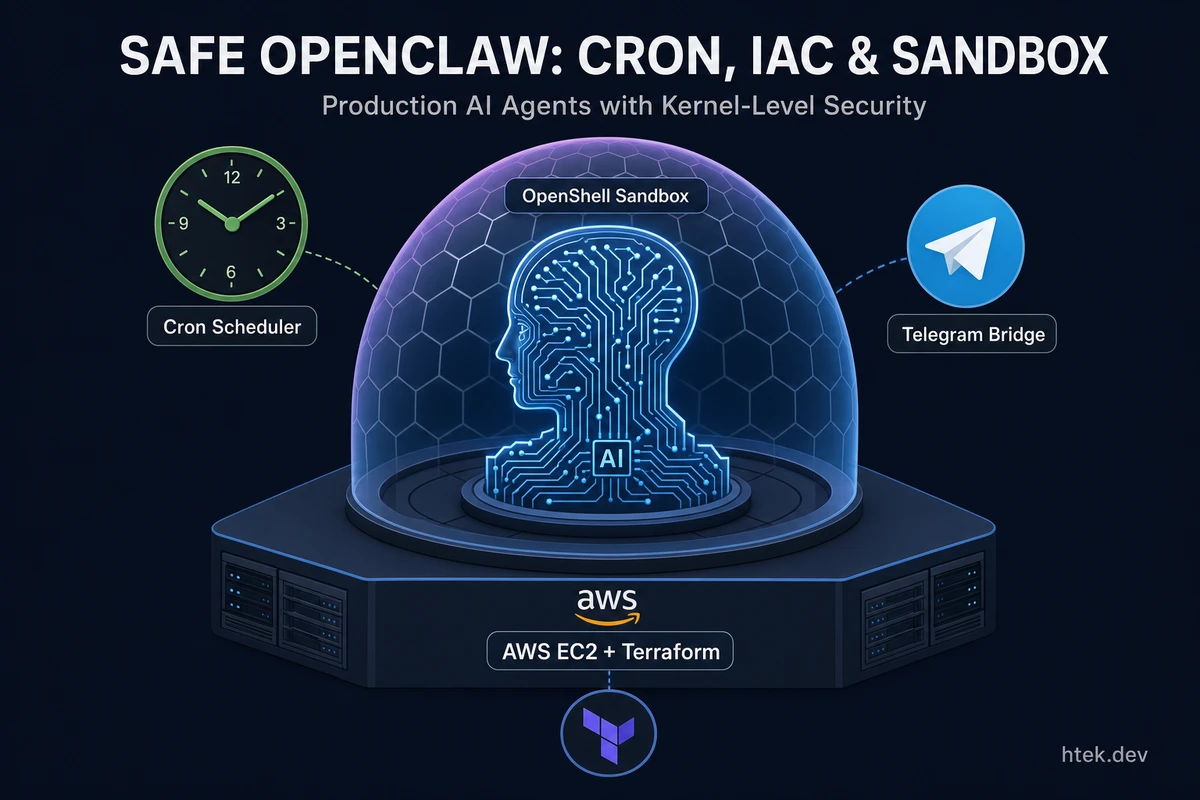
In part one, I built a Telegram bridge to GitHub Copilot CLI in a single .mjs file. The pitch was simple: OpenClaw is a full personal AI assistant framework with a gateway daemon, 20+ channel integrations, and thousands of lines of infrastructure. We did the same core thing — chat with your coding agent from your phone — in ~420 lines and zero external dependencies.
That was the proof of concept. What happened next was the natural question: what does this look like when it’s actually running in production?
The answer turned into three things:
- A cron scheduler extension — so the agent can act on a schedule, not just on demand
- Infrastructure as Code — so deploying the whole thing is
terraform applyand nothing else - NVIDIA OpenShell sandboxing — the part that transforms this from a fun hack into something you’d actually trust
The full project is at htekdev/gh-cli-telegram-extension. Let’s break down what each addition took — and what surprised us along the way.
The Cron Scheduler
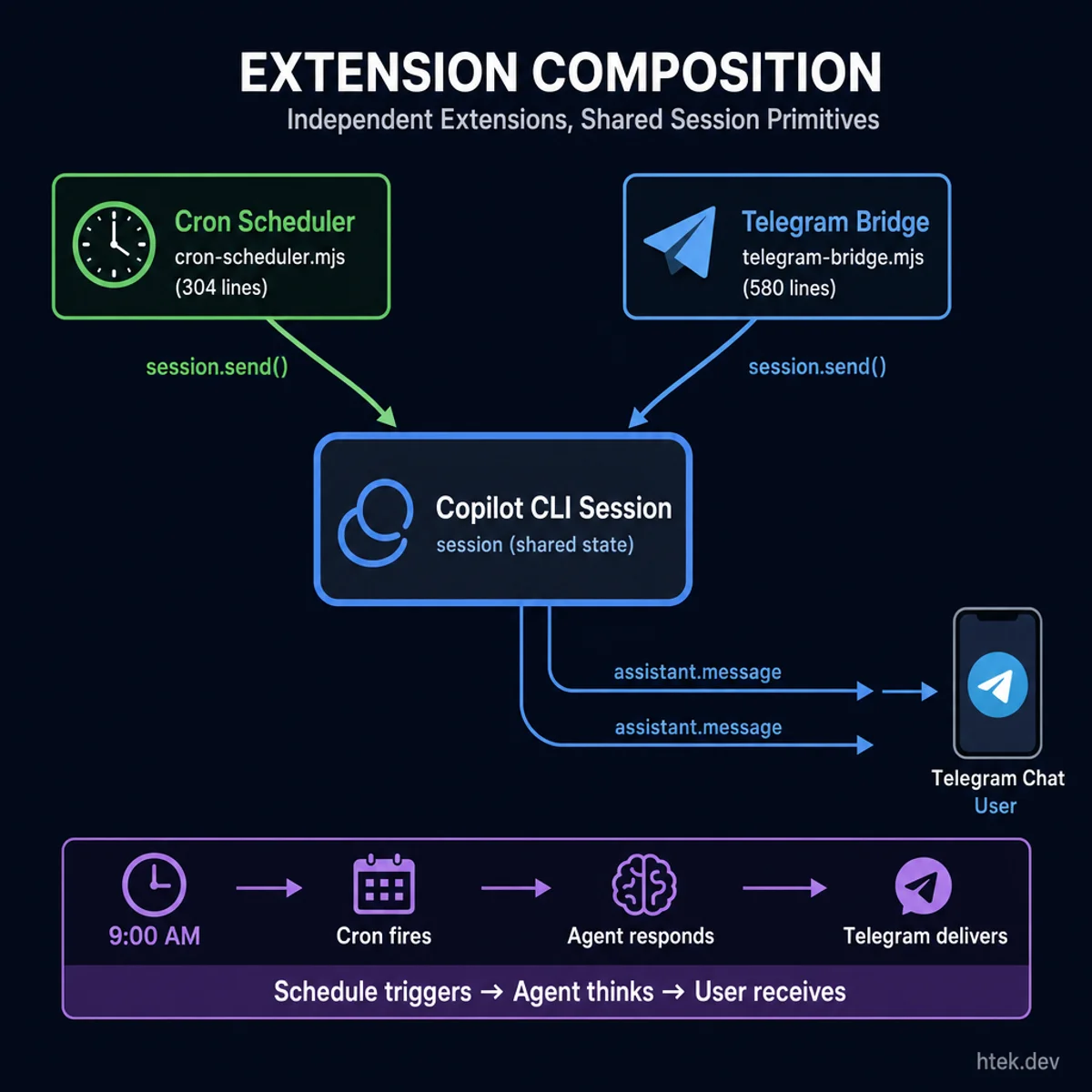 Independent extensions composing through shared session primitives — no direct coupling required
The Telegram bridge is reactive. You send a message, the agent responds. That’s great for on-demand work. But the real value of a persistent AI agent is that it can initiate — check your PRs before your standup, summarize the week’s merges on Friday afternoon, push you morning news you actually care about.
That required a second extension: cron-scheduler.
It reads a cron.json file at project root and fires session.send() at the right times. Define jobs like this:
{
  "timezone": "America/Chicago",
  "jobs": [
    {
      "id": "daily-standup",
      "schedule": "0 9 * * 1-5",
      "prompt": "Daily standup: check my GitHub notifications, list open PRs that need attention, and any issues assigned to me. Keep it brief.",
      "enabled": true
    },
    {
      "id": "weekly-pr-summary",
      "schedule": "0 17 * * 5",
      "prompt": "Weekly PR summary: list all PRs merged this week across htekdev repos with a one-line description of each.",
      "enabled": true
    }
  ]
}
The cron expression format is standard five-field: minute hour day-of-month month day-of-week. Supports *, ranges (1-5), lists (1,3,5), and steps (*/15). Timezone-aware via Intl.DateTimeFormat — no library, no polyfill, just the JS runtime.
The interesting part is what we explicitly didn’t add: node-cron, cron, croner, or any other npm package. Zero dependencies. The parser is ~80 lines of vanilla JS cron matching and it handles everything we need. When you’re building something that runs in a sandboxed environment with a restricted npm registry, you learn to appreciate extensions with no package.json.
The other feature worth calling out: watchFile on cron.json. The scheduler hot-reloads job definitions without restarting Copilot CLI. Update a schedule, disable a job, add a new prompt — it picks up the change automatically. In a long-running cloud deployment where you don’t want to restart the agent, this matters.
Responses from scheduled jobs flow through the Telegram bridge automatically. The cron extension fires session.send(), Copilot responds, the bridge catches assistant.message and sends it to Telegram. The two extensions compose without any direct coupling between them.
Two agent tools ship with the extension so Copilot can inspect its own schedule:
cron_list_jobs— lists all configured jobs with enabled/disabled statuscron_next_run— shows when each enabled job fires next
I use the daily PR review job constantly now. The prompt is detailed enough that the agent does a real review — fetches diffs, runs dual-model critique (one Opus pass, one Codex pass), summarizes both verdicts, and merges if both are clean. All triggered at 9 AM without me doing anything.
Infrastructure as Code
The bridge working locally is nice. The bridge running in a cloud VM 24/7 while you sleep is better.
The IaC module lives in infra/aws/ — a Terraform root module that provisions an EC2 instance on Ubuntu 24.04, configures all the tooling, creates an OpenShell sandbox with proper network policy, and leaves you with a live Telegram agent. Three files, a tfvars, and one command:
cd infra/aws
cp terraform.tfvars.example terraform.tfvars
# fill in your API keys
terraform init && terraform apply
Ten minutes later, the agent is live. No SSH. No manual steps. Here’s what Terraform actually does:
- Provisions a
t3.mediumEC2 instance with a security group that only allows SSH inbound - Runs
bootstrap.shas user-data — installs Docker, Node.js 22, pnpm, GitHub CLI, and OpenShell - Provisions
setup-sandbox.shandsandbox-setup.shvia file provisioners - Calls
remote-execto run the setup chain as the ubuntu user
The setup scripts handle everything that can’t go in user-data: creating the six OpenShell providers for credential injection, provisioning the sandbox with the network policy, cloning the repo inside the sandbox, generating the MCP config from injected environment variables, and launching Copilot CLI with --yolo --autopilot --experimental.
The most important design decision in the IaC: API and service credentials go into OpenShell providers, not files. Providers are named credential bundles — copilot, github, exa, perplexity, youtube, zernio — that get injected as environment variables at runtime. When the sandbox starts, the agent gets COPILOT_GITHUB_TOKEN, GH_TOKEN, EXA_API_KEY, and the rest injected into its environment. These credentials never touch the sandbox filesystem.
The exceptions are messaging platform tokens — TELEGRAM_BOT_TOKEN, SLACK_BOT_TOKEN, and SLACK_APP_TOKEN. These are uploaded into the sandbox via a raw-secrets.env file because OpenShell provider env vars appear as resolver strings in SSH sessions (e.g., openshell:resolve:env:...) rather than raw values. The bridge service reads them from a .env file generated by the setup script. Everything else flows through providers.
Cost is reasonable: ~$30/month running 24/7 on t3.medium, ~$1.60/month if you stop the instance and pay only for EBS.
The Lessons
Terraform file provisioners are slow. Each file block opens a new SSH connection, and we’re uploading several scripts. If you’re iterating on the setup scripts, that round-trip time adds up. We eventually moved most of the script content inline via templatefile() for the pieces that needed variable injection, and left SSH file transfer only for static content.
The trickiest part wasn’t the Terraform — it was the user-data timing. EC2 user-data runs as root asynchronously after instance launch. Terraform’s remote-exec provisioner connects via SSH and starts running before user-data finishes. We added a remote-exec step that waits on a sentinel file written at the end of bootstrap.sh. No sentinel = wait. Sentinel with status: success = proceed. Sentinel with status: failure = bail with an error.
# Wait for bootstrap to complete
until [ -f /home/ubuntu/.deploy-status ]; do sleep 5; done
STATUS=$(cat /home/ubuntu/.deploy-status | python3 -c "import sys,json; print(json.load(sys.stdin)['status'])")
if [ "$STATUS" != "success" ]; then
  echo "Bootstrap failed"
  exit 1
fi
Simple, but it saved hours of “did it work? let me SSH in and check.”
OpenShell Sandboxing
This is the part that changes the character of the project.
The first version ran locally. Whatever directory you launched Copilot CLI from, the agent had access to. Whatever network your machine was on, the agent could reach. It was a proof of concept, not something you’d run autonomously on a cloud VM with your GitHub token.
NVIDIA OpenShell is a policy-driven sandbox runtime for autonomous AI agents. Filesystem isolation via Linux Landlock LSM. Network control via an OPA policy proxy. Process isolation via seccomp BPF. The enforcement happens at the kernel level — not in the application, not as a guideline, but as physics. Your agent can’t reach endpoints that aren’t in the policy. There’s no escape hatch.
I’ve written about OpenShell’s architecture in depth — including contributing the Copilot CLI provider to the project. The short version: it’s the right model for running agents you don’t want to fully trust.
The Network Policy
The most interesting part of the sandbox configuration is sandbox-policy.yaml. Here’s the actual policy we’re running:
Default: deny everything.
Explicit allowlists for:
| Endpoint | Mode | Why |
|---|---|---|
api.github.com | L7 (TLS terminate) | GitHub API with credential injection |
github.com / codeload.github.com | L7 (TLS terminate) | Git clone/push with credential injection |
api.githubcopilot.com (+ variants) | TCP passthrough | Copilot inference |
api.telegram.org | TCP passthrough | Telegram bot polling |
api.exa.ai / mcp.exa.ai | L7 (TLS terminate) | Exa MCP server |
api.perplexity.ai | L7 (TLS terminate) | Perplexity MCP server |
www.googleapis.com | L7 (TLS terminate, read-only) | YouTube Data API |
zernio.com | L7 (TLS terminate) | Zernio social API |
learn.microsoft.com | TCP passthrough | MS Learn MCP server |
registry.npmjs.org | TCP passthrough | npm installs |
The L7 policies are where credential injection happens. When the agent’s node process makes a request to api.github.com, OpenShell’s proxy intercepts it, strips any outbound credential headers, and injects the credentials from the github provider. This means the agent running inside the sandbox doesn’t need to know its own GitHub token — OpenShell injects it transparently.
Two things that surprised us while writing the policy:
The Copilot API needs TCP passthrough, not L7. We initially ran it through the L7 terminating proxy. It worked — until it didn’t. The issue is HTTP/2 connection coalescing: when multiple requests go to hostnames with overlapping TLS certificates (which api.githubcopilot.com and related endpoints do), HTTP/2 coalesces them into a single connection and returns 421 errors. TCP passthrough lets Copilot CLI manage its own TLS session. L7 with tls: terminate broke it intermittently.
Telegram also needs TCP passthrough. Long polling with getUpdates holds connections open for up to 10 seconds waiting for messages. The L7 proxy’s timeout handling interacted badly with this pattern — the proxy would close the connection before Telegram returned, causing polling errors. TCP passthrough lets the extension manage the connection lifecycle directly.
Credential Injection Without Files
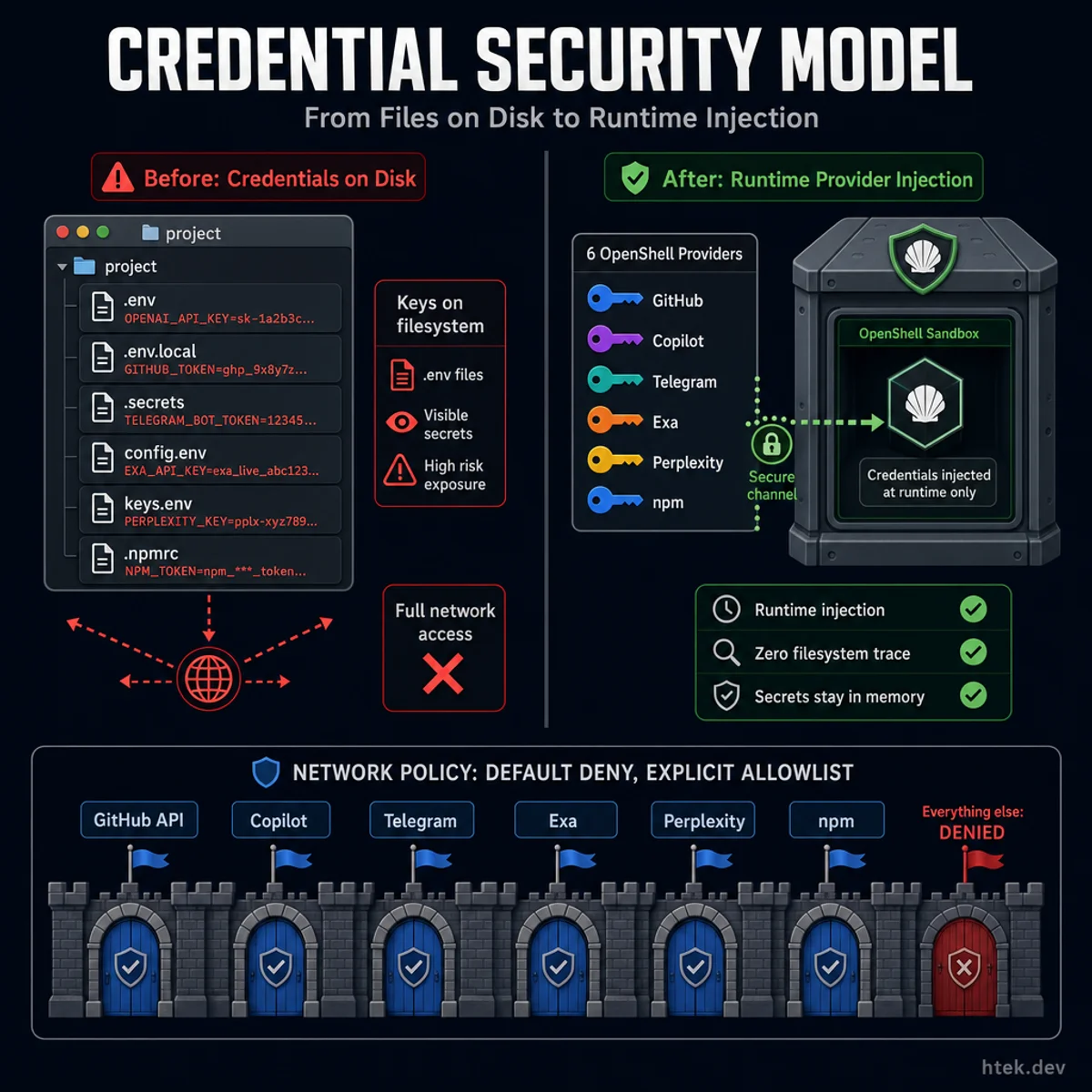 From files on disk to runtime injection — OpenShell providers eliminate filesystem credential traces
The OpenShell provider model deserves its own explanation because it’s the security property that makes this deployment trustworthy.
Before OpenShell: API keys lived in .env files. Terraform provisioned them. They were on disk.
After OpenShell: six credential providers exist as named bundles in OpenShell’s provider store. When you openshell sandbox create --provider copilot --provider github ..., OpenShell injects the corresponding environment variables into the sandbox at runtime. The credentials are never written to the sandbox filesystem.
openshell provider create --name copilot --type generic \
  --credential "COPILOT_GITHUB_TOKEN=ghp_..."

openshell sandbox create \
  --policy infra/shared/files/sandbox-policy.yaml \
  --provider copilot \
  --provider github \
  --provider exa \
  --provider perplexity \
  --provider youtube \
  --provider zernio \
  -- true
Inside the sandbox, echo $COPILOT_GITHUB_TOKEN returns the token. But the token isn’t in any file — it exists only as a runtime environment variable injected by OpenShell. A find / -name "*.env" would find the .env containing the messaging tokens (Telegram and Slack), but not the six provider-injected credentials (COPILOT_GITHUB_TOKEN, GH_TOKEN, EXA_API_KEY, PERPLEXITY_API_KEY, YOUTUBE_API_KEY, ZERNIO_API_KEY). If the sandbox is compromised, the attacker has all tokens for the duration of that sandbox’s lifetime — but can’t exfiltrate them to arbitrary endpoints, because the network policy blocks all egress not in the allowlist.
This isn’t perfect security. But it’s a meaningfully better threat model than “all API keys in files on a VM.” The provider-injected credentials leave no filesystem trace; the messaging tokens are the only ones on disk, and they’re scoped to bot-level access with no infrastructure permissions.
Putting It Together
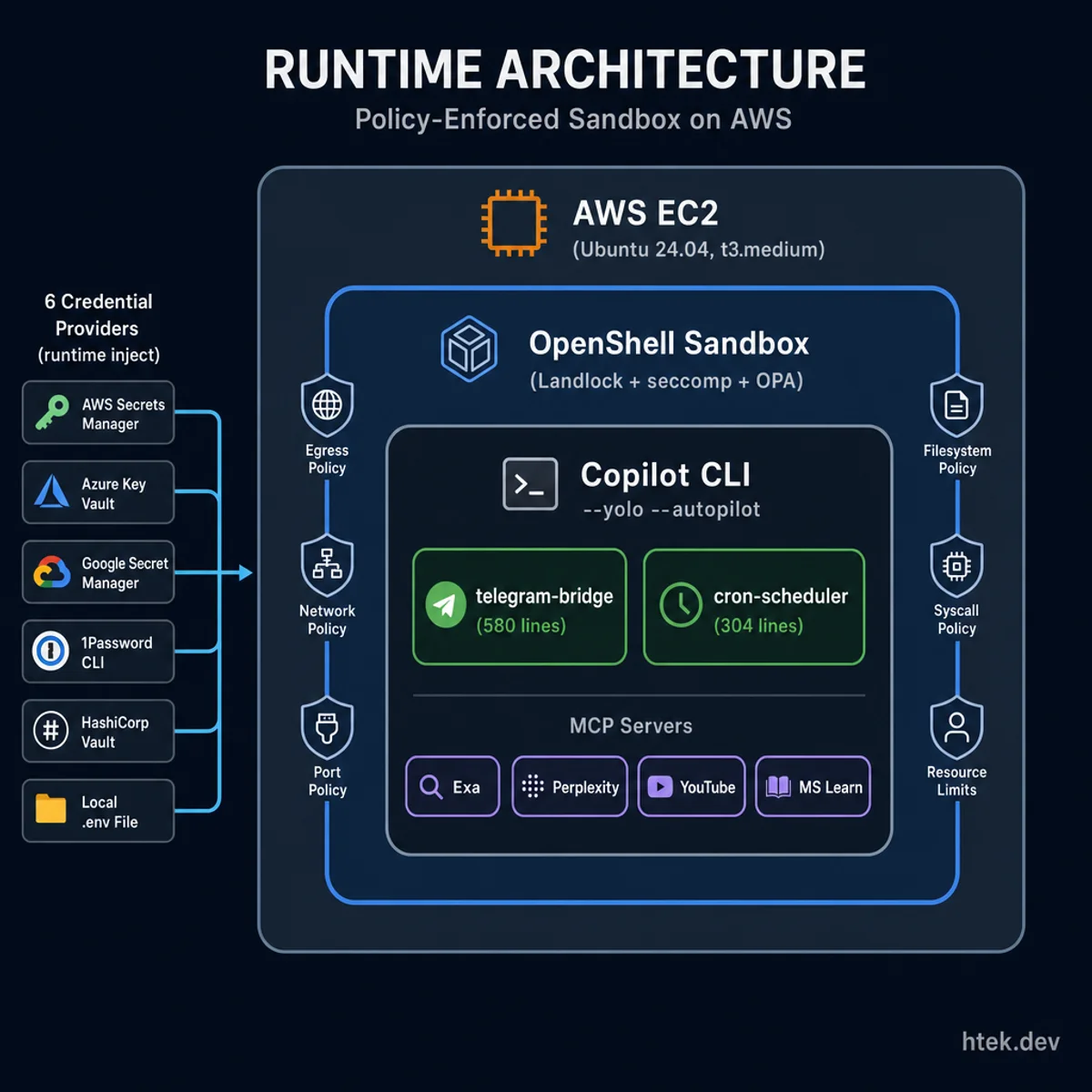 The full runtime architecture: policy-enforced sandbox on AWS with runtime credential injection
Here’s what the full deployment looks like at runtime:
┌──────────────────────────────────────────────────────────────┐
│  AWS EC2 (Ubuntu 24.04, t3.medium)                           │
│  Docker + OpenShell gateway                                   │
│                                                               │
│  ┌────────────────────────────────────────────────────────┐   │
│  │  OpenShell Sandbox (policy-enforced)                   │   │
│  │                                                        │   │
│  │  Copilot CLI --yolo --autopilot --experimental         │   │
│  │  ├── telegram-bridge/extension.mjs   (~580 lines)      │   │
│  │  └── cron-scheduler/extension.mjs    (~304 lines)      │   │
│  │                                                        │   │
│  │  MCP Servers: exa, perplexity, youtube, mslearn        │   │
│  │                                                        │   │
│  │  Network: default-deny + 10 explicit allowlists        │   │
│  │  Credentials: 6 providers (runtime), messaging (.env)       │   │
│  └────────────────────────────────────────────────────────┘   │
└──────────────────────────────────────────────────────────────┘
The two extensions are independent. The cron scheduler fires session.send() on schedule. The Telegram bridge fires session.send() on incoming messages. Both capture assistant.message events and route them to Telegram. Neither knows about the other — they just both use the same session primitives.
The sandbox contains all of it. Copilot CLI can write files — but only in the /sandbox directory and /tmp. It can make network requests — but only to the endpoints in the policy. It can spawn subprocesses — but only the binaries explicitly listed per network policy rule.
Lessons
OpenShell is still alpha software. Single-player, rough edges, documentation that assumes you’ll read the source code. We hit a DNS issue with kube-dns inside the cluster that required a workaround (patching /etc/rancher/k3s/resolv.conf in the Docker container). The setup is not “run three commands and it works” — it’s “run three commands, read the error messages carefully, and apply two documented workarounds.”
But the architecture is correct. Declarative YAML policy, kernel-level enforcement, hot-reload on running sandboxes. If you’re running agents in any context where you care about what they can access, this is the direction the ecosystem is going.
Extensions require --experimental. The EXTENSIONS feature flag is gated behind Copilot CLI’s experimental mode. Don’t skip the flag, don’t trust that it’ll be on by default. Add it explicitly.
OpenShell providers inject resolver strings in SSH sessions. This caught us. When you SSH into the host and check the environment, you’ll see COPILOT_GITHUB_TOKEN=openshell:resolve:env:COPILOT_***** — a resolver string, not the raw value. OpenShell resolves these when starting the sandbox, not when you’re interactive on the host. Files that need raw token values (like .env) must use uploaded secrets, not provider resolution.
ssh -tt keeps Copilot alive. nohup kills the TTY that Copilot requires for its interactive mode. We use ssh -tt to maintain the pseudo-TTY and nohup only for the outer wrapper that prevents the session from dying when our Terraform provisioner connection closes.
Trust the sandbox before loading extensions. Copilot CLI won’t load extensions from untrusted directories. Pre-configure trusted_folders in ~/.copilot/config.json inside the sandbox, pointing at the cloned repo directory. Otherwise the agent starts, loads, and then silently skips all your extensions.
Where This Goes
The current architecture is one session, one Telegram conversation. That’s a limitation. If you want multiple parallel sessions — each with its own context and working directory — you’d need a bridge service that manages multiple CopilotClient instances. That’s issue #1 in the repo.
On the infrastructure side: the AWS module works, but Azure would follow the same pattern — same shared scripts, same sandbox policy, different Terraform provider. And webhook mode for Telegram (versus long polling) would be cleaner for multi-instance deployments, though it requires a public URL.
None of that changes the core insight from part one: the extension SDK gives you everything you need to compose real agent infrastructure from simple primitives. A 580-line bridge, a 304-line cron scheduler, 300 lines of IaC scripts, and a YAML network policy. That’s the whole stack.
terraform apply. Ten minutes. Live AI agent on Telegram, sandboxed, scheduled, and running while you sleep.
Built and iterated entirely through the Telegram bridge — including debugging the sandbox policy from my phone at 11 PM. If you’re going to build a tool for remote agent access, you might as well use it to build itself.