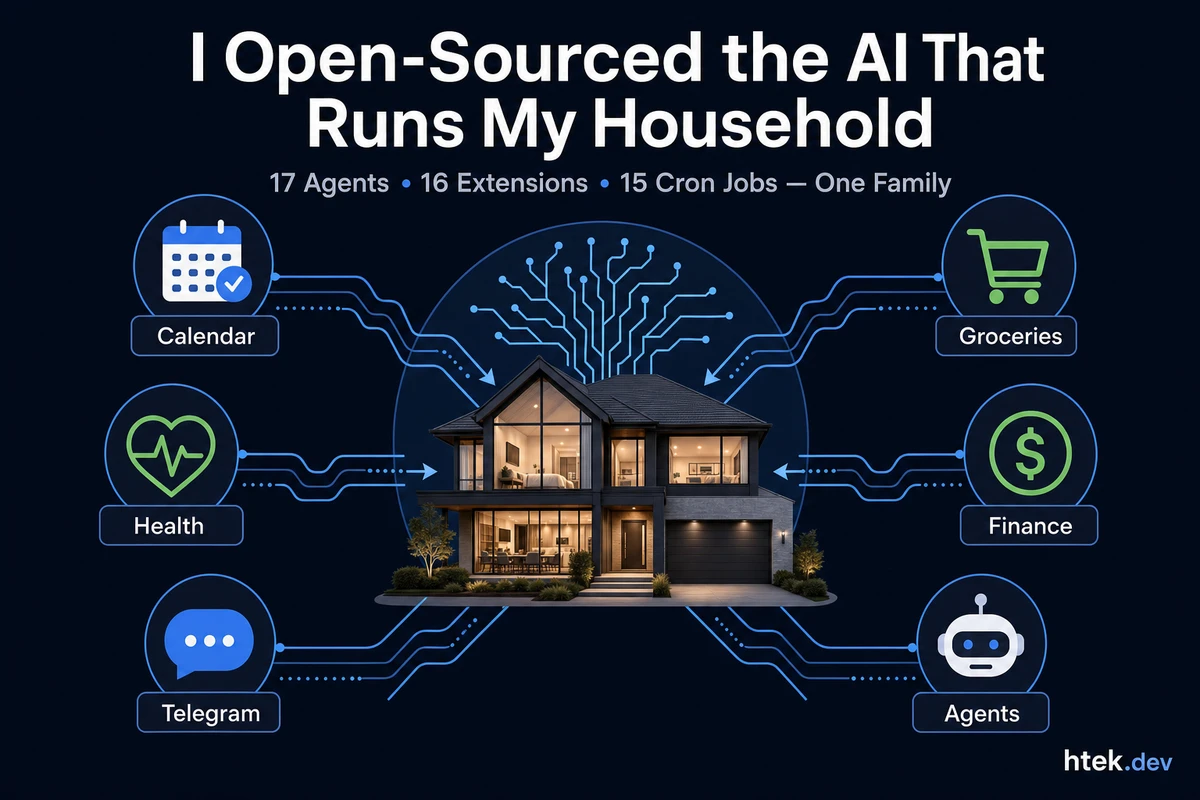
The System That Knows When to Buy Dog Food
Last Tuesday, my phone buzzed at 5:03 AM with a morning briefing: weather, three calendar events, two overdue tasks, a bill due Friday, and a reminder that the HVAC filter was overdue for replacement. I hadn’t asked for any of it. By 6:15, I’d knocked out the first task — refill a prescription — and the system automatically served me the next one.
That’s not a productivity app. It’s not Alexa with extra steps. It’s a multi-agent AI system running on GitHub Copilot CLI, communicating through Telegram, managing everything from groceries to OB appointments to content scheduling — and I just open-sourced the whole thing.
How We Got Here
It started with a single-file Telegram bridge — a few hundred lines of JavaScript that let me chat with Copilot CLI from my phone. Then I added a cron scheduler and OpenShell sandboxing. Then meal planning. Then budget tracking. Then a task coach that understood my ADD brain needed tasks served one at a time, not dumped in a list.
Three months later, I have a system with 17 specialized agents, 16 custom extensions, and 15 scheduled cron jobs running autonomously. My wife gets pregnancy reminders. My 4-year-old has a curriculum tracker. The dogs’ feeding schedule is logged. The house maintenance runs on a schedule I never have to think about.
It’s not a demo. It’s real — it’s been managing our household since January, and every correction we make gets persisted permanently so the system never repeats a mistake.
The Architecture: Agents Are Markdown, Extensions Are Code
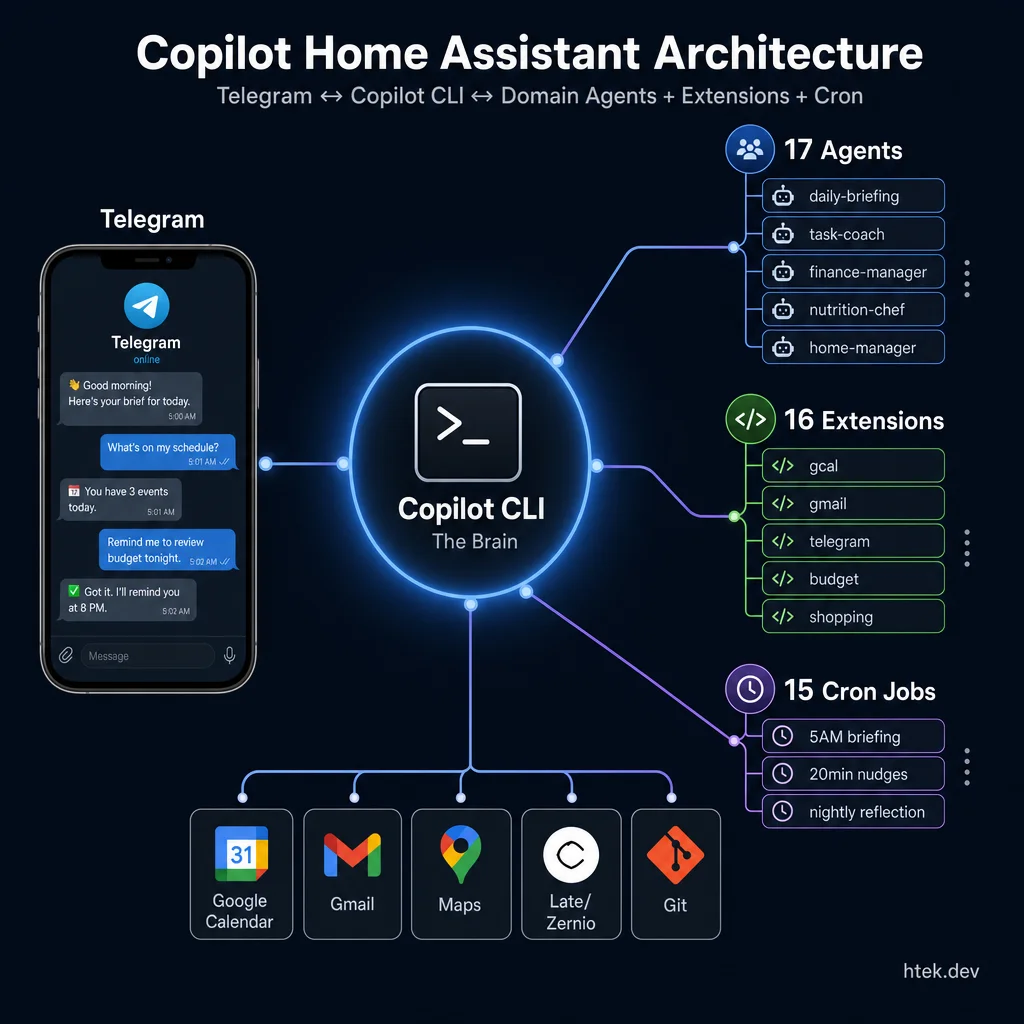 The Copilot Home Assistant architecture — Telegram as the interface, Copilot CLI as the brain, with agents, extensions, and cron jobs managing every life domain.
The entire system sits in a single Git repository with a clean separation between behavior (what agents should do) and capability (what they can do).
Agents are Markdown files in .github/agents/. Each one defines an AI persona with domain expertise, decision rules, memory loading, and integration points. The finance-manager knows how to categorize expenses and track bill due dates. The dog-parent tracks feeding schedules and vet appointments. The task-coach serves tasks one at a time with momentum tracking — because dumping 30 tasks on someone with ADD is the same as giving them zero tasks.
Here’s what an actual agent definition looks like — this is from the task-coach:
# Task Coach — Your Family Productivity Partner

## Identity & Personality

You are the family's productivity coach — you nudge BOTH parents.
You're energetic, encouraging, and no-nonsense. You understand that
long lists are paralyzing, context switches are expensive, and
momentum is everything.

### For {YourName} (ADD-friendly coaching):
- **One task at a time.** Never dump a list. Always serve the single next thing.
- **Celebrate wins.** Every completion gets a brief cheer before the next task.
- **Track momentum.** "You've knocked out 4 tasks today! Keep the streak going."

### For {Spouse} (gentle pregnancy-friendly coaching):
- **Ultra-short messages.** 2-3 lines max. She's carrying twins.
- **Don't nag.** If no response, wait 2+ hours. She may be resting.
That’s not pseudocode — that’s the actual agent file. The {YourName} and {Spouse} placeholders are what you replace when you fork the repo.
Extensions are Node.js ESM modules in .github/extensions/. They expose tools like add_expense, set_meal, telegram_send_message, and gcal_create_event. The Copilot CLI extension SDK lets you create these with the joinSession API — hooks intercept agent actions in real time.
Here’s the auto-commit extension — it watches for data changes and auto-saves to Git after every tool call:
// .github/extensions/auto-commit/extension.mjs
import { execSync } from "node:child_process";
import { joinSession } from "@github/copilot-sdk/extension";

// Tools that modify family data files
const FILE_MODIFY_TOOLS = new Set([
  "add_task", "update_task", "complete_task",
  "add_to_shopping_list", "check_off_item",
  "set_meal", "add_recipe",
  "add_expense", "add_income", "set_budget",
  "add_maintenance_task", "log_maintenance",
]);

const session = await joinSession({
  tools: [],
  hooks: {
    onPostToolUse: async (input) => {
      // After any data-modifying tool, commit and push
      if (FILE_MODIFY_TOOLS.has(input.toolName)) {
        execSync("git add -A && git commit -m 'Auto-save'", { cwd: process.cwd() });
        execSync("git push origin main", { cwd: process.cwd() });
        return { additionalContext: "[auto-commit] ✅ Committed and pushed" };
      }
    },
  },
});
Every time an agent logs an expense, completes a task, or sets a meal — the data is automatically committed to Git. No manual saves. No data loss.
The constitution (data/constitution.md) governs every agent. It defines autonomy levels, communication rules, and the core principles that make this work:
## Core Principles

1. **Act first, report after.** You are autonomous. Detect → act → notify.
   Never say "would you like me to...?" — just do it and tell them what you did.
2. **Be specific and actionable.**
   ✅ "Call MOHELA today — 90 days delinquent. Phone: 1-800-848-0979"
   ❌ "You might want to look into your MOHELA situation."
3. **Every correction is permanent.** When the family corrects you,
   persist the lesson via store_memory, standing-orders.md,
   AND copilot-instructions.md. Never repeat the same mistake.

## Autonomy Levels

| Do it immediately              | Ask first                       |
|--------------------------------|---------------------------------|
| Create calendar events & tasks | Major purchases (>$200)         |
| Add to shopping lists          | Medical decisions               |
| Relay messages between family  | Sending emails on someone's behalf |
| Log expenses, create bills     | Deleting any data               |
Every agent reads this constitution before doing anything else. It’s the shared brain that keeps 17 agents behaving consistently.
Here’s the actual architecture:
Telegram ↔ Copilot CLI ↔ Agents (17) + Extensions (16) + Cron (15)
              ↕
    Google Calendar / Gmail / Maps / Tasks
    Late/Zernio (social media scheduling)
    Budget database / Shopping lists / Recipes
    Family profiles / Home maintenance / Locations
What It Actually Manages
This isn’t a toy. Here’s what runs every day:
Morning briefings hit Telegram at 5 AM weekdays, 7 AM weekends. Weather, today’s calendar, prioritized tasks, unread email summary, today’s meals, upcoming bills, and health reminders — all compiled by the daily-briefing agent delegating to domain specialists.
Task coaching runs every 20 minutes. The task-coach checks what’s pending, evaluates priorities and dependencies, and nudges with one task at a time. It knows to chain errands by location, front-load deadlines, and serve quick wins first for momentum. Our record was 18 tasks completed in one day — not because we were heroic, but because the system served them in the right order.
All of this is driven by cron.json — here’s a slice of the actual schedule:
{
  "timezone": "America/Chicago",
  "jobs": [
    {
      "id": "morning-briefing",
      "schedule": "0 5 * * 1-5",
      "agent": "daily-briefing"
    },
    {
      "id": "task-coach-nudge",
      "schedule": "*/20 5-22 * * *",
      "agent": "task-coach"
    },
    {
      "id": "heartbeat",
      "schedule": "*/30 5-22 * * *",
      "agent": "checkin"
    },
    {
      "id": "nightly-reflection",
      "schedule": "0 21 * * *",
      "agent": "platform-manager"
    }
  ]
}
Fifteen jobs in total. Add an agent, add a cron entry — it starts running on the next cycle.
Meal planning happens Saturday mornings. The nutrition-chef manages three dietary tracks (I’m on a high-protein cut, my wife has pregnancy dietary needs, and we have a picky 4-year-old). The extension generates grocery lists cross-referenced with recipes and sends them to the shopping list.
Budget tracking is continuous. Every expense gets logged, categorized, and compared against monthly targets. The finance-manager scans Gmail for bills, creates tasks for upcoming payments, and the budget-review agent delivers a full monthly report on the 1st.
Home maintenance runs on schedules — HVAC filters, water heater flushes, pest control, appliance checks. The home-manager tracks service providers with ratings and auto-creates tasks when maintenance is due.
Health tracking handles OB appointments, medications, prescription refills, and vet visits. When my wife has an appointment, the system proactively creates prep tasks: grab insurance cards, calculate leave-by time with 15 minutes buffer based on Google Maps drive time, remind me to clean the car.
Content pipeline — this one surprised me. The content-manager agent tracks trending topics, manages an editorial calendar, coordinates with the Late/Zernio social media scheduler, and even triggers blog article creation. The blog post you’re reading right now was written by a blog-writer agent that researched the repo, wrote the draft, ran parallel reviews through Claude Opus and GPT Codex, and created a PR for my review.
The Part Nobody Expects: It Learns
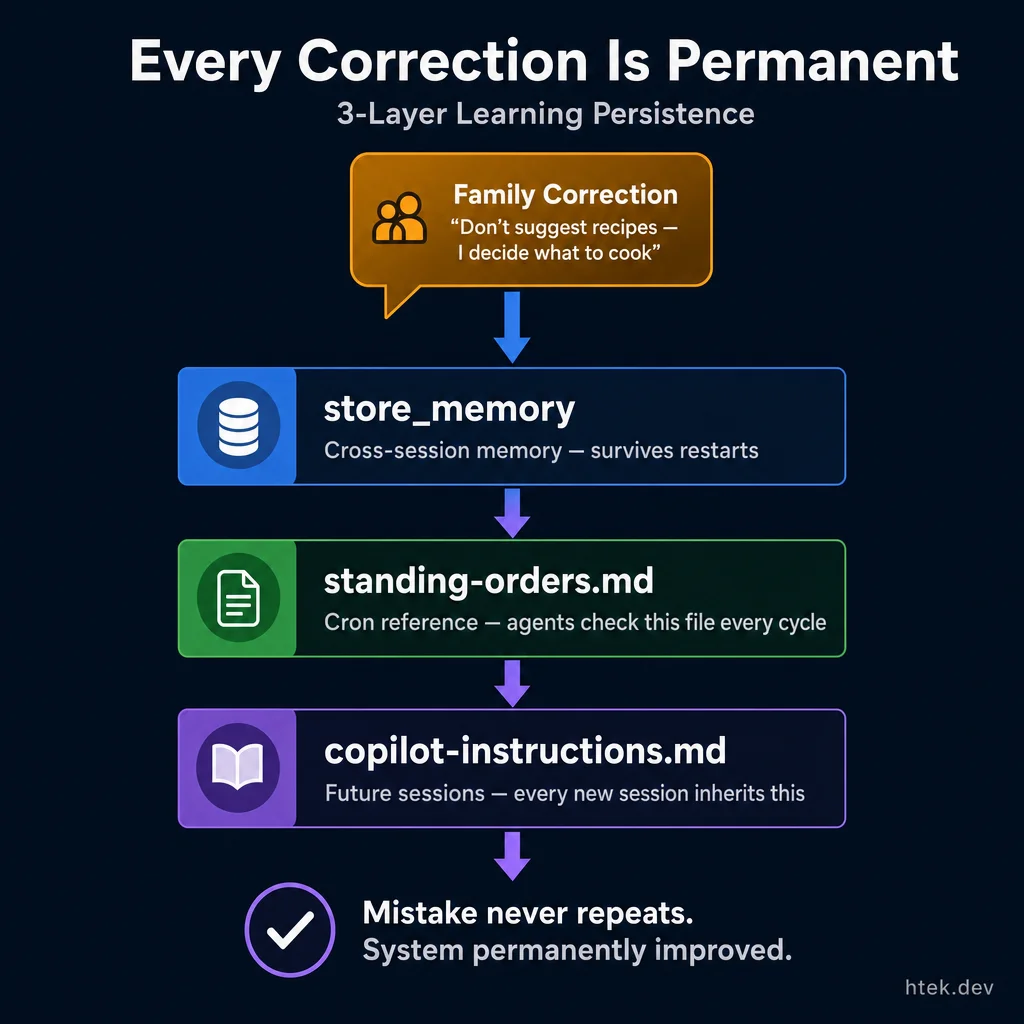 Every correction persists through three layers — cross-session memory, cron references, and future session instructions — making the system permanently better.
The most powerful feature isn’t any single agent — it’s the continuous learning loop.
When I told the system “don’t suggest recipes — I decide what to cook,” that correction got persisted to three places: cross-session memory via store_memory, behavioral rules in data/standing-orders.md, and future session instructions in .github/copilot-instructions.md. The system will never suggest a recipe again.
When my wife didn’t respond to a long message asking five questions at once, I taught the system: “SHORT messages only — 2-3 lines max. ONE question at a time. She’s pregnant with twins — respect her energy.” That rule now governs every agent that communicates with her.
Every correction is permanent. The family is essentially training a personal AI that gets better every day. After three months, the standing orders file is dense with learned behaviors — things like “Hector’s ADD brain needs tasks one at a time” and “always compute Central Time fresh from PowerShell, never trust UTC headers.”
Safety: The OpenShell Layer
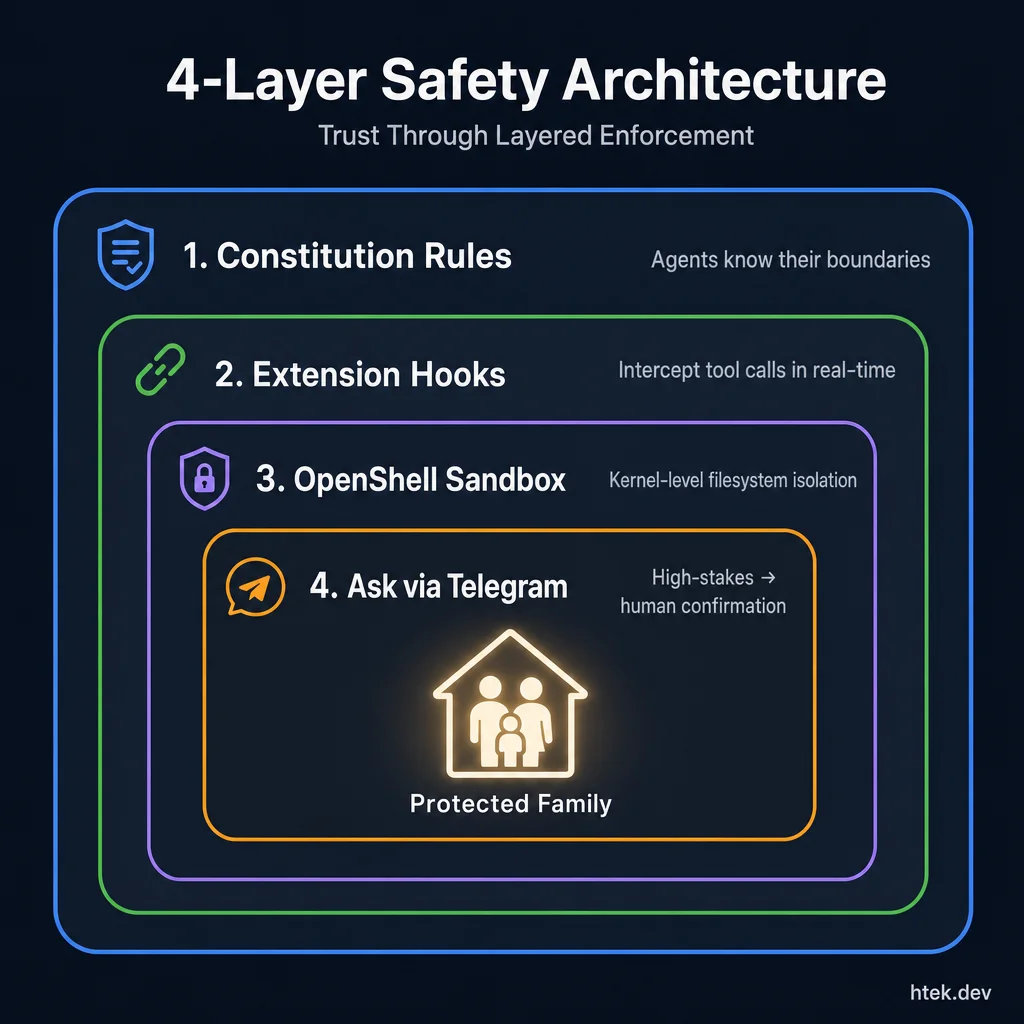 Defense in depth — four layers from soft agent rules to kernel-level sandboxing, ensuring autonomous agents can never exceed their boundaries.
Running autonomous agents that can read email, create calendar events, and send messages is a trust question. I’ve written extensively about sandboxing agents with NVIDIA OpenShell — the project that provides kernel-level filesystem isolation, network policy enforcement, and process sandboxing for AI agents.
The Copilot Home Assistant uses the same layered safety approach I covered in the Safe OpenClaw series:
- Constitution-level rules — agents know what they can and can’t do autonomously
- Extension-level hooks — agent hooks intercept tool calls and enforce policies
- OpenShell sandboxing — kernel-level enforcement for the paranoid (recommended)
- Ask-via-Telegram — high-stakes decisions route a confirmation prompt to your phone
The Telegram bridge extension itself is open source too. It started as a proof of concept and became the communication backbone of the entire system.
Here’s how the bridge routes incoming Telegram messages to the right agent:
// From .github/extensions/telegram-bridge/extension.mjs
onUserPromptSubmitted: async (input) => {
  const prompt = input.prompt || "";
  if (!prompt.startsWith("[Telegram from")) return;

  // Extract sender identity from the Telegram message
  const userMatch = prompt.match(
    /\[Telegram from (.+?) \(user (\d+)\)\]: (.+)/s
  );
  if (!userMatch) return;
  const [, senderName, senderId, userMessage] = userMatch;

  // Inject context: "Pick the best agent and delegate"
  return {
    additionalContext:
      `Message from ${senderName}. ` +
      `Pick the best agent_type, launch it with the task tool, ` +
      `and the agent responds via telegram_send_message.`,
  };
},
Every Telegram message gets tagged with the sender’s identity, then Copilot CLI picks the right domain agent to handle it. I text “what’s for dinner?” and the nutrition-chef agent responds. I text “what tasks do I have?” and the task-coach takes over.
How to Use It
The repo is designed to be forked and customized:
- Clone it:
git clone https://github.com/htekdev/copilot-home-assistant - Configure Telegram: Create a bot via @BotFather, add the token to
.env, and setTELEGRAM_ALLOWED_USERSwith your chat ID - Personalize: Edit family profiles in
data/family/, update the constitution, set your locations - Enable integrations: Add Google OAuth credentials for Calendar/Gmail/Tasks, Maps API key for drive times
- Start it: Run
copilot-cli— the Telegram bridge and cron scheduler start automatically via extensions
You don’t need all 17 agents. Trim to what fits your family — maybe you don’t have pets (remove dog-parent), don’t create content (remove content-manager), or your kids are too young for curriculum tracking (remove teacher). The system is modular by design.
Want to add an agent? Copy a template from .github/agents/templates/, define its domain, decision rules, and memory file, then add a cron entry if it should run on a schedule. Agents are Markdown — not code — so anyone can create them.
Why Copilot CLI?
People ask why I didn’t use LangChain, CrewAI, AutoGen, or any of the agent frameworks. The answer: the god prompt is the new monolith. Those frameworks add orchestration layers, custom runtimes, and dependency chains. Copilot CLI gives me an AI that can run shell commands, edit files, call APIs, and use the extension SDK to expose any tool I need — with zero framework overhead.
The agents are literally Markdown files. The extensions are single .mjs files. The cron scheduler is a JSON config. There’s no build step, no compilation, no Docker, no Kubernetes. I edit a .md file and the agent’s behavior changes instantly.
That simplicity is the whole point. This system runs my family’s life — I need to be able to debug it at 2 AM when the morning briefing breaks, not trace through six layers of orchestration abstractions.
The Bottom Line
I built this because I needed it. Managing a household with a full-time engineering job, a 4-year-old, twin babies on the way, two dogs, a content pipeline, and an ADD brain that loses context every time someone says “hey, can you also…” — that’s not a personal productivity problem. That’s an orchestration problem.
The Copilot Home Assistant treats it like one. Seventeen agents, each owning a domain, communicating through a shared constitution, learning from corrections, and running autonomously on cron schedules. The system handles the remembering so I can focus on the doing.
Fork it. Customize it. Make it yours. And if you build something cool with it, open an issue — I’d love to see what your family’s version looks like.